You are not logged in.
- Topics: Active | Unanswered
#1 2024-03-07 21:19:05
- Papapuff
- Member
- Registered: 2024-03-07
- Posts: 33
[SOLVED] Gnu Grut error while trying to install Arch Linux
Hello guys! Windows user here. This is my first attempt to install Arch Linux and I'm encountering this error at the very first steps of installing Arch.
Basically I placed the Arch iso on my USB flash drive, selected the USB Flash to boot and after restarting I'm seeing only back screen with error ". Minimal BASH like line editing is supported.For the first word,TAB lists possible device or file completion.Anywhere else TAB lists possible device or file completions."
Could you guide me to get through it please? I think I tried to many things and none of it worked and I'd love to get help from someone to get it done.
Notes: I've already disabled secure boot.
Last edited by Papapuff (2024-03-08 21:22:44)
Offline
#2 2024-03-07 21:32:46
- seth
- Member

- From: Won't reply 2 private help req
- Registered: 2012-09-03
- Posts: 78,358
Re: [SOLVED] Gnu Grut error while trying to install Arch Linux
This sounds like some sort of grub failure, but lacks any information on what the problem might be causing you to be left w/ the grub shell.
1. Where did you get the iso from
2. how did you write it onto the usb key
3. most importantly: post the error messages before that support instruction. In doubt link a photo of your monitor (please don't embed large pictures)
Online
#3 2024-03-07 21:50:49
- Papapuff
- Member
- Registered: 2024-03-07
- Posts: 33
Re: [SOLVED] Gnu Grut error while trying to install Arch Linux
Hello Seth! Thank you for replying and sorry for the lack of information, if I may,please have a bit of patience with me as we go along this. So:
1. I downloaded the iso from Arch Linux Download page (the official site).
2. I wrote the .iso on usb key using Rufus (Partition Scheme MBR, File System FAT 32, Wrote in ISO Image Mode and the usb key has 8 GB so I think it's enough for it)
3. The error is this
https://imgur.com/gallery/22Qi8Gu
Offline
#4 2024-03-07 22:06:11
- WorMzy
- Administrator

- From: Scotland
- Registered: 2010-06-16
- Posts: 13,682
- Website
Re: [SOLVED] Gnu Grut error while trying to install Arch Linux
Sakura:-
Mobo: MSI MAG X570S TORPEDO MAX // Processor: AMD Ryzen 9 5950X @4.9GHz // GFX: AMD Radeon RX 5700 XT // RAM: 32GB (4x 8GB) Corsair DDR4 (@ 3000MHz) // Storage: 1x 3TB HDD, 6x 1TB SSD, 2x 120GB SSD, 1x 275GB M2 SSD
Making lemonade from lemons since 2015.
Offline
#5 2024-03-07 22:10:41
- Papapuff
- Member
- Registered: 2024-03-07
- Posts: 33
Re: [SOLVED] Gnu Grut error while trying to install Arch Linux
Hello WorMzy! If you linked the information about this Rufus side note or the tip "Note: If the USB drive does not boot properly using the default ISO Image mode, DD Image mode should be used instead. To switch this mode on, select GPT from the Partition scheme drop-down menu. After clicking START you will get the mode selection dialog, select DD Image mode."
I have to let you know i tried imaging the .iso in DD mode and I had the same result after booting up and followed the proper instructions.
Offline
#6 2024-03-07 22:15:03
- seth
- Member
- From: Won't reply 2 private help req
- Registered: 2012-09-03
- Posts: 78,358
Re: [SOLVED] Gnu Grut error while trying to install Arch Linux
Online
#7 2024-03-07 22:36:01
- Papapuff
- Member
- Registered: 2024-03-07
- Posts: 33
Re: [SOLVED] Gnu Grut error while trying to install Arch Linux
After imaging it with USB Writer, the Bios Menu is not even showing my USB flash key anymore.
Offline
#8 2024-03-07 22:42:27
- seth
- Member
- From: Won't reply 2 private help req
- Registered: 2012-09-03
- Posts: 78,358
Re: [SOLVED] Gnu Grut error while trying to install Arch Linux
Any chance the key has seen its best days?
Can you use it otherwise, resp. do a re-flash with rufus allow you to boot again (at least to the grub console)?
Do you have fast-start disabled, 3rd link below. Mandatory.
Disable it (it's NOT the BIOS setting!) and reboot windows and linux twice for voodo reasons.
Edit: that part of the textblock doesn't apply to you 
Last edited by seth (2024-03-07 22:42:57)
Online
#9 2024-03-07 22:48:08
- Papapuff
- Member
- Registered: 2024-03-07
- Posts: 33
Re: [SOLVED] Gnu Grut error while trying to install Arch Linux
1. The key is perfectly normal, I wrote and re-wrote stuff on it and used it, quite new.
2. I re-flashed with rufus multiple times trying different options in rufus and when I could, I got to the grub console with the error pretty much every time.
3. I have fast-start disabled, checked it a few minutes ago, even downloaded a reggedit key to make sure of it.
Offline
#10 2024-03-07 23:09:18
- seth
- Member
- From: Won't reply 2 private help req
- Registered: 2012-09-03
- Posts: 78,358
Re: [SOLVED] Gnu Grut error while trying to install Arch Linux
Still writing it with different tools leads to different (disfunctional) results.
Make sure the checksum of the dowloaded iso (which verion is is exactly) is correct and try a different usb key (what model is is specifically, maybe it has a mode switch)
Can you download and write https://grml.org onto the key and boot that (it uses syslinux by default, so the results are only mildly transferable)
Online
#11 2024-03-08 00:12:18
- Papapuff
- Member
- Registered: 2024-03-07
- Posts: 33
Re: [SOLVED] Gnu Grut error while trying to install Arch Linux
Seth, I've tried to do the checksum thing but I think it's a bit over my head. (I need a dumbed down tutorial version of that procedure unfortunately)
I will try and post tomorrow the results of booting the Arch installation using a different USB key
For now, what I tried is booting up,with the same USB key, the GRML and the booting process stopped here:
https://imgur.com/gallery/BcJMsQh
I also have access to this (I assume grml bootmenu)
https://imgur.com/gallery/zsdmUbP
Last edited by Papapuff (2024-03-08 00:18:02)
Offline
#12 2024-03-08 08:31:15
- seth
- Member
- From: Won't reply 2 private help req
- Registered: 2012-09-03
- Posts: 78,358
Re: [SOLVED] Gnu Grut error while trying to install Arch Linux
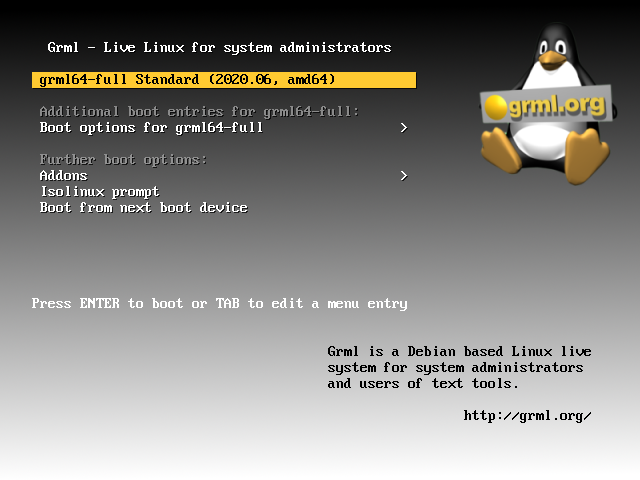
grml should look more like https://grml.org/screenshots/vesamenu.png but grml starts to boot and then stalls(?) at systemd-udevd?
On what kind of device are you trying to runs this exactly?
MS Surface?
Online
#13 2024-03-08 08:38:16
- Papapuff
- Member
- Registered: 2024-03-07
- Posts: 33
Re: [SOLVED] Gnu Grut error while trying to install Arch Linux
I'm using a desktop PC, it has a 3600x Ryzen and b450m mortar max motherboard with 32 GB ram so it's decent. After GRML starts to boot, there's a countdown until it starts to load into the next screen where after some lines I get down to the systemd-udevd where it also stops (I waited around 20 minutes to give it time to proceed). But as I said I can access the other options if I stop the automatically countdown.
Offline
#14 2024-03-08 09:03:52
- seth
- Member
- From: Won't reply 2 private help req
- Registered: 2012-09-03
- Posts: 78,358
Re: [SOLVED] Gnu Grut error while trying to install Arch Linux
You don't need specifically potent hardware, I'm just wondering why you're having so many problems booting notwindows.
There's eg. https://forum-en.msi.com/index.php?thre … lp.365847/ and https://askubuntu.com/questions/1239733 … -3800x-cpu
Is your BIOS/UEFI up-to-date?
Does grml boot when you add "iommu=soft" to the kernel parameters?
Online
#15 2024-03-08 11:10:45
- Papapuff
- Member
- Registered: 2024-03-07
- Posts: 33
Re: [SOLVED] Gnu Grut error while trying to install Arch Linux
Hello there again! It seems you were right about arch iso to be placed and tried with a different USB key
I have mounted the iso in a different USB key and the installation went on successful. (Did partitioning, setting up disks, users, passwords, Nvidia packages and other stuff)
Now after following the steps to complete the installation and boot my system for good, the real boot process got stuck at this.
https://imgur.com/gallery/lpimmr4
After another reboot I get this:
https://imgur.com/gallery/A5ksrkh
Please tell me if I need to make a new post for this specific error too, and thank you again for assisting me.
Last edited by Papapuff (2024-03-08 11:53:02)
Offline
#16 2024-03-08 14:03:32
- seth
- Member
- From: Won't reply 2 private help req
- Registered: 2012-09-03
- Posts: 78,358
Re: [SOLVED] Gnu Grut error while trying to install Arch Linux
Do you overclock or undervolt the system? Is the PSU insufficient?
Do you overclock t he RAM?
Online
#17 2024-03-08 16:27:53
- Papapuff
- Member
- Registered: 2024-03-07
- Posts: 33
Re: [SOLVED] Gnu Grut error while trying to install Arch Linux
I disabled Power Idle Control and C-State in UEFI settings and did the job for me, hopping for others too. Arch Linux is live and booted now. Installed the interface also and some apps. Sorry for slow replying, had to finish work too
Only have one small issue that remained but I think I will open a new different ticket for it so the topic is not going too many places
So with that said, thank you all for your generous time and help with this matter.
Offline
#18 2024-03-08 16:33:56
- seth
- Member
- From: Won't reply 2 private help req
- Registered: 2012-09-03
- Posts: 78,358
Re: [SOLVED] Gnu Grut error while trying to install Arch Linux
Please always remember to mark resolved threads by editing your initial posts subject - so others will know that there's no task left, but maybe a solution to find.
Thanks.
You may want to check the original USB key before trusting it again: https://wiki.archlinux.org/title/Badblo … ad_sectors
Online