You are not logged in.
- Topics: Active | Unanswered
#1 2024-03-31 13:37:21
- yourlocalarchie
- Member
- Registered: 2024-03-31
- Posts: 26
[Solved]Forcefully removed XZ & grub changed system root to a snapshot
I done the big no no out of panic after i saw the backdoor CVE and i forcefully removed XZ (using pacman Rsdd if my memory serves me right).
And now i'm clueless on how to reinstall the package using the Arch LiveCD.
My btrfs backups are none functional due to a configuration error, (cannot mount root).
I have full disk encryption and my BTRFS paritions are setup as the wiki recommended.
I managed to mount the root subvolume (@) on mnt, but i don't know how to proceed.
Solution: Mounting the right root subvolume and using `pacman --root /mnt -S xz` was indeed the solution for reinstalling the missing package.
The reason this didn't work at first was due to an improper snapshot restoration that made the snapshot subvol the root that the kernel uses because grub-mkconfig was ran while booted into said snapshot. This caused all snapshots to be made of the same unused @ subvolume.
I postponed fixing my snapshots and subvolumes.
Last edited by yourlocalarchie (2024-04-03 15:21:04)
Offline
#2 2024-03-31 13:41:28
- Scimmia
- Fellow

- Registered: 2012-09-01
- Posts: 13,729
Re: [Solved]Forcefully removed XZ & grub changed system root to a snapshot
After mounting all partitions/subvols, use pacman's --root option to reinstall it.
Offline
#3 2024-03-31 14:06:18
- yourlocalarchie
- Member
- Registered: 2024-03-31
- Posts: 26
Re: [Solved]Forcefully removed XZ & grub changed system root to a snapshot
After mounting all partitions/subvols, use pacman's --root option to reinstall it.
I stand to correct myelf: i installed arch years ago and i don't know how to properly mount the volumes anymore
I have these subvolumes: @ @home @log @pkg @.snapshot
I don't know how to properly mount them
Last edited by yourlocalarchie (2024-03-31 14:09:43)
Offline
#4 2024-03-31 14:07:42
- Scimmia
- Fellow
- Registered: 2012-09-01
- Posts: 13,729
Re: [Solved]Forcefully removed XZ & grub changed system root to a snapshot
Check your fstab
Offline
#5 2024-03-31 14:38:11
- yourlocalarchie
- Member
- Registered: 2024-03-31
- Posts: 26
Re: [Solved]Forcefully removed XZ & grub changed system root to a snapshot
Check your fstab
I managed to mount everything. Though running "pacman --root /mnt/ -S xz" yields multiple errors.
findmnt: can't read /proc/mounts no such file or directory.
/usr/bin/timeshift-autosnap: line 4 [: ==: unary operator expected]
E: failed to open file to remap file descriptor (no such file or directory.)
Application needs admin access please run the application as admin (using 'sudo' or 'su')
Unable to run timeshift-autosnap! Please close timeshift and try again. Script will exit now...
Offline
#6 2024-03-31 15:19:33
- seth
- Member

- From: Won't reply 2 private help req
- Registered: 2012-09-03
- Posts: 78,267
Re: [Solved]Forcefully removed XZ & grub changed system root to a snapshot
findmnt: can't read /proc/mounts no such file or directory.
pacman --root means that you don't have to chroot - you still might have to "--cachedir /mnt/var/cache/pacman/pkg"
Offline
#7 2024-03-31 15:23:36
- Scimmia
- Fellow
- Registered: 2012-09-01
- Posts: 13,729
Re: [Solved]Forcefully removed XZ & grub changed system root to a snapshot
you need --cachedir to avoid space issues, but we're talking about one package, so not an issue.
The findmnt problem can be fixed by bind mounting /proc, see the chroot wiki page.
The other error is with a timeshift hook. I can't help you with that, I'd say just mask it or move it out of the way for now.
Last edited by Scimmia (2024-03-31 15:35:17)
Offline
#8 2024-03-31 15:23:53
- yourlocalarchie
- Member
- Registered: 2024-03-31
- Posts: 26
Re: [Solved]Forcefully removed XZ & grub changed system root to a snapshot
findmnt: can't read /proc/mounts no such file or directory.
pacman --root means that you don't have to chroot - you still might have to "--cachedir /mnt/var/cache/pacman/pkg"
I tried what you sugjested, sadly it didn't work. I got the same error
Offline
#9 2024-03-31 15:39:27
- seth
- Member
- From: Won't reply 2 private help req
- Registered: 2012-09-03
- Posts: 78,267
Re: [Solved]Forcefully removed XZ & grub changed system root to a snapshot
Don't chroot and use --root or use arch-chroot or chroot properly.
Offline
#10 2024-03-31 15:41:20
- Scimmia
- Fellow
- Registered: 2012-09-01
- Posts: 13,729
Re: [Solved]Forcefully removed XZ & grub changed system root to a snapshot
pacman is broken. You cannot use arch-chroot or chroot.
Offline
#11 2024-03-31 15:56:13
- yourlocalarchie
- Member
- Registered: 2024-03-31
- Posts: 26
Re: [Solved]Forcefully removed XZ & grub changed system root to a snapshot
you need --cachedir to avoid space issues, but we're talking about one package, so not an issue.
The findmnt problem can be fixed by bind mounting /proc, see the chroot wiki page.
The other error is with a timeshift hook. I can't help you with that, I'd say just mask it or move it out of the way for now.
I'm sorry, getting a bit overwealmed at this point and i'm afraid of running the wrong command or running the right command wrong.
Could you give me a bit of a hand holding on bind mounting /proc and on masking timeshift?
Even though i'm using Arch Linux for over 5 years, i haven't learned anything about doing system recovery. Even some of the (to me) more niche termology i haven't learned, such as what masking refers to.
Working with a broken system alawys makes me panic.
Last edited by yourlocalarchie (2024-03-31 15:56:51)
Offline
#12 2024-03-31 16:02:17
- seth
- Member
- From: Won't reply 2 private help req
- Registered: 2012-09-03
- Posts: 78,267
Re: [Solved]Forcefully removed XZ & grub changed system root to a snapshot
Don't chroot into the system. As Scimmia pointed out, you can't use the local pacman.
And if you don't chroot into the system, you should absolutely not be getting any /proc/mounts errors and I'd not be surprised if the timeshift script error has the same cause.
Offline
#13 2024-03-31 16:11:42
- yourlocalarchie
- Member
- Registered: 2024-03-31
- Posts: 26
Re: [Solved]Forcefully removed XZ & grub changed system root to a snapshot
Don't chroot into the system. As Scimmia pointed out, you can't use the local pacman.
And if you don't chroot into the system, you should absolutely not be getting any /proc/mounts errors and I'd not be surprised if the timeshift script error has the same cause.
I haven't chrooted or even tried as i now know i nuked a core system package.
All i did is that i decrypted my drive with cryptsetup and used my fstab as the reference to mount all subvolumes and the boot partition to /mnt
Right now i either need to somehow get the LiveCD pacman to install XZ using my mounted system as it's source/root or whatever the proper term is.
Otherwise the only solution i know is manually copying the btrfs backups to the right folders to restore XZ, which sounds terrible and sounds like a scary idea.
Last edited by yourlocalarchie (2024-03-31 16:12:47)
Offline
#14 2024-03-31 16:14:58
- seth
- Member
- From: Won't reply 2 private help req
- Registered: 2012-09-03
- Posts: 78,267
Re: [Solved]Forcefully removed XZ & grub changed system root to a snapshot
What is the output of
stat /proc/mounts before you try to run pacman?
Edit: and post your fstab! Did you run an explicit mount for /proc??
Last edited by seth (2024-03-31 16:15:54)
Offline
#15 2024-03-31 16:20:06
- yourlocalarchie
- Member
- Registered: 2024-03-31
- Posts: 26
Re: [Solved]Forcefully removed XZ & grub changed system root to a snapshot
What is the output of
stat /proc/mountsbefore you try to run pacman?
Edit: and post your fstab! Did you run an explicit mount for /proc??
Is there any way to post a screenshot? My computer is on a TTY and i'm writing from my phone. I have to manually type what's on the screen. Are links to direct link image hosts allowed? Such as imgur and catbox.moe?
Last edited by yourlocalarchie (2024-03-31 16:20:45)
Offline
#16 2024-03-31 16:20:18
- Scimmia
- Fellow
- Registered: 2012-09-01
- Posts: 13,729
Re: [Solved]Forcefully removed XZ & grub changed system root to a snapshot
pacman checks /etc/mtab, which is a symlink to ../proc/mounts. You do need to mount /proc inside the system as it says in https://wiki.archlinux.org/title/Chroot#Using_chroot. Just that part, though.
Offline
#17 2024-03-31 16:45:33
- yourlocalarchie
- Member
- Registered: 2024-03-31
- Posts: 26
Re: [Solved]Forcefully removed XZ & grub changed system root to a snapshot
LSBLK out: https://files.catbox.moe/35lu0t.jpg
FStab out:
https://files.catbox.moe/na0dyw.jpg
stat /proc/mounts out:
https://files.catbox.moe/4v0rfl.jpg
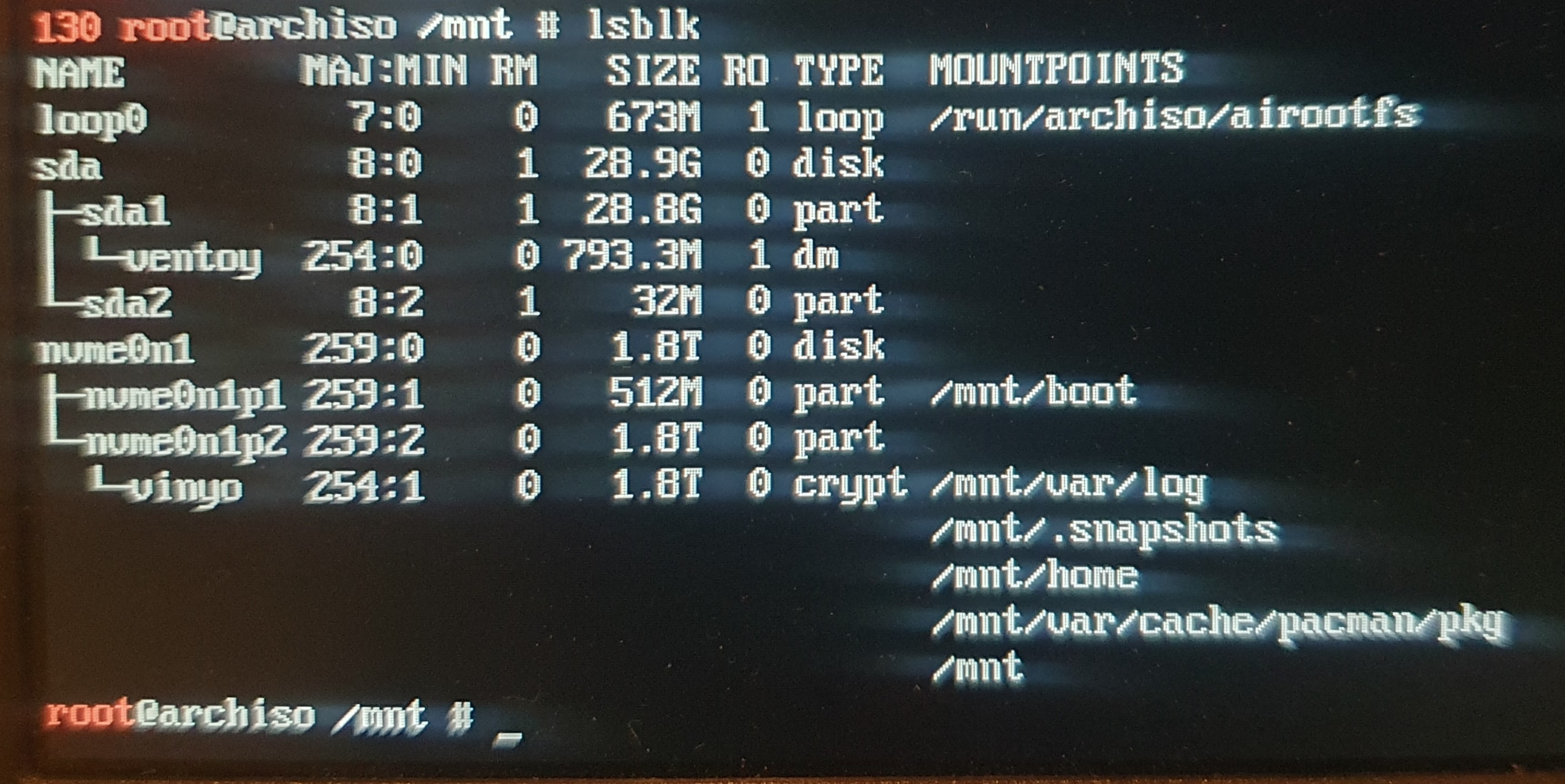
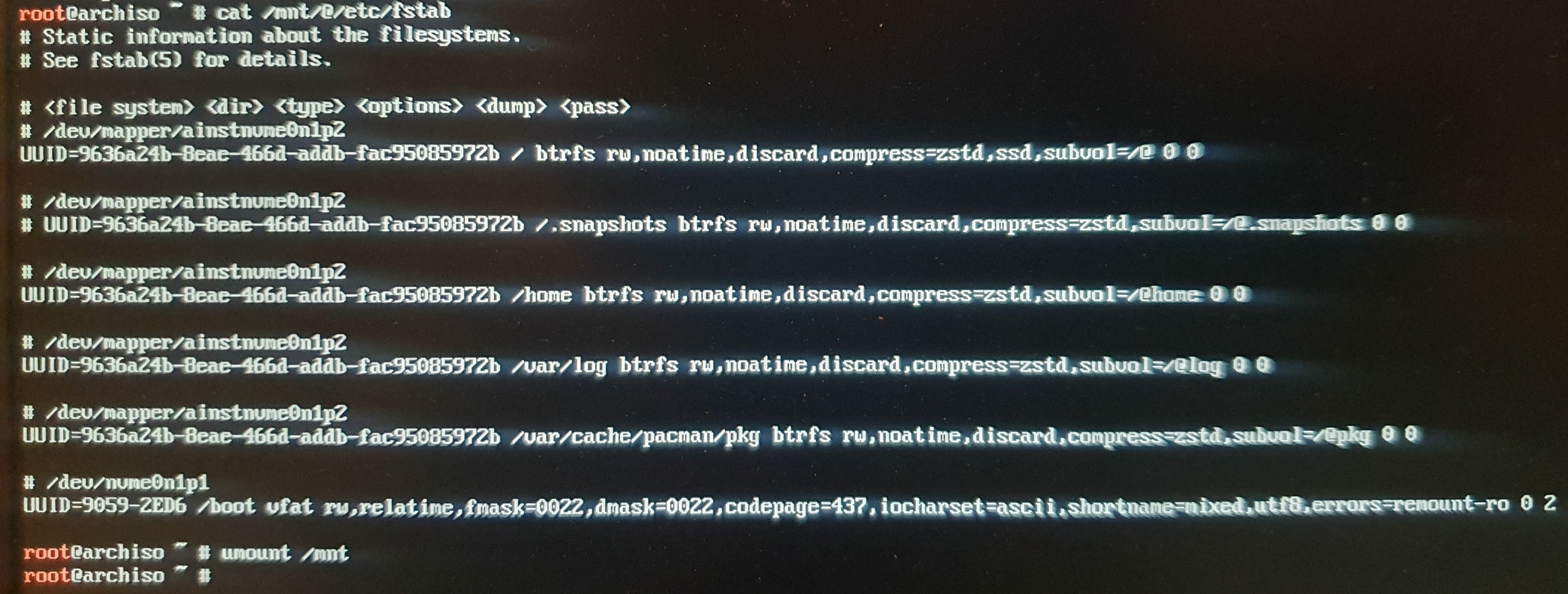
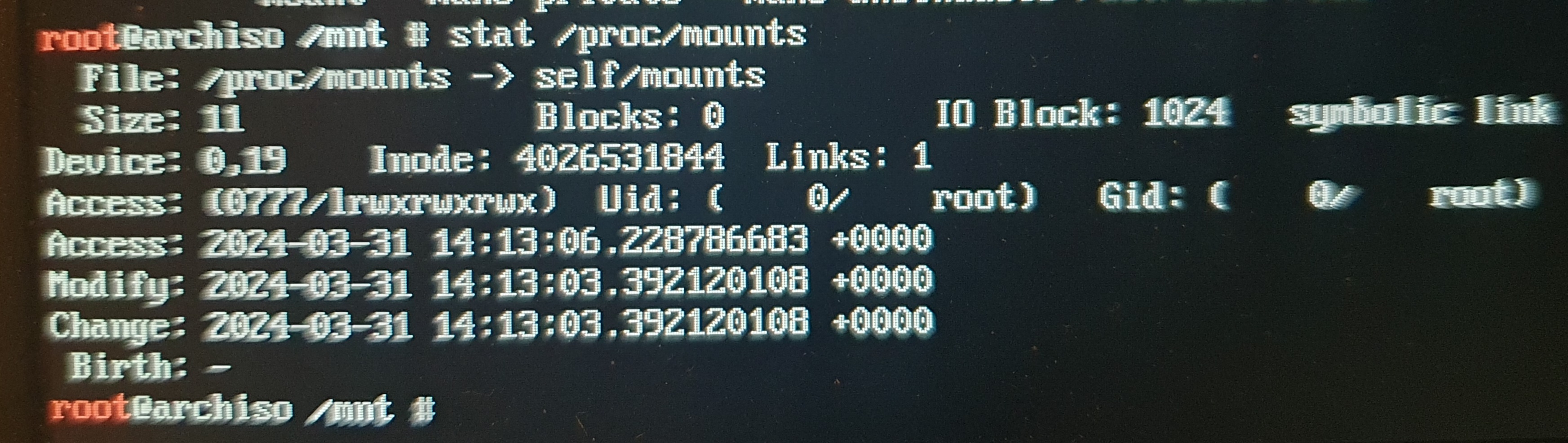
Last edited by yourlocalarchie (2024-03-31 16:46:31)
Offline
#18 2024-03-31 16:54:25
- seth
- Member
- From: Won't reply 2 private help req
- Registered: 2012-09-03
- Posts: 78,267
Re: [Solved]Forcefully removed XZ & grub changed system root to a snapshot
This is all fine, no idea why --root would check the targets mtab, but indeed try to bind /mnt/proc to /proc
mount -t proc /proc /mnt/proc/Offline
#19 2024-03-31 17:28:30
- yourlocalarchie
- Member
- Registered: 2024-03-31
- Posts: 26
Re: [Solved]Forcefully removed XZ & grub changed system root to a snapshot
Well "findmnt" eeror no longer shows.
But remap file descriptor and the rest of the timeshift stuff still causes an error
Offline
#20 2024-03-31 17:31:43
- seth
- Member
- From: Won't reply 2 private help req
- Registered: 2012-09-03
- Posts: 78,267
Re: [Solved]Forcefully removed XZ & grub changed system root to a snapshot
Can you please post the error message?
You can
pacman --root /mnt --cachedir /mnt/var/cache/pacman/pkg -S xz 2>&1 | tee /tmp/pacman.log
cat /tmp/pacman.log | curl -F 'file=@-' 0x0.stOffline
#21 2024-03-31 17:47:11
- yourlocalarchie
- Member
- Registered: 2024-03-31
- Posts: 26
Re: [Solved]Forcefully removed XZ & grub changed system root to a snapshot
Can you please post the error message?
You canpacman --root /mnt --cachedir /mnt/var/cache/pacman/pkg -S xz 2>&1 | tee /tmp/pacman.log cat /tmp/pacman.log | curl -F 'file=@-' 0x0.st
Thanks, here it is:
http://0x0.st/XzSB.txt
Offline
#22 2024-03-31 17:56:34
- seth
- Member
- From: Won't reply 2 private help req
- Registered: 2012-09-03
- Posts: 78,267
Re: [Solved]Forcefully removed XZ & grub changed system root to a snapshot
Ok, so there's some timeshift pre-transaction hook, https://wiki.archlinux.org/title/Pacman#Hooks
Timeshift doesn't seem to ship one so I can't tell you what file exactly, but you want to fimd that and move it out of the way and I even guess that it is what's looking for the targets mtab...
Offline
#23 2024-03-31 17:57:27
- loqs
- Member
- Registered: 2014-03-06
- Posts: 19,098
Re: [Solved]Forcefully removed XZ & grub changed system root to a snapshot
Rename /usr/share/libalpm/hooks/00-timeshift-autosnap.hook to a different extension? Is this the AUR version of timeshift-autosnap or the Manjaro one?
Edit:
@seth:
https://aur.archlinux.org/packages/timeshift-autosnap
https://gitlab.com/gobonja/timeshift-au … type=heads
https://gitlab.manjaro.org/Chrysostomus … osnap.hook
Last edited by loqs (2024-03-31 17:58:35)
Offline
#24 2024-03-31 18:08:02
- yourlocalarchie
- Member
- Registered: 2024-03-31
- Posts: 26
Re: [Solved]Forcefully removed XZ & grub changed system root to a snapshot
Rename /usr/share/libalpm/hooks/00-timeshift-autosnap.hook to a different extension? Is this the AUR version of timeshift-autosnap or the Manjaro one?
Edit:
@seth:
https://aur.archlinux.org/packages/timeshift-autosnap
https://gitlab.com/gobonja/timeshift-au … type=heads
https://gitlab.manjaro.org/Chrysostomus … osnap.hook
It's the AUR package. I use the regular Arch repos with some complementary cherry picked packages from the cachy repos. I don't use anything that has Manjaro even near it's name.
P.S.: i tested it, seems like this worked.
Chrooting into my install worked as well!
Offline
#25 2024-03-31 18:14:46
- loqs
- Member
- Registered: 2014-03-06
- Posts: 19,098
Re: [Solved]Forcefully removed XZ & grub changed system root to a snapshot
Was timeshift-autosnap intended to provide a bootable snapshot for each pacman transaction and you should have been able to use the snapshot from before xz's removal?
Offline