You are not logged in.
- Topics: Active | Unanswered
#26 2024-03-31 18:18:53
- yourlocalarchie
- Member
- Registered: 2024-03-31
- Posts: 26
Re: [Solved]Forcefully removed XZ & grub changed system root to a snapshot
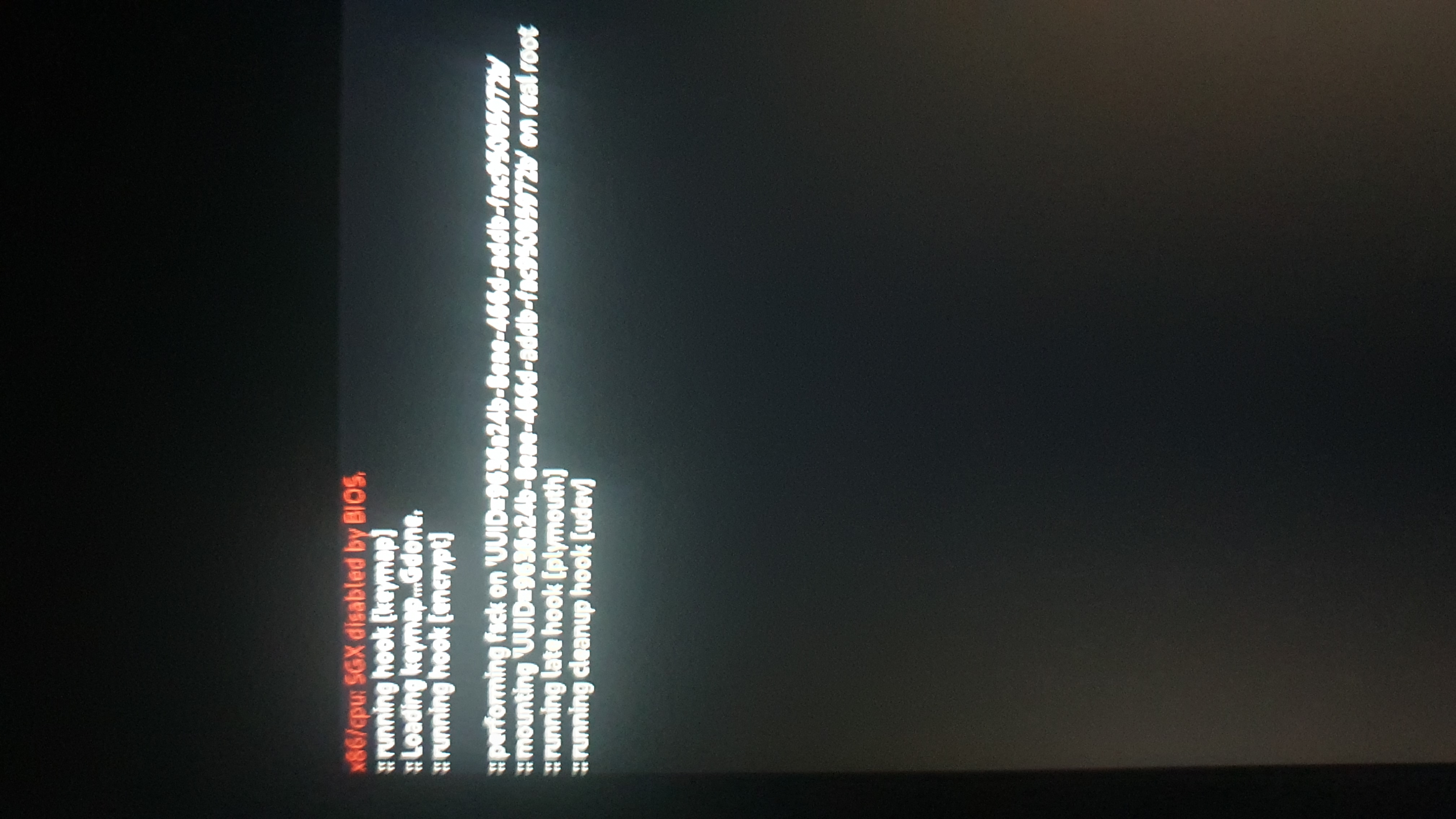
Well new issue came up, now the OS just doesn't load...
https://files.catbox.moe/irg9us.jpg
Things lock up after typing in my decryption pass. SysRQ does nothing and the backlight button does not work
Offline
#27 2024-03-31 18:19:51
- yourlocalarchie
- Member
- Registered: 2024-03-31
- Posts: 26
Re: [Solved]Forcefully removed XZ & grub changed system root to a snapshot
Was timeshift-autosnap intended to provide a bootable snapshot for each pacman transaction and you should have been able to use the snapshot from before xz's removal?
Backups fail to boot properly
Offline
#28 2024-03-31 18:52:10
- yourlocalarchie
- Member
- Registered: 2024-03-31
- Posts: 26
Re: [Solved]Forcefully removed XZ & grub changed system root to a snapshot
Something went horribly wrong. I chrooted back and mx packages seem to be weeks out of date?? Pre plasma6???? Old repos??
Last edited by yourlocalarchie (2024-03-31 18:52:38)
Offline
#29 2024-03-31 18:56:32
- yourlocalarchie
- Member
- Registered: 2024-03-31
- Posts: 26
Re: [Solved]Forcefully removed XZ & grub changed system root to a snapshot
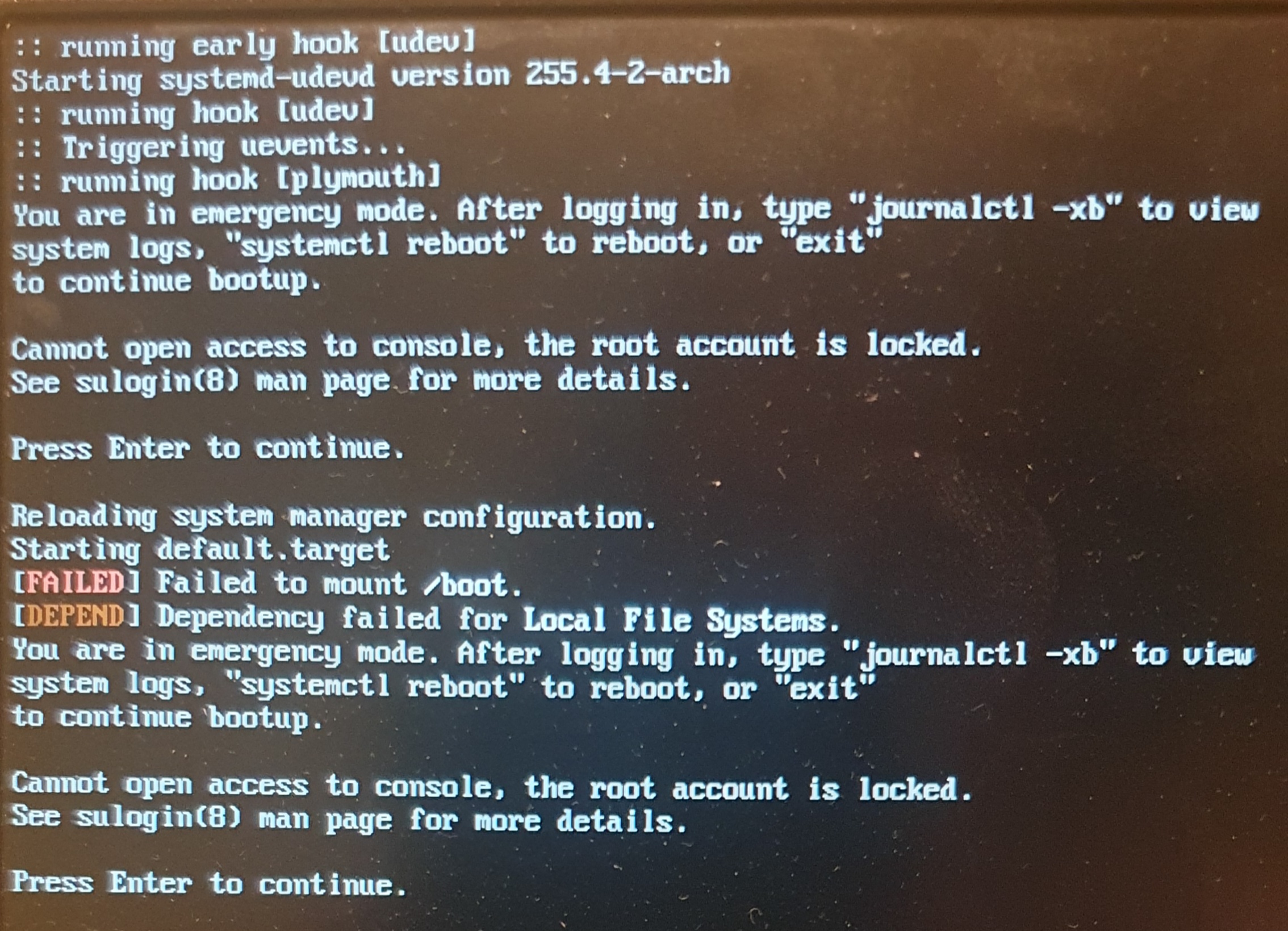
Booting backups leads to this:
https://files.catbox.moe/5pek1a.jpg
Offline
#30 2024-03-31 19:08:58
- yourlocalarchie
- Member
- Registered: 2024-03-31
- Posts: 26
Re: [Solved]Forcefully removed XZ & grub changed system root to a snapshot
When i chroot in, my packages now date to 2023-08 instead of 2024-02 (according to the archlinux keyring
Offline
#31 2024-03-31 21:29:33
- seth
- Member

- From: Won't reply 2 private help req
- Registered: 2012-09-03
- Posts: 78,270
Re: [Solved]Forcefully removed XZ & grub changed system root to a snapshot
Remove the splash and quiet parameters from the kernel commandline and try to boot the multi-user.target (only, 2nd link below) in doubt along "nomodeset"
Did you *only* re-install xz?
Were there any error messages you ignored?
Offline
#32 2024-03-31 22:23:39
- yourlocalarchie
- Member
- Registered: 2024-03-31
- Posts: 26
Re: [Solved]Forcefully removed XZ & grub changed system root to a snapshot
Remove the splash and quiet parameters from the kernel commandline and try to boot the multi-user.target (only, 2nd link below) in doubt along "nomodeset"
Did you *only* re-install xz?
Were there any error messages you ignored?
I did only reinstall xz with no errors, but by now i went mad and applied a full -Syu and re-added my repos (did not help and probably f**ked sh*t up more)
Though i just found out the comnanline starts a snapshot from the 7th month of 2023. Replacinging it with the latest known working one yields the same error as booting any snapshot: failed to mount /boot and i cant do anything because root account is disabled
EDIT: Appologize for any gramatical errors, i can't write on phone well at late night
Last edited by yourlocalarchie (2024-03-31 22:24:53)
Offline
#33 2024-03-31 22:26:16
- seth
- Member
- From: Won't reply 2 private help req
- Registered: 2012-09-03
- Posts: 78,270
Re: [Solved]Forcefully removed XZ & grub changed system root to a snapshot
That snapshot will hold the kernel isntallation of the kernel you're booting, check
uname -a
file /boot/vmlinuz-linux*Offline
#34 2024-03-31 23:25:06
- yourlocalarchie
- Member
- Registered: 2024-03-31
- Posts: 26
Re: [Solved]Forcefully removed XZ & grub changed system root to a snapshot
That snapshot will hold the kernel isntallation of the kernel you're booting, check
uname -a
file /boot/vmlinuz-linux*
I don't know how or where i should check that. While chrooted? In the grub console?
I was working on this all day, i must take a rest before i mess up something while this tired.
Offline
#35 2024-03-31 23:28:28
- seth
- Member
- From: Won't reply 2 private help req
- Registered: 2012-09-03
- Posts: 78,270
Re: [Solved]Forcefully removed XZ & grub changed system root to a snapshot
From the working boot into the July/2023 system - are you taking snapshots of the boot partition as well?
(And take your rest and time, obviously)
Offline
#36 2024-04-01 13:32:14
- yourlocalarchie
- Member
- Registered: 2024-03-31
- Posts: 26
Re: [Solved]Forcefully removed XZ & grub changed system root to a snapshot
From the working boot into the July/2023 system - are you taking snapshots of the boot partition as well?
(And take your rest and time, obviously)
I have no working boot at all. The default boot locks up the system, and trying to load any snapshot fails to mount root.
I only have snapshots of root far as i know, the boot partition is fat32, not btrfs
Offline
#37 2024-04-01 13:43:22
- seth
- Member
- From: Won't reply 2 private help req
- Registered: 2012-09-03
- Posts: 78,270
Re: [Solved]Forcefully removed XZ & grub changed system root to a snapshot
Sorry, I misunderstood the condition.
The cause is likely
Backups fail to boot properly
and you cannot boot because the kernel in the /boot partition is much newer than the snapshot you've restored.
* Restore the latest snapshot you have
* mount everything incl. the boot partition into place,
* "arch-chroot /mnt" into the system and
* run a full udpate (pacman -Syu) - this should™ not be a problem since you've restored a snapshot w/ xz still present.
Afterwards you'll likely be able to boot the system again.
Offline
#38 2024-04-01 13:47:07
- yourlocalarchie
- Member
- Registered: 2024-03-31
- Posts: 26
Re: [Solved]Forcefully removed XZ & grub changed system root to a snapshot
Sorry, I misunderstood the condition.
The cause is likely
Backups fail to boot properly
and you cannot boot because the kernel in the /boot partition is much newer than the snapshot you've restored.
* Restore the latest snapshot you have
* mount everything incl. the boot partition into place,
* "arch-chroot /mnt" into the system and
* run a full udpate (pacman -Syu) - this should™ not be a problem since you've restored a snapshot w/ xz still present.Afterwards you'll likely be able to boot the system again.
How do i properly restore a snapshot? I mount everything on the LiveCD /mnt, chroot and some btrfs command?
(Since booting and timeshift gui restoring is out of the question)
Last edited by yourlocalarchie (2024-04-01 13:52:35)
Offline
#39 2024-04-01 14:13:07
- seth
- Member
- From: Won't reply 2 private help req
- Registered: 2012-09-03
- Posts: 78,270
Re: [Solved]Forcefully removed XZ & grub changed system root to a snapshot
i just found out the comnanline starts a snapshot from the 7th month of 2023. Replacinging it with the latest known working one
How did you go about that?
Just https://wiki.archlinux.org/title/Btrfs# … _snapshots ?
You can use https://man.archlinux.org/man/extra/tim … shift.1.en w/o GUI
Last resort is to use the version you have, check the installed kernel version in (/mnt)/usr/lib/modules/ and re-install that kernel from the https://wiki.archlinux.org/title/Arch_Linux_Archive
Offline
#40 2024-04-01 14:26:39
- yourlocalarchie
- Member
- Registered: 2024-03-31
- Posts: 26
Re: [Solved]Forcefully removed XZ & grub changed system root to a snapshot
So i mounted my system on the livecd and what i see kind of breaks my brain.
I installed archlinux on this device with the built in archinstall and picked snapper (i think?) As my snapshotter. I ended up not liking it and tried to change to timeshift but that broke a bunch of things and this is the likely cause for some of the issues here. The .snapshots volume is now actually unused and has 6 old snapshots in there. My snapshots supposed to be in a folder called timeshift-btrfs, which i can't find anywhere when i mount my drive on the livecd
Edit: i found thr grub-btrfs.cfg in /boot/grub, now i sort of understand it
Last edited by yourlocalarchie (2024-04-01 14:31:52)
Offline
#41 2024-04-01 14:39:16
- yourlocalarchie
- Member
- Registered: 2024-03-31
- Posts: 26
Re: [Solved]Forcefully removed XZ & grub changed system root to a snapshot
grub.cfg
http://0x0.st/Xz9X.txt
grub-btrfs.cfg
http://0x0.st/Xz98.txt
Last edited by yourlocalarchie (2024-04-01 14:40:09)
Offline
#42 2024-04-01 15:21:45
- seth
- Member
- From: Won't reply 2 private help req
- Registered: 2012-09-03
- Posts: 78,270
Re: [Solved]Forcefully removed XZ & grub changed system root to a snapshot
Not sure why you think that grub config is relevant but
You can use https://man.archlinux.org/man/extra/tim … shift.1.en w/o GUI
Last resort is to use the version you have, check the installed kernel version in (/mnt)/usr/lib/modules/ and re-install that kernel from the https://wiki.archlinux.org/title/Arch_Linux_Archive
Offline
#43 2024-04-01 19:24:06
- yourlocalarchie
- Member
- Registered: 2024-03-31
- Posts: 26
Re: [Solved]Forcefully removed XZ & grub changed system root to a snapshot
Not sure why you think that grub config is relevant but
seth wrote:You can use https://man.archlinux.org/man/extra/tim … shift.1.en w/o GUI
Last resort is to use the version you have, check the installed kernel version in (/mnt)/usr/lib/modules/ and re-install that kernel from the https://wiki.archlinux.org/title/Arch_Linux_Archive
I managed to boot by looking up the name of a subvolume from btrfs grub config. Mounting that, not mounting the pkgs subvolume, updating the arch linux keyring and doing a pacman -Syyuu and reinstalling the kernel. Then manually changing the root subvolume in the grub commandline.
This booted me in, but even though this snapshot i used was 3 days old, *somehow* i have packages that i had installed month ago and all system changes since gone.
And if you look at the grub file i linked, it still has the entries trying to use that snapshot from 2023-09-07 which i still don't understand how that works.
Offline
#44 2024-04-01 20:45:40
- seth
- Member
- From: Won't reply 2 private help req
- Registered: 2012-09-03
- Posts: 78,270
Re: [Solved]Forcefully removed XZ & grub changed system root to a snapshot
Afaiu you mounted and updated into some snapshot but then didn't boot that snapshot but the main FS (which probably holds the data of some even older snapshot previously resored by timeshift)?
Did you see the timeshift manpage?
You can list and restore snapshots from the commandline - if you can chroot into the system again, that should™ allow you to restore one of them?
I've never used timeshift, but it's also not exactly clear what you've done so far and what filesystem/snapshot you're currently facing.
Offline
#45 2024-04-01 20:54:16
- yourlocalarchie
- Member
- Registered: 2024-03-31
- Posts: 26
Re: [Solved]Forcefully removed XZ & grub changed system root to a snapshot
Afaiu you mounted and updated into some snapshot but then didn't boot that snapshot but the main FS (which probably holds the data of some even older snapshot previously resored by timeshift)?
Did you see the timeshift manpage?
You can list and restore snapshots from the commandline - if you can chroot into the system again, that should™ allow you to restore one of them?I've never used timeshift, but it's also not exactly clear what you've done so far and what filesystem/snapshot you're currently facing.
I mounted, updated and booted into the same snapshot that was made just a few days ago.
Timeshift did not work while chrooted. It listed nothing
Offline
#46 2024-04-01 20:58:50
- seth
- Member
- From: Won't reply 2 private help req
- Registered: 2012-09-03
- Posts: 78,270
Re: [Solved]Forcefully removed XZ & grub changed system root to a snapshot
Well, then this should have shown you the snapshot of that time (w/ all the data from then in place) and still after the reboot along your updates.
btrfs snapshots are read-only by default, though. Did you set it to readwrite?
Does timeshift list anything when properly booting into the system?
Offline
#47 2024-04-01 21:42:31
- yourlocalarchie
- Member
- Registered: 2024-03-31
- Posts: 26
Re: [Solved]Forcefully removed XZ & grub changed system root to a snapshot
I might have figured out what's going on. ALL of the snapshots seem to be taken of the same exact time and state. That 2023 07 snapshot might be my one and only real up to date root because that's what my system booted into for some reason and wrote to. While the actual proper root that my system kept making snapshots of never changed as it was never used. What the hell happaned here???
Ps: this is likely because when grub updates the kernel entries it makes the current running subvol as the root
Last edited by yourlocalarchie (2024-04-01 21:46:40)
Offline
#48 2024-04-03 15:25:17
- yourlocalarchie
- Member
- Registered: 2024-03-31
- Posts: 26
Re: [Solved]Forcefully removed XZ & grub changed system root to a snapshot
I guess that was the cause. My root for months was a snapshot because i ran grub-mkconfing while booted into a snapshot and timeshift kept making snapshots of an unused root frozen in time.
For now i will just leave this be and fix this btrfs mess when i mentally recovered from getting my OS to be operational.
Offline