You are not logged in.
- Topics: Active | Unanswered
#1 2024-06-03 09:13:24
- vt220
- Member
- Registered: 2012-10-03
- Posts: 23
[SOLVED] Fixing resolution issue for HDMI EDID emulator dongle
I have a cheap HDMI EDID emulator dongle like this one. The dongle is connected to machine's HDMI output, and then the display (Asus PA278QV) is connected to dongle's HDMI output.
In general, the 'native' dongle's resolution is 1920x1080@60HZ, but it also supports 2560x1440@59.95HZ resolution and this resolution works fine in Windows 10. When I use the dongle in Linux on the same machine (Intel NUC8I5BEK with Iris Plus Graphics 655) - upon switching to this resolution the display blanks out. When the display is connected directly to this machine (without the dongle), 2560x1440@59.95HZ works fine as well (for the display this is the 'native' resolution).
Since the hardware itself definitely supports the resolution, the problem must be either in the used driver, or in the configuration, but I cannot figure out what it is that I should change.
Where should I look to solve this problem?
When the dongle is connected, xrandr shows the following info (don't know why the port is called DP1 - it is HDMI and not a DisplayPort, as the port's name implies):
Screen 0: minimum 8 x 8, current 1920 x 1080, maximum 32767 x 32767
DP1 connected 1920x1080+0+0 (normal left inverted right x axis y axis) 620mm x 340mm
   1920x1080     60.00*+ 120.00   119.88    74.99    50.00    24.00    23.98
   4096x2160     24.00    23.98
   3840x2160     30.00    30.00    25.00    24.00    29.97    23.98
   2880x1800     60.00
   2560x1600     59.97
   2560x1440     59.95
   1920x1200     59.95
   1920x1080i    60.00    50.00    59.94
   1680x1050     59.88
   1600x900      60.00
   1280x1024     75.02    61.00
   1440x900      59.90
   1280x800      59.91
   1280x720      60.00    50.00    59.94
   1024x768      75.03    70.07    60.00
   800x600       72.19    75.00    60.32    56.25
   720x576       50.00
   720x480       60.00    59.94
   640x480       75.00    72.81    60.00    59.94
DP2 disconnected (normal left inverted right x axis y axis)
HDMI1 disconnected (normal left inverted right x axis y axis)
VIRTUAL1 disconnected (normal left inverted right x axis y axis)
I try to switch resolution using the following command:
xrandr --output DP1 --mode 2560x1440 --rate 59.95read-edid displays the following:
Section "Monitor"
        Identifier "28E850"
        ModelName "28E850"
        VendorName "AOC"
        # Monitor Manufactured week 3 of 2017
        # EDID version 1.3
        # Digital Display
        DisplaySize 620 340
        Gamma 2.20
        Option "DPMS" "true"
        #Not giving standard mode: 1920x1080, 75Hz
        #Not giving standard mode: 1680x1050, 60Hz
        #Not giving standard mode: 1600x900, 60Hz
        #Not giving standard mode: 1440x900, 60Hz
        #Not giving standard mode: 1280x1024, 61Hz
        #Not giving standard mode: 1280x800, 60Hz
        #Not giving standard mode: 1280x720, 60Hz
        #Not giving standard mode: 1920x1200, 60Hz

        #Extension block found. Parsing...
When display is connected directly, xrandr shows the following:
Screen 0: minimum 8 x 8, current 2560 x 1440, maximum 32767 x 32767
DP1 connected 2560x1440+0+0 (normal left inverted right x axis y axis) 600mm x 340mm
   2560x1440     59.95*+  75.00
   2560x1080     59.98
   2048x1152     60.00
   1920x1200     59.95
   1920x1080     60.00    50.00    59.94
   1920x1080i    60.00    50.00    59.94
   1600x1200     60.00
   1680x1050     59.88
   1280x1024     75.02    60.02
   1440x900      59.90
   1280x960      60.00
   1280x800      59.81
   1152x864      75.00
   1280x768      59.87
   1280x720      60.00    50.00    59.94
   1024x768      75.03    70.07    60.00
   800x600       75.00    60.32    56.25
   720x576       50.00
   720x480       60.00    59.94
   640x480       75.00    72.81    66.67    60.00    59.94
   720x400       70.08
DP2 disconnected (normal left inverted right x axis y axis)
HDMI1 disconnected (normal left inverted right x axis y axis)
VIRTUAL1 disconnected (normal left inverted right x axis y axis)
and read-edid shows the following:
Section "Monitor"
        Identifier "PA278QV"
        ModelName "PA278QV"
        VendorName "AUS"
        # Monitor Manufactured week 21 of 2021
        # EDID version 1.3
        # Digital Display
        DisplaySize 600 340
        Gamma 2.20
        Option "DPMS" "true"
        Horizsync 30-112
        VertRefresh 46-75
        # Maximum pixel clock is 300MHz
        #Not giving standard mode: 1152x864, 75Hz
        #Not giving standard mode: 1280x1024, 60Hz
        #Not giving standard mode: 1280x960, 60Hz
        #Not giving standard mode: 1440x900, 60Hz
        #Not giving standard mode: 1600x1200, 60Hz
        #Not giving standard mode: 1680x1050, 60Hz
        #Not giving standard mode: 1920x1200, 60Hz
        #Not giving standard mode: 2048x1152, 60Hz

        #Extension block found. Parsing...
Last edited by vt220 (2024-06-11 14:53:26)
Offline
#2 2024-06-03 09:52:00
- Lone_Wolf
- Administrator

- From: Netherlands, Europe
- Registered: 2005-10-04
- Posts: 15,403
Re: [SOLVED] Fixing resolution issue for HDMI EDID emulator dongle
The aliexpress link gives "page not found" .
ddg'ing "aliexpress hdmi edid emulator" gives https://www.aliexpress.com/w/wholesale- … lator.html .
All those look like DisplayPort over USB-c devices that convert DP signals to HDMI.
If yours is like that xrandr is correct in listing it as DP-1 .
The display you're using supports DP , is there a reason why you want to use HDMI ?
Disliking systemd intensely, but not satisfied with alternatives so focusing on taming systemd.
clean chroot building not flexible enough ?
Try clean chroot manager by graysky
Offline
#3 2024-06-03 10:57:57
- vt220
- Member
- Registered: 2012-10-03
- Posts: 23
Re: [SOLVED] Fixing resolution issue for HDMI EDID emulator dongle
This is strange - the link opens for me. Maybe aliexpress uses geolocation to show some products only in specific areas. Here are two pictures of the dongle (which is pure HDMI):
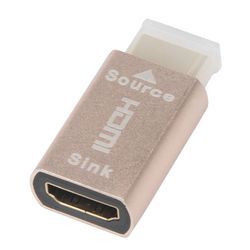
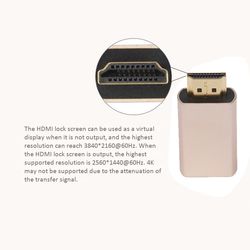
The real purpose of this dongle is for connecting the machine to a KVM switch which has only HDMI ports. To simplify the case I connected display directly to the dongle, but eventually it will be connected to a KVM (along with another machine), and KVM's HDMI output will be connected to a display.
Offline
#4 2024-06-04 07:35:00
- Lone_Wolf
- Administrator
- From: Netherlands, Europe
- Registered: 2005-10-04
- Posts: 15,403
Re: [SOLVED] Fixing resolution issue for HDMI EDID emulator dongle
I no longer think this is a DP-over-USB to hdmi converter, but the function still eludes me.
Is sink supposed to be connected to a display and source to a signal provider ?
Does the dongle do nothing (except transferring the signal from source to sink) when the display is powered on ?
When the display is powered off , does the dongle present a fake display to the signal provider ?
Disliking systemd intensely, but not satisfied with alternatives so focusing on taming systemd.
clean chroot building not flexible enough ?
Try clean chroot manager by graysky
Offline
#5 2024-06-04 08:05:23
- vt220
- Member
- Registered: 2012-10-03
- Posts: 23
Re: [SOLVED] Fixing resolution issue for HDMI EDID emulator dongle
Yes to all questions.
More often such dongles are used with KVMs that don't have built-in EDID emulator and a when laptop is connected to a KVM. This way, when KVM switches from laptop to a second machine or vice versa, laptop's display doesn't turn off/on and it doesn't change its resolution + resize all open windows (which takes a lot of time and moves windows around). In case of a machine without built-in display such dongle makes switch time to this machine much shorter.
Offline
#6 2024-06-04 11:09:50
- Lone_Wolf
- Administrator
- From: Netherlands, Europe
- Registered: 2005-10-04
- Posts: 15,403
Re: [SOLVED] Fixing resolution issue for HDMI EDID emulator dongle
ok, that clarifies how the dongle works .
Connect the dongle , run xrandr with the display powered on and again with the display powered off .
Are the outputs the same ?
If yes, post one . If not, post both .
Disliking systemd intensely, but not satisfied with alternatives so focusing on taming systemd.
clean chroot building not flexible enough ?
Try clean chroot manager by graysky
Offline
#7 2024-06-04 17:19:58
- vt220
- Member
- Registered: 2012-10-03
- Posts: 23
Re: [SOLVED] Fixing resolution issue for HDMI EDID emulator dongle
Output of xrandr with only dongle connected to the machine is identical to xrandr's output when both dongle and display are connected (dongle to the machine, and then display to the dongle). And it is exactly the same output as in the first listing in the first post in this thread.
Also, maybe logs from Xorg's logs can help understand the problem - below are 3 listings:
Xorg's messages upon connecting dongle to the machine
Xorg's messages upon connecting display (directly) to the machine
Xorg's messages when both dongle + display are connected and I switch resolution first to 2560x1440 (and display turns off), and then to 1920x1080 (and display turns on)
Note: if dongle is already connected to the machine and I connect/disconnect display from the dongle, no new messages appear in Xorg's logs.
And following are the mentioned listings.
Xorg's messages upon connecting dongle to the machine:
[436902.923] (II) intel(0): EDID vendor "AOC", prod id 3277
[436902.923] (II) intel(0): Printing DDC gathered Modelines:
[436902.923] (II) intel(0): Modeline "1920x1080"x0.0  148.50  1920 2008 2052 2200  1080 1083 1088 1125 +hsync -vsync (67.5 kHz eP)
[436902.923] (II) intel(0): Modeline "2560x1600"x0.0  268.50  2560 2608 2640 2720  1600 1603 1609 1646 +hsync -vsync (98.7 kHz e)
[436902.923] (II) intel(0): Modeline "2560x1440"x0.0  241.50  2560 2608 2640 2720  1440 1443 1449 1481 +hsync -vsync (88.8 kHz e)
[436902.923] (II) intel(0): Modeline "2880x1800"x0.0  336.72  2880 2928 2960 3040  1800 1803 1809 1846 +hsync -vsync (110.8 kHz e)
[436902.923] (II) intel(0): Modeline "3840x2160"x0.0  297.00  3840 3888 3920 4400  2160 2164 2170 2250 +hsync -vsync (67.5 kHz e)
[436902.923] (II) intel(0): Modeline "3840x2160"x0.0  594.00  3840 4016 4104 4400  2160 2162 2172 2250 +hsync +vsync (135.0 kHz e)
[436902.923] (II) intel(0): Modeline "1920x1080"x0.0  297.00  1920 2008 2052 2200  1080 1084 1089 1125 +hsync +vsync (135.0 kHz e)
[436902.924] (II) intel(0): Modeline "1920x1080i"x0.0   74.25  1920 2008 2052 2200  1080 1084 1094 1125 interlace +hsync +vsync (33.8 kHz e)
[436902.924] (II) intel(0): Modeline "1280x720"x0.0   74.25  1280 1390 1430 1650  720 725 730 750 +hsync +vsync (45.0 kHz e)
[436902.924] (II) intel(0): Modeline "720x480"x0.0   27.00  720 736 798 858  480 489 495 525 -hsync -vsync (31.5 kHz e)
[436902.924] (II) intel(0): Modeline "640x480"x0.0   25.18  640 656 752 800  480 490 492 525 -hsync -vsync (31.5 kHz e)
[436902.924] (II) intel(0): Modeline "1920x1080"x0.0  148.50  1920 2448 2492 2640  1080 1084 1089 1125 +hsync +vsync (56.2 kHz e)
[436902.924] (II) intel(0): Modeline "720x576"x0.0   27.00  720 732 796 864  576 581 586 625 -hsync -vsync (31.2 kHz e)
[436902.924] (II) intel(0): Modeline "1280x720"x0.0   74.25  1280 1720 1760 1980  720 725 730 750 +hsync +vsync (37.5 kHz e)
[436902.924] (II) intel(0): Modeline "1920x1080i"x0.0   74.25  1920 2448 2492 2640  1080 1084 1094 1125 interlace +hsync +vsync (28.1 kHz e)
[436902.924] (II) intel(0): Modeline "1920x1080"x0.0   74.25  1920 2558 2602 2750  1080 1084 1089 1125 +hsync +vsync (27.0 kHz e)
[436902.924] (II) intel(0): Modeline "800x600"x0.0   40.00  800 840 968 1056  600 601 605 628 +hsync +vsync (37.9 kHz e)
[436902.924] (II) intel(0): Modeline "800x600"x0.0   36.00  800 824 896 1024  600 601 603 625 +hsync +vsync (35.2 kHz e)
[436902.924] (II) intel(0): Modeline "640x480"x0.0   31.50  640 656 720 840  480 481 484 500 -hsync -vsync (37.5 kHz e)
[436902.924] (II) intel(0): Modeline "640x480"x0.0   31.50  640 664 704 832  480 489 492 520 -hsync -vsync (37.9 kHz e)
[436902.924] (II) intel(0): Modeline "1280x1024"x0.0  135.00  1280 1296 1440 1688  1024 1025 1028 1066 +hsync +vsync (80.0 kHz e)
[436902.924] (II) intel(0): Modeline "1024x768"x0.0   78.75  1024 1040 1136 1312  768 769 772 800 +hsync +vsync (60.0 kHz e)
[436902.924] (II) intel(0): Modeline "1024x768"x0.0   75.00  1024 1048 1184 1328  768 771 777 806 -hsync -vsync (56.5 kHz e)
[436902.924] (II) intel(0): Modeline "1024x768"x0.0   65.00  1024 1048 1184 1344  768 771 777 806 -hsync -vsync (48.4 kHz e)
[436902.924] (II) intel(0): Modeline "800x600"x0.0   49.50  800 816 896 1056  600 601 604 625 +hsync +vsync (46.9 kHz e)
[436902.925] (II) intel(0): Modeline "800x600"x0.0   50.00  800 856 976 1040  600 637 643 666 +hsync +vsync (48.1 kHz e)
[436902.925] (II) intel(0): Modeline "1920x1080"x75.0  220.64  1920 2056 2264 2608  1080 1081 1084 1128 -hsync +vsync (84.6 kHz e)
[436902.925] (II) intel(0): Modeline "1680x1050"x0.0  119.00  1680 1728 1760 1840  1050 1053 1059 1080 +hsync -vsync (64.7 kHz e)
[436902.925] (II) intel(0): Modeline "1600x900"x60.0  119.00  1600 1696 1864 2128  900 901 904 932 -hsync +vsync (55.9 kHz e)
[436902.925] (II) intel(0): Modeline "1440x900"x0.0   88.75  1440 1488 1520 1600  900 903 909 926 +hsync -vsync (55.5 kHz e)
[436902.925] (II) intel(0): Modeline "1280x1024"x61.0  110.80  1280 1360 1496 1712  1024 1025 1028 1061 -hsync +vsync (64.7 kHz e)
[436902.925] (II) intel(0): Modeline "1280x800"x0.0   71.00  1280 1328 1360 1440  800 803 809 823 +hsync -vsync (49.3 kHz e)
[436902.925] (II) intel(0): Modeline "1920x1200"x0.0  154.00  1920 1968 2000 2080  1200 1203 1209 1235 +hsync -vsync (74.0 kHz e)
[436902.925] (--) intel(0): HDMI max TMDS frequency 340000KHz
[436902.940] (II) intel(0): resizing framebuffer to 1920x1080
[436902.945] (II) intel(0): switch to mode 1920x1080@60.0 on DP1 using pipe 0, position (0, 0), rotation normal, reflection none
Xorg's messages upon connecting display (directly) to the machine:
[438220.438] (II) intel(0): EDID vendor "AUS", prod id 9985
[438220.438] (II) intel(0): Using hsync ranges from config file
[438220.438] (II) intel(0): Using vrefresh ranges from config file
[438220.438] (II) intel(0): Printing DDC gathered Modelines:
[438220.438] (II) intel(0): Modeline "2560x1440"x0.0  241.50  2560 2608 2640 2720  1440 1443 1448 1481 +hsync -vsync (88.8 kHz eP)
[438220.438] (II) intel(0): Modeline "1280x768"x0.0   79.50  1280 1344 1472 1664  768 771 778 798 -hsync +vsync (47.8 kHz e)
[438220.438] (II) intel(0): Modeline "2560x1440"x0.0  299.90  2560 2588 2620 2680  1440 1478 1486 1492 +hsync -vsync (111.9 kHz e)
[438220.438] (II) intel(0): Modeline "1280x800"x0.0   83.50  1280 1352 1480 1680  800 803 809 831 -hsync +vsync (49.7 kHz e)
[438220.438] (II) intel(0): Modeline "2560x1080"x0.0  181.25  2560 2608 2640 2720  1080 1083 1093 1111 +hsync -vsync (66.6 kHz e)
[438220.438] (II) intel(0): Modeline "1920x1080"x0.0  148.50  1920 2008 2052 2200  1080 1084 1089 1125 +hsync +vsync (67.5 kHz e)
[438220.438] (II) intel(0): Modeline "1280x720"x0.0   74.25  1280 1390 1430 1650  720 725 730 750 +hsync +vsync (45.0 kHz e)
[438220.438] (II) intel(0): Modeline "720x480"x0.0   27.00  720 736 798 858  480 489 495 525 -hsync -vsync (31.5 kHz e)
[438220.438] (II) intel(0): Modeline "720x576"x0.0   27.00  720 732 796 864  576 581 586 625 -hsync -vsync (31.2 kHz e)
[438220.438] (II) intel(0): Modeline "1280x720"x0.0   74.25  1280 1720 1760 1980  720 725 730 750 +hsync +vsync (37.5 kHz e)
[438220.438] (II) intel(0): Modeline "1920x1080"x0.0  148.50  1920 2448 2492 2640  1080 1084 1089 1125 +hsync +vsync (56.2 kHz e)
[438220.438] (II) intel(0): Modeline "1920x1080i"x0.0   74.25  1920 2008 2052 2200  1080 1084 1094 1125 interlace +hsync +vsync (33.8 kHz e)
[438220.438] (II) intel(0): Modeline "1920x1080i"x0.0   74.25  1920 2448 2492 2640  1080 1084 1094 1125 interlace +hsync +vsync (28.1 kHz e)
[438220.439] (II) intel(0): Modeline "800x600"x0.0   40.00  800 840 968 1056  600 601 605 628 +hsync +vsync (37.9 kHz e)
[438220.439] (II) intel(0): Modeline "800x600"x0.0   36.00  800 824 896 1024  600 601 603 625 +hsync +vsync (35.2 kHz e)
[438220.439] (II) intel(0): Modeline "640x480"x0.0   31.50  640 656 720 840  480 481 484 500 -hsync -vsync (37.5 kHz e)
[438220.439] (II) intel(0): Modeline "640x480"x0.0   31.50  640 664 704 832  480 489 492 520 -hsync -vsync (37.9 kHz e)
[438220.439] (II) intel(0): Modeline "640x480"x0.0   30.24  640 704 768 864  480 483 486 525 -hsync -vsync (35.0 kHz e)
[438220.439] (II) intel(0): Modeline "640x480"x0.0   25.18  640 656 752 800  480 490 492 525 -hsync -vsync (31.5 kHz e)
[438220.439] (II) intel(0): Modeline "720x400"x0.0   28.32  720 738 846 900  400 412 414 449 -hsync +vsync (31.5 kHz e)
[438220.439] (II) intel(0): Modeline "1280x1024"x0.0  135.00  1280 1296 1440 1688  1024 1025 1028 1066 +hsync +vsync (80.0 kHz e)
[438220.439] (II) intel(0): Modeline "1024x768"x0.0   78.75  1024 1040 1136 1312  768 769 772 800 +hsync +vsync (60.0 kHz e)
[438220.439] (II) intel(0): Modeline "1024x768"x0.0   75.00  1024 1048 1184 1328  768 771 777 806 -hsync -vsync (56.5 kHz e)
[438220.439] (II) intel(0): Modeline "1024x768"x0.0   65.00  1024 1048 1184 1344  768 771 777 806 -hsync -vsync (48.4 kHz e)
[438220.439] (II) intel(0): Modeline "800x600"x0.0   49.50  800 816 896 1056  600 601 604 625 +hsync +vsync (46.9 kHz e)
[438220.439] (II) intel(0): Modeline "1152x864"x0.0  108.00  1152 1216 1344 1600  864 865 868 900 +hsync +vsync (67.5 kHz e)
[438220.439] (II) intel(0): Modeline "1280x1024"x0.0  108.00  1280 1328 1440 1688  1024 1025 1028 1066 +hsync +vsync (64.0 kHz e)
[438220.439] (II) intel(0): Modeline "1280x960"x0.0  108.00  1280 1376 1488 1800  960 961 964 1000 +hsync +vsync (60.0 kHz e)
[438220.439] (II) intel(0): Modeline "1440x900"x0.0   88.75  1440 1488 1520 1600  900 903 909 926 +hsync -vsync (55.5 kHz e)
[438220.439] (II) intel(0): Modeline "1600x1200"x0.0  162.00  1600 1664 1856 2160  1200 1201 1204 1250 +hsync +vsync (75.0 kHz e)
[438220.439] (II) intel(0): Modeline "1680x1050"x0.0  119.00  1680 1728 1760 1840  1050 1053 1059 1080 +hsync -vsync (64.7 kHz e)
[438220.439] (II) intel(0): Modeline "1920x1200"x0.0  154.00  1920 1968 2000 2080  1200 1203 1209 1235 +hsync -vsync (74.0 kHz e)
[438220.439] (II) intel(0): Modeline "2048x1152"x60.0  197.97  2048 2184 2408 2768  1152 1153 1156 1192 -hsync +vsync (71.5 kHz e)
[438220.439] (--) intel(0): HDMI max TMDS frequency 320000KHz
[438220.454] (II) intel(0): resizing framebuffer to 2560x1440
[438220.457] (II) intel(0): switch to mode 2560x1440@60.0 on DP1 using pipe 0, position (0, 0), rotation normal, reflection none
Xorg's messages when both dongle + display are connected and I switch resolution first to 2560x1440 (and display turns off), and then to 1920x1080 (and display turns on):
[437526.537] (II) intel(0): resizing framebuffer to 2560x1440
[437526.560] (II) intel(0): switch to mode 2560x1440@60.0 on DP1 using pipe 0, position (0, 0), rotation normal, reflection none
[437536.850] (II) intel(0): resizing framebuffer to 1920x1080
[437536.852] (II) intel(0): switch to mode 1920x1080@60.0 on DP1 using pipe 0, position (0, 0), rotation normal, reflection none
Last edited by vt220 (2024-06-04 17:20:48)
Offline
#8 2024-06-10 11:35:58
- Lone_Wolf
- Administrator
- From: Netherlands, Europe
- Registered: 2005-10-04
- Posts: 15,403
Re: [SOLVED] Fixing resolution issue for HDMI EDID emulator dongle
Sorry for late reply, needed some time to get a fresh look at this (and hoped others would have stepped in) .
dongle
[436902.923] (II) intel(0): EDID vendor "AOC", prod id 3277
[436902.923] (II) intel(0): Printing DDC gathered Modelines:

[436902.923] (II) intel(0): Modeline "2560x1440"x0.0  241.50  2560 2608 2640 2720  1440 1443 1449 1481 +hsync -vsync (88.8 kHz e)

directly
[438220.438] (II) intel(0): EDID vendor "AUS", prod id 9985
[438220.438] (II) intel(0): Using hsync ranges from config file
[438220.438] (II) intel(0): Using vrefresh ranges from config file
[438220.438] (II) intel(0): Printing DDC gathered Modelines:

[438220.438] (II) intel(0): Modeline "2560x1440"x0.0  241.50  2560 2608 2640 2720  1440 1443 1448 1481 +hsync -vsync (88.8 kHz eP)
[438220.438] (II) intel(0): Modeline "2560x1440"x0.0  299.90  2560 2588 2620 2680  1440 1478 1486 1492 +hsync -vsync (111.9 kHz e)
Test both modelines shown under direct connection manually .
Does one of them fail with direct connection ?
Do you have files in /etc/X11/xorg.conf.d ?
Disliking systemd intensely, but not satisfied with alternatives so focusing on taming systemd.
clean chroot building not flexible enough ?
Try clean chroot manager by graysky
Offline
#9 2024-06-11 12:03:19
- vt220
- Member
- Registered: 2012-10-03
- Posts: 23
Re: [SOLVED] Fixing resolution issue for HDMI EDID emulator dongle
Both those modelines work under a direct connection. As I understand, the first one corresponds to 2560x1440@59.95 and the second one to 2560x1440@75.00, according xrandr's info for a directly connected display (xvidtune also shows corresponding values when the matching configurations are applied).
No, I don't have any config files in /etc/X11/xorg.conf.d. The only place out of all locations used by xorg where I do have any kind of config files is in /usr/share/X11/xorg.conf.d/: 10-quirks.conf (which belongs to xorg-server) and 40-libinput.conf (which belongs to xf86-input-libinput).
Offline
#10 2024-06-11 13:17:21
- Lone_Wolf
- Administrator
- From: Netherlands, Europe
- Registered: 2005-10-04
- Posts: 15,403
Re: [SOLVED] Fixing resolution issue for HDMI EDID emulator dongle
A possible cause is that the signals are outside of what the dongle cam handle and windows uses reduced blanking techniques to change the signals enough to get things working .
(lying about really used refreshrates is rather common for windows drivers).
Install cvt12-git from AUR and let it calculate some reduced blanking (v2) modelines.
Here are two to get things started:
$ cvt12 2560 1440 59.95 --rb-v2
# 2560x1440 @ 59.950 Hz Reduced Blank (CVT) field rate 59.950 Hz; hsync: 88.786 kHz; pclk: 234.39 MHz
Modeline "2560x1440_59.95_rb2"  234.39  2560 2568 2600 2640  1440 1467 1475 1481 +hsync -vsync

$ cvt12 2560 1440 58 --rb-v2
# 2560x1440 @ 58.000 Hz Reduced Blank (CVT) field rate 58.000 Hz; hsync: 85.840 kHz; pclk: 226.62 MHz
Modeline "2560x1440_58.00_rb2"  226.62  2560 2568 2600 2640  1440 1466 1474 1480 +hsync -vsync
$
Try using both with the dongle . If neither works, try lower refresh rates.
Disliking systemd intensely, but not satisfied with alternatives so focusing on taming systemd.
clean chroot building not flexible enough ?
Try clean chroot manager by graysky
Offline
#11 2024-06-11 14:53:04
- vt220
- Member
- Registered: 2012-10-03
- Posts: 23
Re: [SOLVED] Fixing resolution issue for HDMI EDID emulator dongle
Seems that your explanation is what actually happens - the dongle started working with reduced blanking rates starting from 58Hz, and refused to work with any higher rates.
Many thanks for your suggestions & explanations.
Offline