You are not logged in.
- Topics: Active | Unanswered
#1 2024-08-27 21:07:00
- Kaspers
- Member

- From: the Netherlands
- Registered: 2019-06-18
- Posts: 4
- Website
Apple Studio Display (thunderbolt) flickers when running native
This is the issue I'm facing: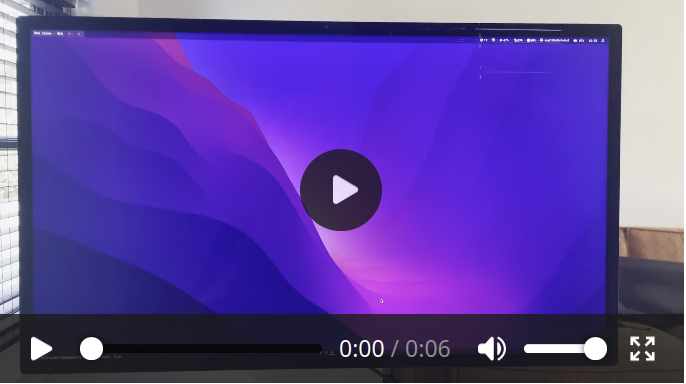
I would describe this as 'flickering'.
I have an Apple Studio Display, connected via Thunderbolt:
boltctl list
 ● Apple Inc. Studio Display #2
   ├─ type:          peripheral
   ├─ name:          Studio Display
   ├─ vendor:        Apple Inc.
   ├─ uuid:          bb030000-0072-7c1e-03af-bfd824e38808
   ├─ generation:    Thunderbolt 3
   ├─ status:        authorized
   │  ├─ domain:     b8030000-0090-941e-8350-c83322114927
   │  ├─ rx speed:   40 Gb/s = 2 lanes * 20 Gb/s
   │  ├─ tx speed:   40 Gb/s = 2 lanes * 20 Gb/s
   │  └─ authflags:  none
   ├─ authorized:    za 17 aug 2024 11:19:02 UTC
   ├─ connected:     za 17 aug 2024 11:19:02 UTC
   └─ stored:        za 17 aug 2024 10:35:56 UTC
      ├─ policy:     auto
      └─ key:        no
I'm running this kernel:
uname -a
Linux macbookpro 6.10.3-arch1-Adashima-T2-1-t2 #1 SMP PREEMPT_DYNAMIC Sun, 11 Aug 2024 07:17:42 +0000 x86_64 GNU/Linux
This is my graphics configuration:
inxi -G --display
Graphics:
  Device-1: Intel CoffeeLake-H GT2 [UHD Graphics 630] driver: i915 v: kernel
  Device-2: AMD Navi 14 [Radeon RX 5500/5500M / Pro 5500M] driver: amdgpu
    v: kernel
  Device-3: Apple FaceTime HD Camera (Built-in) driver: uvcvideo type: USB
  Device-4: Apple Touch Bar Display driver: appletbdrm,hid-multitouch,usbhid
    type: USB
  Device-5: Apple Studio Display
    driver: hid-generic,hid-sensor-hub,snd-usb-audio,usbhid,uvcvideo type: USB
  Display: wayland server: X.org v: 1.21.1.13 with: Xwayland v: 24.1.2
    compositor: Hyprland v: 0.42.0 driver: X: loaded: modesetting
    dri: radeonsi,iris gpu: amdgpu,appletbdrm resolution: 1: 5120x2880~60Hz
    2: 3072x1920~60Hz
  API: EGL v: 1.5 drivers: iris,radeonsi,swrast
    platforms: gbm,wayland,x11,surfaceless,device
  API: OpenGL v: 4.6 compat-v: 4.5 vendor: amd mesa v: 24.1.6-arch1.1
    renderer: AMD Radeon Graphics (radeonsi navi14 LLVM 18.1.8 DRM 3.57
    6.10.3-arch1-Adashima-T2-1-t2)
As you can see, I've two options regarding graphics:
 Device-1: Intel CoffeeLake-H GT2 [UHD Graphics 630] driver: i915 v: kernel
 Device-2: AMD Navi 14 [Radeon RX 5500/5500M / Pro 5500M] driver: amdgpu
I'm currently on the amdgpu:
glxinfo | grep "OpenGL renderer"
OpenGL renderer string: AMD Radeon Graphics (radeonsi, navi14, LLVM 18.1.8, DRM 3.57, 6.10.3-arch1-Adashima-T2-1-t2)
What I already have tried to solve this issue, and to no avail:
1. Swapping the screen for a new one
2. Swapping the thunderbolt cable
3. Running Ubuntu Live iso (ubuntu-24.04-6.9.9-t2-noble.iso)
4. Running integrated graphics (UHD Graphics 630) instead of amdgpu
5. Installing the correct color profile ('P3-600 nits')
6. X.org instead of Wayland
This issue does **not** occur when:
1. Running the same resolution connected to the same laptop (MacBookPro16,1), **but on Mac OS**
2. Connecting the screen to a Dell+Windows laptop
3. Running the screen with resolution **2560x1440~60Hz** instead of native (5120x2880~60Hz)
4. Trying some kernel settings:
- amdgpu.dcdebugmask=0x1
- amdgpu.dcdebugmask=0x10
- amdgpu.sg_display=0
- pcie_ports=native pci=realloc
I'd conclude it's a software thing. Screen seems fine. But I'm not sure whether its a display driver / kernel issue or a thunderbolt thing. Any kernel settings I could try? Or any other suggestions?
Offline
#2 2024-08-27 21:17:03
- gromit
- Administrator

- From: Germany
- Registered: 2024-02-10
- Posts: 1,546
- Website
Re: Apple Studio Display (thunderbolt) flickers when running native
Do you also have the issue with the linux-lts package?
Also could you try to see if the issue also is present on the latest mainline kernel?
sudo pacman -U https://pkgbuild.com/\~gromit/linux-bisection-kernels/linux-mainline-6.11rc5-1-x86_64.pkg.tar.zstNote that this installs a new kernel image next to the ones you currently have installed, so you'll have to teach your bootloader how to boot this new image (i.e. via grub-mkconfig, new systemd-boot loader entry or similar)
Offline
#3 2024-08-28 09:04:29
- Kaspers
- Member
- From: the Netherlands
- Registered: 2019-06-18
- Posts: 4
- Website
Re: Apple Studio Display (thunderbolt) flickers when running native
Do you also have the issue with the linux-lts package?
Also could you try to see if the issue also is present on the latest mainline kernel?
sudo pacman -U https://pkgbuild.com/\~gromit/linux-bisection-kernels/linux-mainline-6.11rc5-1-x86_64.pkg.tar.zstNote that this installs a new kernel image next to the ones you currently have installed, so you'll have to teach your bootloader how to boot this new image (i.e. via grub-mkconfig, new systemd-boot loader entry or similar)
Thanks for helping out gromit!
Just installed the mainline kernel with the package you've provided:
sudo pacman -U https://pkgbuild.com/\~gromit/linux-bisection-kernels/linux-mainline-6.11rc5-1-x86_64.pkg.tar.zstand created a systemd boot entry:
title   Arch Linux Mainline
linux   vmlinuz-linux-mainline
initrd  /intel-ucode.img
initrd  /initramfs-linux-mainline.img
options root=PARTUUID=479406d4-8fca-4daf-b146-a5dab03af194 quiet loglevel=3 rw intel_iommu=on iommu=pt pcie_ports=native apple-gmux.force_igd=n
I'll report back in a minute.
Offline
#4 2024-08-28 09:20:20
- Kaspers
- Member
- From: the Netherlands
- Registered: 2019-06-18
- Posts: 4
- Website
Re: Apple Studio Display (thunderbolt) flickers when running native
Do you also have the issue with the linux-lts package?
Also could you try to see if the issue also is present on the latest mainline kernel?
So I've tried both:
Linux-LTS 6.6.47-1
Linux Mainline 6.11rc5-1
With both kernels I'm facing the same issue, so I'd conclude it's not a specific Linux T2 issue. It's present in the regular kernel as well.
Offline
#5 2024-09-04 10:03:02
- Kaspers
- Member
- From: the Netherlands
- Registered: 2019-06-18
- Posts: 4
- Website
Re: Apple Studio Display (thunderbolt) flickers when running native
Are there any other kernel parameters I could try?
Offline
#6 2025-01-31 01:12:49
- andrepaes
- Member
- Registered: 2025-01-31
- Posts: 1
Re: Apple Studio Display (thunderbolt) flickers when running native
Hey man, have you solved this issue? i'm with the same problem. If i suspend or even after some reboots i notice this issue and the way i can solve it is unpluging and pluging again the cable thunderbolt to dp
Offline
#7 2025-07-28 19:33:48
- r0ctane
- Member

- From: Germany
- Registered: 2025-07-28
- Posts: 1
Re: Apple Studio Display (thunderbolt) flickers when running native
Looking at the same issue. I'd be happily trying things our to squish this issue.
Offline
#8 2025-09-02 14:34:27
- jrfernandez
- Member

- Registered: 2024-03-24
- Posts: 23
Re: Apple Studio Display (thunderbolt) flickers when running native
I have the same issue as the OP and also did the same type of debugging to rule out things. I'm on arch's 6.16.4. There are no reports of this issue in the Linux kernel mailing list either. I attempted to use this display on Linux again with the Omarchy 2.0 release since DHH also uses the monitor and hasn't reported issues, but no luck.
Last edited by jrfernandez (2025-09-02 14:51:23)
Offline
#9 2025-09-02 14:50:18
- jrfernandez
- Member
- Registered: 2024-03-24
- Posts: 23
Re: Apple Studio Display (thunderbolt) flickers when running native
I just checked, and my Apple Studio Display is on the latest firmware (17): https://support.apple.com/en-us/106345
Offline
#10 2026-07-24 03:16:11
- FerrariRocher
- Member
- Registered: 2026-07-24
- Posts: 1
Re: Apple Studio Display (thunderbolt) flickers when running native
I know this topic is pretty old, but if you haven't figured out a fix yet check this post from Reddit:
https://www.reddit.com/r/cachyos/commen … ck_screen/
It helped me out a ton, been working flawlessly at full 5K for the last month.
Offline