You are not logged in.
- Topics: Active | Unanswered
#1 2024-09-29 13:10:50
- SofieSasao
- Member
- Registered: 2024-03-03
- Posts: 20
[SOLVED] Safe way to reinstall Windows on the dual-boot system
The setup in question has two operating systems installed: Windows 11 and Arch Linux. GRUB 2 is the boot manager.
It works fine, but a while ago Windows stopped installing updates and this message appeared: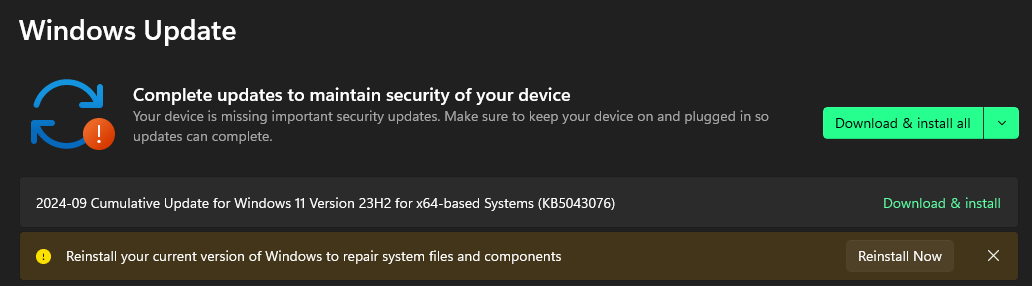
While it's unclear to me what exactly may be affected by the "Reinstall Now" action, I do see the potential for it to break by dual-boot setup.
To be clear, I'm only concerned about breaking bootloader and loosing important Linux system configurations, since there was quite a lot effort put into getting it to work properly. Securing most user data on both systems isn't top priority, and I doubt windows reinstllation process affecting it.
So the question is: how do I approach fixing the issue with Windows updates mitigating the risk of breaking my Linux and dual-boot setup?
I believe backup is necessary in this situation, so I would also appreciate recommendations regarding the backup strategy and tools for it, since I don't have much experience in this regard.
Disk partitioning looks like this, in case it gives you more useful information about the situation:
❯ lsblk
NAME                    MAJ:MIN RM   SIZE RO TYPE  MOUNTPOINTS
nvme0n1                 259:0    0 953.9G  0 disk
├─nvme0n1p1             259:1    0 987.4M  0 part  /boot/efi
├─nvme0n1p2             259:2    0 100.1G  0 part
├─nvme0n1p3             259:3    0 400.1G  0 part
├─nvme0n1p4             259:4    0    16M  0 part
├─nvme0n1p5             259:5    0     1G  0 part  /boot
├─nvme0n1p6             259:6    0 451.1G  0 part
│ └─volgroup0           254:0    0   451G  0 crypt
│   ├─volgroup0-lv_root 254:1    0    80G  0 lvm   /
│   └─volgroup0-lv_home 254:2    0   371G  0 lvm   /home
└─nvme0n1p7             259:7    0   621M  0 part
Partitions 2, 3, 4 and 7 are purely related to Windows, and the purpose of other ones is probably clear.
Last edited by SofieSasao (2024-09-30 10:32:14)
Offline
#2 2024-09-29 14:30:18
- Head_on_a_Stick
- Member

- From: The Wirral
- Registered: 2014-02-20
- Posts: 9,003
- Website
Re: [SOLVED] Safe way to reinstall Windows on the dual-boot system
It could be that Windows needs to be first in the boot order for the updates to work, much the same as fwupd in Linux.
Windows will leave your disks alone if you reinstall but it will put bootmgfw.efi at the top of the NVRAM boot entries. This can be corrected with efibootmgr(8) from any live ISO image booted in UEFI mode with efivarfs mounted read-write.
Jin, Jîyan, Azadî
Offline
#3 2024-09-29 15:37:22
- cryptearth
- Member
- Registered: 2024-02-03
- Posts: 2,352
Re: [SOLVED] Safe way to reinstall Windows on the dual-boot system
although off-topic and not supported here - I still give this reply before you get dustbined:
https://christitus.com/install-windows- … linux-way/
using the regular windows installer WILL break the boot stuff
also: make sure to have some arch install media on hand - you likely will need it
Offline
#4 2024-09-29 16:05:04
- Head_on_a_Stick
- Member
- From: The Wirral
- Registered: 2014-02-20
- Posts: 9,003
- Website
Re: [SOLVED] Safe way to reinstall Windows on the dual-boot system
using the regular windows installer WILL break the boot stuff
It doesn't really break the boot, it just changes the boot order, which is easily fixed even from Windows.
Jin, Jîyan, Azadî
Offline
#5 2024-09-30 10:31:20
- SofieSasao
- Member
- Registered: 2024-03-03
- Posts: 20
Re: [SOLVED] Safe way to reinstall Windows on the dual-boot system
Windows will leave your disks alone if you reinstall
Thank you very much for replying to, what seems to be, windows and boot order related question (despite me being sure it's about constructing good backup and restore strategy).
The issue is solved. What I did is:
1. Temporarily made Windows the first entry in the boot order manually;
2. Since the warning was still present, I clicked that "Reinstall now" button, and waited for it to complete;
3. Restarted computer a bunch of times (it was also updating BIOS);
4. Brought grub entry back to the top of the boot order.
For now everything works fine as it did before. Thank you for clarifying the affected area of the windows reinstallaion process.
Offline