You are not logged in.
- Topics: Active | Unanswered
#1 2025-02-14 07:13:17
- OpusOne
- Member
- Registered: 2023-05-31
- Posts: 189
Kernel 6.13: nvme nvme0: using unchecked data buffer
Hi, just updated to 6.13.2 from 6.12.10 and noticed this new warning in dmesg:
nvme nvme0: using unchecked data bufferDoes anyone know what exactly that means and if that's a potential problem?
Offline
#2 2025-02-14 11:06:30
- gromit
- Administrator

- From: Germany
- Registered: 2024-02-10
- Posts: 1,542
- Website
Re: Kernel 6.13: nvme nvme0: using unchecked data buffer
Could you give more context (i.e. the full 'dmesg' output)?
Offline
#3 2025-02-14 11:15:09
- frostschutz
- Member

- Registered: 2013-11-15
- Posts: 1,652
Re: Kernel 6.13: nvme nvme0: using unchecked data buffer
Here's a description to this change https://github.com/torvalds/linux/commi … 1765050c43
If I understand correctly this is more a security issue in kernel (that needs root permission to exploit, or otherwise make nvme interface accessible by regular user which you shouldn't do). And not an issue with the drive or anything.
So I file this under "don't worry about it" until something proves otherwise.
Last edited by frostschutz (2025-02-14 11:19:28)
Offline
#4 2025-02-14 11:52:21
- OpusOne
- Member
- Registered: 2023-05-31
- Posts: 189
Re: Kernel 6.13: nvme nvme0: using unchecked data buffer
Here's a description to this change https://github.com/torvalds/linux/commi … 1765050c43
If I understand correctly this is more a security issue in kernel (that needs root permission to exploit, or otherwise make nvme interface accessible by regular user which you shouldn't do). And not an issue with the drive or anything.
So I file this under "don't worry about it" until something proves otherwise.
Thanks. Thought so, but I admit it's not fully clear to me what it's about. Anyway, it's on a nvme drive that only has Windows partitions (that I use very occasionally for dual booting), so it's rarely if ever accessed from Linux. So I guess this is more than benign then.
Still, I was curious.
This is a Samsung 960 Pro NVme (so oldish).
Offline
#5 2025-02-14 14:23:00
- Ac5000
- Member
- Registered: 2025-02-14
- Posts: 3
Re: Kernel 6.13: nvme nvme0: using unchecked data buffer
I noticed this same warning in my journal yesterday while trying to troubleshoot an issue I am having.
The question I have: Why do I only see the warning for one of my NVME drives (nvme0) and not the other? (nvme1)
- Both drives are Samsung 990 Pro 2TB
Is there something I can/should do about this warning?
Offline
#6 2025-02-14 16:24:32
- loqs
- Member
- Registered: 2014-03-06
- Posts: 19,045
Re: Kernel 6.13: nvme nvme0: using unchecked data buffer
The question I have: Why do I only see the warning for one of my NVME drives (nvme0) and not the other? (nvme1)
- Both drives are Samsung 990 Pro 2TB
The message is printed using `dev_warn_once` so it is suppressed after printing once.
Last edited by loqs (2025-02-14 16:30:59)
Offline
#7 2025-02-15 03:44:43
- OpusOne
- Member
- Registered: 2023-05-31
- Posts: 189
Re: Kernel 6.13: nvme nvme0: using unchecked data buffer
Ac5000 wrote:The question I have: Why do I only see the warning for one of my NVME drives (nvme0) and not the other? (nvme1)
- Both drives are Samsung 990 Pro 2TBThe message is printed using `dev_warn_once` so it is suppressed after printing once.
Ah, thanks. So I probably have the same on the second nvme I have, which is a Samsung 980 Pro, and since Ac5000 sees it with a Samsung 990 Pro...
Those are relatively recent drives.
Does that mean that their controllers are (relatively) unsafe? Or that Linux is just being too pedantic here?
Offline
#8 2025-02-15 17:03:24
- loqs
- Member
- Registered: 2014-03-06
- Posts: 19,045
Re: Kernel 6.13: nvme nvme0: using unchecked data buffer
Ah, thanks. So I probably have the same on the second nvme I have, which is a Samsung 980 Pro, and since Ac5000 sees it with a Samsung 990 Pro...
Based on https://blog.westerndigital.com/nvme-dr … -features/ You can check with:
# nvme id-ctrl /dev/nvmeIDIf the output contains:
sgls : 0No Scatter Gather List support.
Does that mean that their controllers are (relatively) unsafe? Or that Linux is just being too pedantic here?
I defer to frostschutz.
Offline
#9 2025-02-16 03:38:52
- OpusOne
- Member
- Registered: 2023-05-31
- Posts: 189
Re: Kernel 6.13: nvme nvme0: using unchecked data buffer
Indeed, I get
sgls : 0for both (960 Pro and 980 Pro). Which sounds kind of surprising, but oh well. Why have they omitted SGL in their "Pro" controllers, even the recent ones?
Offline
#10 2025-02-17 22:06:46
- 4internetanonymity
- Member
- Registered: 2009-07-09
- Posts: 57
Re: Kernel 6.13: nvme nvme0: using unchecked data buffer
Just saw this for my U.2 SSDs... Following
Offline
#11 2025-02-28 11:57:18
- Zentoo
- Member
- Registered: 2025-02-28
- Posts: 1
Re: Kernel 6.13: nvme nvme0: using unchecked data buffer
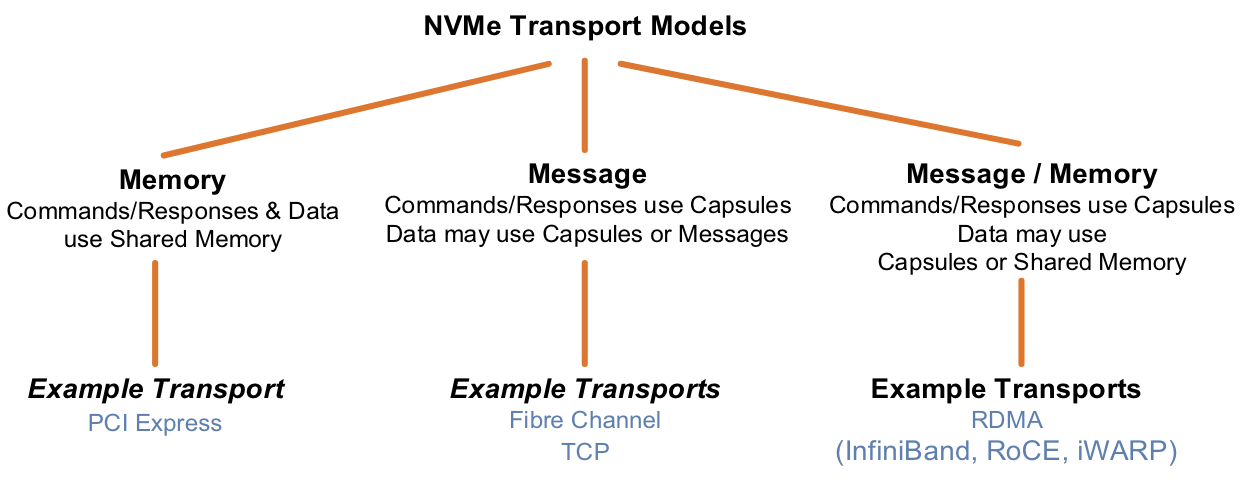
"sgls" is a NVMe feature for datacenter SSD that are used over FibreChannel/RDMA network.
So don't worry for a consumer SSD that doesn't need this feature at all because it use PCI express transport.
SGL Feature in NVMe Drives

There are two distinct mechanisms used by the NVMe protocol to transfer commands and data:

    PRP (Physical Region Page)
    SGL (Scatter Gather List)

PRP was the unique mechanism supported by the first NVMe specification. SGL support was added later-on and it allows more efficient large data transfer. This mechanism is mandatory for NVMe over Fabrics (NVMe-oF™) where NVMe commands use capsules. In addition, the support of SGL on NVMe over PCIe was added to the version 4.15 of the Linux kernel. PRP or SGL is part of the Submission Queue Entry.

“SGL support is mandatory for NVMe over Fabrics where NVMe commands use capsules”
Source: https://blog.westerndigital.com/nvme-dr … -features/
Last edited by Zentoo (2025-02-28 12:00:18)
Offline