You are not logged in.
- Topics: Active | Unanswered
#1 2025-02-16 17:49:46
- tesla135
- Member
- Registered: 2013-06-27
- Posts: 76
[SOLVED]Partition too full with 10 percentage usage
I want to fix a broken system with a live cd arch
pacman -Syu --root /mnt
error: Partition / too full: 847058 blocks needed, 65263 blocks free
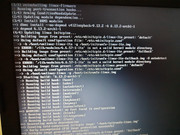
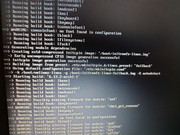
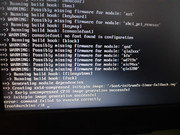
error: failed to commit transaction (not enough free disk space)
df
Filesystem     1K-blocks      Used Available Use% Mounted on
dev              3924068         0   3924068   0% /dev
run              4006964      9732   3997232   1% /run
efivarfs             160       138        18  89% /sys/firmware/efi/efivars
copytoram        6010448    844724   5165724  15% /run/archiso/copytoram
cowspace          262144      1092    261052   1% /run/archiso/cowspace
/dev/loop0        844800    844800         0 100% /run/archiso/airootfs
airootfs          262144      1092    261052   1% /
tmpfs            4006964         0   4006964   0% /dev/shm
tmpfs            4006964         0   4006964   0% /tmp
tmpfs               1024         0      1024   0% /run/credentials/systemd-journald.service
tmpfs               1024         0      1024   0% /run/credentials/systemd-resolved.service
tmpfs            4006964      2680   4004284   1% /etc/pacman.d/gnupg
tmpfs               1024         0      1024   0% /run/credentials/systemd-networkd.service
tmpfs               1024         0      1024   0% /run/credentials/getty@tty1.service
tmpfs             801392         8    801384   1% /run/user/0
/dev/nvme0n1p3 236147908  21392188 202687304  10% /mnt
/dev/nvme0n1p1    523248    328528    194720  63% /mnt/boot
/dev/sdc1      976727036 709763856 266963180  73% /mnt/usb
Last edited by tesla135 (2025-02-17 20:31:40)
Offline
#2 2025-02-16 18:03:21
- jonno2002
- Member
- Registered: 2016-11-21
- Posts: 904
Re: [SOLVED]Partition too full with 10 percentage usage
-r, --root <path>
Specify an alternative installation root (default is /). This should not be used as a way to install software into /usr/local instead of /usr. NOTE: If database path or log file are not specified on either the command line
or in pacman.conf(5), their default location will be inside this root path. NOTE: This option is not suitable for performing operations on a mounted guest system. See --sysroot instead.--sysroot <dir>
Specify an alternative system root. This path will be prepended to all other configuration directories and any repository servers beginning with file://. Any paths or URLs passed as targets will not be modified. This allows
mounted guest systems to be properly operated on.
Offline
#3 2025-02-16 20:23:43
- Scimmia
- Fellow

- Registered: 2012-09-01
- Posts: 13,729
Re: [SOLVED]Partition too full with 10 percentage usage
You need to set cachedir as well. There's not enough space on the ramdisk to download packages.
--sysroot would do that for you, but if things are broken enough to require an external pacman to fix, chances are --sysroot will fail.
Last edited by Scimmia (2025-02-16 20:24:58)
Offline
#4 2025-02-17 16:24:18
- tesla135
- Member
- Registered: 2013-06-27
- Posts: 76
Re: [SOLVED]Partition too full with 10 percentage usage
Well... there were no errors during -Syu --sysroot without cache dir(i did not see previous post).
Now, my system did not boot, it's stuck at
Failed to mount /bootOffline
#5 2025-02-17 16:34:31
- loqs
- Member
- Registered: 2014-03-06
- Posts: 19,065
Re: [SOLVED]Partition too full with 10 percentage usage
Probably a mismatch between the running kernel version and the kernel packages version. If you chroot in and check the journal for the last boot the running kernels version will be at the start and compare that with the output of `pacman -Q linux` also from inside the chroot. If that is not the issue the journal should contain more information about why /boot could not be mounted.
Last edited by loqs (2025-02-17 16:34:45)
Offline
#6 2025-02-17 18:03:49
- tesla135
- Member
- Registered: 2013-06-27
- Posts: 76
Re: [SOLVED]Partition too full with 10 percentage usage
ok, in my logs I found lines like:
Feb 17 19:35:27 archiso kernel: Linux version 6.12.10-arch1-1 (linux@archlinux) (gcc (GCC) 14.2.1 20240910, GNU ld (GNU Binutils) 2.43.1) #1 SMP PREEMPT_DYNAMIC Sat, 18 Jan 2025 02:26:57 +0000
Feb 17 19:35:27 archiso kernel: Command line: initrd=\arch\boot\x86_64\initramfs-linux.img archisobasedir=arch archisosearchuuid=2025-02-01-08-29-13-00
pacman -Q linux
linux 6.13.2.arch1-1Based of my research I have to arch-chroot again and then:
pacman -S linux base linux-firmware
grub-mkconfig -o /boot/grub/grub.cfg
Right?
Offline
#7 2025-02-17 18:06:41
- Head_on_a_Stick
- Member

- From: The Wirral
- Registered: 2014-02-20
- Posts: 9,003
- Website
Re: [SOLVED]Partition too full with 10 percentage usage
Make sure all your partitions are correctly mounted before running those commands; either mount them all before using arch-chroot or run this immediately after chrooting into the root partition:
mount -a^ That will mount everything listed in /etc/fstab.
Jin, Jîyan, Azadî
Offline
#8 2025-02-17 18:09:50
- Scimmia
- Fellow
- Registered: 2012-09-01
- Posts: 13,729
Re: [SOLVED]Partition too full with 10 percentage usage
That log is not from booting the actual system, that's from booting the ISO. You need to use the -b option to select the correct boot.
Offline
#9 2025-02-17 18:54:55
- tesla135
- Member
- Registered: 2013-06-27
- Posts: 76
Re: [SOLVED]Partition too full with 10 percentage usage
Well in arch-chroot journalctl -b does not help because only the archiso kernel lines it shows.
So, I used -since option and found:
Feb 17 20:28:57 myhost kernel: Linux version 6.11.3-arch1-1 (linux@archlinux) (gcc (GCC) 14.2.1 20240910, GNU ld (GNU Binutils) 2.43.0) #1 SMP PREEMPT_DYNAMIC Thu, 10 Oct 2024 20:11:06 +0000
Feb 17 20:28:57 myhost kernel: Command line: initrd=\intel-ucode.img initrd=\initramfs-linux.img root=UUID=d5506391-9728-42a5-9405-f536d13c61d8 rw
I'll get back here after:
pacman -S linux base linux-firmware
grub-mkconfig -o /boot/grub/grub.cfg
Offline
#10 2025-02-17 19:21:52
- Scimmia
- Fellow
- Registered: 2012-09-01
- Posts: 13,729
Re: [SOLVED]Partition too full with 10 percentage usage
I didn't say to just use -b, I said to use the -b option to select the correct boot. You have to give it a number.
Offline
#11 2025-02-17 19:32:32
- tesla135
- Member
- Registered: 2013-06-27
- Posts: 76
Re: [SOLVED]Partition too full with 10 percentage usage
failed only after
pacman -S linux base linux-firmwaresome screenshots
Offline
#12 2025-02-17 19:38:30
- Scimmia
- Fellow
- Registered: 2012-09-01
- Posts: 13,729
Re: [SOLVED]Partition too full with 10 percentage usage
The failure is the linux-lts kernel, which also needs reinstalled.
Offline
#13 2025-02-17 19:51:43
- tesla135
- Member
- Registered: 2013-06-27
- Posts: 76
Re: [SOLVED]Partition too full with 10 percentage usage
Ok, now I have an error with grub, I noticed that there isn't any grub folder in /boot partion, so..should I reinstall grub?
With
grub-install --target=x86_64-efi --efi-directory=esp --bootloader-id=GRUBOffline
#14 2025-02-17 20:31:21
- tesla135
- Member
- Registered: 2013-06-27
- Posts: 76
Re: [SOLVED]Partition too full with 10 percentage usage
Well, after errors with
grub-install --target=x86_64-efi --efi-directory=/boot/EFI --bootloader-id=GRUBgrub-install --target=x86_64-efi --efi-directory=/boot --bootloader-id=GRUBI noticed the grub folder created and
grub-mkconfig -o /boot/grub/grub.cfgWorked, thx you all guys. 
Offline