You are not logged in.
- Topics: Active | Unanswered
#1 2025-02-17 18:56:57
- Seacat17
- Member
- Registered: 2023-05-13
- Posts: 109
Nvidia X server settings drop-down lists have no options
I've been having this weird issue for a while now and I tried to solve it but I cannot.
There's Nvidia X server settings application that can be used for power management.
And... I cannot use it.
The thing is that this app should provide performance levels to choose. And it does not.
I googled this issue multiple times and there's just no solution. I tried running it with sudo but that doesn't help, there's still no options to choose. I tried CLI utilities and they work but they are good example of user-unfriendly software, so I want to find a way to fix Nvidia X server settings.
I've seen people posting pictures here but it seems like you don't like it. How do I post images here then?
Born to lose
Offline
#2 2025-02-17 21:46:17
- V1del
- Forum Moderator

- Registered: 2012-10-16
- Posts: 25,419
Re: Nvidia X server settings drop-down lists have no options
If you're on a wayland session these are not going to work, you need to be in a xorg session for nvidia x server to show anything, and furthermore enable the Coolbits for some of the more advanced power settings: https://wiki.archlinux.org/title/NVIDIA … a-settings
As for pictures, upload them to a image hoster e.g. imgur and link them here (don't embed them directly, that's likely going to be too big and against the rules)
Offline
#3 2025-02-18 18:07:14
- tekstryder
- Member

- Registered: 2013-02-14
- Posts: 595
Re: Nvidia X server settings drop-down lists have no options
Updated the nvidia-settings control panel to use NVML rather than NV-CONTROL to control GPU clocks and fan speed. This allows related functionality to work when using Wayland, where the NV-CONTROL X extension is not available. Note that as a result, some operations which were previously available to unprivileged users, due to the privileges of the X server, may now require elevated privileges.
I don't use any of the settings, but they're present now on native Wayland sessions.
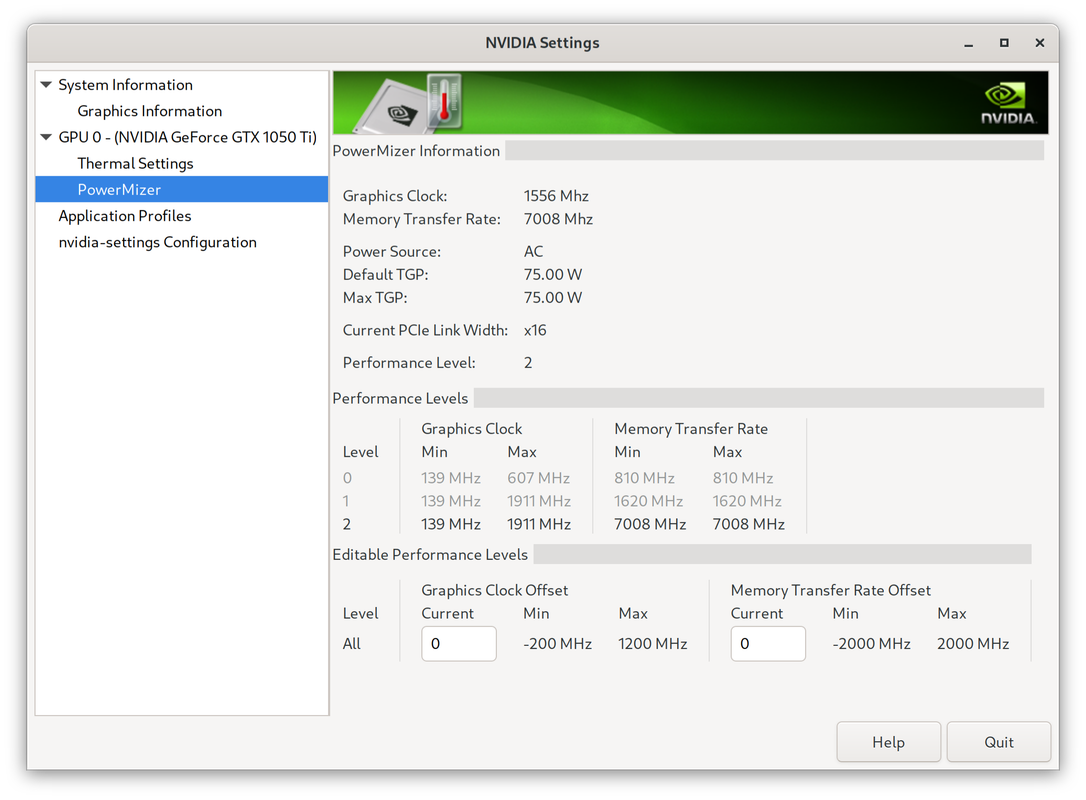
Here's a screenshot of nvidia-settings for my old 1050 Ti currently:
• https://i.postimg.cc/1z7w5Tsz/nvidia-se … ayland.png
Last edited by tekstryder (2025-02-18 18:13:32)
Online
#4 2025-02-18 22:36:17
- Seacat17
- Member
- Registered: 2023-05-13
- Posts: 109
Re: Nvidia X server settings drop-down lists have no options
If you're on a wayland session these are not going to work, you need to be in a xorg session for nvidia x server to show anything, and furthermore enable the Coolbits for some of the more advanced power settings: https://wiki.archlinux.org/title/NVIDIA … a-settings
As for pictures, upload them to a image hoster e.g. imgur and link them here (don't embed them directly, that's likely going to be too big and against the rules)
Here's the image of the issue.
I am running Xorg. I don't like Wayland, my favorite DE is not supported there.
Last edited by Seacat17 (2025-02-18 22:37:14)
Born to lose
Offline
#5 2025-02-18 23:32:08
- V1del
- Forum Moderator
- Registered: 2012-10-16
- Posts: 25,419
Re: Nvidia X server settings drop-down lists have no options
You have the "Preferred Mode" Dropdown? that doesn't have options (does it actually not have options or can you simply not see them, try selecting with arrow keys or so)? Which GTK3 theme are you using?
Offline
#6 2025-02-19 17:02:55
- Seacat17
- Member
- Registered: 2023-05-13
- Posts: 109
Re: Nvidia X server settings drop-down lists have no options
You have the "Preferred Mode" Dropdown? that doesn't have options (does it actually not have options or can you simply not see them, try selecting with arrow keys or so)? Which GTK3 theme are you using?
No matter what theme I use the result is always same.
There's no options, I cannot click it or change the value of the dropdown list with arrows.
Born to lose
Offline