You are not logged in.
- Topics: Active | Unanswered
Pages: 1
#1 2025-03-19 03:33:01
- qu@rk
- Member
- Registered: 2021-07-28
- Posts: 149
RAM timings and other details
I'm trying to check current RAM timings and voltage but I can't seem to get any meaningful info. Data seems to be some kind of standard data for my modules, not the actual timings and voltage that are currently active.
Tried dmidecode and lshw and decode-dimms but there isn't anything relevant. The only relevant information I get is current speed, that's it.
Any way to get timings?
Offline
#2 2025-03-19 07:30:00
- seth
- Member

- From: Won't reply 2 private help req
- Registered: 2012-09-03
- Posts: 77,697
Re: RAM timings and other details
BIOS/UEFI settings?
The OS will only tell you what the firmware exposes on that interface.
Offline
#3 2025-03-19 13:52:36
- qu@rk
- Member
- Registered: 2021-07-28
- Posts: 149
Re: RAM timings and other details
I've seen in Windows CPU-Z manages to show some of them. Was curious if there's any way to get the same info in arch.
Here's a random example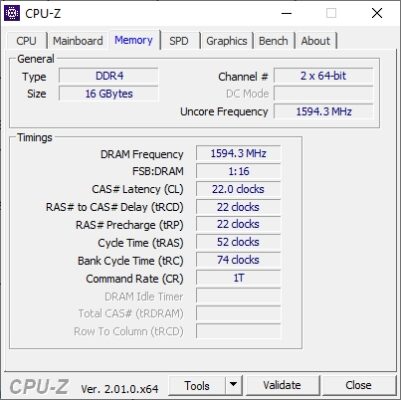
Offline
#4 2025-03-19 14:27:13
- qu@rk
- Member
- Registered: 2021-07-28
- Posts: 149
Re: RAM timings and other details
decode-dimms has some timings but not sure if some standard list or actual read from BIOS.
---=== Timing Parameters ===---
Minimum Cycle Time (tCKmin)                      0.833 ns
Maximum Cycle Time (tCKmax)                      1.600 ns
Minimum CAS Latency Time (tAA)                   13.750 ns
Minimum RAS to CAS Delay (tRCD)                  13.750 ns
Minimum Row Precharge Delay (tRP)                13.750 ns
Minimum Active to Precharge Delay (tRAS)         32.000 ns
Minimum Active to Auto-Refresh Delay (tRC)       45.750 ns
Minimum Recovery Delay (tRFC1)                   350.000 ns
Minimum Recovery Delay (tRFC2)                   260.000 ns
Minimum Recovery Delay (tRFC4)                   160.000 ns
Minimum Four Activate Window Delay (tFAW)        21.000 ns
Minimum Row Active to Row Active Delay (tRRD_S)  3.300 ns
Minimum Row Active to Row Active Delay (tRRD_L)  4.900 ns
Minimum CAS to CAS Delay (tCCD_L)                5.000 ns
Minimum Write Recovery Time (tWR)                15.000 ns
Minimum Write to Read Time (tWTR_S)              2.500 ns
Minimum Write to Read Time (tWTR_L)              7.500 ns
If it's actual data from current setup then it might just need some reformatting to convert to clocks like CPU-Z.
Still couldn't find a way to read actual RAM voltage. I think hwinfo on Windows manages to list all of them.
Offline
#5 2025-03-19 16:32:41
- seth
- Member
- From: Won't reply 2 private help req
- Registered: 2012-09-03
- Posts: 77,697
Re: RAM timings and other details
Offline
#6 2025-03-19 17:52:26
- qu@rk
- Member
- Registered: 2021-07-28
- Posts: 149
Re: RAM timings and other details
I tried modifying some timings but the timings report didn't change so it's reading some table stored somewhere, like default XMP timings profile or something. Weird that it's not possible to read the active ones like Windows does. Not losing time on this
Offline
#7 2025-03-19 20:05:49
- mmy8x
- Member
- Registered: 2025-03-02
- Posts: 115
Re: RAM timings and other details
decode-dimms reports capabilities encoded in the RAM itself.
dmidecode reports whatever information the BIOS decides to share, which technically isn't even 100% guaranteed to be correct.
CPU-Z presumably reads actual timing settings from memory controller's registers. There is nothing preventing doing the same in Linux, but somebody would have to put in the effort to write decoders for all the various CPU families out there and AFAIK there isn't much of such software around.
memtest86+ can read basic timings from some memory controllers.
Offline
#8 2025-03-24 16:11:31
- qu@rk
- Member
- Registered: 2021-07-28
- Posts: 149
Re: RAM timings and other details
Funnily enough I already had a program that sees RAM timings.
https://github.com/hattedsquirrel/ryzen_monitor
It's specific for ryzen 5000/3000, but has loads of info. And needs ryzen_smu kernel module https://gitlab.com/leogx9r/ryzen_smu
╭───────────────────────────────────────────────┬────────────────────────────────────────────────╮
│                                     CPU Model │            AMD Ryzen 9 5900X 12-Core Processor │
│                           Processor Code Name │                                        Vermeer │
│                                         Cores │                                             12 │
│                                     Core CCDs │                                              2 │
│                                 Cores Per CCD │                                              6 │
│                                SMU FW Version │                                       v56.76.0 │
│                                MP1 IF Version │                                            v11 │
╰───────────────────────────────────────────────┴────────────────────────────────────────────────╯
╭─────────┬────────────┬──────────┬─────────┬──────────┬─────────────┬─────────────┬─────────────╮
│  Core 0 │    464 MHz |  1.601 W | 0.755 V |  47.84 C | C0:   9.9 % | C1:  47.4 % | C6:  42.6 % │
│  Core 1 │   Sleeping |  1.334 W | 1.004 V |  46.72 C | C0:   4.0 % | C1:  79.0 % | C6:  17.0 % │
│  Core 2 │   Sleeping |  0.497 W | 0.399 V |  43.91 C | C0:   2.6 % | C1:  18.0 % | C6:  79.4 % │
│  Core 3 │   Sleeping |  0.647 W | 0.459 V |  44.79 C | C0:   3.1 % | C1:  23.6 % | C6:  73.3 % │
│  Core 4 │   Sleeping |  0.805 W | 0.570 V |  44.28 C | C0:   4.5 % | C1:  33.7 % | C6:  61.8 % │
│  Core 5 │   Sleeping |  0.501 W | 0.404 V |  44.23 C | C0:   2.4 % | C1:  18.7 % | C6:  78.9 % │
│  Core 6 │    281 MHz |  1.580 W | 1.168 V |  45.01 C | C0:   7.2 % | C1:  92.8 % | C6:   0.0 % │
│  Core 7 │   Sleeping |  1.291 W | 0.980 V |  43.36 C | C0:   4.3 % | C1:  76.3 % | C6:  19.5 % │
│  Core 8 │   Sleeping |  1.475 W | 0.966 V |  44.88 C | C0:   6.0 % | C1:  73.2 % | C6:  20.8 % │
│  Core 9 │   Sleeping |  0.313 W | 0.358 V |  41.55 C | C0:   1.1 % | C1:  15.3 % | C6:  83.7 % │
│ Core 10 │   Sleeping |  0.701 W | 0.657 V |  42.39 C | C0:   1.8 % | C1:  45.4 % | C6:  52.8 % │
│ Core 11 │   Sleeping |  0.928 W | 0.759 V |  42.08 C | C0:   2.6 % | C1:  55.2 % | C6:  42.2 % │
╰─────────┴────────────┴──────────┴─────────┴──────────┴─────────────┴─────────────┴─────────────╯
╭── Core Statistics (Calculated) ───────────────┬────────────────────────────────────────────────╮
│              Highest Effective Core Frequency │                                        464 MHz │
│                      Highest Core Temperature │                                        47.84 C │
│                          Highest Core Voltage │                                        1.168 V │
│                          Average Core Voltage │                                        0.707 V │
│                              Average Core CC6 │                                        47.66 % │
│                          Total Core Power Sum │                                       11.674 W │
├── Reported by SMU ────────────────────────────┼────────────────────────────────────────────────┤
│                             Peak Core Voltage │                                        1.168 V │
│                                   Package CC6 │                                         0.00 % │
╰───────────────────────────────────────────────┴────────────────────────────────────────────────╯
╭── Electrical & Thermal Constraints ───────────┬────────────────────────────────────────────────╮
│                              Peak Temperature │                                        76.50 C │
│                               SoC Temperature │                                        42.47 C │
│                         Voltage from Core VRM │               1.168 V |   1.499 V |    77.93 % │
│                                           PPT │              56.393 W |     130 W |    43.38 % │
│                                     TDC Value │              18.075 A |      90 A |    20.08 % │
│                                    TDC Actual │              12.326 A |      90 A |    13.70 % │
│                                           EDC │              18.075 A |     110 A |    16.43 % │
│                                           THM │               48.92 C |      90 C |    54.36 % │
│                                           FIT │                1099   |    9422   |    11.66 % │
╰───────────────────────────────────────────────┴────────────────────────────────────────────────╯
╭── Memory Interface ───────────────────────────┬────────────────────────────────────────────────╮
│                                  Coupled Mode │                                             ON │
│                        Fabric Clock (Average) │                                       1800 MHz │
│                                  Fabric Clock │                                       1800 MHz │
│                                  Uncore Clock │                                       1800 MHz │
│                                  Memory Clock │                                       1800 MHz │
│                                     cLDO_VDDM │                                       0.9504 V │
│                                     cLDO_VDDP │                                       1.0477 V │
│                                 cLDO_VDDG_IOD │                                       1.0477 V │
│                                 cLDO_VDDG_CCD │                                       1.0477 V │
╰───────────────────────────────────────────────┴────────────────────────────────────────────────╯
╭── Power Consumption ──────────────────────────┬────────────────────────────────────────────────╮
│                          Total Core Power Sum │                                       11.674 W │
│                               VDDCR_SOC Power │                                       18.889 W │
│                            IO VDDCR_SOC Power │                                        0.000 W │
│                               GMI2_VDDG Power │                                        8.716 W │
│                                     ROC Power │                                        1.000 W │
│                                L3 Logic Power │                2.092 W +   2.063 W =   4.155 W │
│                                 L3 VDDM Power │                0.467 W +   0.440 W =   0.907 W │
│                                               │                                                │
│                               VDDIO_MEM Power │                                       12.345 W │
│                           IOD_VDDIO_MEM Power │                                        2.666 W │
│                                DDR_VDDP Power │                                        7.371 W │
│                                   VDD18 Power │                                        0.999 W │
│                                               │                                                │
│                     Calculated Thermal Output │                                       67.721 W │
├── Additional Reports ─────────────────────────┼────────────────────────────────────────────────┤
│                              SoC Power (SVI2) │               1.081 V |  17.470 A |   18.889 W │
│                             Core Power (SVI2) │               1.168 V |  18.096 A |   23.188 W │
│                              Core Power (SMU) │                                       23.188 W │
│                            Socket Power (SMU) │                                       56.420 W │
│                           Package Power (SMU) │                                       55.799 W │
╰───────────────────────────────────────────────┴────────────────────────────────────────────────╯
I used it for power monitoring, but -m dumps RAM timings.
Memory Clock: 1800 MHz
GDM: Enabled
CR: 1T
Tcl: 18
Tras: 39
Trcdrd: 22
Trcdwr: 22
Trc: 83
Trp: 22
Trrds: 6
Trrdl: 9
Trtp: 14
Tfaw: 38
Tcwl: 18
Twtrs: 5
Twtrl: 14
Twr: 26
Trdrddd: 4
Trdrdsd: 5
Trdrdsc: 1
Trdrdscl: 5
Twrwrdd: 6
Twrwrsd: 7
Twrwrsc: 1
Twrwrscl: 5
Twrrd: 4
Trdwr: 8
Tcke: 0
Trfc: 991
Trfc2: 631
Trfc4: 469
And it's the actual info not some table, I changed a few of them and it was reflected in its output.
Can't easily use this version for scripts, I see there's also a fork that has pipe redirection https://github.com/emirbuljubasic/ryzen_monitor, might try this one as well.
Last edited by qu@rk (2025-03-24 16:11:52)
Offline
Pages: 1