You are not logged in.
- Topics: Active | Unanswered
#26 2025-03-20 14:34:52
- seth
- Member

- From: Won't reply 2 private help req
- Registered: 2012-09-03
- Posts: 78,487
Re: [SOLVED] Intel Arc A770 HDMI Limited to 60Hz on KDE
In that case it's most likely just the compositor, SHIFT+Alt+F12 will suspend it (on X11) - can you then see the windows?
In doubt some stale kscreen config gets in the way, https://wiki.archlinux.org/title/KDE#Un … lution_set
However the main part is that the output accepts the modeline and stays enabled and "xrandr -q" says that you're using the 100 Hz mode.
If you can still see the mouse cursor on it, that's actually good enough for that test (and you should also test this w/o the config in #18)
After all this I have decided to buy a display port to HDMI dongle, which might solve my problem.
I'm not entirely sold on the idea that introducing a translation layer will make anything better here.
Offline
#27 2025-03-20 14:39:43
- HattaPauzi
- Member
- Registered: 2025-03-13
- Posts: 22
Re: [SOLVED] Intel Arc A770 HDMI Limited to 60Hz on KDE
I got a feeling it gotta had something to do with the proprietary driver of intel on windows...
I remember when this gpu got released, at its early stages it got a bunch of problems with HDMI because Intel only makes its display port is native instead of HDMI...
So its gotta be that right?
Offline
#28 2025-03-20 15:02:09
- HattaPauzi
- Member
- Registered: 2025-03-13
- Posts: 22
Re: [SOLVED] Intel Arc A770 HDMI Limited to 60Hz on KDE

https://i.imgur.com/nDis7Hr.png
X11 logs:
https://0x0.st/81Wn.txt

I still dont like the fact that alacrity transparent and gaussian blur effect did not work on X11 

Last edited by HattaPauzi (2025-03-20 15:41:13)
Offline
#29 2025-03-20 15:24:35
- seth
- Member
- From: Won't reply 2 private help req
- Registered: 2012-09-03
- Posts: 78,487
Re: [SOLVED] Intel Arc A770 HDMI Limited to 60Hz on KDE
You have only one output configured there, transparency and blur depend on a compositor (SHIFT+Alt+F12 will disable that) and if the comppositor is (still) running at 60fps (despite you changing the mode afterwards), that's where glxgears will cap.
The relevant data is "xrandr -q" and if you want to check eg. glxgears at least make sure that the compositor is disabled to get that out of the way.
Please also replace the oversized screenshot w/ a link (the board has 250x250 px max rule to keep mouse wheels cool)
Offline
#30 2025-03-22 10:53:06
- HattaPauzi
- Member
- Registered: 2025-03-13
- Posts: 22
Re: [SOLVED] Intel Arc A770 HDMI Limited to 60Hz on KDE
This is the output of xrandr -q after disabling the compositor:
Screen 0: minimum 320 x 200, current 3520 x 1080, maximum 16384 x 16384
DP-3 disconnected (normal left inverted right x axis y axis)
HDMI-3 connected primary 1920x1080+0+0 (normal left inverted right x axis y axis) 479mm x 260mm
   1920x1080     60.00*+  50.00    59.94
   1680x1050     59.88
   1280x1024     75.02    60.02
   1440x900      59.90
   1280x960      60.00
   1280x800      59.91
   1152x864      75.00
   1280x720      60.00    50.00    59.94
   1024x768      75.03    70.07    60.00
   832x624       74.55
   800x600       72.19    75.00    60.32    56.25
   720x576       50.00
   720x480       60.00    59.94
   640x480       75.00    72.81    66.67    60.00    59.94
   720x400       70.08
   1920x1080_100.00 100.00
DP-4 disconnected (normal left inverted right x axis y axis)
HDMI-4 disconnected (normal left inverted right x axis y axis)
DP-5 disconnected (normal left inverted right x axis y axis)
HDMI-5 disconnected (normal left inverted right x axis y axis)
HDMI-6 disconnected (normal left inverted right x axis y axis)
DP-1-1 connected 1600x900+1920+90 (normal left inverted right x axis y axis) 443mm x 249mm
   1600x900      60.00*+
   1280x1024     60.02
   1440x900      59.89
   1280x720      60.00
   1024x768      60.00
   800x600       60.32
   640x480       59.94
   720x400       70.08
HDMI-1-1 disconnected (normal left inverted right x axis y axis)
DP-1-2 disconnected (normal left inverted right x axis y axis)
HDMI-1-2 disconnected (normal left inverted right x axis y axis)
  1280x1024 (0x4f) 108.000MHz +HSync +VSync
        h: width  1280 start 1328 end 1440 total 1688 skew    0 clock  63.98KHz
        v: height 1024 start 1025 end 1028 total 1066           clock  60.02Hz
  1280x720 (0x54) 74.250MHz +HSync +VSync
        h: width  1280 start 1390 end 1430 total 1650 skew    0 clock  45.00KHz
        v: height  720 start  725 end  730 total  750           clock  60.00Hz
  1024x768 (0x59) 65.000MHz -HSync -VSync
        h: width  1024 start 1048 end 1184 total 1344 skew    0 clock  48.36KHz
        v: height  768 start  771 end  777 total  806           clock  60.00Hz
  800x600 (0x5d) 40.000MHz +HSync +VSync
        h: width   800 start  840 end  968 total 1056 skew    0 clock  37.88KHz
        v: height  600 start  601 end  605 total  628           clock  60.32Hz
  640x480 (0x66) 25.175MHz -HSync -VSync
        h: width   640 start  656 end  752 total  800 skew    0 clock  31.47KHz
        v: height  480 start  490 end  492 total  525           clock  59.94Hz
  720x400 (0x67) 28.320MHz -HSync +VSync
        h: width   720 start  738 end  846 total  900 skew    0 clock  31.47KHz
        v: height  400 start  412 end  414 total  449           clock  70.08Hz
screenshot of the screen refresh rate after disabling the compositor:
https://imgur.com/a/JY8eO5l.png

The reason the name is now HDMI-3 is I ended up buying a display port to HDMI cable, that way it is easily switch around behind my monitor(two cable on my computer now, where one connected to the dgpu and another one on the motherboard) instead of going at the back of my computer.
I hope we can continue this discussion tho until we can come up a conclusion of this problem.
Last edited by HattaPauzi (2025-03-22 10:54:21)
Offline
#31 2025-03-22 14:00:45
- seth
- Member
- From: Won't reply 2 private help req
- Registered: 2012-09-03
- Posts: 78,487
Re: [SOLVED] Intel Arc A770 HDMI Limited to 60Hz on KDE
And what happens when you run "xrandr --output HDMI-3 --mode 1920x1080_100.00" ?
Specifically to the active mode according to "xrandr -q"?
Offline
#32 2025-03-22 14:37:15
- HattaPauzi
- Member
- Registered: 2025-03-13
- Posts: 22
Re: [SOLVED] Intel Arc A770 HDMI Limited to 60Hz on KDE
both screen went black for a second, and then the screen went back up, the terminal output this:
xrandr: Configure crtc 0 failedOffline
#33 2025-03-22 16:06:37
- seth
- Member
- From: Won't reply 2 private help req
- Registered: 2012-09-03
- Posts: 78,487
Re: [SOLVED] Intel Arc A770 HDMI Limited to 60Hz on KDE
So the modeline is accepted but doesn't work…
Try the behavior w/ the https://aur.archlinux.org/packages/linux-drm-tip-git kernel - https://bbs.archlinux.org/viewtopic.php?id=302773
(Though somewhat different scenario…)
Offline
#34 2025-03-24 18:11:00
- HattaPauzi
- Member
- Registered: 2025-03-13
- Posts: 22
Re: [SOLVED] Intel Arc A770 HDMI Limited to 60Hz on KDE
X11 logs:
https://0x0.st/8j_F.txt
xrandr -r
Screen 0: minimum 320 x 200, current 3520 x 1080, maximum 16384 x 16384
DP-3 disconnected (normal left inverted right x axis y axis)
HDMI-3 connected primary 1920x1080+0+0 (normal left inverted right x axis y axis) 479mm x 260mm
   1920x1080     60.00*+  50.00    59.94
   1680x1050     59.88
   1280x1024     75.02    60.02
   1440x900      59.90
   1280x960      60.00
   1280x800      59.91
   1152x864      75.00
   1280x720      60.00    50.00    59.94
   1024x768      75.03    70.07    60.00
   832x624       74.55
   800x600       72.19    75.00    60.32    56.25
   720x576       50.00
   720x480       60.00    59.94
   640x480       75.00    72.81    66.67    60.00    59.94
   720x400       70.08
   1920x1080_100.00 100.00
DP-4 disconnected (normal left inverted right x axis y axis)
HDMI-4 disconnected (normal left inverted right x axis y axis)
DP-5 disconnected (normal left inverted right x axis y axis)
HDMI-5 disconnected (normal left inverted right x axis y axis)
HDMI-6 disconnected (normal left inverted right x axis y axis)
DP-1-1 connected 1600x900+1920+90 (normal left inverted right x axis y axis) 443mm x 249mm
   1600x900      60.00*+
   1280x1024     60.02
   1440x900      59.89
   1280x720      60.00
   1024x768      60.00
   800x600       60.32
   640x480       59.94
   720x400       70.08
HDMI-1-1 disconnected (normal left inverted right x axis y axis)
DP-1-2 disconnected (normal left inverted right x axis y axis)
HDMI-1-2 disconnected (normal left inverted right x axis y axis)
  1280x1024 (0x4f) 108.000MHz +HSync +VSync
        h: width  1280 start 1328 end 1440 total 1688 skew    0 clock  63.98KHz
        v: height 1024 start 1025 end 1028 total 1066           clock  60.02Hz
  1280x720 (0x54) 74.250MHz +HSync +VSync
        h: width  1280 start 1390 end 1430 total 1650 skew    0 clock  45.00KHz
        v: height  720 start  725 end  730 total  750           clock  60.00Hz
  1024x768 (0x59) 65.000MHz -HSync -VSync
        h: width  1024 start 1048 end 1184 total 1344 skew    0 clock  48.36KHz
        v: height  768 start  771 end  777 total  806           clock  60.00Hz
  800x600 (0x5d) 40.000MHz +HSync +VSync
        h: width   800 start  840 end  968 total 1056 skew    0 clock  37.88KHz
        v: height  600 start  601 end  605 total  628           clock  60.32Hz
  640x480 (0x66) 25.175MHz -HSync -VSync
        h: width   640 start  656 end  752 total  800 skew    0 clock  31.47KHz
        v: height  480 start  490 end  492 total  525           clock  59.94Hz
  720x400 (0x67) 28.320MHz -HSync +VSync
        h: width   720 start  738 end  846 total  900 skew    0 clock  31.47KHz
        v: height  400 start  412 end  414 total  449           clock  70.08Hz
xrandr: Configure crtc 0 failed
same thing happened even after installing the linux-drm-tip-git, but I used the latest kernel though,
journalctl -b
https://0x0.st/8jLs.txt
if its relevant
Offline
#35 2025-03-25 21:49:43
- seth
- Member
- From: Won't reply 2 private help req
- Registered: 2012-09-03
- Posts: 78,487
Re: [SOLVED] Intel Arc A770 HDMI Limited to 60Hz on KDE
File a bug upstream - the closest I can see is https://gitlab.freedesktop.org/drm/i915 … sues/12417 but
1. apparently not reproducible w/ drmtip
2. hinges on waking from sleep (what would feed into the dual-boot situation, though)
Can you btw. disable the HD770 chip and only use the arc one?
Does it then have this problem on either OS?
Offline
#36 2025-03-27 12:04:23
- HattaPauzi
- Member
- Registered: 2025-03-13
- Posts: 22
Re: [SOLVED] Intel Arc A770 HDMI Limited to 60Hz on KDE
Thanks, I will look it up...
Can you btw. disable the HD770 chip and only use the arc one?
In the BIOS, the closest thing about disabling the HD770(igpu) is to choose the disable option for Muti-monitor igpu thus making my second monitor unusable on both OS since that monitor is using VGA connection.
Does it then have this problem on either OS?
Yes, on Arch, the refresh rate still limited to 60Hz. But I did not check its X11 logs and journalctl.
Offline
#37 2025-07-23 08:45:45
- HattaPauzi
- Member
- Registered: 2025-03-13
- Posts: 22
Re: [SOLVED] Intel Arc A770 HDMI Limited to 60Hz on KDE
I just wanted to do a follow up to this thread, the latest update of my system seems to make things in order now...
I no longer has this problem, I just dont specifically know what update fixed it but I got a strong feeling it is KDE and kernel updates...
This is the screenshot of my current monitor's refresh rate while the HDMI connected to the dGPU directly
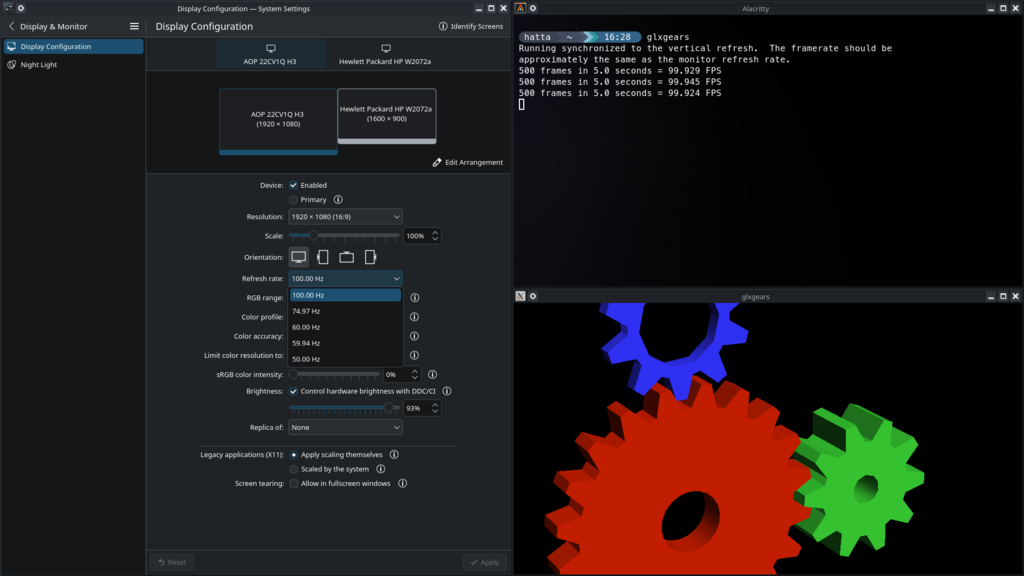
thanks seth...
Offline
#38 2025-07-23 15:20:07
- seth
- Member
- From: Won't reply 2 private help req
- Registered: 2012-09-03
- Posts: 78,487
Re: [SOLVED] Intel Arc A770 HDMI Limited to 60Hz on KDE
=> /var/log/pacman.log
What was in the last updates that fixed it?
Please always remember to mark resolved threads by editing your initial posts subject - so others will know that there's no task left, but maybe a solution to find.
Thanks.
Offline