You are not logged in.
- Topics: Active | Unanswered
Pages: 1
#1 2025-04-12 17:56:57
- oxke
- Member
- Registered: 2025-03-01
- Posts: 9
- Website
[hardware problem] Sudden shutdowns
My laptop keeps shutting down suddenly.
It is a 2013 samsung NP530U3C laptop, when I use it often I suddenly experience a shutdown, without any forewarning. I (about 1 year ago) removed from it the HDD and installed the OS on the already present 24GB iSSD. I don't think the problem is on that because I experience shutdowns also in BIOS. I thought the problem was with the battery but it's charged, and I experience shutdowns also when in charge. I thought the problem might have been with the CPU temp, but it can shutdown also if the recorded temp is under 50°C. Similarly, it doesn't seem to be a RAM problem because, even though I have 4GB, it shuts down even if there are 3GB free. What could it be? What do I have to check?
I'm sorry if at the moment I am not giving logging, but right now when I try to turn on the pc it immediately shuts down in the bios (I'm using my desktop pc). Maybe later it will turn on enough for me to run and save the output of `journalctl -b -1 -e`. Actually, can you give me suggestions for other commands I should run and give here the output when I will be able to?
Last edited by oxke (2025-04-14 20:53:04)
Offline
#2 2025-04-12 19:46:41
- seth
- Member

- From: Won't reply 2 private help req
- Registered: 2012-09-03
- Posts: 77,789
Re: [hardware problem] Sudden shutdowns
I experience shutdowns also in BIOS
The battery will not be able to maintian the required voltage - can you run the system w/o battery (just on the charger, bypassing any battery)?
Sudden shutdowns are down to
- underpowered
- overheated
- broken cpu
- bad RAM
(- hibernating windows scheduling a reboot, unlikely while in the BIOS, though)
W/ the shutdowns happening in the BIOS already, it's not the RAM, broken heat management could be but you ruled that out so either the CPU (unlikely in the BIOS) or the battery (by far most likely contender)
It's obviously not the OS if you don't even get out of the pre-boot system anymore…
Offline
#3 2025-04-12 23:03:11
- oxke
- Member
- Registered: 2025-03-01
- Posts: 9
- Website
Re: [hardware problem] Sudden shutdowns
It's kinda hard to remove the battery and so I was hesitant to do it without being sure it could have helped, but for now it seems you were right. I'm trying to perform a couple benchmarks right now that the computer is on with no battery and if it doesn't shutdown I'll buy a new battery.
I should have probably asked on a hardware forum in the first place, but why did the battery cause the shutdowns even while in charge?
Offline
#4 2025-04-13 06:45:12
- seth
- Member
- From: Won't reply 2 private help req
- Registered: 2012-09-03
- Posts: 77,789
Re: [hardware problem] Sudden shutdowns
If it's inbetween the charger and the board and acts as kinda capacitor (normal-ish design) and is sufficiently dead, it ends up being a broken capacitor that cannot do its job to provide a stable voltage/current.
In case and please always remember to mark resolved threads by editing your initial posts subject - so others will know that there's no task left, but maybe a solution to find.
Thanks.
Offline
#5 2025-04-13 08:49:17
- oxke
- Member
- Registered: 2025-03-01
- Posts: 9
- Website
Re: [hardware problem] Sudden shutdowns
Unfortunately I cannot mark it as solved yet. It worked well without the battery but when I tried again doing a test with the back panel and no battery it shut down again while booting. Now I'm on the laptop while on battery again and without back panel and it seem to work without shutdowns. Would it be possible on a laptop that the case (in particular the baack panel for me) is causing a short circuit?
Offline
#6 2025-04-13 12:46:41
- seth
- Member
- From: Won't reply 2 private help req
- Registered: 2012-09-03
- Posts: 77,789
Re: [hardware problem] Sudden shutdowns
Would it be possible on a laptop that the case (in particular the back panel for me) is causing a short circuit?
Depends on material, tension, pressure, stuff - but it's not impossible.
Is it attached with screws?
Offline
#7 2025-04-13 20:37:04
- oxke
- Member
- Registered: 2025-03-01
- Posts: 9
- Website
Re: [hardware problem] Sudden shutdowns
same problem both with and without screws, it seems the only discriminant is the back panel itself
Last edited by oxke (2025-04-13 20:37:20)
Offline
#8 2025-04-13 20:50:21
- seth
- Member
- From: Won't reply 2 private help req
- Registered: 2012-09-03
- Posts: 77,789
Re: [hardware problem] Sudden shutdowns
Metal or plastic?
Does it cause any pressure/tension or is it a loose fit?
Does it touch anything but the rest of the case?
Offline
#9 2025-04-13 23:03:59
- oxke
- Member
- Registered: 2025-03-01
- Posts: 9
- Website
Re: [hardware problem] Sudden shutdowns
first I'll add some clarifications and new information. With "back panel" I mean the whole posterior part of the case. I've tried to recreate the shutdown by applying a small pressure on the keyboard, and it does work in triggering the shutdown, convincing me even more that the case is causing some kind of short circuit. With no other idea in mind, I tried to remove only the easily removable part of the back panel and turning on the pc, and it doesn't shutdown, not even if I try to apply pressure on the keyboard. With this little evidence in hand I think I can say the problem is on the little part, though by inspecting it I don't see anything out of the ordinary. I'll add a photo hoping it clarifies a bit 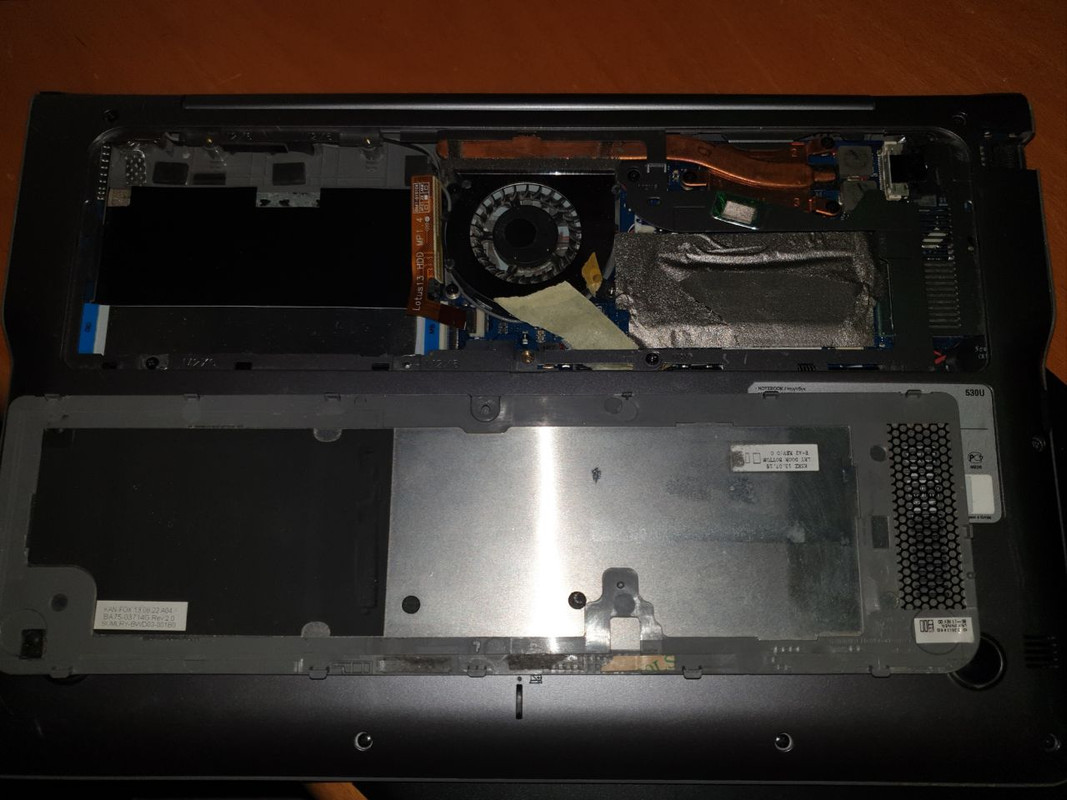
Metal or plastic?
the panel is metal, but it's mostly covered with plastic on the interior part, except for some points for cooling (in particolar a big area on the little cover)
Does it cause any pressure/tension or is it a loose fit?
loose but precise fit
Does it touch anything but the rest of the case?
Seems to only touch the rest of the case, but when using the laptop also some cooling agents rest on the metal part of the little cover
Offline
#10 2025-04-14 04:58:08
- ArchEr9
- Member
- Registered: 2025-03-18
- Posts: 39
Re: [hardware problem] Sudden shutdowns
Right to repair cannot come soon enough. This soldered on battery, ram, disk are going to be the end of us own the things that we bought. But very good way for those who believe in planned obsolescence.
Offline
#11 2025-04-14 06:55:50
- seth
- Member
- From: Won't reply 2 private help req
- Registered: 2012-09-03
- Posts: 77,789
Re: [hardware problem] Sudden shutdowns
@ArcheEr9 the battery isn't soldered on - the OP has removed it for testing.
@oxke are the tapes (one of them half-wise covering a capacitor, it seems…) currentl mitigational efforts or have they been there before?
Cause that looks like make-shift insulation and I'd maybe use electrical insulating tape for that…
Offline
#12 2025-04-14 08:21:17
- oxke
- Member
- Registered: 2025-03-01
- Posts: 9
- Website
Re: [hardware problem] Sudden shutdowns
The paper tape is indeed home-made to keep the cables from a previous teardown, it's been there a long time and never caused any problem before. I might try to remove it and see though, but I really doubt it would change anything. The silver one which covers the ram is thermal tape and has been there since 2013, now it's only a bit damaged
Offline
#13 2025-04-14 13:54:04
- seth
- Member
- From: Won't reply 2 private help req
- Registered: 2012-09-03
- Posts: 77,789
Re: [hardware problem] Sudden shutdowns
As suggested: replace that with electrical insulation tape - there's also a suspicious dark spot on the back cover…
Offline
#14 2025-04-14 15:53:19
- oxke
- Member
- Registered: 2025-03-01
- Posts: 9
- Website
Re: [hardware problem] Sudden shutdowns
In the next days I'll try. In the meanwhile, I tried to put a small patch of electrical insulation tape on the dark spot but it doesn't seem to change anything. Also, it seems like it turns off even with the small cover off sometimes when I move the lid, but it's very impredictable.
However, with the small cover off, I can use it and I never use the laptop for long periods of time so it's fine for now.
Is there a way of marking the topic as "suspended" or so, should I marked it as solved?
Offline
#15 2025-04-14 19:11:44
- seth
- Member
- From: Won't reply 2 private help req
- Registered: 2012-09-03
- Posts: 77,789
Re: [hardware problem] Sudden shutdowns
You could mark it as "[hardware problem]" so others will know there's no open SW question.
Try to keep the tape away from the capacitors (assumption based on what I think to see in that photo)
Offline
#16 2025-04-14 20:52:25
- oxke
- Member
- Registered: 2025-03-01
- Posts: 9
- Website
Re: [hardware problem] Sudden shutdowns
yes I removed the useless and dangerous parts of the tape. Thank you so much for your help until now, I'll update next week or so
Offline
Pages: 1