You are not logged in.
- Topics: Active | Unanswered
#1 2025-06-29 14:23:03
- SinghSaab
- Member
- Registered: 2025-06-21
- Posts: 19
Arch running fsck for root directry at startup increasing boot time
This randomly started happening after 2 weeks of arch install on my system. Every time I boot arch it starts by showing
/dev/sda3: clean, xxxxxxx/xxxxxxx , 4428377/5242880 blocks here's the fstab:
  # <file system> <dir> <type> <options> <dump> <pass>
 # /dev/sda3
 UUID=xxxxxxxxxxxxxxxxxxxx  /           ext4        rw,relatime 0 1

 # /dev/sda1
 UUID=xxxxxxx          /boot       vfat        rw,relatime,fmask=0022,dmask=0022,codepage=43 7,iocharset=ascii,shortname=mixed,utf8,errors=remount-ro   0 2

 # /dev/sda4
 UUID=xxxxxxxxxxxxxxxxxxxxx   /home       ext4        rw,relatime 0 2

 # /dev/sda2
 UUID=xxxxxxxxxxxxxxxxxxxxxxx   none        swap        defaults    0 0
I don't know why is it happening now and wasn't happening for two weeks.
Last edited by SinghSaab (2025-06-29 14:24:19)
Offline
#2 2025-06-29 14:45:32
- seth
- Member

- From: Won't reply 2 private help req
- Registered: 2012-09-03
- Posts: 77,776
Re: Arch running fsck for root directry at startup increasing boot time
https://man.archlinux.org/man/fstab.5#T … o%3C/i%3E).
Running fsck is perfectly normal - "increasing boot time" is not.
Is this even true?
systemd-analyze critical-chainOffline
#3 2025-06-29 21:20:51
- SinghSaab
- Member
- Registered: 2025-06-21
- Posts: 19
Re: Arch running fsck for root directry at startup increasing boot time
https://man.archlinux.org/man/fstab.5#T … o%3C/i%3E).
Running fsck is perfectly normal - "increasing boot time" is not.
Is this even true?systemd-analyze critical-chain
The time when unit became active or started is printed after the "@" character.
The time the unit took to start is printed after the "+" character.

graphical.target @32.775s
└─multi-user.target @32.770s
  └─getty.target @32.765s
    └─getty@tty1.service @32.762s
      └─systemd-user-sessions.service @32.709s +43ms
        └─network.target @32.705s
          └─dhcpcd@enp2s0f2.service @2.573s +30.129s
            └─basic.target @2.564s
              └─dbus-broker.service @2.500s +58ms
                └─dbus.socket @2.471s
                  └─sysinit.target @2.455s
                    └─systemd-update-utmp.service @2.435s +17ms
                      └─systemd-tmpfiles-setup.service @1.928s +502ms
                        └─local-fs.target @1.880s
                          └─boot.mount @1.569s +304ms
                            └─dev-sda1.device @1.181s
Offline
#4 2025-06-29 21:33:13
- seth
- Member
- From: Won't reply 2 private help req
- Registered: 2012-09-03
- Posts: 77,776
Re: Arch running fsck for root directry at startup increasing boot time
Mounting sda1 takes 304 ms, the big fat stall (> 30s) is your network.
Please post your complete system journal for the boot:
sudo journalctl -b | curl -F 'file=@-' 0x0.stOffline
#5 2025-06-29 22:35:43
- SinghSaab
- Member
- Registered: 2025-06-21
- Posts: 19
Re: Arch running fsck for root directry at startup increasing boot time
Mounting sda1 takes 304 ms, the big fat stall (> 30s) is your network.
Please post your complete system journal for the boot:sudo journalctl -b | curl -F 'file=@-' 0x0.st
output: https://pastebin.com/sUzHELXB
Yes, when I removed quiet from arch.conf, the dhcpcd was spinning for some seconds while everything else showed "OK".
A different or maybe related issue: When I first installed arch on my system about 4 weeks ago(I came from windows, first time linux), the systemd-journald was constantly using 25% of CPU and filling the log folder, and when I was tried to shut down or restart my system, the error spammed at the speed of light forcing me to hard shutdown by holding down the power button.
I tried to identify the problem with the help of ChatGPT and it said one device was causing this error LIKELY because of no proper aspm support for my wifi card, the error was: 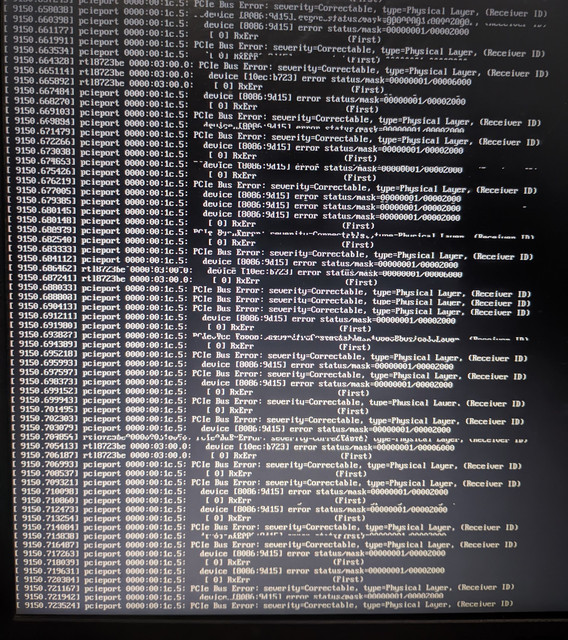
The "fix" i found online for this was adding "pcie=noaer" and "pcie_aspm=off" to kernel parameters which doesn't addresses the problem but fixed journald cpu usage and error spam on upon shutdown.
I will be very thankful if I can somehow get the same battery backup as windows, I'm getting 2.5 hours on arch+hyprland(with tlp, powertop, animations, fancy stuff off) compared to 4 hours on windows and I think my wifi card is one of the culprit. However when ruuning powertop it shows
  6.55 W      4.3 pkts/s                Device         Network interface: wlp3s0 (rtl8723be)
7.45 W      9.9 ms/s     270.8        Timer          tick_nohz_handler
Offline
#6 2025-06-29 23:05:48
- seth
- Member
- From: Won't reply 2 private help req
- Registered: 2012-09-03
- Posts: 77,776
Re: Arch running fsck for root directry at startup increasing boot time
"pcie=noaer" suppresses the message what only fixes "systemd-journald sucks at handling error flurries"
"pcie_aspm=off" might actually do something real, but you'd have to disable "pcie=noaer" to know that
root=PARTUUID=xxxxxxxxxxxxxxxxxxxxxxxxxxxThe partition UUID exist to unambiguously address the partition - it's a meaningless number.
First off all
Jun 29 20:43:33 deep dhcpcd[540]: dhcpcd-10.2.4 starting
Jun 29 20:43:33 deep dhcpcd[541]: dhcpcd-10.2.4 starting
Jun 29 20:43:33 deep dhcpcd[552]: DUID 00:01:00:01:2f:ce:02:f9:64:6e:69:03:05:51
Jun 29 20:43:33 deep dhcpcd[547]: DUID 00:01:00:01:2f:ce:02:f9:64:6e:69:03:05:51
Jun 29 20:43:33 deep dhcpcd[547]: enp2s0f2: waiting for carrier
Jun 29 20:43:34 deep dhcpcd[552]: wlp3s0: waiting for carrier
Jun 29 20:43:34 deep NetworkManager[539]: <info>  [1751210014.2714] dhcp: init: Using DHCP client 'internal'
Please post the output of
find /etc/systemd -type l -exec test -f {} \; -print | awk -F'/' '{ printf ("%-40s | %s\n", $(NF-0), $(NF-1)) }' | sort -fDo not run concurrent network config services, if you want to use networkmanager, disable all dhcpcd services.
If you want to use dhcpcd as NM backend, see https://wiki.archlinux.org/title/Networ … HCP_client
Jun 29 20:43:32 deep kernel: rtl8723be 0000:03:00.0 wlp3s0: renamed from wlan0This device is acting up in that screenshot.
Remove "pcie_aspm=off" and "pcie=noaer", add
rtl8723be.aspm=0 rtl8723be.aspm=0 rtl8723be.ips=0 rtl8723be.fwlps=0see whether you're still getting errors.
Offline
#7 2025-06-30 00:07:30
- SinghSaab
- Member
- Registered: 2025-06-21
- Posts: 19
Re: Arch running fsck for root directry at startup increasing boot time
The partition UUID exist to unambiguously address the partition - it's a meaningless number.
I actually replaced the UUID with xxxxxxx since i saw online people hiding theirs 
Please post the output of
find /etc/systemd -type l -exec test -f {} \; -print | awk -F'/' '{ printf ("%-40s | %s\n", $(NF-0), $(NF-1)) }' | sort -f
dbus-org.freedesktop.nm-dispatcher.service | system
dbus-org.freedesktop.timesync1.service   | system
dhcpcd@enp2s0f2.service                  | multi-user.target.wants
dhcpcd@wlp3s0.service                    | multi-user.target.wants
fstrim.timer                             | timers.target.wants
getty@tty1.service                       | getty.target.wants
NetworkManager.service                   | multi-user.target.wants
NetworkManager-wait-online.service       | network-online.target.wants
nvidia-hibernate.service                 | systemd-hibernate.service.wants
nvidia-persistenced.service              | multi-user.target.wants
nvidia-resume.service                    | systemd-hibernate.service.wants
nvidia-resume.service                    | systemd-suspend.service.wants
nvidia-resume.service                    | systemd-suspend-then-hibernate.service.wants
nvidia-suspend.service                   | systemd-suspend.service.wants
p11-kit-server.socket                    | sockets.target.wants
pipewire-pulse.socket                    | sockets.target.wants
pipewire-session-manager.service         | user
pipewire.socket                          | sockets.target.wants
remote-fs.target                         | multi-user.target.wants
systemd-timesyncd.service                | sysinit.target.wants
systemd-userdbd.socket                   | sockets.target.wants
tlp.service                              | multi-user.target.wants
wireplumber.service                      | pipewire.service.wants
xdg-user-dirs-update.service             | default.target.wants
Do not run concurrent network config services, if you want to use networkmanager, disable all dhcpcd services.
I actually had no idea I can use wifi without dhcp, I just followed online guide while manually installing arch. If my wifi can work without dhcpcd, I will for sure disable it.
Remove "pcie_aspm=off" and "pcie=noaer", add
rtl8723be.aspm=0 rtl8723be.aspm=0 rtl8723be.ips=0 rtl8723be.fwlps=0see whether you're still getting errors.
Will try, thanks
Last edited by SinghSaab (2025-07-01 12:07:43)
Offline
#8 2025-06-30 00:20:20
- SinghSaab
- Member
- Registered: 2025-06-21
- Posts: 19
Re: Arch running fsck for root directry at startup increasing boot time
Remove "pcie_aspm=off" and "pcie=noaer", add
rtl8723be.aspm=0 rtl8723be.aspm=0 rtl8723be.ips=0 rtl8723be.fwlps=0see whether you're still getting errors.
Sadly it didn't work, It did turn off the display this time but system didn't shutdown, had to hard shutdown by holding power button.
And now after restarting, the journald and aerdrv cpu usage is back to 25% and 10%.

Offline
#9 2025-06-30 00:40:26
- SinghSaab
- Member
- Registered: 2025-06-21
- Posts: 19
Re: Arch running fsck for root directry at startup increasing boot time
Disabled dhcpcd and uninstalled it. Now the boot time is 10-15 seconds, which is excellent. So this issue is now fixed, Thank you!
And about the pcie bus error, I think its a driver issue? Really hate realtek for this, both my wifi card and sound card are from realtek and both these devices have given me the most issues(the sound works fine now,aside from random cackling noises). I don't know why aspm won't work for this wifi card. Adding aspm=off will probably affect all devices so I'm not adding it back to arch.conf.
Offline
#10 2025-06-30 06:39:05
- seth
- Member
- From: Won't reply 2 private help req
- Registered: 2012-09-03
- Posts: 77,776
Re: Arch running fsck for root directry at startup increasing boot time
Please avoid bloating the the thread w/ full quotes, the previous posts are still readily available
Also please don't bump. Edit your previous post to mend it if nobody has yet replied.
dhcpcd isn't related to wifi at all, the carrier is provided by either wpa_supplicant or iwd.
Can you post the journal of the boot w/o noaer ?
Eg. for the previous ("-1") boot
sudo journalctl -b -1 | curl -F 'file=@-' 0x0.stAnd in doubt try to disable tlp
Adding aspm=off will probably affect all devices so I'm not adding it back to arch.conf.
Yes and it might be driving the battery load (next to journald abusing the CPU and maybe previously the two network services fighting over the device)
If we cannot get the bus errors under control it might be viable to just suppress those (keep in mind you're doing that if you face further issues since this might stash important error messages) and keep aspm enabled to increase battery time.
Offline
#11 2025-07-01 11:46:09
- SinghSaab
- Member
- Registered: 2025-06-21
- Posts: 19
Re: Arch running fsck for root directry at startup increasing boot time
My bad, will keep my posts clean from now on.
Can you post the journal of the boot w/o noaer ?
And in doubt try to disable tlp
I have completely removed tlp from my system, because I was going to switch to autocpufreq anyways.
Edit: Does TLP mean Transaction Layer Packet here? In that case I haven't disabled it.
The error is related to pcieport 1c.5 , and in the log I can see it shows
pcieport 0000:00:1c.5: AER: Multiple Correctable error message received from 0000:00:1c.5
pcieport 0000:00:1c.5: PCIe Bus Error: severity=Correctable, type=Physical Layer, (Receiver ID)
pcieport 0000:00:1c.5:   device [8086:9d15] error status/mask=00000001/00002000
pcieport 0000:00:1c.5:    [ 0] RxErr                  (First)
The device under 1c.5 is :
 00:1c.5 PCI bridge: Intel Corporation Sunrise Point-LP PCI Express Root Port #6 (rev f1) (prog-if 00 [Normal decode])
	Subsystem: ASUSTeK Computer Inc. Device 1670
	Control: I/O+ Mem+ BusMaster+ SpecCycle- MemWINV- VGASnoop- ParErr- Stepping- SERR- FastB2B- DisINTx+
	Status: Cap+ 66MHz- UDF- FastB2B- ParErr- DEVSEL=fast >TAbort- <TAbort- <MAbort- >SERR- <PERR- INTx-
	Latency: 0, Cache Line Size: 64 bytes
	Interrupt: pin B routed to IRQ 122
	Bus: primary=00, secondary=03, subordinate=03, sec-latency=0
	I/O behind bridge: c000-cfff [size=4K] [16-bit]
	Memory behind bridge: ef100000-ef1fffff [size=1M] [32-bit]
	Prefetchable memory behind bridge: 00000000fff00000-00000000000fffff [disabled] [64-bit]
	Secondary status: 66MHz- FastB2B- ParErr- DEVSEL=fast >TAbort- <TAbort- <MAbort- <SERR- <PERR-
	BridgeCtl: Parity- SERR+ NoISA- VGA- VGA16+ MAbort- >Reset- FastB2B-
		PriDiscTmr- SecDiscTmr- DiscTmrStat- DiscTmrSERREn-
	Capabilities: <access denied>
	Kernel driver in use: pcieport
and the bus number 03 is :
03:00.0 Network controller: Realtek Semiconductor Co., Ltd. RTL8723BE PCIe Wireless Network Adapter
	Subsystem: Lite-On Communications Inc Device 1723
	Control: I/O+ Mem+ BusMaster+ SpecCycle- MemWINV- VGASnoop- ParErr- Stepping- SERR- FastB2B- DisINTx-
	Status: Cap+ 66MHz- UDF- FastB2B- ParErr- DEVSEL=fast >TAbort- <TAbort- <MAbort- >SERR- <PERR- INTx-
	Latency: 0, Cache Line Size: 64 bytes
	Interrupt: pin A routed to IRQ 17
	Region 0: I/O ports at c000 [size=256]
	Region 2: Memory at ef100000 (64-bit, non-prefetchable) [size=16K]
	Capabilities: <access denied>
	Kernel driver in use: rtl8723be
	Kernel modules: rtl8723be
What ChatGPT says about this:
Why RTL8723BE Triggers RxErr
Marginal signal quality on this Wi-Fi card is common, especially on certain motherboards or laptop models.
Realtek drivers are sometimes less strict about error correction or link training.
Physical factors like poor shielding, antenna grounding, or connector seating can worsen it.
Often, just using the device causes spurious AER messages, even though the Wi-Fi works fine.
✅ What You Can Do
? Option 1: Ignore It (Safe)The error is correctable, and unless you're seeing Wi-Fi instability, you can safely ignore it.
If the logs are too noisy:
Add pci=noaer to your kernel command line to suppress the AER logs (but not fix the cause).
? Option 2: Reduce or Stop the Errors
Try setting the RTL8723BE driver parameters (some may help with signal quality):
sudo modprobe -r rtl8723be
sudo modprobe rtl8723be ant_sel=1 fwlps=0 ips=0You can try ant_sel=2 instead of 1 — only one will be correct depending on your antenna setup.
To make it permanent, create or edit:
/etc/modprobe.d/rtl8723be.conf
And add:
options rtl8723be ant_sel=1 fwlps=0 ips=0
? Option 3: Physically Reseat or Replace
If it's a laptop, you could:
Open the back panel, reseat the Wi-Fi card.
Blow compressed air into the PCIe mini slot.
If you're up for it, replace with an Intel card, which has better Linux support and fewer AER issues.
? Summary
Your RxErr AER logs are coming from the Realtek Wi-Fi card, which is not unusual.
They're harmless unless you're having Wi-Fi issues.
You can reduce the log spam, tune driver settings, or swap the card for a better one.
Last edited by SinghSaab (2025-07-01 12:28:21)
Offline
#12 2025-07-01 12:34:19
- seth
- Member
- From: Won't reply 2 private help req
- Registered: 2012-09-03
- Posts: 77,776
Re: Arch running fsck for root directry at startup increasing boot time
That is a lot of errors 
They're all marked as correctable but you essentially have no stable signal on that bus (and it starts right away, I don't think this is PM related)
Did you assemble the system yourself or any any point open and tamper with it?
You might want to check that the wifi card is properly seated and in case it's secured w/ a screw, it's not under tension levering it out of its slot.
Offline
#13 2025-07-01 12:48:35
- SinghSaab
- Member
- Registered: 2025-06-21
- Posts: 19
Re: Arch running fsck for root directry at startup increasing boot time
That is a lot of errors ;)Did you assemble the system yourself or any any point open and tamper with it?
You might want to check that the wifi card is properly seated and in case it's secured w/ a screw, it's not under tension levering it out of its slot.
I have opened up my laptop to clean the fans which are only accessible after removing wifi card, so this might be it. Have also replaced display back panel and had to remove antennas as well. In the last year alone, I have cleaned my laptop's fan for 5 times because they started making too much noise.
I do no face any wifi related issues on arch but my wifi did automatically disconnect on windows after an hour.
BTW I have edited my previous post with chatgpt responses. ChatGPT says realtek 8723be is problematic with linux, so don't know what is it.
So adding pci=noaer is the only solution now. Will try reseating the wifi card once i open it again in the future.
Thank you for your time. Appreciate the help 
Offline
#14 2025-07-01 12:52:26
- seth
- Member
- From: Won't reply 2 private help req
- Registered: 2012-09-03
- Posts: 77,776
Re: Arch running fsck for root directry at startup increasing boot time
I'd frankly try to reseat it now - improper connection can cause corrosion or ultimately fuse the connection.
There's still a decent electric current on that wire.
Offline
#15 2025-07-01 15:44:52
- SinghSaab
- Member
- Registered: 2025-06-21
- Posts: 19
Re: Arch running fsck for root directry at startup increasing boot time
I'd frankly try to reseat it now - improper connection can cause corrosion or ultimately fuse the connection.
There's still a decent electric current on that wire.
I'm pretty sure i screwed it in tightly and very carefully. But i'll try it again for luck.
Upon googling, I saw some people having the same issue on their laptops. So it seems I'm not the only one. As ChatGPT said: Realtek chips are known to be problematic on linux.
Here's a reddit post: https://www.reddit.com/r/linux4noobs/co … oor_linux/
someone in the comment section says:
Yes, Realtek is an asshole company refusing to make their own drivers for Linux and upstream them in the kernel.
Here's another old thread from other user having the same error spam issue but with a different model of realtek wifi card: https://bbs.archlinux.org/viewtopic.php?id=271534
BTW can I completely disable this wifi card so it doesn't drain the battery and spam this error? I'm fine with using my type C port for internet.
Offline
#16 2025-07-01 15:51:46
- seth
- Member
- From: Won't reply 2 private help req
- Registered: 2012-09-03
- Posts: 77,776
Re: Arch running fsck for root directry at startup increasing boot time
This is not a linux or driver thing - the card might generally have poor design and be prone to fragile bus signals. Or the other user is facing an assembly issue as well.
This randomly started happening after 2 weeks of arch install on my system.
and did you tamper w/ the device at the time?
BTW can I completely disable this wifi card so it doesn't drain the battery and spam this error?
You can blacklist the driver or pass the device to the pci_stub module - or rfkill the device.
The best option would be to deactivate it in the firmware (uefi/bios)
Offline