You are not logged in.
- Topics: Active | Unanswered
#1 2025-07-26 03:51:56
- GortHelpUs
- Member

- From: .au
- Registered: 2025-07-22
- Posts: 11
Should SysRq+U produce an ext4 journal stack trace?
Hello!
I've set kernel.sysrq=1 and wanted to test to ensure it's working, before I need it.
On tty1 I try SysRq+REISU. I get stack trace below for 'U'. This looks...abnormal.
Searching for "ext4 journal stack trace SysRq" is tricky because stack traces and SysRq go together all the time!
Stack trace is repeatable; REISUB twice after a reboot - same output.
System is fully up to date as of 26 July. Fstab:
Linux dasbox 6.15.7-arch1-1 #1 SMP PREEMPT_DYNAMIC Thu, 17 Jul 2025 21:05:29 +0000 x86_64 GNU/Linux# /dev/nvme0n1p2
UUID=e8da6f9a-cd04-49b8-aa39-3dfe6af94a37 / ext4 rw,relatime 0 1
# /dev/nvme2n1p1
UUID=8A7A-F87E /boot vfat rw,relatime,fmask=0022,dmask=0022,codepage=437,iocharset=ascii,shortname=mixed,utf8,errors=remount-ro 0 2
# /dev/nvme0n1p1
UUID=d1632983-edbf-48c5-9095-17454b33d34c none swap defaults 0 0
# /dev/nvme2n1p2
UUID=6e8b3cc3-3f63-47ff-8b54-59a391d41300 /mnt/twotb ext4 rw,relatime 0 2proc on /proc type proc (rw,nosuid,nodev,noexec,relatime)
sys on /sys type sysfs (rw,nosuid,nodev,noexec,relatime)
dev on /dev type devtmpfs (rw,nosuid,relatime,size=16172636k,nr_inodes=4043159,mode=755,inode64)
run on /run type tmpfs (rw,nosuid,nodev,relatime,mode=755,inode64)
efivarfs on /sys/firmware/efi/efivars type efivarfs (rw,nosuid,nodev,noexec,relatime)
/dev/nvme0n1p2 on / type ext4 (rw,relatime)
securityfs on /sys/kernel/security type securityfs (rw,nosuid,nodev,noexec,relatime)
tmpfs on /dev/shm type tmpfs (rw,nosuid,nodev,inode64)
devpts on /dev/pts type devpts (rw,nosuid,noexec,relatime,gid=5,mode=620,ptmxmode=000)
cgroup2 on /sys/fs/cgroup type cgroup2 (rw,nosuid,nodev,noexec,relatime,nsdelegate,memory_recursiveprot)
none on /sys/fs/pstore type pstore (rw,nosuid,nodev,noexec,relatime)
bpf on /sys/fs/bpf type bpf (rw,nosuid,nodev,noexec,relatime,mode=700)
systemd-1 on /proc/sys/fs/binfmt_misc type autofs (rw,relatime,fd=40,pgrp=1,timeout=0,minproto=5,maxproto=5,direct,pipe_ino=3454)
mqueue on /dev/mqueue type mqueue (rw,nosuid,nodev,noexec,relatime)
debugfs on /sys/kernel/debug type debugfs (rw,nosuid,nodev,noexec,relatime)
hugetlbfs on /dev/hugepages type hugetlbfs (rw,nosuid,nodev,relatime,pagesize=2M)
tracefs on /sys/kernel/tracing type tracefs (rw,nosuid,nodev,noexec,relatime)
tmpfs on /run/credentials/systemd-journald.service type tmpfs (ro,nosuid,nodev,noexec,relatime,nosymfollow,size=1024k,nr_inodes=1024,mode=700,inode64,noswap)
fusectl on /sys/fs/fuse/connections type fusectl (rw,nosuid,nodev,noexec,relatime)
configfs on /sys/kernel/config type configfs (rw,nosuid,nodev,noexec,relatime)
tmpfs on /run/credentials/systemd-resolved.service type tmpfs (ro,nosuid,nodev,noexec,relatime,nosymfollow,size=1024k,nr_inodes=1024,mode=700,inode64,noswap)
tmpfs on /run/credentials/systemd-networkd.service type tmpfs (ro,nosuid,nodev,noexec,relatime,nosymfollow,size=1024k,nr_inodes=1024,mode=700,inode64,noswap)
tmpfs on /tmp type tmpfs (rw,nosuid,nodev,size=16196828k,nr_inodes=1048576,inode64)
/dev/nvme2n1p1 on /boot type vfat (rw,relatime,fmask=0022,dmask=0022,codepage=437,iocharset=ascii,shortname=mixed,utf8,errors=remount-ro)
/dev/nvme2n1p2 on /mnt/twotb type ext4 (rw,relatime)
tmpfs on /run/credentials/getty@tty1.service type tmpfs (ro,nosuid,nodev,noexec,relatime,nosymfollow,size=1024k,nr_inodes=1024,mode=700,inode64,noswap)
tmpfs on /run/user/1000 type tmpfs (rw,nosuid,nodev,relatime,size=3239364k,nr_inodes=809841,mode=700,uid=1000,gid=1000,inode64)
portal on /run/user/1000/doc type fuse.portal (rw,nosuid,nodev,relatime,user_id=1000,group_id=1000)
binfmt_misc on /proc/sys/fs/binfmt_misc type binfmt_misc (rw,nosuid,nodev,noexec,relatime)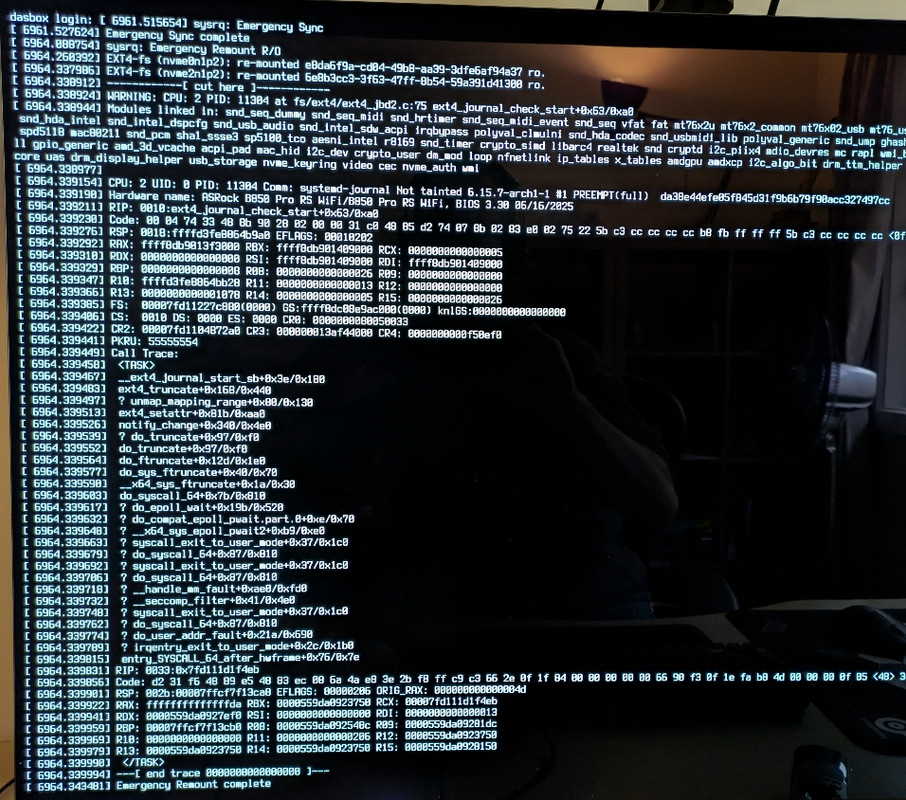
Source code link: https://github.com/torvalds/linux/blob/ … jbd2.c#L75
Last edited by GortHelpUs (2025-07-26 10:46:10)
Offline
#2 2025-07-26 06:16:33
- seth
- Member

- From: Won't reply 2 private help req
- Registered: 2012-09-03
- Posts: 77,768
Re: Should SysRq+U produce an ext4 journal stack trace?
Looks like that's the /mnt/twotb that wants to remount r/o on the already r/o root partition?
Are you getting this when commenting and umounting /mnt/twotb ?
Offline
#3 2025-07-26 06:34:52
- GortHelpUs
- Member
- From: .au
- Registered: 2025-07-22
- Posts: 11
Re: Should SysRq+U produce an ext4 journal stack trace?
Are you getting this when commenting and umounting /mnt/twotb ?
Yes. Commented /mnt/twotb in fstab, issue umount (successful); confirm it's no longer mounted (cat /proc/mounts).
Repeat REISUB on tty1, get same stack trace, but only 1 "EXT4-fs ... re-mounted ... ro" line.
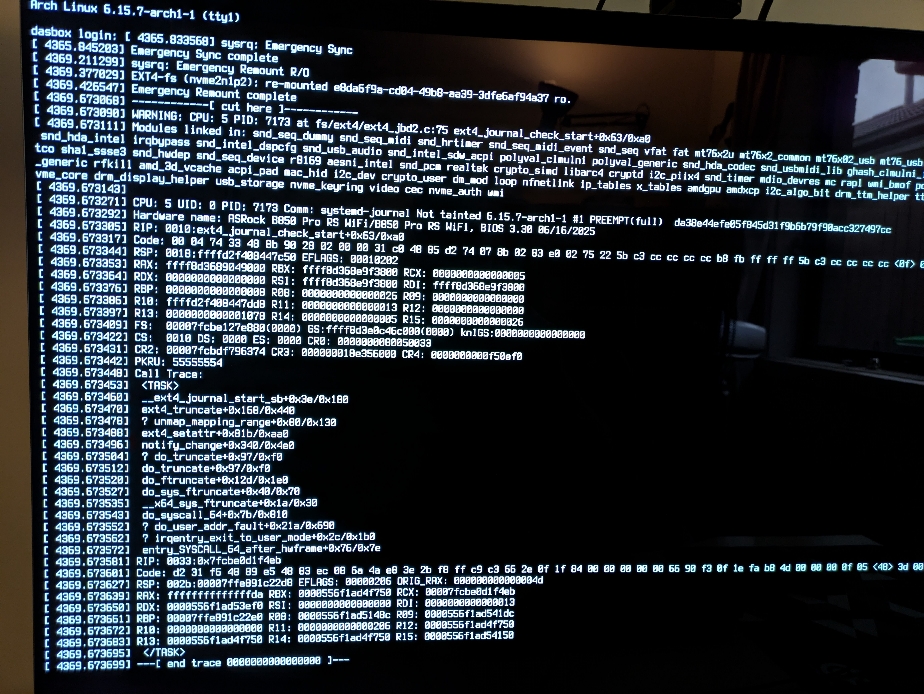
Why...is the device (nvme2n1p2) and UUID swapping during the remount?
Last edited by GortHelpUs (2025-07-26 06:47:11)
Offline
#4 2025-07-26 06:53:25
- seth
- Member
- From: Won't reply 2 private help req
- Registered: 2012-09-03
- Posts: 77,768
Re: Should SysRq+U produce an ext4 journal stack trace?
You're getting the warning ~250ms after the r/o remount completed…
https://stackoverflow.com/questions/729 … -for-20-ms
https://wiki.archlinux.org/title/Solid_ … leshooting - try to disable APST…
Offline
#5 2025-07-26 08:20:06
- GortHelpUs
- Member
- From: .au
- Registered: 2025-07-22
- Posts: 11
Re: Should SysRq+U produce an ext4 journal stack trace?
try to disable APST…
Interesting. Doesn't appear to be APST related, but the timing and description makes a lot of sense. I added kernel parameter:
nvme_core.default_ps_max_latency_us=0and confirmed after reboot it's set 0 (cat /sys/module/nvme_core/parameters/default_ps_max_latency_us). Default value is 100,000.
Same behaviour for REISUB on tty1. In a similar effort, I also write 0 to /sys/class/nvme/nvme{0,1,2}/power/pm_qos_latency_tolerance_us - same outcome with REISUB.
Noticed there are firmware updates for 2 of my 3 nvme (/dev/nvme0n1 and /dev/nvme1n1). Unsure if updating will help. Checking what's involved or if changelog suggests it's relevant.
Edit: will try pcie_aspm=off pcie_port_pm=off also
Edit Edit: same outcome
Last edited by GortHelpUs (2025-07-26 08:35:17)
Offline
#6 2025-07-26 08:26:07
- frostschutz
- Member

- Registered: 2013-11-15
- Posts: 1,652
Re: Should SysRq+U produce an ext4 journal stack trace?
not sure if it's the same issue: https://lore.kernel.org/linux-ext4/2025 … gmail.com/
anyway I'd send it to the mailing list. this is not normal
Why...is the device (nvme2n1p2) and UUID swapping during the remount?
that's the normal part - drive names/numbers are not stable between reboots. sda, sdb, sdc and nvme0, nvme1, nvme2, ... can switch places. whichever drive is detected first, gets the first available name assigned to it
Last edited by frostschutz (2025-07-26 08:29:11)
Offline
#7 2025-07-26 10:27:03
- GortHelpUs
- Member
- From: .au
- Registered: 2025-07-22
- Posts: 11
Re: Should SysRq+U produce an ext4 journal stack trace?
whichever drive is detected first, gets the first available name assigned to it
Ah ok, thanks. I updated both NVMe firmware using vendor tools - no change. Tried booting linux-lts (6.12.40-1), also no change.
To try old(er) kernel versions, so I can maybe identify when the issue started happening, would pacman to downgrade be safe/recommended?
Or following https://wiki.archlinux.org/title/Kernel … ild_system ?
I have timeshift already making backups for some days now!
Offline
#8 2025-07-26 13:56:54
- seth
- Member
- From: Won't reply 2 private help req
- Registered: 2012-09-03
- Posts: 77,768
Re: Should SysRq+U produce an ext4 journal stack trace?
https://lore.kernel.org/linux-ext4/2025 … gmail.com/ was a bug at least in 6.12 (so the LTS kernel is affected by that)
=> is the LTS kernel affected for you?
Also: What happens if you do SysRq+REIS…
get a cup of coffee, have a chat with the cute girl from accounting about how this is irritatingly part of an international effort to debug a kernel race condition between the filesystem and nvme driver (she'll know what a filesystem is so that you're not lying or trying to impress her, but nvme is still magic IT knowledge, hence impressed), thank her for letting you employ her in that effort, excuse yourself, leave, do NOT turn around…
… then continue SysRq+U
=> Do you still run into this?
Offline
#9 2025-07-27 00:47:26
- GortHelpUs
- Member
- From: .au
- Registered: 2025-07-22
- Posts: 11
Re: Should SysRq+U produce an ext4 journal stack trace?
=> is the LTS kernel affected for you?
Yes, 6.12.40-1 LTS also gives the stack trace.
=> Do you still run into this?
I set a 10 minute timer between 'S' + 'U', unfortunately, same behaviour.
Is there value in trying kernel before 6.12? Asking so I understand the recommended approach (pacman vs https://wiki.archlinux.org/title/Kernel … ild_system vs https://pkgbuild.com//~gromit/linux-bisection-kernels/)
Last edited by GortHelpUs (2025-07-27 05:33:54)
Offline
#10 2025-07-27 06:39:27
- seth
- Member
- From: Won't reply 2 private help req
- Registered: 2012-09-03
- Posts: 77,768
Re: Should SysRq+U produce an ext4 journal stack trace?
So the remount triggers a writing filesystem access??
I'd first try an older kernel from https://archive.archlinux.org/packages/l/linux/ - keep the LTS kernel installed in case the chosen kernel gets too old to work (though should™ not be the case for a reasonable amount of 6.x kernels)
Did you change anything about the journalling mechanism, https://wiki.archlinux.org/title/Ext4#U … erformance - notably eg. https://wiki.archlinux.org/title/Ext4#E … ast_commit (since there's no mount parameter)?
Offline
#11 2025-07-27 07:30:35
- GortHelpUs
- Member
- From: .au
- Registered: 2025-07-22
- Posts: 11
Re: Should SysRq+U produce an ext4 journal stack trace?
So the remount triggers a writing filesystem access??
Maybe?  I'm not to pretend I understand much about ext4 beyond how it's spelled.
Did you change anything about the journalling mechanism,
I removed free space reservation on twotb (tune2fs -m0). Otherwise, it's default
$ grep ext4 /proc/mounts
/dev/nvme0n1p2 / ext4 rw,relatime 0 0
/dev/nvme1n1p2 /mnt/twotb ext4 rw,relatime 0 0
$ sudo tune2fs -l /dev/nvme0n1p2 | grep features
Filesystem features: has_journal ext_attr resize_inode dir_index orphan_file filetype needs_recovery extent 64bit flex_bg metadata_csum_seed sparse_super large_file huge_file dir_nlink extra_isize metadata_csum orphan_present
$ sudo tune2fs -l /dev/nvme1n1p2 | grep features
Filesystem features: has_journal ext_attr resize_inode dir_index orphan_file filetype needs_recovery extent 64bit flex_bg metadata_csum_seed sparse_super large_file huge_file dir_nlink extra_isize metadata_csum orphan_presentI will start testing older kernel versions.
Last edited by GortHelpUs (2025-07-27 07:31:23)
Offline
#12 2025-07-27 08:50:54
- GortHelpUs
- Member
- From: .au
- Registered: 2025-07-22
- Posts: 11
Re: Should SysRq+U produce an ext4 journal stack trace?
Results of testing:
6.10.10 <- BAD
6.9.10 <- BAD
6.8.9 <- BAD
6.5.9 <- GOOD!
6.6.10 <- BAD
6.6.5 <- BAD
6.6.0 <- BAD
6.5.9 <- GOOD!
6.6.0 <- BAD
Repeated REISUB a couple of times on 6.5.9, 6.6.0 for consistency.
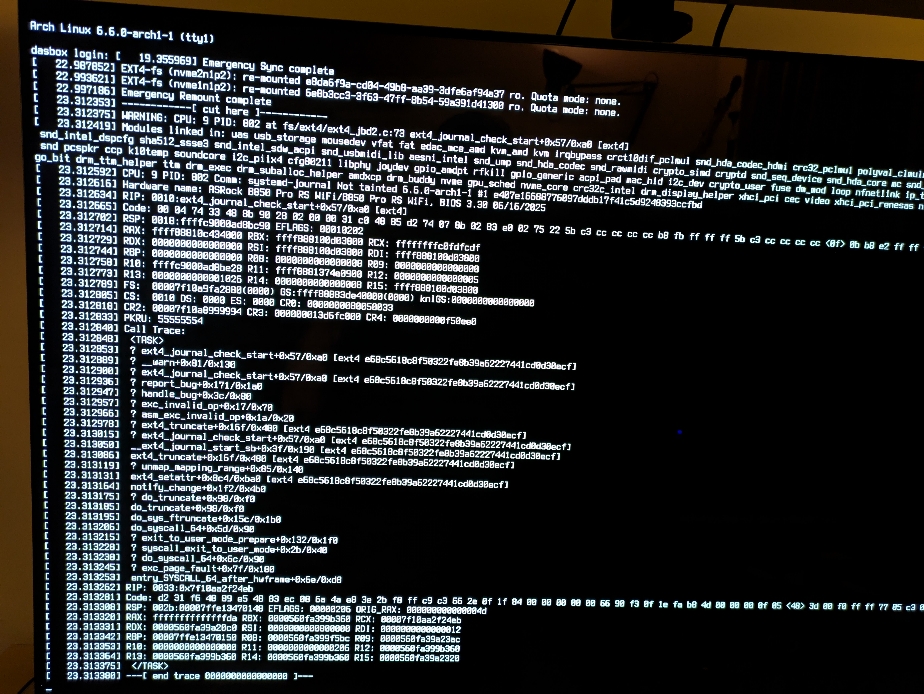
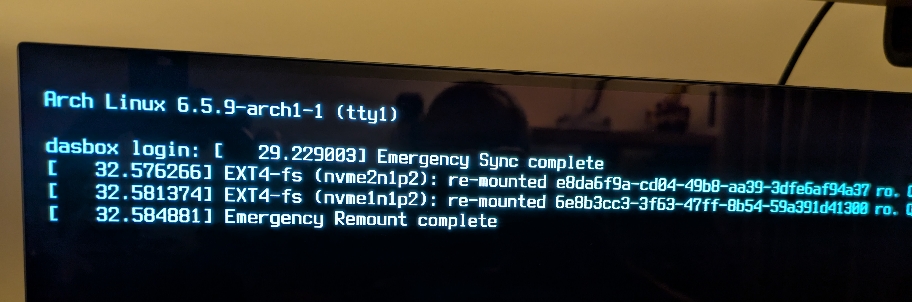
Something introduced with 6.6.0?
Only 2 changes to ext4, 1 change to NVMe: https://kernelnewbies.org/Linux_6.6#ext4
Storage info:
$ nvme list
Node                  Generic               SN                   Model                                    Namespace  Usage                      Format           FW Rev
--------------------- --------------------- -------------------- ---------------------------------------- ---------- -------------------------- ---------------- --------
/dev/nvme0n1          /dev/ng0n1            23424497574D         CT2000T500SSD5                           0x1          2.00  TB /   2.00  TB    512   B +  0 B   P8CR004
/dev/nvme1n1          /dev/ng1n1            NDL5942000770P2202   Lexar SSD NM790 1TB                      0x1          1.02  TB /   1.02  TB    512   B +  0 B   21572
/dev/nvme2n1          /dev/ng2n1            S7U7NU0Y623629T      Samsung SSD 990 EVO Plus 2TB             0x1        129.41  GB /   2.00  TB    512   B +  0 B   2B2QKXG7
PCI info:
$ lspci -k
00:00.0 Host bridge: Advanced Micro Devices, Inc. [AMD] Raphael/Granite Ridge Root Complex
        Subsystem: Advanced Micro Devices, Inc. [AMD] Raphael/Granite Ridge Root Complex
00:00.2 IOMMU: Advanced Micro Devices, Inc. [AMD] Raphael/Granite Ridge IOMMU
        Subsystem: Advanced Micro Devices, Inc. [AMD] Raphael/Granite Ridge IOMMU
00:01.0 Host bridge: Advanced Micro Devices, Inc. [AMD] Raphael/Granite Ridge Dummy Host Bridge
00:01.1 PCI bridge: Advanced Micro Devices, Inc. [AMD] Raphael/Granite Ridge GPP Bridge
        Subsystem: Advanced Micro Devices, Inc. [AMD] Device 1453
        Kernel driver in use: pcieport
00:01.2 PCI bridge: Advanced Micro Devices, Inc. [AMD] Raphael/Granite Ridge GPP Bridge
        Subsystem: Advanced Micro Devices, Inc. [AMD] Device 1453
        Kernel driver in use: pcieport
00:02.0 Host bridge: Advanced Micro Devices, Inc. [AMD] Raphael/Granite Ridge Dummy Host Bridge
00:02.1 PCI bridge: Advanced Micro Devices, Inc. [AMD] Raphael/Granite Ridge GPP Bridge
        Subsystem: Advanced Micro Devices, Inc. [AMD] Device 1453
        Kernel driver in use: pcieport
00:02.2 PCI bridge: Advanced Micro Devices, Inc. [AMD] Raphael/Granite Ridge GPP Bridge
        Subsystem: Advanced Micro Devices, Inc. [AMD] Device 1453
        Kernel driver in use: pcieport
00:03.0 Host bridge: Advanced Micro Devices, Inc. [AMD] Raphael/Granite Ridge Dummy Host Bridge
00:04.0 Host bridge: Advanced Micro Devices, Inc. [AMD] Raphael/Granite Ridge Dummy Host Bridge
00:08.0 Host bridge: Advanced Micro Devices, Inc. [AMD] Raphael/Granite Ridge Dummy Host Bridge
00:08.1 PCI bridge: Advanced Micro Devices, Inc. [AMD] Raphael/Granite Ridge Internal GPP Bridge to Bus [C:A]
        Subsystem: Advanced Micro Devices, Inc. [AMD] Raphael/Granite Ridge Internal GPP Bridge to Bus [C:A]
        Kernel driver in use: pcieport
00:08.3 PCI bridge: Advanced Micro Devices, Inc. [AMD] Raphael/Granite Ridge Internal GPP Bridge to Bus [C:A]
        Subsystem: Advanced Micro Devices, Inc. [AMD] Raphael/Granite Ridge Internal GPP Bridge to Bus [C:A]
        Kernel driver in use: pcieport
00:14.0 SMBus: Advanced Micro Devices, Inc. [AMD] FCH SMBus Controller (rev 71)
        Subsystem: ASRock Incorporation Device 790b
        Kernel driver in use: piix4_smbus
        Kernel modules: i2c_piix4, sp5100_tco
00:14.3 ISA bridge: Advanced Micro Devices, Inc. [AMD] FCH LPC Bridge (rev 51)
        Subsystem: ASRock Incorporation Device 790e
00:18.0 Host bridge: Advanced Micro Devices, Inc. [AMD] Raphael/Granite Ridge Data Fabric; Function 0
00:18.1 Host bridge: Advanced Micro Devices, Inc. [AMD] Raphael/Granite Ridge Data Fabric; Function 1
00:18.2 Host bridge: Advanced Micro Devices, Inc. [AMD] Raphael/Granite Ridge Data Fabric; Function 2
00:18.3 Host bridge: Advanced Micro Devices, Inc. [AMD] Raphael/Granite Ridge Data Fabric; Function 3
        Kernel driver in use: k10temp
        Kernel modules: k10temp
00:18.4 Host bridge: Advanced Micro Devices, Inc. [AMD] Raphael/Granite Ridge Data Fabric; Function 4
00:18.5 Host bridge: Advanced Micro Devices, Inc. [AMD] Raphael/Granite Ridge Data Fabric; Function 5
00:18.6 Host bridge: Advanced Micro Devices, Inc. [AMD] Raphael/Granite Ridge Data Fabric; Function 6
00:18.7 Host bridge: Advanced Micro Devices, Inc. [AMD] Raphael/Granite Ridge Data Fabric; Function 7
01:00.0 PCI bridge: Advanced Micro Devices, Inc. [AMD/ATI] Navi 10 XL Upstream Port of PCI Express Switch (rev 10)
        Kernel driver in use: pcieport
02:00.0 PCI bridge: Advanced Micro Devices, Inc. [AMD/ATI] Navi 10 XL Downstream Port of PCI Express Switch (rev 10)
        Subsystem: Advanced Micro Devices, Inc. [AMD/ATI] Navi 10 XL Downstream Port of PCI Express Switch
        Kernel driver in use: pcieport
03:00.0 VGA compatible controller: Advanced Micro Devices, Inc. [AMD/ATI] Navi 31 [Radeon RX 7900 XT/7900 XTX/7900 GRE/7900M] (rev c8)
        Subsystem: Micro-Star International Co., Ltd. [MSI] Device 5200
        Kernel driver in use: amdgpu
        Kernel modules: amdgpu
03:00.1 Audio device: Advanced Micro Devices, Inc. [AMD/ATI] Navi 31 HDMI/DP Audio
        Subsystem: Advanced Micro Devices, Inc. [AMD/ATI] Navi 31 HDMI/DP Audio
        Kernel driver in use: snd_hda_intel
        Kernel modules: snd_hda_intel
04:00.0 Non-Volatile memory controller: Micron/Crucial Technology T500 NVMe PCIe SSD (rev 01)
        Subsystem: Micron/Crucial Technology Device 2b00
        Kernel driver in use: nvme
        Kernel modules: nvme
05:00.0 PCI bridge: Advanced Micro Devices, Inc. [AMD] 600 Series Chipset PCIe Switch Upstream Port (rev 01)
        Subsystem: ASMedia Technology Inc. Device 3328
        Kernel driver in use: pcieport
06:00.0 PCI bridge: Advanced Micro Devices, Inc. [AMD] 600 Series Chipset PCIe Switch Downstream Port (rev 01)
        Subsystem: ASMedia Technology Inc. Device 3328
        Kernel driver in use: pcieport
06:04.0 PCI bridge: Advanced Micro Devices, Inc. [AMD] 600 Series Chipset PCIe Switch Downstream Port (rev 01)
        Subsystem: ASMedia Technology Inc. Device 3328
        Kernel driver in use: pcieport
06:08.0 PCI bridge: Advanced Micro Devices, Inc. [AMD] 600 Series Chipset PCIe Switch Downstream Port (rev 01)
        Subsystem: ASMedia Technology Inc. Device 3328
        Kernel driver in use: pcieport
06:09.0 PCI bridge: Advanced Micro Devices, Inc. [AMD] 600 Series Chipset PCIe Switch Downstream Port (rev 01)
        Subsystem: ASMedia Technology Inc. Device 3328
        Kernel driver in use: pcieport
06:0b.0 PCI bridge: Advanced Micro Devices, Inc. [AMD] 600 Series Chipset PCIe Switch Downstream Port (rev 01)
        Subsystem: ASMedia Technology Inc. Device 3328
        Kernel driver in use: pcieport
06:0c.0 PCI bridge: Advanced Micro Devices, Inc. [AMD] 600 Series Chipset PCIe Switch Downstream Port (rev 01)
        Subsystem: ASMedia Technology Inc. Device 3328
        Kernel driver in use: pcieport
06:0d.0 PCI bridge: Advanced Micro Devices, Inc. [AMD] 600 Series Chipset PCIe Switch Downstream Port (rev 01)
        Subsystem: ASMedia Technology Inc. Device 3328
        Kernel driver in use: pcieport
07:00.0 Non-Volatile memory controller: Samsung Electronics Co Ltd NVMe SSD Controller PM9C1a (DRAM-less)
        Subsystem: Samsung Electronics Co Ltd Device a801
        Kernel driver in use: nvme
        Kernel modules: nvme
0a:00.0 SATA controller: ASMedia Technology Inc. ASM1061/ASM1062 Serial ATA Controller (rev 02)
        Subsystem: ASRock Incorporation Motherboard
        Kernel driver in use: ahci
0b:00.0 Ethernet controller: Realtek Semiconductor Co., Ltd. RTL8125 2.5GbE Controller (rev 05)
        Subsystem: ASRock Incorporation Device 8125
        Kernel driver in use: r8169
        Kernel modules: r8169
0c:00.0 USB controller: Advanced Micro Devices, Inc. [AMD] 800 Series Chipset USB 3.x XHCI Controller (rev 01)
        Subsystem: ASMedia Technology Inc. Device 1142
        Kernel driver in use: xhci_hcd
0d:00.0 SATA controller: Advanced Micro Devices, Inc. [AMD] 600 Series Chipset SATA Controller (rev 01)
        Subsystem: ASMedia Technology Inc. Device 1062
        Kernel driver in use: ahci
0e:00.0 Non-Volatile memory controller: Shenzhen Longsys Electronics Co., Ltd. Lexar NM790 NVME SSD (DRAM-less) (rev 01)
        Subsystem: Shenzhen Longsys Electronics Co., Ltd. Lexar NM790 NVME SSD (DRAM-less)
        Kernel driver in use: nvme
        Kernel modules: nvme
0f:00.0 Non-Essential Instrumentation [1300]: Advanced Micro Devices, Inc. [AMD] Raphael/Granite Ridge PCIe Dummy Function (rev cb)
        Subsystem: ASRock Incorporation Device 364e
0f:00.2 Encryption controller: Advanced Micro Devices, Inc. [AMD] Family 19h PSP/CCP
        Subsystem: Advanced Micro Devices, Inc. [AMD] Family 19h PSP/CCP
        Kernel driver in use: ccp
        Kernel modules: ccp
0f:00.3 USB controller: Advanced Micro Devices, Inc. [AMD] Raphael/Granite Ridge USB 3.1 xHCI
        Subsystem: ASRock Incorporation Device 15b6
        Kernel driver in use: xhci_hcd
0f:00.4 USB controller: Advanced Micro Devices, Inc. [AMD] Raphael/Granite Ridge USB 3.1 xHCI
        Subsystem: ASRock Incorporation Device 15b6
        Kernel driver in use: xhci_hcd
10:00.0 USB controller: Advanced Micro Devices, Inc. [AMD] Raphael/Granite Ridge USB 2.0 xHCI
        Subsystem: ASRock Incorporation Device 15b6
        Kernel driver in use: xhci_hcd
Thinking I can try latest 6.16 also..looking to see if I can find a package. 6.16 should be finalized v. soon...
Otherwise, bug report to ext4 mailing list/bugzilla, or to Arch bugtracker?
Last edited by GortHelpUs (2025-07-27 09:56:25)
Offline
#13 2025-07-27 09:51:02
- seth
- Member
- From: Won't reply 2 private help req
- Registered: 2012-09-03
- Posts: 77,768
Re: Should SysRq+U produce an ext4 journal stack trace?
https://git.kernel.org/pub/scm/linux/ke … 7a60b98e87
See the ext4_jbd2.c commit
-	if (sb_rdonly(sb))
+	if (WARN_ON_ONCE(sb_rdonly(sb)))
 		return -EROFS;
doesn't change anything but introduces a warning.
You could build a 6.5 kernel w/ just that change to see whether the condition also exists w/ older kernels
Offline
#14 2025-07-27 11:43:40
- GortHelpUs
- Member
- From: .au
- Registered: 2025-07-22
- Posts: 11
Re: Should SysRq+U produce an ext4 journal stack trace?
You could build a 6.5 kernel w/ just that change to see whether the condition also exists w/ older kernels
Ok, I'll see what I can learn. Hold on to yer butts...
Offline