You are not logged in.
- Topics: Active | Unanswered
#1 2025-08-01 03:54:19
- louist103
- Member
- Registered: 2023-12-02
- Posts: 13
[Solved] Poor (But better) WOW64 dx9 performance
I know others have had issues with the new WOW64 wine versions (10.9(?)+) with OpenGL but I didn't see many issues online about DX9 performance. It seems to be the same. 32bit DX9 apps have the same performance issues. I tried the obvious things like making a new prefix, which didn't help. I also tried to make a 32bit prefix which obviously you can't do with WOW64. I did notice though, when I was using 10.10 I would get 1-2 FPS in a DX9 app, but now with 10.12 I can get maybe 15 or so. Since all I use wine for is these older 32bit DX9 era programs, should I just blacklist wine from upgrading from 10.8, or will these issues eventually be fixed? It seems weird for wine to just give up on all 32bit graphical apps since a lot of games would be 32bit on Windows outside of modern stuff.
Another weird thing I noticed, on my popOS laptop with a fresh wine install these issues don't exist. It has the same version of wine, 10.12, but the dev version instead of staging. Could there be a dependency on my desktop machine that is causing this issue?
Any information would be appreciated.
Last edited by louist103 (2025-08-01 19:05:04)
Offline
#2 2025-08-01 05:29:12
- SimonJ
- Member

- From: Spain
- Registered: 2021-05-11
- Posts: 376
- Website
Re: [Solved] Poor (But better) WOW64 dx9 performance
I moved to wine32 from the aur as I only use wine for old games and they all work better with it. There may be a way to work the new wine to solve your problems but I just needed something to work without any setup, this solved it for me.
wine32 10.12-1
A compatibility layer for running Windows programs on both 32-bit and 64-bit architectures (without WoW64)
Rlu: 222126
Offline
#3 2025-08-01 06:25:38
- seth
- Member

- From: Won't reply 2 private help req
- Registered: 2012-09-03
- Posts: 77,697
Re: [Solved] Poor (But better) WOW64 dx9 performance
Do you use dxvk ?
Offline
#4 2025-08-01 06:34:00
- cryptearth
- Member
- Registered: 2024-02-03
- Posts: 2,315
Re: [Solved] Poor (But better) WOW64 dx9 performance
as for ditching 32bit in more general: time moves on - and in my opinion this step is way too late
nvidia just now starts to ditch 32bit physx
intel was a step ahead by not implementing DX9 physical in thier ARC gpus but up-translate it to DX10 to be executed on the hardware
and according to wikipedia win11 is just now the first 64bit only release - a step that should had happened with NT6 (vista)
also its partly fault of the gaming industry: the kept supporting 32bit for way too long - I can't back this with facts but would guess 64bit was ahead as late as win7 - so why devs kept cling to 32bit for 10 more years?
tldr: it's the right choice that 32bit is finally ditched and it's far too late anyway - and with steam no longer supporting win7 because steam is hardly more than chrome with a custom ui and chrome stopped support for win7 I question why it is still 32bit
if you want to keep playing 20 year old games there's nothin wrong with it - but you can't expect them to be supported forever
it already happened a few times in history when we moved from win9x and the 16bit dos era to 32/64 bit and ditched support for 16bit - it's the very same happen again but with the difference there's no 128bit to asvance to
Offline
#5 2025-08-01 07:03:30
- seth
- Member
- From: Won't reply 2 private help req
- Registered: 2012-09-03
- Posts: 77,697
Re: [Solved] Poor (But better) WOW64 dx9 performance
x86_64 only won the 64bit wars in 2006 precisely *because* it was 32bit compatible, https://en.wikipedia.org/wiki/X86-64#Intel_64
Until then it wasn't even clear which architecture would prevail.
Win7 was released in 2009, https://en.wikipedia.org/wiki/Windows_7 - but you're right: Windows™ Wegda© should™ have been 64bit only (ideally ia64 because it was developed during the 64bit wars) because then MS would have died by ~2010 
People kept supporting 32 for ages because not everybody upgraded their systems in 2007, nor would, nor ever should. Also these kind of infrastructure changes are a massive endeavor outside your bedroom.
You might or not have heard that a ginormous German company (they're destroying rails or something) relied on window 3.11 for workgroups until not that long ago and apparently US flight control is even worse.
None of that is relevant because despite it's name wine is factually an emulator and I can happily play games compiled for a https://de.wikipedia.org/wiki/Motorola_68000
And if we're being very honest: videogames /are/ the predominant usecase for wine, so if that doesn't properly work, wine can just stop to exists and we use old copies of winxp in VMs (much like MS shipped a fully compatible DOS emulator w/ XP that I've not seen failing *once* - despite dosbox then being much cooler)
Also I think you're misunderstanding Win11 abandoning 32bit support.
You'll not be able to run it on 32bit architectures but it very much runs 32bit software.
Now guess how…
intel was a step ahead by not implementing DX9 physical in thier ARC gpus but up-translate it to DX10 to be executed on the hardware
Ahemm… "intel was a step ahead by only introducing it's first ever real GPU now" - ftfy.
It's easy to completely skip a technological step because you arrived too late to the party anyway
Maybe surprisingly Africa has one of the most developed mobile network infrastructures - because it largely skipped the wired one…
Do you want to report this off-topic tangent for being split off?
Offline
#6 2025-08-01 10:11:19
- cryptearth
- Member
- Registered: 2024-02-03
- Posts: 2,315
Re: [Solved] Poor (But better) WOW64 dx9 performance
ok ok - getting back to topic
holding back on older versions would fall under the "partial updates are not support" point - and could also cause issues with newer stuff requiring uo-to-date versions
I'm not sure but is there a way to install packages in a "local" manner as in "not system wide"?
like have current wine installed regular and an older version in /opt - and when you want to play older games or need a 32bit prefix use that by implicit call overriding the system default
or would such require a re-build from source because it would require different configure flags?
Offline
#7 2025-08-01 13:32:26
- louist103
- Member
- Registered: 2023-12-02
- Posts: 13
Re: [Solved] Poor (But better) WOW64 dx9 performance
Do you use dxvk ?
I tried both. The launcher has an option to enable DXVK or not. Both had the same issue.
Offline
#8 2025-08-01 13:41:04
- louist103
- Member
- Registered: 2023-12-02
- Posts: 13
Re: [Solved] Poor (But better) WOW64 dx9 performance
And if we're being very honest: videogames /are/ the predominant usecase for wine, so if that doesn't properly work, wine can just stop to exists and we use old copies of winxp in VMs (much like MS shipped a fully compatible DOS emulator w/ XP that I've not seen failing *once* - despite dosbox then being much cooler)
This is where my mind is right now. If it can't run 32bit apps graphically, what is the point? This will just lead to Steam supporting their own fork without WOW64. I know its not an exhaustive list but almost everything here https://www.pcgamingwiki.com/wiki/List_ … -bit_games is post 2015. So only 10 years ago.I'd be willing to bet a lot of what is on Steam from that time period would still be 32 bit.
Offline
#9 2025-08-01 13:54:12
- seth
- Member
- From: Won't reply 2 private help req
- Registered: 2012-09-03
- Posts: 77,697
Re: [Solved] Poor (But better) WOW64 dx9 performance
I did notice though, when I was using 10.10 I would get 1-2 FPS in a DX9 app, but now with 10.12 I can get maybe 15 or so.
For a baseline: what performance do you get on 10.8 ?
Also: is this GPU or CPU limited? (mangohud seems to nicely blend that into everything)
And is this on nvidia + nvidia-utils or mesa ?
Offline
#10 2025-08-01 14:05:50
- louist103
- Member
- Registered: 2023-12-02
- Posts: 13
Re: [Solved] Poor (But better) WOW64 dx9 performance
I did notice though, when I was using 10.10 I would get 1-2 FPS in a DX9 app, but now with 10.12 I can get maybe 15 or so.
For a baseline: what performance do you get on 10.8 ?
Also: is this GPU or CPU limited? (mangohud seems to nicely blend that into everything)
And is this on nvidia + nvidia-utils or mesa ?
I got whatever full performance is. I can't tell if that is 30 or 60. Probably 60.
I am not sure if its GPU or CPU. I'll need to test it.
I don't have an nvidia card installed. I am using my AMD iGPU. 9950x. mesa is installed along with whatever else is needed for AMD graphics.
Offline
#11 2025-08-01 17:24:57
- louist103
- Member
- Registered: 2023-12-02
- Posts: 13
Re: [Solved] Poor (But better) WOW64 dx9 performance
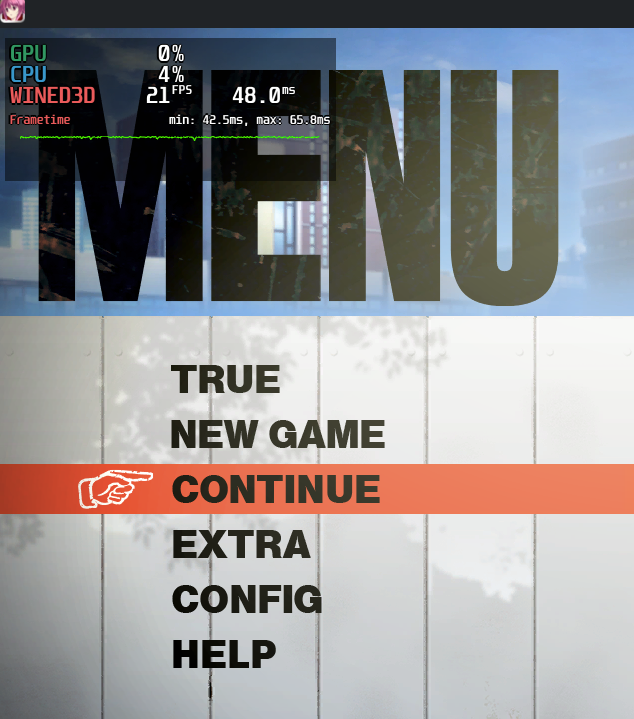
I got mangohud installed. I can't use it with wine 10.8 probably because of 32bit issues. With WOW64 wine (10.12 Staging) I get the following on the title screen:
GPU 20ish%
CPU 6%
WINE3D 20FPS.
https://pub-58b26804d9674418b12864b0ebc … C_MAIN.png
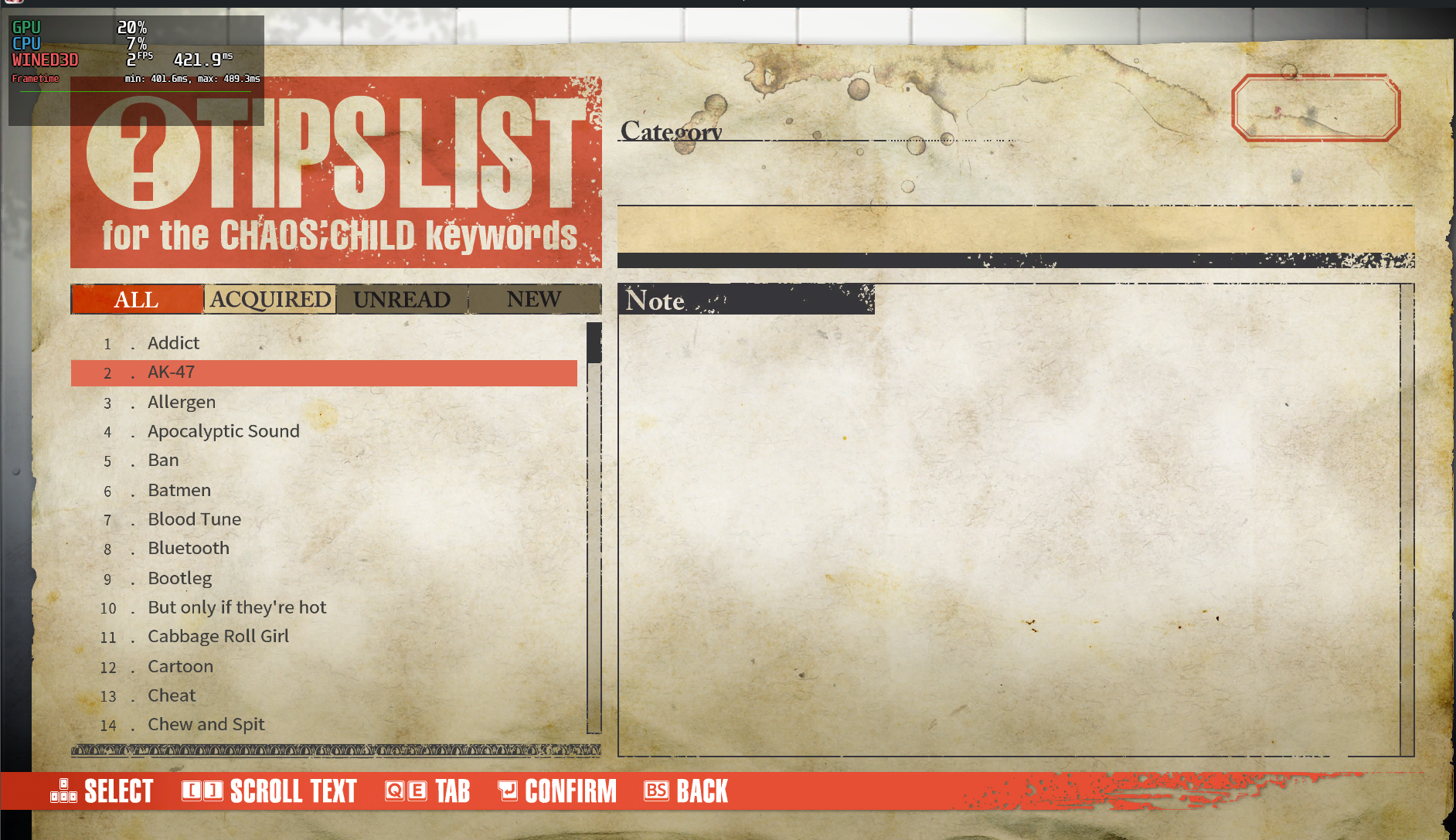
In a menu with a lot of stuff in it:
GPU 0-5%
CPU 6%
WINE3D 2FPS
https://pub-58b26804d9674418b12864b0ebc … C_TIPS.png
Offline
#12 2025-08-01 19:03:44
- louist103
- Member
- Registered: 2023-12-02
- Posts: 13
Re: [Solved] Poor (But better) WOW64 dx9 performance
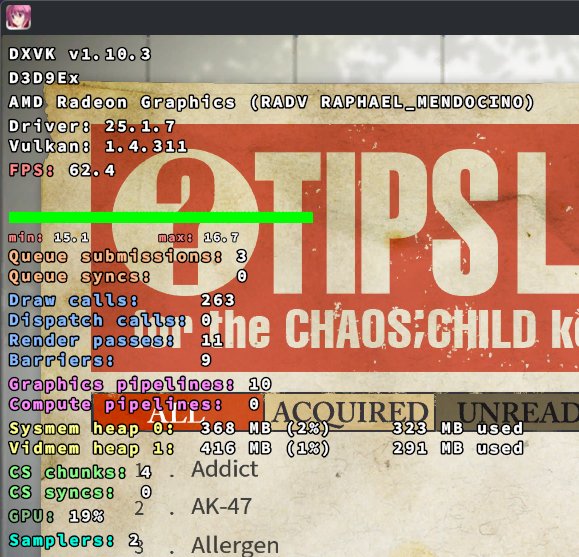
I hate to do this to you guys, but it turns our DXVK was not installed. I assumed that I would see some kind of error in the terminal when I enabled DXVK without it being installed, but thats not the case. It silently fell back to the WINE3D driver. I installed DXVK in my prefix and its working like it did before.
I'll mark the thread as solved since this seems to fix it.
https://pub-58b26804d9674418b12864b0ebc … C_DXVK.png
Offline
#13 2025-08-01 19:08:56
- seth
- Member
- From: Won't reply 2 private help req
- Registered: 2012-09-03
- Posts: 77,697
Re: [Solved] Poor (But better) WOW64 dx9 performance
\o/
DXVK aside, your stats look nothing's limiting the performance - might be a vsync issue.
Try to "export vblank_mode=0" (assuming this isn't also a hybrid system)
Offline
#14 2025-08-01 19:36:13
- louist103
- Member
- Registered: 2023-12-02
- Posts: 13
Re: [Solved] Poor (But better) WOW64 dx9 performance
\o/
DXVK aside, your stats look nothing's limiting the performance - might be a vsync issue.
Try to "export vblank_mode=0" (assuming this isn't also a hybrid system)
I made a new prefix without DXVK and this time on the tips menu I get about 10-30% GPU (it kinda alternates every other frame between the two), 6% CPU again, and 3 FPS. Similar utilization on the title screen but at 21 FPS.
This is not a hybrid system. The iGPU is the only installed GPU right now. I do have an RTX 2060 but almost never keep it installed anymore. I did test it back in June to see if this performance issue was a GPU/driver issue but it had the same issue.
Offline
#15 2025-08-01 19:37:12
- cryptearth
- Member
- Registered: 2024-02-03
- Posts: 2,315
Re: [Solved] Poor (But better) WOW64 dx9 performance
I hate to do this to you guys, but it turns our DXVK was not installed. I assumed that I would see some kind of error in the terminal when I enabled DXVK without it being installed, but thats not the case. It silently fell back to the WINE3D driver. I installed DXVK in my prefix and its working like it did before.
I'll mark the thread as solved since this seems to fix it.
https://pub-58b26804d9674418b12864b0ebc … C_DXVK.png
so you run WINE directly without any launcher like Lutris or Heroic (or Steam)?
as I checked my system - although I don't have dxvk installed via pacman - so it's not pulled in as a dependency - when using find and scan the launchers they all either come with it or use the one provided by proton(-ge)
tldr: when using a launcher (if the game is available on it - which for lutris should be the case) it should provide dxvk and manage wine and proton versions
Offline
#16 2025-08-01 20:17:08
- louist103
- Member
- Registered: 2023-12-02
- Posts: 13
Re: [Solved] Poor (But better) WOW64 dx9 performance
louist103 wrote:I hate to do this to you guys, but it turns our DXVK was not installed. I assumed that I would see some kind of error in the terminal when I enabled DXVK without it being installed, but thats not the case. It silently fell back to the WINE3D driver. I installed DXVK in my prefix and its working like it did before.
I'll mark the thread as solved since this seems to fix it.
https://pub-58b26804d9674418b12864b0ebc … C_DXVK.pngso you run WINE directly without any launcher like Lutris or Heroic (or Steam)?
as I checked my system - although I don't have dxvk installed via pacman - so it's not pulled in as a dependency - when using find and scan the launchers they all either come with it or use the one provided by proton(-ge)
tldr: when using a launcher (if the game is available on it - which for lutris should be the case) it should provide dxvk and manage wine and proton versions
Correct. I call wine directly. There is an option in the game's launch to enable or disable DXVK. I did check with the patch devs and they did confirm that toggle has no effect on wine.
I didn't see a way to install DXVK with pacman but I did use the instructions on the DXVK github and that worked.
Offline
#17 2025-08-01 21:06:44
- seth
- Member
- From: Won't reply 2 private help req
- Registered: 2012-09-03
- Posts: 77,697
Re: [Solved] Poor (But better) WOW64 dx9 performance
https://aur.archlinux.org/packages?K=dxvk is only in the AUR but https://wiki.archlinux.org/title/Wine#DXVK would be fine.
Offline
#18 2025-08-01 21:40:43
- cryptearth
- Member
- Registered: 2024-02-03
- Posts: 2,315
Re: [Solved] Poor (But better) WOW64 dx9 performance
Correct. I call wine directly.
would had been a good info from upfront - as that's not how most users play games on linux
also from the screenshots google image search got me outlast trails - which is distributed via either epic games or steam - so it uses DRM which usually requires to run it either via steam or epic (lutris, heroic) - unless it's a pirated version
tldr: buy games and use available launchers - they manage such stuff for you - if you pirate games - BUY them! quite bald to complain about issues then when the solution is to just use a legit copy
Offline
#19 2025-08-02 13:13:24
- Lone_Wolf
- Administrator

- From: Netherlands, Europe
- Registered: 2005-10-04
- Posts: 15,392
Re: [Solved] Poor (But better) WOW64 dx9 performance
I use wine directly also.
about half were bought as originals when I still used windows , the rest mostly comes from gog but I've never used/needed the gog launcher.
Most of those games are 32-bit from directx 6.1 to directx 8 (pre-windows xp) and run fine with latest repo wine.
That includes 2 games of which lutris claims they need an older wine version.
Disliking systemd intensely, but not satisfied with alternatives so focusing on taming systemd.
clean chroot building not flexible enough ?
Try clean chroot manager by graysky
Offline