You are not logged in.
- Topics: Active | Unanswered
Pages: 1
#1 2025-08-23 20:28:40
- xy1vro4
- Member
- Registered: 2025-07-06
- Posts: 33
can't setup GRUB Secure Boot with sbctl
re-installed grub with tpm module
grub-install --target=x86_64-efi --efi-directory=/boot --bootloader-id=GRUB --modules="normal test efi_gop efi_uga search echo linux all_video gfxmenu gfxterm_background gfxterm_menu gfxterm loadenv configfile tpm" --disable-shim-lockvia UEFI set the Secure Boot to setup mode
i prepared sbctl
sudo -i
sbctl status # (made sure sbctl is not installed, Setup Mode is enabled, and Secure Boot is disabled)
sbctl create-keys
sbctl enroll-keys -m
sbctl verfiy
In addition to the files that need to be signed, I received a lot of errors in response related to the files inside /grub
They are all the same, so I will insert one example
failed to verify file /boot/grub/x86_64-efi/tpm.mod: /boot/grub/x86_64-efi/tpm.mod: invalid pe headeri signed
[root@ArchLinux ~]# sbctl verify
Verifying file database and EFI images in /boot...
✓ /boot/EFI/BOOT/BOOTX64.EFI is signed
✓ /boot/EFI/grub/grubx64.efi is signed
✓ /boot/grub/x86_64-efi/core.efi is signed
✓ /boot/grub/x86_64-efi/grub.efi is signed
✓ /boot/vmlinuz-linux is signed
✓ /boot/EFI/GRUB/grubx64.efi is signed
✗ /boot/EFI/systemd/systemd-bootx64.efi is not signed
i boot in GRUB, grub looks broken visually, like some fonts didn't load, but it's readable
When I try to boot into the system GRUB gives an error
error: verification requested but nobody cares & need to load the kernel first
I hope the picture is acceptable to you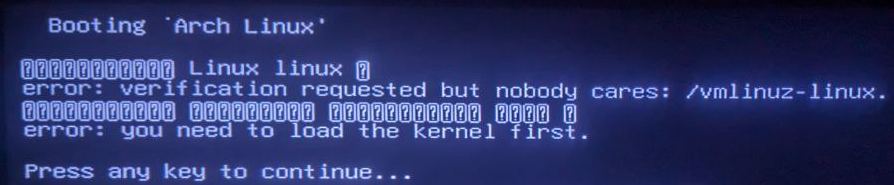
Last edited by xy1vro4 (2025-08-24 13:20:42)
Offline
#2 2025-08-24 00:07:49
- solskog
- Member
- Registered: 2020-09-05
- Posts: 462
Re: can't setup GRUB Secure Boot with sbctl
Rebuild grub EFI image including tpm module and sign it.
# grub-mkimage -p /boot/grub -o /boot/EFI/grub/grubx64.efi -O x86_64-efi tpm part_gpt ext2 normal linux
# sbctl sign /boot/EFI/grub/grubx64.efi
# grub-mkconfig -o /boot/grub/grub.cfg
Last edited by solskog (2025-08-24 00:21:15)
Offline
#3 2025-08-24 04:03:57
- xy1vro4
- Member
- Registered: 2025-07-06
- Posts: 33
Re: can't setup GRUB Secure Boot with sbctl
Rebuild grub EFI image including tpm module and sign it.
# grub-mkimage -p /boot/grub -o /boot/EFI/grub/grubx64.efi -O x86_64-efi tpm part_gpt ext2 normal linux
# sbctl sign /boot/EFI/grub/grubx64.efi
# grub-mkconfig -o /boot/grub/grub.cfg
For some reason my grub broke, but it seemed like something worked, grub did not give errors related to secure boot, but it is broken.
When turning off secure boot, grub also did not start.
I tried to repeat the commands via Live CD,
replacing the modules with all the modules from this command, the grab broke again
grub-mkimage -p /boot/grub -o /boot/EFI/grub/grubx64.efi -O x86_64-efi normal test efi_gop efi_uga search echo linux all_video gfxmenu gfxterm_background gfxterm_menu gfxterm loadenv configfile tpmLast edited by xy1vro4 (2025-08-24 16:58:25)
Offline
#4 2025-08-24 20:17:19
- xy1vro4
- Member
- Registered: 2025-07-06
- Posts: 33
Re: can't setup GRUB Secure Boot with sbctl
sudo grub-mkstandalone --disable-shim-lock --fonts=all -O x86_64-efi --modules="normal test efi_gop efi_uga search echo linux all_video gfxmenu gfxterm_background gfxterm_menu gfxterm loadenv configfile tpm" -o /boot/EFI/grub/grubx64.efi "/boot/grub/grub.cfg" -vI used this command and got a self-contained grub img
Without secure boot it boots without problems, but with secure boot it can't boot, with the same errors
So I think either some modules are missing, or the grab version is broken in terms of what I want to do
Or for some reason my UEFI does not want to work with GRUB, although it loads it, so why it does not work is not clear
Last edited by xy1vro4 (2025-08-24 20:18:56)
Offline
#5 2025-08-25 22:34:50
- solskog
- Member
- Registered: 2020-09-05
- Posts: 462
Re: can't setup GRUB Secure Boot with sbctl
I have no issue run this command in my Arch setup:
# grub-mkimage -p /boot/grub -o /boot/EFI/grub/grubx64.efi -O x86_64-efi normal test efi_gop efi_uga search echo linux all_video gfxmenu gfxterm_background gfxterm_menu gfxterm loadenv configfile tpm
# flie /boot/EFI/grub/grubx64.efi
/boot/EFI/grub/grubx64.efi: PE32+ executable for EFI (application), x86-64 (stripped to external PDB), 4 sections
Offline
Pages: 1