You are not logged in.
- Topics: Active | Unanswered
#1 2025-10-31 18:09:23
- kiwitiny
- Member
- Registered: 2025-10-18
- Posts: 2
HDMI output not detected on hybrid Intel/NVIDIA laptop under KDE Wayla
Hello everyone,
I’m running Arch Linux on a laptop with a hybrid GPU setup: Intel UHD 630 + NVIDIA RTX 2060 Mobile.
- I’m using KDE Plasma Wayland with LYDM as my display manager.
- My internal laptop screen (Intel) works fine.
- My external monitor is connected via HDMI, which is physically wired to the NVIDIA GPU.
The problem:
-
xrandr only shows my internal screen (eDP-1).
-
xrandr --listproviders shows 0 providers, which is expected under Wayland.
- The file
/sys/class/drm/card0-HDMI-A-1/status shows disconnected.
- The directory
/sys/class/drm/card1-HDMI-A-1/ does not exist (NVIDIA HDMI output).
- nvidia_drm modeset is enabled (Y).
It seems that KDE Wayland running on Intel cannot detect or use the HDMI output on NVIDIA. I also don’t have a “Detect Displays” button in KDE System Settings → Displays.
I’m looking for advice on:
- How to make my HDMI output on NVIDIA appear and work under KDE Wayland.
Thanks in advance for your help!
Offline
#2 2025-10-31 18:28:01
- kiwitiny
- Member
- Registered: 2025-10-18
- Posts: 2
Re: HDMI output not detected on hybrid Intel/NVIDIA laptop under KDE Wayla
And I'm getting this error message on LYDM. I'm thinking it's probably related.
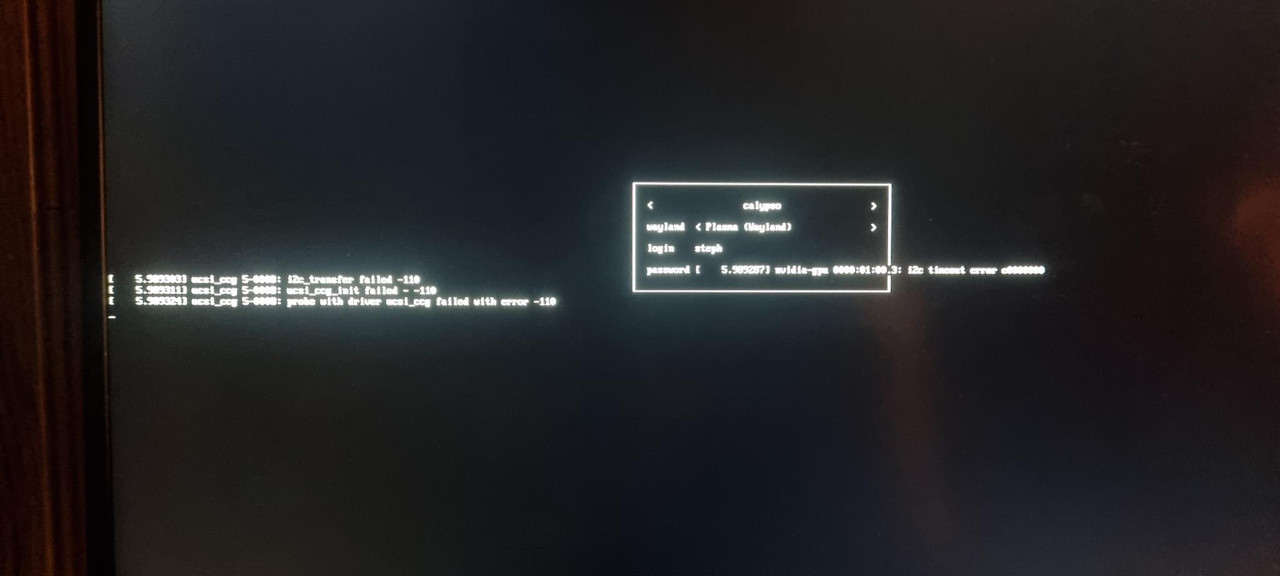
Can you help me?
Offline
#3 2025-10-31 22:19:41
- seth
- Member

- From: Won't reply 2 private help req
- Registered: 2012-09-03
- Posts: 78,522
Re: HDMI output not detected on hybrid Intel/NVIDIA laptop under KDE Wayla
The messages there are from the nvidia USB chip, try to blacklist ucsi_ccg
xrandr on wayland is borderline meaningless
kscreen-doctor
qdbus6 org.kde.KWin /KWin supportInformation
/sys/class/drm/card0-HDMI-A-1/status
shows disconnected.for OUT in /sys/class/drm/card*; do echo $OUT; edid-decode $OUT/edid; echo "================="; doneYou'll need https://archlinux.org/packages/extra/x86_64/v4l-utils/
It seems that KDE Wayland running on Intel
Sanity check: what about kwin on X11?
Online