You are not logged in.
- Topics: Active | Unanswered
#1 2025-11-06 08:37:25
- rouen-sk
- Member
- Registered: 2025-10-13
- Posts: 4
mkinitcpio - how to switch to systemd on encrypted root?
Hi guys,
so yesterday I updated my system, and noticed in mkinitcpio.conf.pacnew, that defaults have been changed to use systemd based initial ramdisk now.
So I looked at wiki, and it seems the change should be pretty straightforward, there are even examples for encrypted root in mkinitcpio.conf itself.
So, I changed my previous:
HOOKS=(base udev autodetect microcode modconf kms keyboard keymap consolefont block encrypt filesystems fsck)to
HOOKS=(base systemd autodetect microcode modconf kms keyboard sd-vconsole sd-encrypt block filesystems fsck)regenerated initramfs (sudo mkinitcpio -p linux) and rebooted... aaaand got this 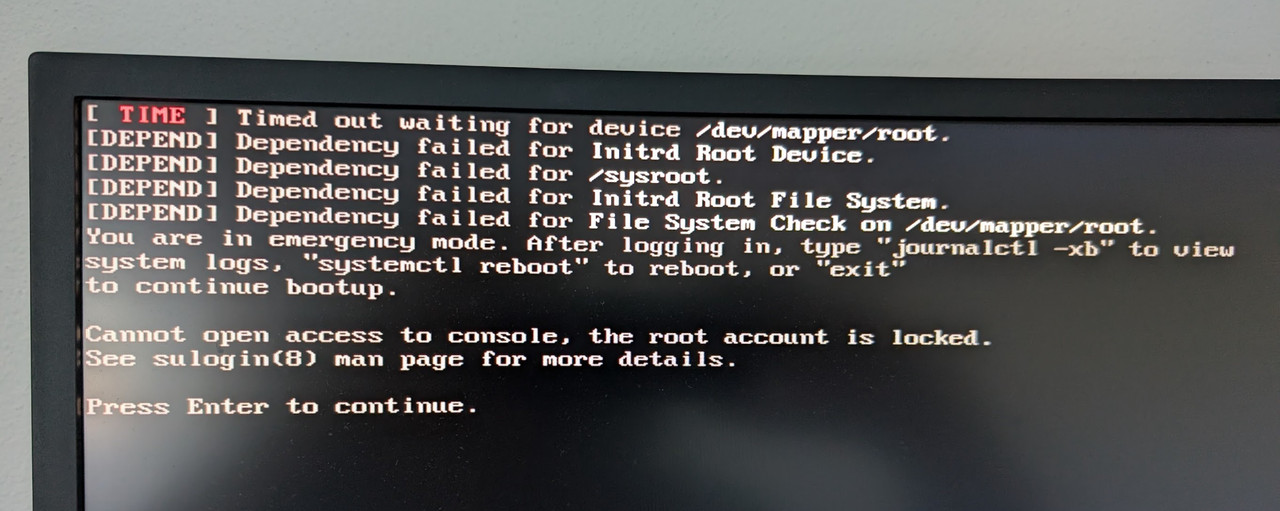
For now, I booted from usb, cryptsetup open, mount, arch-chroot, reverted changes in mkinitcpio.conf and regenerated initramfs, rebooted - and I am running again, so this is not "help ASAP pls" post, but I would like to learn what is the problem and how to correctly switch to systemd based initial ramdisk. I have LUKS2 encrypted disk with BTRFS. Not using LVM. Root is set in /etc/default/grub like this:
GRUB_DEFAULT=0
GRUB_TIMEOUT=5
GRUB_DISTRIBUTOR="Arch"
GRUB_CMDLINE_LINUX_DEFAULT="loglevel=3 quiet cryptdevice=UUID=771679b5-0ac2-4cc7-a25e-a4e570d29f9a:root root=/dev/mapper/root"
GRUB_CMDLINE_LINUX="cryptdevice=UUID=771679b5-0ac2-4cc7-a25e-a4e570d29f9a:root root=/dev/mapper/root"
Thanks!
EDIT: Looking at Wiki, it seems there is different kernel parameter syntax for sd-encrypt.
So in /etc/default/grub I should replace
GRUB_CMDLINE_LINUX_DEFAULT="loglevel=3 quiet cryptdevice=UUID=771679b5-0ac2-4cc7-a25e-a4e570d29f9a:root root=/dev/mapper/root"
GRUB_CMDLINE_LINUX="cryptdevice=UUID=771679b5-0ac2-4cc7-a25e-a4e570d29f9a:root root=/dev/mapper/root"
with
GRUB_CMDLINE_LINUX_DEFAULT="loglevel=3 quiet rd.luks.name=771679b5-0ac2-4cc7-a25e-a4e570d29f9a=root root=/dev/mapper/root"
GRUB_CMDLINE_LINUX="rd.luks.name=771679b5-0ac2-4cc7-a25e-a4e570d29f9a=root root=/dev/mapper/root"
Is that the only thing I missed, or something else maybe? (Not feeling like doing another usb-boot-revert round just now 
Last edited by rouen-sk (2025-11-06 09:09:36)
Offline
#2 2025-11-06 09:28:39
- frostschutz
- Member

- Registered: 2013-11-15
- Posts: 1,658
Re: mkinitcpio - how to switch to systemd on encrypted root?
One way to find out but that should be pretty much it.
Of course after editing default/grub you still have to regenerate the actual grub cfg or it won't change anything.
Offline
#3 2025-11-06 10:13:17
- agapito
- Member
- From: Who cares.
- Registered: 2008-11-13
- Posts: 703
Re: mkinitcpio - how to switch to systemd on encrypted root?
Yes, you need:
rd.luks.name=771679b5-0ac2-4cc7-a25e-a4e570d29f9a=rootand then, you can remove:
root=/dev/mapper/rootExcuse my poor English.
Offline
#4 2025-11-06 12:39:37
- broken pipe
- Member

- Registered: 2010-12-10
- Posts: 248
Re: mkinitcpio - how to switch to systemd on encrypted root?
I'm using systemd-boot and changed the following files. However, the boot process hangs, “there is a background process running for /dev/mapper/root.”
I recreated the images using mkinitcpio -P, did i miss anything else?
mkinitcpio.conf
MODULES=()
BINARIES=()
FILES=()
HOOKS=(base systemd autodetect microcode modconf kms keyboard keymap block sd-encrypt filesystems fsck)
/boot/loader/entries/linux-zen.conf
title   Arch Linux (linux-zen)
linux   /vmlinuz-linux-zen
initrd  /initramfs-linux-zen.img
options rd.luks.name=c4ba2d3c-acf5-41f2-817f-728c24f7788b=root root=/dev/mapper/root zswap.enabled=0 rw rootfstype=ext4
Offline
#5 2025-11-06 12:46:00
- frostschutz
- Member
- Registered: 2013-11-15
- Posts: 1,658
Re: mkinitcpio - how to switch to systemd on encrypted root?
Double check the UUID. Must be the UUID as shown by cryptsetup luksDump
Offline
#6 2025-11-06 15:01:03
- broken pipe
- Member
- Registered: 2010-12-10
- Posts: 248
Re: mkinitcpio - how to switch to systemd on encrypted root?
Double check the UUID. Must be the UUID as shown by cryptsetup luksDump
It's the same UUID as before, but
cryptsetup luksDump /dev/nvme0n1p2 (root device), shows a complete different UUID. Do i need this?
edit: I solved it, it's the UUID not the PARTUUID! It's working now! Bonus: kwalletmanager is now unlocked by the same passphrase with the sddm inherit mechanism ... noice
Last edited by broken pipe (2025-11-06 18:22:02)
Offline
#7 2025-11-06 18:43:16
- antivalenz
- Member
- Registered: 2023-05-04
- Posts: 3
Re: mkinitcpio - how to switch to systemd on encrypted root?
Thanks for the thread and the helpful advice everybody! I encountered the same error that you mentioned, broken pipe. In my case (using systemd-boot as bootloader), I had simply forgotten to reinstall the bootloader with "bootctl install". For anyone else who comes across this thread - perhaps this information is useful.
Last edited by antivalenz (2025-11-06 18:44:52)
Offline
#8 2025-11-08 18:51:41
- Saroumane
- Member
- Registered: 2023-12-25
- Posts: 17
Re: mkinitcpio - how to switch to systemd on encrypted root?
@rouen-sk :
Did you notice any "real" benefits thanks to the switch to systemd ? (apart from the sddm / wallet unlocking written above)
Shorter boot times ?
I'm a bit afraid of this change because my grub commandline is different, I use "rootflags". I'd like to not be the 1st to verify if it's still working...
GRUB_CMDLINE_LINUX="cryptdevice=/dev/disk/by-uuid/xxxxxxxxxx:system:allow-discards rootflags=subvol=@archroot"Last edited by Saroumane (2025-11-08 18:52:16)
Offline
#9 2025-11-10 20:27:46
- espritlibre
- Member
- Registered: 2022-12-15
- Posts: 138
Re: mkinitcpio - how to switch to systemd on encrypted root?
i'm a bit lost on this one... how do i properly apply the mkinitcpio change? my setup is luks encrypted root/boot with lvm and grub.
my current config:
HOOKS=(base udev autodetect microcode keyboard keymap modconf block encrypt lvm2 filesystems fsck plymouth)GRUB_CMDLINE_LINUX_DEFAULT="net.ifnames=0 lsm=landlock,yama,apparmor,integrity,bpf nvidia_drm.modeset=1 nvidia_drm.fbdev=1 initcall_blacklist=simpledrm_platform_driver_init intel_iommu=on iommu=pt ipv6.disable=1 loglevel=3 audit=1 audit_backlog_limit=8192 nowatchdog module_blacklist=iTCO_wdt,iTCO_vendor_support panic=45 splash"
GRUB_CMDLINE_LINUX="cryptdevice=UUID=XXXXXXXX-XXXX-XXXX-XXXX-XXXXXXXXXXXX:cryptlvm cryptkey=rootfs:/root/cryptlvm.keyfile"should i change it to:
HOOKS=(base systemd autodetect microcode keyboard sd-vconsole modconf block encrypt lvm2 filesystems fsck plymouth)GRUB_CMDLINE_LINUX="rd.luks.name=UUID=XXXXXXXX-XXXX-XXXX-XXXX-XXXXXXXXXXXX:cryptlvm cryptkey=rootfs:/root/cryptlvm.keyfile"i don't want to try it out under the week, in case i have to chroot inside the system. maybe i'll just try it out on the weekend...
thanks in advance
Last edited by espritlibre (2025-11-16 00:41:46)
Offline
#10 2025-11-11 13:06:58
- rouen-sk
- Member
- Registered: 2025-10-13
- Posts: 4
Re: mkinitcpio - how to switch to systemd on encrypted root?
@rouen-sk :
Did you notice any "real" benefits thanks to the switch to systemd ? (apart from the sddm / wallet unlocking written above)
Shorter boot times ?I'm a bit afraid of this change because my grub commandline is different, I use "rootflags". I'd like to not be the 1st to verify if it's still working...
GRUB_CMDLINE_LINUX="cryptdevice=/dev/disk/by-uuid/xxxxxxxxxx:system:allow-discards rootflags=subvol=@archroot"
Not really, but I did not expect shorter boot times or anything like that.
I updated, because maintainers clearly think systemd based initramfs is better default now. Who am I to argue and accumulate technical debt over time? I am on rolling distro, so I will roll with it
Cannot speak for rootflags, I did what I described in EDIT to my post, and it works. Good luck tho!
Offline
#11 2025-11-11 22:30:52
- boarim
- Member

- From: France
- Registered: 2022-05-28
- Posts: 36
- Website
Re: mkinitcpio - how to switch to systemd on encrypted root?
I switched yesterday (I had a similar setup than the OP with similar problem to transition, but thanks to this post, everything works as expected now). I noticed a slightly faster boot time, because the decryption process is faster.
Simplicity is the ultimate sophistication. — Leonardo da Vinci (1452–1519)
Offline
#12 2025-11-12 01:18:39
- Saroumane
- Member
- Registered: 2023-12-25
- Posts: 17
Re: mkinitcpio - how to switch to systemd on encrypted root?
In my case the CMDLINE I used in grub config was :
GRUB_CMDLINE_LINUX="cryptdevice=/dev/disk/by-uuid/xxxxxxxxxx:system:allow-discards rootflags=subvol=@archroot"and became :
GRUB_CMDLINE_LINUX="rd.luks.name=UUID=system rootflags=subvol=@archroot"But something "broke" in mkinitcpio.conf HOOKS.
I had :
HOOKS=(base udev autodetect microcode modconf kms keyboard keymap consolefont numlock block filesystems fsck encrypt)Now I have :
HOOKS=(base systemd autodetect microcode modconf kms keyboard sd-vconsole numlock block sd-encrypt filesystems fsck)"numlock" hook as no more effect : it's no more active when I have to type the password to unlock the root partition.
This lost feature is confirmed here (Pinned comment) : https://aur.archlinux.org/packages/mkinitcpio-numlock
Offline
#13 2025-11-16 00:55:28
- espritlibre
- Member
- Registered: 2022-12-15
- Posts: 138
Re: mkinitcpio - how to switch to systemd on encrypted root?
if anyone is running full disk encryption with lvm on luks and use a keyfile for the 2nd password prompt for the init... this is how i switched from busybox to systemd init
before:
HOOKS=(base udev autodetect microcode keyboard keymap modconf block encrypt lvm2 filesystems fsck plymouth)GRUB_CMDLINE_LINUX="cryptdevice=UUID=XXXXXXXX-XXXX-XXXX-XXXX-XXXXXXXXXXXX:cryptlvm cryptkey=rootfs:/path/to/cryptlvm.keyfile"after:
HOOKS=(base systemd autodetect microcode keyboard sd-vconsole modconf block sd-encrypt lvm2 filesystems fsck plymouth)GRUB_CMDLINE_LINUX="rd.luks.name=XXXXXXXX-XXXX-XXXX-XXXX-XXXXXXXXXXXX=cryptlvm rd.luks.key=/path/to/cryptlvm.keyfile"the run grub-mkconfig... and mkinitcpio -P
maybe this will help someone..
Last edited by espritlibre (2025-11-16 00:58:26)
Offline
#14 2025-11-16 05:18:09
- ecognito
- Member
- Registered: 2009-05-30
- Posts: 24
Re: mkinitcpio - how to switch to systemd on encrypted root?
I tried changing my hooks like from:
HOOKS=(base udev autodetect microcode modconf kms keyboard keymap consolefont block encrypt filesystems resume fsck)to:
HOOKS=(base systemd autodetect microcode modconf kms keyboard keymap sd-vconsole block sd-encrypt filesystems fsck)And got it hanging during boot at:
A start job is running for /dev/mapper/root (Xmin Ys / no limit)No prompt to enter the passphrase or anything. Just the incrementing timer.
I initially used efibootmgr for boot management (as I've documented here) and there didn't seem to be anything needing a tweak like it does with Grub.
Offline
#15 2025-11-17 23:40:53
- MonolithImmortal
- Member
- From: Atlanta, GA
- Registered: 2011-01-29
- Posts: 12
Re: mkinitcpio - how to switch to systemd on encrypted root?
Thanks for the thread and the helpful advice everybody! I encountered the same error that you mentioned, broken pipe. In my case (using systemd-boot as bootloader), I had simply forgotten to reinstall the bootloader with "bootctl install". For anyone else who comes across this thread - perhaps this information is useful.
You know what, I had a similar issue with Limine, when I get around to trying to get this configured again I'm going to try running limine-install as I had missed that detail.
Edit: yep that was the step I was missing.
Last edited by MonolithImmortal (2025-11-18 12:32:24)
Dental CAD designer, bodybuilder, arch linux enthusiast.
Offline
#16 2025-12-07 23:32:53
- _Six-VI
- Member

- Registered: 2024-11-12
- Posts: 3
Re: mkinitcpio - how to switch to systemd on encrypted root?
Saroumane wrote:@rouen-sk :
Did you notice any "real" benefits thanks to the switch to systemd ? (apart from the sddm / wallet unlocking written above)
Shorter boot times ?I'm a bit afraid of this change because my grub commandline is different, I use "rootflags". I'd like to not be the 1st to verify if it's still working...
GRUB_CMDLINE_LINUX="cryptdevice=/dev/disk/by-uuid/xxxxxxxxxx:system:allow-discards rootflags=subvol=@archroot"Not really, but I did not expect shorter boot times or anything like that.
I updated, because maintainers clearly think systemd based initramfs is better default now. Who am I to argue and accumulate technical debt over time? I am on rolling distro, so I will roll with it
Cannot speak for rootflags, I did what I described in EDIT to my post, and it works. Good luck tho!
Thanks so much for the update in the edit, after many many hours trying to troubleshoot this myself and confused why my login would never boot, and realising after hours it worked in udev and not systemd, I come across this thread after going through many prior to find my solution to this. This was the one part that was wrong every single time when it didn't work.
Offline