You are not logged in.
- Topics: Active | Unanswered
#26 2025-11-22 08:00:16
- Bedna
- Member
- Registered: 2025-11-14
- Posts: 42
- Website
Re: Network stops working after system being turned off for a few hours
Today I booted with LTS kernel, plasma firewall (UFW) active and opensnitch active.
The network dropped but took a few minutes longer.
nmcli reported the connection as established, I could not down and then up it, nothing happens when trying to bring it up again.
opensnitchd.service is masked, and plasma firewall is enabled in the gui, and network dies almost immediately.
So probably exclusively the plasma firewall (whatever that's supposed to be) and no opensnitch at all that sets a bogus netfilter rule?
Can you print is rule list (ipdates or nftables?)
Plasma firewall uses UFW as backend IIUC, and it is set to default witch means allow all outgoing and I have a few rules set to allow incoming from some of my network devices and block everything else.
I have iptables-nft installed and the rules are set from plasma firewall, I have not edited anything in cli, but the allowed ip:s are exactly the same as I allowed in plasma firewall.
I forgot to do this while the network dropped so this is from the rebooted system, but I hope the rules are the same even if I disabled plasma firewall (ufw):
# sudo nft list ruleset

table inet filter {
        chain forward {
                type filter hook forward priority filter; policy accept;
        }

        chain output {
                type filter hook output priority filter; policy accept;
        }

        chain input {
                type filter hook input priority filter; policy drop;
                udp sport 53 queue flags bypass to 0
                ip saddr 192.168.99.152 accept
                ip saddr 192.168.99.100 accept
                ip saddr 192.168.99.60 accept
                ip saddr 192.168.99.30 accept
                ip saddr 192.168.99.20 accept
                ip saddr 192.168.99.16-192.168.99.17 accept
                iifname "lo" accept
                ct state established,related accept
        }
}
table inet nat {
        chain filter-prerouting {
                type filter hook prerouting priority filter; policy accept;
        }

        chain prerouting {
                type nat hook prerouting priority dstnat; policy accept;
        }

        chain postrouting {
                type nat hook postrouting priority srcnat; policy accept;
        }

        chain input {
                type nat hook input priority srcnat; policy accept;
        }

        chain output {
                type nat hook output priority 100; policy accept;
        }
}
table inet mangle {
        chain prerouting {
                type filter hook prerouting priority mangle; policy accept;
        }

        chain postrouting {
                type filter hook postrouting priority mangle; policy accept;
        }

        chain output {
                type filter hook output priority mangle; policy accept;
                icmp type { echo-reply, destination-unreachable, echo-request } accept
                meta l4proto != tcp ct state related,new queue flags bypass to 0
                tcp flags & (fin | syn | rst | ack) == syn queue flags bypass to 0
        }

        chain forward {
                type filter hook forward priority mangle; policy accept;
        }
}
All outgoing allowed IIUC.
But ntfables.service is and has been disabled for all boots, journalctl -u nftables.service gives absolutely nothing so I am not sure how plasma firewall/ufw does it.
ufw.service seems to be connected to if I enable/disable plasma firewall though.
The interface is still called enp13s0 so it changing name being related to opensnitch or plasma firewall seems more and more unlikely
Posts #12 and #14 suggest that enp13s0 is aligned w/ bad and enp14s0 with good behavior?
You actually are still following the pattern…
You are correct, I was very tired and did the search incorrectly, only since -b -9 and forward has the network been named enp13s0, before that it was called enp14s0.
But that does not explain why rebooting makes enp13s0 working.
The issue was also present before boot -10, so the logic is not completely without it's flaws.
That application was removed months ago.
Its coredumps from when it crashed are still around, that's dead weight but no concern.
systemctl is-enabled drkonqi-coredump-processor@.service
systemctl is-enabled drkonqi-coredump-processor@bedna.servicebut idk whether it's started via the service.
I think that is how you enable it according to the github, but I was hoping I could flush the logs instead somehow and not have drkonqi enabled.
I will keep plasma firewall disabled (in extension UFW) moving forward, only focusing on opensnitch, because there seems to be other issues with plasma firewall. My graphical interface crashes/restarts when I try to check logs in the plasma firewall gui interface about 50% of the times.
If I monitor opensnitch when the network drops, I can see requests going out and they are all allowed, but they obv get no response from my dns (192.168.99.20) or the internet since nothing on the network it reachable.
Tomorrow I will try with nothing enabled again to make sure it working with both firewalls disabled was not just a fluke.
Last edited by Bedna (2025-11-22 08:25:50)
Offline
#27 2025-11-25 23:19:26
- TracerP
- Member
- Registered: 2025-11-18
- Posts: 13
Re: Network stops working after system being turned off for a few hours
Hi, may I ask you to confirm if the firewall indeed was the issue?
Offline
#28 2025-11-29 10:56:11
- Bedna
- Member
- Registered: 2025-11-14
- Posts: 42
- Website
Re: Network stops working after system being turned off for a few hours
Sorry, can't confirm anything other than disabling opensnitch and plasma firewall (ufw) removes the issue for me.
Using udev instead of systemd in mkinitcpio no longer works for me.
There is a discussion on opensnitch github with a very helpful person witch might lead to something if you are interested.
New relevant information:
- You can use ifconfig up/down instead of nmcli to bring back network without requiring a reboot.
- When network dies, localhost is still pingable.
Do you experience something similar?
Last edited by Bedna (2025-11-29 10:57:28)
Offline
#29 2025-12-02 07:47:54
- TracerP
- Member
- Registered: 2025-11-18
- Posts: 13
Re: Network stops working after system being turned off for a few hours
Ok so I think I will create new thread as I don't use opensnitch and ufw at all 
But yes i can use ip command to reset network without reboot but it only works for a while most of the time, after couple of minutes it does the same thing - dies
I didn't check if localhost is still pingable maybe next time I will check.
I will also check your discussion on github
Anyway happy that it was resolved for you!
Offline
#30 2025-12-08 03:16:32
- Bedna
- Member
- Registered: 2025-11-14
- Posts: 42
- Website
Re: Network stops working after system being turned off for a few hours
Ok so I think I will create new thread as I don't use opensnitch and ufw at all
But yes i can use ip command to reset network without reboot but it only works for a while most of the time, after couple of minutes it does the same thing - dies
I didn't check if localhost is still pingable maybe next time I will check.I will also check your discussion on github
Anyway happy that it was resolved for you!
It wasn't resolved, I just got used to the workflow of restarting once after a cold boot.
A reboot "resolves" the issue for the rest of the day while using ifconfig down|up usually causes the issue to return at some point, can be within an hour, can be 4hrs later, but a reboot always resolves it for the rest of the day.
Since I get nowhere with this issue, the air kinda went out of me and I have no new information to provide. So if you find something, please let me know (or let me know when you make another post about this issue so I can follow that thread)
Edit.
BTW there is a new bios out, F37 - Nov 25. Didn't change anything for me but it's probably a good idea to update.
I also got a response from gigabyte about not being able to disable wifi, a few days after the new firmware was released informing me to update firmware (witch I already had done). I asked back why they think the issue would be fixed with that firmware, still awaiting a reply, witch will probably come a few days after next firmware release (that seems to be the workflow they have, new firmware release, respond to all questions with "update firmware"), ie in a few months or so. And the response will be "update firmware"..............
Last edited by Bedna (2025-12-08 03:42:12)
Offline
#31 2025-12-09 07:40:24
- TracerP
- Member
- Registered: 2025-11-18
- Posts: 13
Re: Network stops working after system being turned off for a few hours
Ehh thats a bummer I thought that disabling all that firewalls helped you.
For me its the same I first boot, reboot immediately - it works until PC is turned off for copule of hours.
The ifconfig down/up does work for a while as you say but in my case usually only 3-5 minutes. So I don't bother anymore.
I start to think this may be some driver/kernel issue, because we have similar hardware same network chips and problem occurred kinda at the same time.
I don't have spare money now but if I break on this I will buy some pcie 2.5gbe network card and check.
But if anyone can know what to check next I would be more than willing to provide any information, this is annoying as heck.
Offline
#32 2025-12-09 17:15:18
- Bedna
- Member
- Registered: 2025-11-14
- Posts: 42
- Website
Re: Network stops working after system being turned off for a few hours
Well, disabling something I want to use (firewall) is not a fix.
Since the air went out of me I haven't checked if it still works with just disabling firewall since last firmware update, maybe it has also broken for me now.
I am more and more suspecting this is gigabyte and firmware issues, especially since it happens on your system without firewall as well.
I actually got a response from gigabyte, hold on to your hats with this goldie of response:
Q: Can you point me to patchnotes or something similar that makes you think updating bios would fix the issue of wifi not disabling even though disabled in uefi? (the initial question was how to disable wifi in uefi and they responded with "update bios", hence this follow up question)
A: after double checking we can confirm there is no option in the BIOS to disable Wi-Fi. If you do not want to use Wi-Fi, it can only be turned off within Windows.
(I guess both you and me are hallucinating finding the setting for wifi with auto/enable/disable)
If you use a Linux system, there should be relevant commands available. However, about how to do it, you should consult Linux developers or refer to Linux forums.
(Really? Would be great if they provided information how to disable hardware on the motherboard via linux. Not soft disable, but actually disable the hardware so it's no longer visible with rfkill. I don't think I have ever used a computer where you can shut off hardware completely from an operating system. Sounds like a security nightmare if that was possible. Aren't those settings in like ring -2...)
So yeah, this is the quality of gigabyte support portal and I think we can assume we are not going to get anywhere with them.
Let's see if we have other similarities:
If you disable wifi in uefi, does your enp change?
For me, by disabling wifi in uefi, my lan network interface changes from enp14 to enp13, but the wifi is still available to activate. (if you read this entire thread it was pointed out that it changed, I was suspecting it was after I "disabled" wifi but has since confirmed I can reproduce this.)
Offline
#33 2025-12-09 21:25:56
- TracerP
- Member
- Registered: 2025-11-18
- Posts: 13
Re: Network stops working after system being turned off for a few hours
Thats a joke not a support answer from gigabyte to be honest.
I double checked but my board do not allow disabling wifi, there is no switch like that, (I blacklisted wifi driver to disable wifi) but yeah thats also flip from gigabyte I don't understand why there is no option like that, but maybe could you tell me what is it called in your board? I think I searched like every menu and submenu but there were nothing about wifi or wireless network.
Also I don't think that could be bios thing because I was running for the long time F32a version and it was just fine up until some arch packages update that I ran, usually I update twice a month so I can't pinpoint exact date, and when I tried to rollback all packages to date that I was pretty sure it worked I had so much troubles I abandoned that idea.
And after that I tried updating bios to F36 but this did not make any difference.
So in short
I do not have option to disable wifi from bios
Thus my enp do not change (or ever it stays the same always its enp16s0)
Offline
#34 2025-12-10 15:52:12
- Bedna
- Member
- Registered: 2025-11-14
- Posts: 42
- Website
Re: Network stops working after system being turned off for a few hours
I double checked but my board do not allow disabling wifi, there is no switch like that
What?!?
On mine there are switches, set interface to advanced then Settings > IO Ports > Onboard Wifi Controller > auto|enable|disable.
Are we not using the same uefi although we have the exact same version? What is your mobo rev? I have 1.1.
Also I don't think that could be bios thing because I was running for the long time F32a version and it was just fine up until some arch packages update that I ran, usually I update twice a month so I can't pinpoint exact date, and when I tried to rollback all packages to date that I was pretty sure it worked I had so much troubles I abandoned that idea.
Does not necessarily mean there is a bug in the kernel or arch if the mobo firmware is written incorrectly. If the error was in kernel or arch, logs would very likely scream at us with information.
Let's just say, I have 10 000% more trust in both arch and kernel developers compared to gigabyte firmware devs...
I have since last message confirmed it happens without firewall for me now too. I even tried a live arch env (EndeavourOS) and the error occurs there too now!
So the "fixes" I had no longer works, ie disabling firewall or use udev instead of systemd in mkiniticpio.conf no longer works for me.
I use KDE like the live env I tried. What DE do you use?
Please double-check if you have a different user interface compared to me in uefi, maybe you must set it to advanced for the setting to show? If you find it, try to disable and see what happens.
Offline
#35 2025-12-10 20:58:06
- seth
- Member

- From: Won't reply 2 private help req
- Registered: 2012-09-03
- Posts: 77,861
Re: Network stops working after system being turned off for a few hours
Fwwi, https://www.techpowerup.com/review/giga … probes.jpg
The wifi card is in the lower right corner of that picture, secured with a screw - not sure what that would do to your warranty.
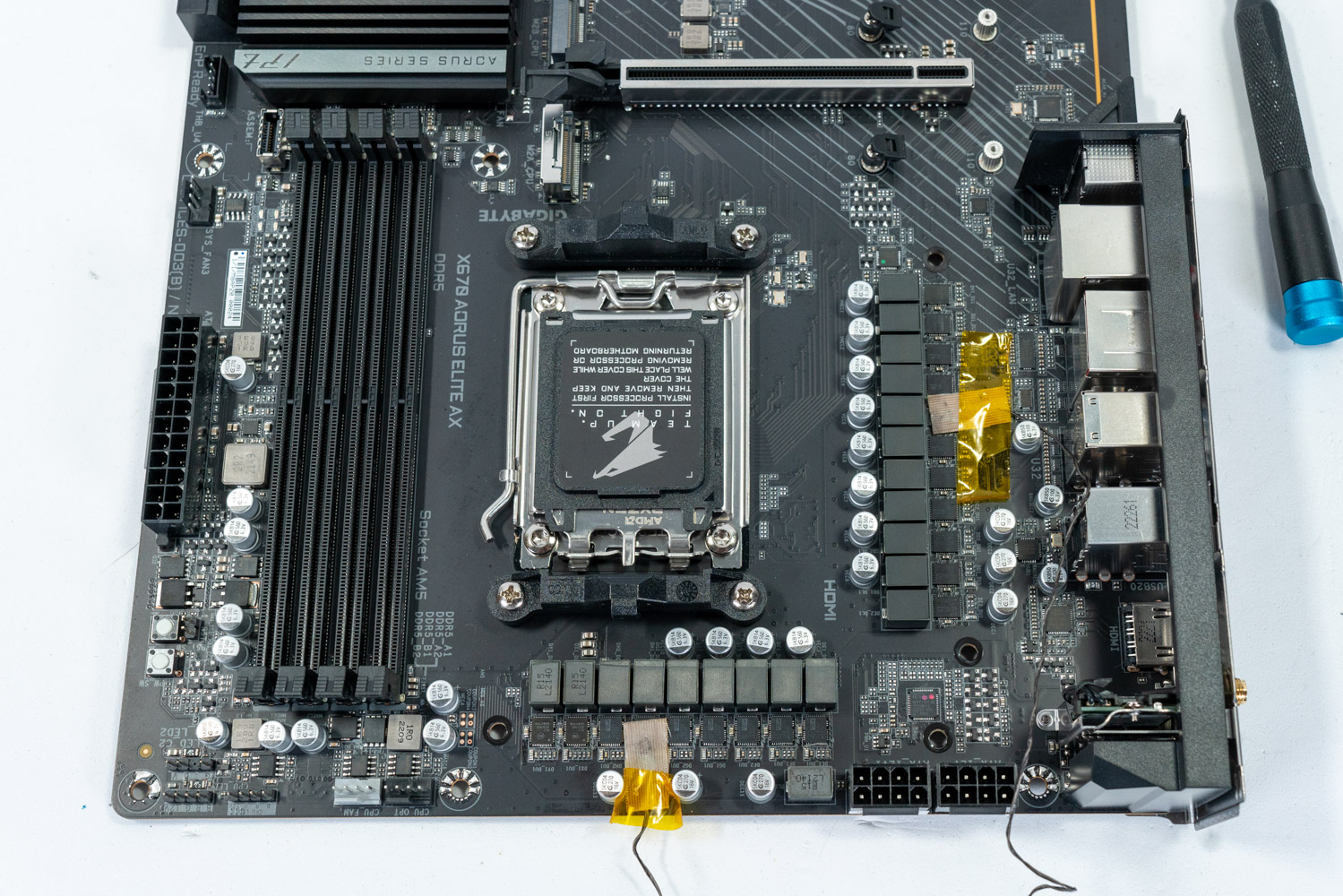
Does the board btw. offer any kind of power saving features, notably wrt S5?
"after system being turned off for a few hours" sounds like the wifi NIC loses some volatile memory and doesn't get properly reset on the first try.
Does it btw. help to delay the boot (ie. hang out in the bootloader and get a cup of coffee? Sorry if I already asked)
Offline
#36 2025-12-11 00:17:56
- TracerP
- Member
- Registered: 2025-11-18
- Posts: 13
Re: Network stops working after system being turned off for a few hours
Please double-check if you have a different user interface compared to me in uefi, maybe you must set it to advanced for the setting to show? If you find it, try to disable and see what happens.
yes I don't have "onboard wifi controller" switch, I do have wifi card but my uefi does not have functionality to disable it

I use KDE like the live env I tried. What DE do you use?
I use i3
Let's just say, I have 10 000% more trust in both arch and kernel developers compared to gigabyte firmware devs...
Yeah me too but Im using this board with arch linux for about a year now or longer and before that I was using it with windows without a problem so about 2years use without a problem (with 1year of using current arch setup), this is relatively "new" issue now It would be about a month or so, thats why I suspect bug
Are we not using the same uefi although we have the exact same version? What is your mobo rev? I have 1.1.
Im using X670 Gaming X AX board while you have X670 AORUS ELITE AX I was talking about chipset so we both having x670 chipset, boards are slightly different, but uses same realtek lan chip and same wifi chip if I'm not mistaken
I have rev 1.0
The wifi card is in the lower right corner of that picture, secured with a screw - not sure what that would do to your warranty
I long past the warranty but I would rather not mess up my only board so I would left unscrewing wifi card as last resort if possible
Does the board btw. offer any kind of power saving features, notably wrt S5?
Im not familliar with that, what is "wrt s5", could you point to some resources or expand that? I think I saw some power management there but I don't know what you are asking for
Edit: I think I found something it is called ErP it was disabled I change it to enabled. will check in the morning if anything changes
Does it btw. help to delay the boot (ie. hang out in the bootloader and get a cup of coffee? Sorry if I already asked)
I can try that in the morning
Last edited by TracerP (2025-12-11 00:33:29)
Offline
#37 2025-12-11 12:22:25
- TracerP
- Member
- Registered: 2025-11-18
- Posts: 13
Re: Network stops working after system being turned off for a few hours
So neither enabling ErP or waiting in the boot (about 5min) didn't help
Offline
#38 2025-12-11 15:24:49
- Bedna
- Member
- Registered: 2025-11-14
- Posts: 42
- Website
Re: Network stops working after system being turned off for a few hours
Im using X670 Gaming X AX board while you have X670 AORUS ELITE AX I was talking about chipset so we both having x670 chipset, boards are slightly different, but uses same realtek lan chip and same wifi chip if I'm not mistaken
I have rev 1.0
Oooh! I mixed up, it was on another forum there was a user with the exact same mobo. Sry...
I guess we have the explanation what happened with that gigabyte support technician "confirming" it did not exist. They did not check on the board I use but rather a similar board, even though I have to provide serial number even to be able to create a ticket.
Mine also has disable buttons for bluetooth and wifi...
The wifi card is in the lower right corner of that picture, secured with a screw - not sure what that would do to your warranty.
Interesting idea. My warranty is long gone and I might try that, just for testing purposes to see what happens. But I'd rather not unless someone can really confirm that the mobo won't become bricked or something if doing that.
Does the board btw. offer any kind of power saving features, notably wrt S5?
"after system being turned off for a few hours" sounds like the wifi NIC loses some volatile memory and doesn't get properly reset on the first try.
Check the links to ubuntu forums in OP. The wifi card not shutting down was exactly what happened and removing power to the mobo for +10 mins was the "fix". So your speculation can absolutely be true.
I could try enabling ErP too.
Does it btw. help to delay the boot (ie. hang out in the bootloader and get a cup of coffee? Sorry if I already asked)
"Haning out in uefi" does not help, I have tried that. But I had a cup of tea, I'm trying to cut down on my coffee... xD
Or do you mean "hanging around in grub menu"? (bootloader)
Not sure I have mentioned this, but not logging in via sddm but rather go directly to a tty also causes the issue, after a while network drops in tty too.
Offline
#39 2025-12-11 20:01:47
- xerxes_
- Member
- Registered: 2018-04-29
- Posts: 1,073
Re: Network stops working after system being turned off for a few hours
@TracerP:
To disable WiFi look in "Network Stack Configuration" (if you can go there).
@Both of you:
Did you properly blacklisted WiFi driver? Check driver name by 'lspci -k' and blacklist it in kernel command line: "module_blacklist=module_name", like here. Then you can check if kernel is trying to load and use other kernel driver for it and blacklist that one too. Blacklist all drivers that will be trying to use your wifi card.
Also you mentioned that Wifi card is using some realtek chip; you can try to downgrade only linux-firmware-realtek to some earlier versions by ala and test if that changes something.
Offline
#40 2025-12-11 22:50:12
- TracerP
- Member
- Registered: 2025-11-18
- Posts: 13
Re: Network stops working after system being turned off for a few hours
@TracerP:
To disable WiFi look in "Network Stack Configuration" (if you can go there).
@Both of you:
Did you properly blacklisted WiFi driver? Check driver name by 'lspci -k' and blacklist it in kernel command line: "module_blacklist=module_name", like here. Then you can check if kernel is trying to load and use other kernel driver for it and blacklist that one too. Blacklist all drivers that will be trying to use your wifi card.
Also you mentioned that Wifi card is using some realtek chip; you can try to downgrade only linux-firmware-realtek to some earlier versions by ala and test if that changes something.
Im on delegation for 2 days right now but I'm certain that there were no way to disable wifi in "Network Stack Configuration", but will confirm when I'm back, and will try downgrading "linux-firmware-realtek"
About blacklisting im pretty sure I did it right
 lspci -k | grep -i wireles -A 1
11:00.0 Network controller: MEDIATEK Corp. MT7922 802.11ax PCI Express Wireless Network Adapter
        Subsystem: MEDIATEK Corp. MT7922 802.11ax PCI Express Wireless Network Adapter
        Kernel modules: mt7921e
lsmod | grep mt7921e
*returns nothing*Check the links to ubuntu forums in OP. The wifi card not shutting down was exactly what happened and removing power to the mobo for +10 mins was the "fix". So your speculation can absolutely be true.
I did try something like that, I unplugged power supply from the power outlet and click couple of times power button to discharge any electric charge and left PC overnight but it didn't help, but maybe removing bios battery for some time will do anything different, I will test that when I'm back
Offline
#41 2025-12-11 23:42:09
- seth
- Member
- From: Won't reply 2 private help req
- Registered: 2012-09-03
- Posts: 77,861
Re: Network stops working after system being turned off for a few hours
I unplugged power supply from the power outlet and click couple of times power button to discharge any electric charge and left PC overnight but it didn't help
Hold on, the problem only happens for Bedna when the system was powered down for some time (and then works on the 2nd reboot)
You network doesn't work at all then?
Mediatek though is absolutely on the records for randomly "dying" and full power cuts are usually what remedies this.
Instead of removing the battery you could first also just try to reset the CMOS.
Offline
#42 2025-12-12 09:19:50
- TracerP
- Member
- Registered: 2025-11-18
- Posts: 13
Re: Network stops working after system being turned off for a few hours
Sorry for the confusion, my case is like Bedna, so after the PC is power off for at least 3 hours network dies (I also attached journals in one of my previous messages), after reboot it work flawless, so I'm booting and reboot immediately it works.
Mediatek is wifi chip it works without a problem (but I don't use it that often)
Lan chip is Realtek and that network connection dies, with Bedna we use same lan chip, with I would say same problems
Offline
#43 2025-12-12 10:00:52
- seth
- Member
- From: Won't reply 2 private help req
- Registered: 2012-09-03
- Posts: 77,861
Re: Network stops working after system being turned off for a few hours
Afaiu we still suspect the wlan chip to be the origin of the actual network failure, hence all the efforts to deactivate it.
And in that case blacklisting the module won't do - it needs to go off the bus.
If we'd abandon that for a moment you could test to explicitly move r8169 into the initramfs or "modprobe.blacklist=r8169" and only manually load it later (the module must NOT show up in the MODULES array for this to work because systemd would then load it explicitly) and you can also test the behavior of the https://aur.archlinux.org/packages/r8125-dkms module
Offline
#44 2025-12-12 23:16:54
- TracerP
- Member
- Registered: 2025-11-18
- Posts: 13
Re: Network stops working after system being turned off for a few hours
I tested r8125-dkms and r8125 from realtek page by building my own and it did not make any difference.
I will try to physically disconnect wlan chip from motherboard tommorow or on sunday when I will be fully rested.
Offline
#45 2025-12-13 08:06:55
- Bedna
- Member
- Registered: 2025-11-14
- Posts: 42
- Website
Re: Network stops working after system being turned off for a few hours
I can also confirm above.
I blacklisted r8169 in modprobe.d (strangely kernel parameter did not work, not even module_blacklist=r8169) and activated it manually with modprobe but network failed.
Installed r8125-dkms and it also failed a short while after first boot.
Last edited by Bedna (2025-12-13 08:07:32)
Offline
#46 2025-12-13 08:55:08
- seth
- Member
- From: Won't reply 2 private help req
- Registered: 2012-09-03
- Posts: 77,861
Re: Network stops working after system being turned off for a few hours
strangely kernel parameter did not work, not even module_blacklist=r8169
Means it doesn't get applied, check
cat /proc/cmdlineOffline
#47 2025-12-13 22:04:57
- Bedna
- Member
- Registered: 2025-11-14
- Posts: 42
- Website
Re: Network stops working after system being turned off for a few hours
$ cat /etc/default/grup | head -8
# GRUB boot loader configuration

#GRUB_DEFAULT=0
GRUB_DEFAULT="1>2"
GRUB_TIMEOUT=5
GRUB_DISTRIBUTOR="Arch"
GRUB_CMDLINE_LINUX_DEFAULT="module_blacklist=r8169 ipv6.disable=1 modeset=1 fbdev=1 nvidia-drm.modeset=1 loglevel=3 amd-pstate=guided udev.log-priority=info rd.udev.log_level=3"
GRUB_CMDLINE_LINUX="rootfstype=btrfs sysrq_always_enabled=1"

# mkinticpio -P

## I rebooted here

$ cat /proc/cmdline
BOOT_IMAGE=/@/boot/vmlinuz-linux root=UUID=78235068-f1ca-4363-99b1-474175fb3438 rw rootflags=subvol=@ rootfstype=btrfs sysrq_always_enabled=1 ipv6.disable=1 modeset=1 fbdev=1 nvidia-drm.modeset=1 loglevel=3 amd-pstate=guided udev.log-priority=info rd.udev.log_level=3
Seems you are correct, grub kernel parameters are ignored for some reason.
Maybe that is why I could not get udev to change loglevel...
Last edited by Bedna (2025-12-13 22:06:22)
Offline
#48 2025-12-13 22:10:28
- Scimmia
- Fellow

- Registered: 2012-09-01
- Posts: 13,729
Re: Network stops working after system being turned off for a few hours
Did you regenerate the config? That file is only to configure the generator, not configure grub.
Offline
#49 2025-12-13 22:17:28
- Bedna
- Member
- Registered: 2025-11-14
- Posts: 42
- Website
Re: Network stops working after system being turned off for a few hours
Did you regenerate the config? That file is only to configure the generator, not configure grub.
Holy crap you're fast, I was about to come in and edit that I FORGOT TO DO THAT... xD
After a grub-mkconfig the driver is not available.
I'll redo the test with r8125-dkms again, but with r8169 completely blacklisted this time.
It did use r8125 according to lspci, but I should make sure r8169 it is completely blacklisted and redo the tests tomorrow.
Sry for my noobiness...
Edit:
sudo modrpobe r8169
modprobe: ERROR: could not insert 'r8169': Operation not permitted

$ lspci -vv -s 0e:00.0
0e:00.0 Ethernet controller: Realtek Semiconductor Co., Ltd. RTL8125 2.5GbE Controller (rev 05)
        Subsystem: Gigabyte Technology Co., Ltd Device e000
        Control: I/O+ Mem+ BusMaster+ SpecCycle- MemWINV- VGASnoop- ParErr- Stepping- SERR- FastB2B- DisINTx+
        Status: Cap+ 66MHz- UDF- FastB2B- ParErr- DEVSEL=fast >TAbort- <TAbort- <MAbort- >SERR- <PERR- INTx-
        Latency: 0, Cache Line Size: 64 bytes
        Interrupt: pin A routed to IRQ 37
        IOMMU group: 20
        Region 0: I/O ports at e000 [size=256]
        Region 2: Memory at f6600000 (64-bit, non-prefetchable) [size=64K]
        Region 4: Memory at f6610000 (64-bit, non-prefetchable) [size=16K]
        Capabilities: <access denied>
        Kernel driver in use: r8125
        Kernel modules: r8169, r8125
I can't modprobe it to add now, but why is it still showing in "Kernel modules"?
I'll redo tests with only r8125 available tomorrow.
Last edited by Bedna (2025-12-13 22:30:34)
Offline
#50 2025-12-13 23:58:42
- Bedna
- Member
- Registered: 2025-11-14
- Posts: 42
- Website
Re: Network stops working after system being turned off for a few hours
After updating today, using r8125 while blacklisting r8169 broke for me after a reboot.
When I wrote above, I had rebooted and ran with r8125 while r8169 blacklisted in kernel parameters.
After updating my system and a reboot, my network were no longer available at all. I had to remove the kernel parameter and reboot.
"sudo modprobe r8125" did nothing.
I took care of the 3 .pacnew:s I got.
[2025-12-14T00:06:26+0100] [PACMAN] Running 'pacman -Syu'
[2025-12-14T00:06:26+0100] [PACMAN] synchronizing package lists
[2025-12-14T00:06:28+0100] [PACMAN] starting full system upgrade
[2025-12-14T00:06:53+0100] [ALPM] running '00-timeshift-autosnap.hook'...
[2025-12-14T00:06:53+0100] [ALPM-SCRIPTLET] Using system disk as snapshot device for creating snapshots in BTRFS mode
[2025-12-14T00:06:53+0100] [ALPM-SCRIPTLET] Mounted '/dev/nvme0n1p2' (subvolid=0) at '/run/timeshift/16148/backup'
[2025-12-14T00:06:53+0100] [ALPM-SCRIPTLET] Mounted '/dev/nvme0n1p3' (subvolid=0) at '/run/timeshift/16148/backup-home'
[2025-12-14T00:06:53+0100] [ALPM-SCRIPTLET] btrfs: Quotas are not enabled
[2025-12-14T00:06:53+0100] [ALPM-SCRIPTLET] Creating new backup...(BTRFS)
[2025-12-14T00:06:53+0100] [ALPM-SCRIPTLET] Saving to device: /dev/nvme0n1p2, mounted at path: /run/timeshift/16148/backup
[2025-12-14T00:06:53+0100] [ALPM-SCRIPTLET] Saving to device: /dev/nvme0n1p3, mounted at path: /run/timeshift/16148/backup-home
[2025-12-14T00:06:53+0100] [ALPM-SCRIPTLET] Created directory: /run/timeshift/16148/backup/timeshift-btrfs/snapshots/2025-12-14_00-06-53
[2025-12-14T00:06:53+0100] [ALPM-SCRIPTLET] Created subvolume snapshot: /run/timeshift/16148/backup/timeshift-btrfs/snapshots/2025-12-14_00-06-53/@
[2025-12-14T00:06:53+0100] [ALPM-SCRIPTLET] Created control file: /run/timeshift/16148/backup/timeshift-btrfs/snapshots/2025-12-14_00-06-53/info.json
[2025-12-14T00:06:53+0100] [ALPM-SCRIPTLET] BTRFS Snapshot saved successfully (0s)
[2025-12-14T00:06:53+0100] [ALPM-SCRIPTLET] Tagged snapshot '2025-12-14_00-06-53': ondemand
[2025-12-14T00:06:53+0100] [ALPM-SCRIPTLET] ------------------------------------------------------------------------------
[2025-12-14T00:06:54+0100] [ALPM-SCRIPTLET] Mounted '/dev/nvme0n1p2' (subvolid=0) at '/run/timeshift/16334/backup'
[2025-12-14T00:06:54+0100] [ALPM-SCRIPTLET] Mounted '/dev/nvme0n1p3' (subvolid=0) at '/run/timeshift/16334/backup-home'
[2025-12-14T00:06:54+0100] [ALPM-SCRIPTLET] btrfs: Quotas are not enabled
[2025-12-14T00:06:54+0100] [ALPM-SCRIPTLET] ------------------------------------------------------------------------------
[2025-12-14T00:06:54+0100] [ALPM-SCRIPTLET] Removing snapshot: 2025-12-11_16-52-59
[2025-12-14T00:06:54+0100] [ALPM-SCRIPTLET] Deleting subvolume: @ (Id:3224)
[2025-12-14T00:07:12+0100] [ALPM-SCRIPTLET] Deleted subvolume: @ (Id:3224)
[2025-12-14T00:07:12+0100] [ALPM-SCRIPTLET]
[2025-12-14T00:07:12+0100] [ALPM-SCRIPTLET] Deleted directory: /run/timeshift/16334/backup/timeshift-btrfs/snapshots/2025-12-11_16-52-59
[2025-12-14T00:07:12+0100] [ALPM-SCRIPTLET] Deleted directory: /run/timeshift/16334/backup/timeshift-btrfs/snapshots/2025-12-11_16-52-59
[2025-12-14T00:07:12+0100] [ALPM-SCRIPTLET] Removed snapshot: 2025-12-11_16-52-59
[2025-12-14T00:07:12+0100] [ALPM-SCRIPTLET] ------------------------------------------------------------------------------
[2025-12-14T00:07:12+0100] [ALPM] transaction started
[2025-12-14T00:07:12+0100] [ALPM] upgraded systemd-libs (258.2-2 -> 258.3-1)
[2025-12-14T00:07:12+0100] [ALPM] upgraded spirv-tools (1:1.4.328.1-1 -> 1:1.4.335.0-1)
[2025-12-14T00:07:12+0100] [ALPM] upgraded attica (6.20.0-1 -> 6.21.0-1)
[2025-12-14T00:07:12+0100] [ALPM] upgraded kconfig (6.20.0-1 -> 6.21.0-1)
[2025-12-14T00:07:12+0100] [ALPM] upgraded kcoreaddons (6.20.0-1 -> 6.21.0-1)
[2025-12-14T00:07:12+0100] [ALPM] upgraded kcrash (6.20.0-1 -> 6.21.0-1)
[2025-12-14T00:07:12+0100] [ALPM] upgraded kdbusaddons (6.20.0-1 -> 6.21.0-1)
[2025-12-14T00:07:12+0100] [ALPM] upgraded glslang (1:1.4.328.1-1 -> 1:1.4.335.0-1)
[2025-12-14T00:07:12+0100] [ALPM] upgraded vulkan-icd-loader (1.4.328.1-1 -> 1.4.335.0-1)
[2025-12-14T00:07:12+0100] [ALPM] upgraded shaderc (2025.4-2 -> 2025.5-1)
[2025-12-14T00:07:12+0100] [ALPM] upgraded libplacebo (7.351.0-3 -> 7.351.0-4)
[2025-12-14T00:07:12+0100] [ALPM] upgraded ffmpeg (2:8.0.1-1 -> 2:8.0.1-2)
[2025-12-14T00:07:12+0100] [ALPM] upgraded karchive (6.20.0-1 -> 6.21.0-1)
[2025-12-14T00:07:12+0100] [ALPM] upgraded kcodecs (6.20.0-1 -> 6.21.0-1)
[2025-12-14T00:07:12+0100] [ALPM] upgraded ki18n (6.20.0-1 -> 6.21.0-1)
[2025-12-14T00:07:12+0100] [ALPM] upgraded kfilemetadata (6.20.0-1 -> 6.21.0-1)
[2025-12-14T00:07:12+0100] [ALPM] upgraded kidletime (6.20.0-1 -> 6.21.0-1)
[2025-12-14T00:07:12+0100] [ALPM] upgraded kwidgetsaddons (6.20.0-1 -> 6.21.0-1)
[2025-12-14T00:07:12+0100] [ALPM] upgraded kbookmarks (6.20.0-1 -> 6.21.0-1)
[2025-12-14T00:07:12+0100] [ALPM] upgraded kguiaddons (6.20.0-1 -> 6.21.0-1)
[2025-12-14T00:07:13+0100] [ALPM] upgraded kcolorscheme (6.20.0-1 -> 6.21.0-1)
[2025-12-14T00:07:13+0100] [ALPM] upgraded kcompletion (6.20.0-1 -> 6.21.0-1)
[2025-12-14T00:07:15+0100] [ALPM] upgraded breeze-icons (6.20.0-1 -> 6.21.0-1)
[2025-12-14T00:07:15+0100] [ALPM] upgraded kiconthemes (6.20.0-1 -> 6.21.0-1)
[2025-12-14T00:07:15+0100] [ALPM] upgraded kitemviews (6.20.0-1 -> 6.21.0-1)
[2025-12-14T00:07:15+0100] [ALPM] upgraded knotifications (6.20.0-1 -> 6.21.0-1)
[2025-12-14T00:07:15+0100] [ALPM] upgraded kjobwidgets (6.20.0-1 -> 6.21.0-1)
[2025-12-14T00:07:15+0100] [ALPM] upgraded kservice (6.20.0-1 -> 6.21.0-1)
[2025-12-14T00:07:15+0100] [ALPM] upgraded kwindowsystem (6.20.0-1 -> 6.21.0-1)
[2025-12-14T00:07:15+0100] [ALPM] upgraded kwallet (6.20.0-1 -> 6.21.0-1)
[2025-12-14T00:07:15+0100] [ALPM] upgraded systemd (258.2-2 -> 258.3-1)
[2025-12-14T00:07:16+0100] [ALPM] upgraded solid (6.20.0-1 -> 6.21.0-1)
[2025-12-14T00:07:16+0100] [ALPM] upgraded kio (6.20.0-1 -> 6.21.0-1)
[2025-12-14T00:07:16+0100] [ALPM] upgraded baloo (6.20.0-1 -> 6.21.0-1)
[2025-12-14T00:07:16+0100] [ALPM] upgraded bluez-qt (6.20.0-1 -> 6.21.0-1)
[2025-12-14T00:07:16+0100] [ALPM] upgraded kconfigwidgets (6.20.0-1 -> 6.21.0-1)
[2025-12-14T00:07:16+0100] [ALPM] upgraded kirigami (6.20.0-1 -> 6.21.0-1)
[2025-12-14T00:07:16+0100] [ALPM] upgraded kglobalaccel (6.20.0-1 -> 6.21.0-1)
[2025-12-14T00:07:16+0100] [ALPM] upgraded kxmlgui (6.20.0-1 -> 6.21.0-1)
[2025-12-14T00:07:16+0100] [ALPM] upgraded kcmutils (6.20.0-1 -> 6.21.0-1)
[2025-12-14T00:07:16+0100] [ALPM] upgraded kpackage (6.20.0-1 -> 6.21.0-1)
[2025-12-14T00:07:16+0100] [ALPM] upgraded syndication (6.20.0-1 -> 6.21.0-1)
[2025-12-14T00:07:16+0100] [ALPM] upgraded knewstuff (6.20.0-1 -> 6.21.0-1)
[2025-12-14T00:07:16+0100] [ALPM] upgraded frameworkintegration (6.20.0-1 -> 6.21.0-1)
[2025-12-14T00:07:16+0100] [ALPM] upgraded freerdp (2:3.19.0-1 -> 2:3.19.1-1)
[2025-12-14T00:07:16+0100] [ALPM] upgraded goverlay (1.6.1-1 -> 1.6.2-1)
[2025-12-14T00:07:16+0100] [ALPM] upgraded kauth (6.20.0-1 -> 6.21.0-1)
[2025-12-14T00:07:16+0100] [ALPM] upgraded kcontacts (1:6.20.0-1 -> 1:6.21.0-1)
[2025-12-14T00:07:16+0100] [ALPM] upgraded kdeclarative (6.20.0-1 -> 6.21.0-1)
[2025-12-14T00:07:16+0100] [ALPM] upgraded kded (6.20.0-1 -> 6.21.0-1)
[2025-12-14T00:07:16+0100] [ALPM] upgraded kpty (6.20.0-1 -> 6.21.0-1)
[2025-12-14T00:07:16+0100] [ALPM] upgraded kdesu (6.20.0-1 -> 6.21.0-1)
[2025-12-14T00:07:16+0100] [ALPM] upgraded kdnssd (6.20.0-1 -> 6.21.0-1)
[2025-12-14T00:07:16+0100] [ALPM] upgraded kholidays (1:6.20.0-1 -> 1:6.21.0-1)
[2025-12-14T00:07:17+0100] [ALPM] upgraded kimageformats (6.20.0-1 -> 6.21.0-1)
[2025-12-14T00:07:17+0100] [ALPM] upgraded kitemmodels (6.20.0-1 -> 6.21.0-1)
[2025-12-14T00:07:17+0100] [ALPM] upgraded knotifyconfig (6.20.0-1 -> 6.21.0-1)
[2025-12-14T00:07:17+0100] [ALPM] upgraded kparts (6.20.0-1 -> 6.21.0-1)
[2025-12-14T00:07:17+0100] [ALPM] upgraded kpeople (6.20.0-1 -> 6.21.0-1)
[2025-12-14T00:07:17+0100] [ALPM] upgraded kquickcharts (6.20.0-1 -> 6.21.0-1)
[2025-12-14T00:07:17+0100] [ALPM] upgraded krunner (6.20.0-1 -> 6.21.0-1)
[2025-12-14T00:07:17+0100] [ALPM] upgraded kstatusnotifieritem (6.20.0-1 -> 6.21.0-1)
[2025-12-14T00:07:17+0100] [ALPM] upgraded ksvg (6.20.0-1 -> 6.21.0-1)
[2025-12-14T00:07:17+0100] [ALPM] upgraded sonnet (6.20.0-1 -> 6.21.0-1)
[2025-12-14T00:07:17+0100] [ALPM] upgraded syntax-highlighting (6.20.0-1 -> 6.21.0-1)
[2025-12-14T00:07:17+0100] [ALPM] upgraded ktexteditor (6.20.0-1 -> 6.21.0-1)
[2025-12-14T00:07:17+0100] [ALPM] upgraded ktextwidgets (6.20.0-1 -> 6.21.0-1)
[2025-12-14T00:07:17+0100] [ALPM] upgraded kunitconversion (6.20.0-1 -> 6.21.0-1)
[2025-12-14T00:07:17+0100] [ALPM] upgraded kuserfeedback (6.20.0-1 -> 6.21.0-1)
[2025-12-14T00:07:17+0100] [ALPM] upgraded lib32-spirv-tools (1:1.4.328.1-1 -> 1:1.4.335.0-1)
[2025-12-14T00:07:17+0100] [ALPM] upgraded lib32-systemd (258.2-1 -> 258.3-1)
[2025-12-14T00:07:17+0100] [ALPM] upgraded lib32-vulkan-icd-loader (1.4.328.1-1 -> 1.4.335.0-1)
[2025-12-14T00:07:17+0100] [ALPM] upgraded modemmanager-qt (6.20.0-1 -> 6.21.0-1)
[2025-12-14T00:07:17+0100] [ALPM] upgraded networkmanager-qt (6.20.0-1 -> 6.21.0-1)
[2025-12-14T00:07:17+0100] [ALPM] installed libmakepkg-dropins (18-1)
[2025-12-14T00:07:17+0100] [ALPM] warning: /etc/makepkg.conf installed as /etc/makepkg.conf.pacnew
[2025-12-14T00:07:17+0100] [ALPM] warning: /etc/makepkg.conf.d/fortran.conf installed as /etc/makepkg.conf.d/fortran.conf.pacnew
[2025-12-14T00:07:17+0100] [ALPM] warning: /etc/pacman.conf installed as /etc/pacman.conf.pacnew
[2025-12-14T00:07:17+0100] [ALPM] upgraded pacman (7.0.0.r6.gc685ae6-6 -> 7.1.0.r7.gb9f7d4a-1)
[2025-12-14T00:07:17+0100] [ALPM] upgraded pacman-contrib (1.13.0-1 -> 1.13.1-1)
[2025-12-14T00:07:17+0100] [ALPM] upgraded perl-capture-tiny (0.50-3 -> 0.50-4)
[2025-12-14T00:07:18+0100] [ALPM] upgraded perl-alien-build (2.84-3 -> 2.84-4)
[2025-12-14T00:07:18+0100] [ALPM] upgraded perl-alien-libxml2 (0.20-3 -> 0.20-4)
[2025-12-14T00:07:18+0100] [ALPM] upgraded perl-image-exiftool (13.36-1 -> 13.36-2)
[2025-12-14T00:07:18+0100] [ALPM] upgraded prison (6.20.0-1 -> 6.21.0-1)
[2025-12-14T00:07:18+0100] [ALPM] upgraded purpose (6.20.0-1 -> 6.21.0-1)
[2025-12-14T00:07:18+0100] [ALPM] upgraded qqc2-desktop-style (6.20.0-1 -> 6.21.0-1)
[2025-12-14T00:07:18+0100] [ALPM] upgraded systemd-sysvcompat (258.2-2 -> 258.3-1)
[2025-12-14T00:07:18+0100] [ALPM] upgraded threadweaver (6.20.0-1 -> 6.21.0-1)
[2025-12-14T00:07:18+0100] [ALPM] upgraded timeshift (25.07.7-1 -> 25.12.1-1)
[2025-12-14T00:07:18+0100] [ALPM-SCRIPTLET] TimeShift scheduled backups require the cronie.service to be running.
[2025-12-14T00:07:18+0100] [ALPM-SCRIPTLET] Try:
[2025-12-14T00:07:18+0100] [ALPM-SCRIPTLET]   systemctl enable --now cronie.service
[2025-12-14T00:07:18+0100] [ALPM] upgraded vulkan-tools (1.4.328.1-1 -> 1.4.335.0-1)
[2025-12-14T00:07:18+0100] [ALPM] transaction completed
[2025-12-14T00:07:19+0100] [ALPM] running '20-systemd-sysusers.hook'...
[2025-12-14T00:07:19+0100] [ALPM] running '30-systemd-catalog.hook'...
[2025-12-14T00:07:19+0100] [ALPM] running '30-systemd-daemon-reload-system.hook'...
[2025-12-14T00:07:19+0100] [ALPM] running '30-systemd-daemon-reload-user.hook'...
[2025-12-14T00:07:19+0100] [ALPM] running '30-systemd-hwdb.hook'...
[2025-12-14T00:07:20+0100] [ALPM] running '30-systemd-restart-marked.hook'...
[2025-12-14T00:07:20+0100] [ALPM] running '30-systemd-sysctl.hook'...
[2025-12-14T00:07:20+0100] [ALPM] running '30-systemd-tmpfiles.hook'...
[2025-12-14T00:07:20+0100] [ALPM] running '30-systemd-udev-reload.hook'...
[2025-12-14T00:07:22+0100] [ALPM] running '30-systemd-update.hook'...
[2025-12-14T00:07:22+0100] [ALPM] running '30-update-mime-database.hook'...
[2025-12-14T00:07:22+0100] [ALPM] running '90-mkinitcpio-install.hook'...
[2025-12-14T00:07:22+0100] [ALPM-SCRIPTLET] ==> Building image from preset: /etc/mkinitcpio.d/linux-lts.preset: 'default'
[2025-12-14T00:07:22+0100] [ALPM-SCRIPTLET] ==> Using default configuration file: '/etc/mkinitcpio.conf'
[2025-12-14T00:07:22+0100] [ALPM-SCRIPTLET]   -> -k /boot/vmlinuz-linux-lts -g /boot/initramfs-linux-lts.img
[2025-12-14T00:07:22+0100] [ALPM-SCRIPTLET] ==> Starting build: '6.12.61-1-lts'
[2025-12-14T00:07:22+0100] [ALPM-SCRIPTLET]   -> Running build hook: [base]
[2025-12-14T00:07:22+0100] [ALPM-SCRIPTLET]   -> Running build hook: [udev]
[2025-12-14T00:07:22+0100] [ALPM-SCRIPTLET]   -> Running build hook: [autodetect]
[2025-12-14T00:07:22+0100] [ALPM-SCRIPTLET]   -> Running build hook: [microcode]
[2025-12-14T00:07:22+0100] [ALPM-SCRIPTLET]   -> Running build hook: [keyboard]
[2025-12-14T00:07:23+0100] [ALPM-SCRIPTLET]   -> Running build hook: [keymap]
[2025-12-14T00:07:23+0100] [ALPM-SCRIPTLET]   -> Running build hook: [modconf]
[2025-12-14T00:07:23+0100] [ALPM-SCRIPTLET]   -> Running build hook: [block]
[2025-12-14T00:07:23+0100] [ALPM-SCRIPTLET]   -> Running build hook: [filesystems]
[2025-12-14T00:07:24+0100] [ALPM-SCRIPTLET] ==> Generating module dependencies
[2025-12-14T00:07:24+0100] [ALPM-SCRIPTLET] ==> Creating zstd-compressed initcpio image: '/boot/initramfs-linux-lts.img'
[2025-12-14T00:07:24+0100] [ALPM-SCRIPTLET]   -> Early uncompressed CPIO image generation successful
[2025-12-14T00:07:24+0100] [ALPM-SCRIPTLET] ==> Initcpio image generation successful
[2025-12-14T00:07:24+0100] [ALPM-SCRIPTLET] ==> Building image from preset: /etc/mkinitcpio.d/linux-lts.preset: 'fallback'
[2025-12-14T00:07:24+0100] [ALPM-SCRIPTLET] ==> Using default configuration file: '/etc/mkinitcpio.conf'
[2025-12-14T00:07:24+0100] [ALPM-SCRIPTLET]   -> -k /boot/vmlinuz-linux-lts -g /boot/initramfs-linux-lts-fallback.img -S autodetect
[2025-12-14T00:07:24+0100] [ALPM-SCRIPTLET] ==> Starting build: '6.12.61-1-lts'
[2025-12-14T00:07:24+0100] [ALPM-SCRIPTLET]   -> Running build hook: [base]
[2025-12-14T00:07:24+0100] [ALPM-SCRIPTLET]   -> Running build hook: [udev]
[2025-12-14T00:07:24+0100] [ALPM-SCRIPTLET]   -> Running build hook: [microcode]
[2025-12-14T00:07:24+0100] [ALPM-SCRIPTLET]   -> Running build hook: [keyboard]
[2025-12-14T00:07:24+0100] [ALPM-SCRIPTLET] ==> WARNING: Possibly missing firmware for module: 'xhci_pci_renesas'
[2025-12-14T00:07:25+0100] [ALPM-SCRIPTLET]   -> Running build hook: [keymap]
[2025-12-14T00:07:25+0100] [ALPM-SCRIPTLET]   -> Running build hook: [modconf]
[2025-12-14T00:07:25+0100] [ALPM-SCRIPTLET]   -> Running build hook: [block]
[2025-12-14T00:07:25+0100] [ALPM-SCRIPTLET] ==> WARNING: Possibly missing firmware for module: 'aic94xx'
[2025-12-14T00:07:25+0100] [ALPM-SCRIPTLET] ==> WARNING: Possibly missing firmware for module: 'bfa'
[2025-12-14T00:07:26+0100] [ALPM-SCRIPTLET] ==> WARNING: Possibly missing firmware for module: 'qed'
[2025-12-14T00:07:26+0100] [ALPM-SCRIPTLET] ==> WARNING: Possibly missing firmware for module: 'qla1280'
[2025-12-14T00:07:26+0100] [ALPM-SCRIPTLET] ==> WARNING: Possibly missing firmware for module: 'qla2xxx'
[2025-12-14T00:07:26+0100] [ALPM-SCRIPTLET] ==> WARNING: Possibly missing firmware for module: 'wd719x'
[2025-12-14T00:07:27+0100] [ALPM-SCRIPTLET]   -> Running build hook: [filesystems]
[2025-12-14T00:07:29+0100] [ALPM-SCRIPTLET] ==> Generating module dependencies
[2025-12-14T00:07:29+0100] [ALPM-SCRIPTLET] ==> Creating zstd-compressed initcpio image: '/boot/initramfs-linux-lts-fallback.img'
[2025-12-14T00:07:30+0100] [ALPM-SCRIPTLET]   -> Early uncompressed CPIO image generation successful
[2025-12-14T00:07:30+0100] [ALPM-SCRIPTLET] ==> Initcpio image generation successful
[2025-12-14T00:07:30+0100] [ALPM-SCRIPTLET] ==> Building image from preset: /etc/mkinitcpio.d/linux.preset: 'default'
[2025-12-14T00:07:30+0100] [ALPM-SCRIPTLET] ==> Using default configuration file: '/etc/mkinitcpio.conf'
[2025-12-14T00:07:30+0100] [ALPM-SCRIPTLET]   -> -k /boot/vmlinuz-linux -g /boot/initramfs-linux.img
[2025-12-14T00:07:30+0100] [ALPM-SCRIPTLET] ==> Starting build: '6.17.9-arch1-1'
[2025-12-14T00:07:30+0100] [ALPM-SCRIPTLET]   -> Running build hook: [base]
[2025-12-14T00:07:30+0100] [ALPM-SCRIPTLET]   -> Running build hook: [udev]
[2025-12-14T00:07:30+0100] [ALPM-SCRIPTLET]   -> Running build hook: [autodetect]
[2025-12-14T00:07:31+0100] [ALPM-SCRIPTLET]   -> Running build hook: [microcode]
[2025-12-14T00:07:31+0100] [ALPM-SCRIPTLET]   -> Running build hook: [keyboard]
[2025-12-14T00:07:31+0100] [ALPM-SCRIPTLET]   -> Running build hook: [keymap]
[2025-12-14T00:07:31+0100] [ALPM-SCRIPTLET]   -> Running build hook: [modconf]
[2025-12-14T00:07:31+0100] [ALPM-SCRIPTLET]   -> Running build hook: [block]
[2025-12-14T00:07:31+0100] [ALPM-SCRIPTLET]   -> Running build hook: [filesystems]
[2025-12-14T00:07:32+0100] [ALPM-SCRIPTLET] ==> Generating module dependencies
[2025-12-14T00:07:32+0100] [ALPM-SCRIPTLET] ==> Creating zstd-compressed initcpio image: '/boot/initramfs-linux.img'
[2025-12-14T00:07:32+0100] [ALPM-SCRIPTLET]   -> Early uncompressed CPIO image generation successful
[2025-12-14T00:07:32+0100] [ALPM-SCRIPTLET] ==> Initcpio image generation successful
[2025-12-14T00:07:32+0100] [ALPM-SCRIPTLET] ==> Building image from preset: /etc/mkinitcpio.d/linux.preset: 'fallback'
[2025-12-14T00:07:32+0100] [ALPM-SCRIPTLET] ==> Using default configuration file: '/etc/mkinitcpio.conf'
[2025-12-14T00:07:32+0100] [ALPM-SCRIPTLET]   -> -k /boot/vmlinuz-linux -g /boot/initramfs-linux-fallback.img -S autodetect
[2025-12-14T00:07:32+0100] [ALPM-SCRIPTLET] ==> Starting build: '6.17.9-arch1-1'
[2025-12-14T00:07:32+0100] [ALPM-SCRIPTLET]   -> Running build hook: [base]
[2025-12-14T00:07:32+0100] [ALPM-SCRIPTLET]   -> Running build hook: [udev]
[2025-12-14T00:07:32+0100] [ALPM-SCRIPTLET]   -> Running build hook: [microcode]
[2025-12-14T00:07:32+0100] [ALPM-SCRIPTLET]   -> Running build hook: [keyboard]
[2025-12-14T00:07:33+0100] [ALPM-SCRIPTLET] ==> WARNING: Possibly missing firmware for module: 'xhci_pci_renesas'
[2025-12-14T00:07:33+0100] [ALPM-SCRIPTLET]   -> Running build hook: [keymap]
[2025-12-14T00:07:33+0100] [ALPM-SCRIPTLET]   -> Running build hook: [modconf]
[2025-12-14T00:07:33+0100] [ALPM-SCRIPTLET]   -> Running build hook: [block]
[2025-12-14T00:07:34+0100] [ALPM-SCRIPTLET] ==> WARNING: Possibly missing firmware for module: 'aic94xx'
[2025-12-14T00:07:34+0100] [ALPM-SCRIPTLET] ==> WARNING: Possibly missing firmware for module: 'bfa'
[2025-12-14T00:07:34+0100] [ALPM-SCRIPTLET] ==> WARNING: Possibly missing firmware for module: 'qed'
[2025-12-14T00:07:34+0100] [ALPM-SCRIPTLET] ==> WARNING: Possibly missing firmware for module: 'qla1280'
[2025-12-14T00:07:34+0100] [ALPM-SCRIPTLET] ==> WARNING: Possibly missing firmware for module: 'qla2xxx'
[2025-12-14T00:07:34+0100] [ALPM-SCRIPTLET] ==> WARNING: Possibly missing firmware for module: 'wd719x'
[2025-12-14T00:07:36+0100] [ALPM-SCRIPTLET]   -> Running build hook: [filesystems]
[2025-12-14T00:07:38+0100] [ALPM-SCRIPTLET] ==> Generating module dependencies
[2025-12-14T00:07:38+0100] [ALPM-SCRIPTLET] ==> Creating zstd-compressed initcpio image: '/boot/initramfs-linux-fallback.img'
[2025-12-14T00:07:38+0100] [ALPM-SCRIPTLET]   -> Early uncompressed CPIO image generation successful
[2025-12-14T00:07:38+0100] [ALPM-SCRIPTLET] ==> Initcpio image generation successful
[2025-12-14T00:07:38+0100] [ALPM] running 'dbus-reload.hook'...
[2025-12-14T00:07:39+0100] [ALPM] running 'detect-old-perl-modules.hook'...
[2025-12-14T00:07:39+0100] [ALPM] running 'gtk-update-icon-cache.hook'...
[2025-12-14T00:07:39+0100] [ALPM] running 'update-desktop-database.hook'...
$ lspci -vv -s 0e:00.0
0e:00.0 Ethernet controller: Realtek Semiconductor Co., Ltd. RTL8125 2.5GbE Controller (rev 05)
Subsystem: Gigabyte Technology Co., Ltd Device e000
Control: I/O- Mem- BusMaster- SpecCycle- MemWINV- VGASnoop- ParErr- Stepping- SERR- FastB2B- DisINTx-
Status: Cap+ 66MHz- UDF- FastB2B- ParErr- DEVSEL=fast >TAbort- <TAbort- <MAbort- >SERR- <PERR- INTx-
Interrupt: pin A routed to IRQ 37
IOMMU group: 20
Capabilities: <access denied>
Kernel modules: r8169, r8125$ inxi -Na
Network:
Device-1: Realtek RTL8125 2.5GbE vendor: Gigabyte driver: N/A
modules: r8169, r8125 pcie: gen: 2 speed: 5 GT/s lanes: 1 port: N/A
bus-ID: 0e:00.0 chip-ID: 10ec:8125 class-ID: 0200
Device-2: MEDIATEK MT7922 802.11ax PCI Express Wireless Network Adapter
driver: mt7921e v: kernel pcie: gen: 2 speed: 5 GT/s lanes: 1
bus-ID: 0f:00.0 chip-ID: 14c3:0616 class-ID: 0280Offline