You are not logged in.
- Topics: Active | Unanswered
#1 2026-01-28 19:42:20
- zhihuiyuze
- Member
- Registered: 2022-12-27
- Posts: 52
- Website
Unable to mount Bcachefs on Arch Linux after reinstalling Windows
My laptop is equipped with two SSDs: one serves as the Windows drive, and the other acts as the boot drive for Arch Linux. The BIOS is configured to boot from the Arch drive (the second drive). I previously copied the Windows boot files to this drive to enable dual-boot selection via the bootloader.
The Arch drive is set up using Bcachefs on LVM on LUKS. Automatic decryption is implemented via TPM 2.0 (PCR 7+11 policy).
Since my Windows 11 C: drive was full and there was a partition separating the C: and D: drives, I decided to reinstall Windows 11. During the installation process, I attempted to prevent the Windows installer from detecting the boot files on the second hard drive (the Linux drive) by disabling all boot options located on the second drive before booting the installation media.
However, after the installation was complete, I discovered that Windows had wiped all boot entries from the first drive and only preserved the entries for the second drive.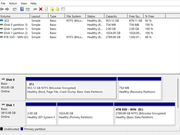
I can currently boot into Windows normally. Furthermore, the Linux-based system selection menu (bootloader) located on the second drive still loads correctly at startup. However, I am unable to actually boot into the Linux system.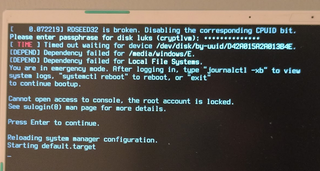
Subsequently, I disabled Secure Boot and booted into an Arch Live environment. The LUKS container verifies and decrypts correctly, but I am unable to mount the Bcachefs root partition within the Arch Live environment.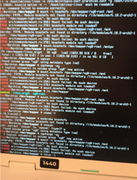
Here are my diagnostic findings:
1. I checked the partition table and the LUKS header, everything appears to be normal.
2. When attempting to mount Bcachefs, it reports that the volume does not exist.
3. I have confirmed that I have already activated vg0.
Given that I can successfully unlock the LUKS container but still fail to boot into the system, I suspect the Windows 11 installer corrupted something critical required to read the system files.
The Arch Linux kernel should natively include Bcachefs support, so no extra installation should be required.
Offline
#2 2026-01-28 19:50:24
- Scimmia
- Fellow

- Registered: 2012-09-01
- Posts: 13,729
Re: Unable to mount Bcachefs on Arch Linux after reinstalling Windows
The Arch Linux kernel should natively include Bcachefs support, so no extra installation should be required.
Nope. It was removed upstream with 6.18.
Offline
#3 2026-01-28 20:11:48
- zhihuiyuze
- Member
- Registered: 2022-12-27
- Posts: 52
- Website
Re: Unable to mount Bcachefs on Arch Linux after reinstalling Windows
zhihuiyuze wrote:The Arch Linux kernel should natively include Bcachefs support, so no extra installation should be required.
Nope. It was removed upstream with 6.18.
Is there any way that I can install the module with bcachefs in live or should I use an older version?
I double-check that my kernel for the arch on the PC is not in the live is 6.17.8 zen and g14 kernels which it means that it should not be the case.
Offline
#4 2026-01-28 20:20:56
- Scimmia
- Fellow
- Registered: 2012-09-01
- Posts: 13,729
Re: Unable to mount Bcachefs on Arch Linux after reinstalling Windows
No easy way that I know of, just use an older ISO.
You haven't updated in over 2 months?
Offline
#5 2026-01-29 04:29:17
- zhihuiyuze
- Member
- Registered: 2022-12-27
- Posts: 52
- Website
Re: Unable to mount Bcachefs on Arch Linux after reinstalling Windows
Yes I didn’t update it so the kernel is still old.
But since the kernel is old I don’t think this is the reason that the system can’t start.
Offline
#6 2026-01-29 09:53:04
- seth
- Member

- From: Won't reply 2 private help req
- Registered: 2012-09-03
- Posts: 77,527
Re: Unable to mount Bcachefs on Arch Linux after reinstalling Windows
I don’t think this is the reason that the system can’t start.
No, that would be because
Windows had wiped all boot entries from the first drive
Get an older iso, fix the system and install https://archlinux.org/packages/extra/x8 … hefs-dkms/
Offline
#7 2026-01-29 15:54:58
- zhihuiyuze
- Member
- Registered: 2022-12-27
- Posts: 52
- Website
Re: Unable to mount Bcachefs on Arch Linux after reinstalling Windows
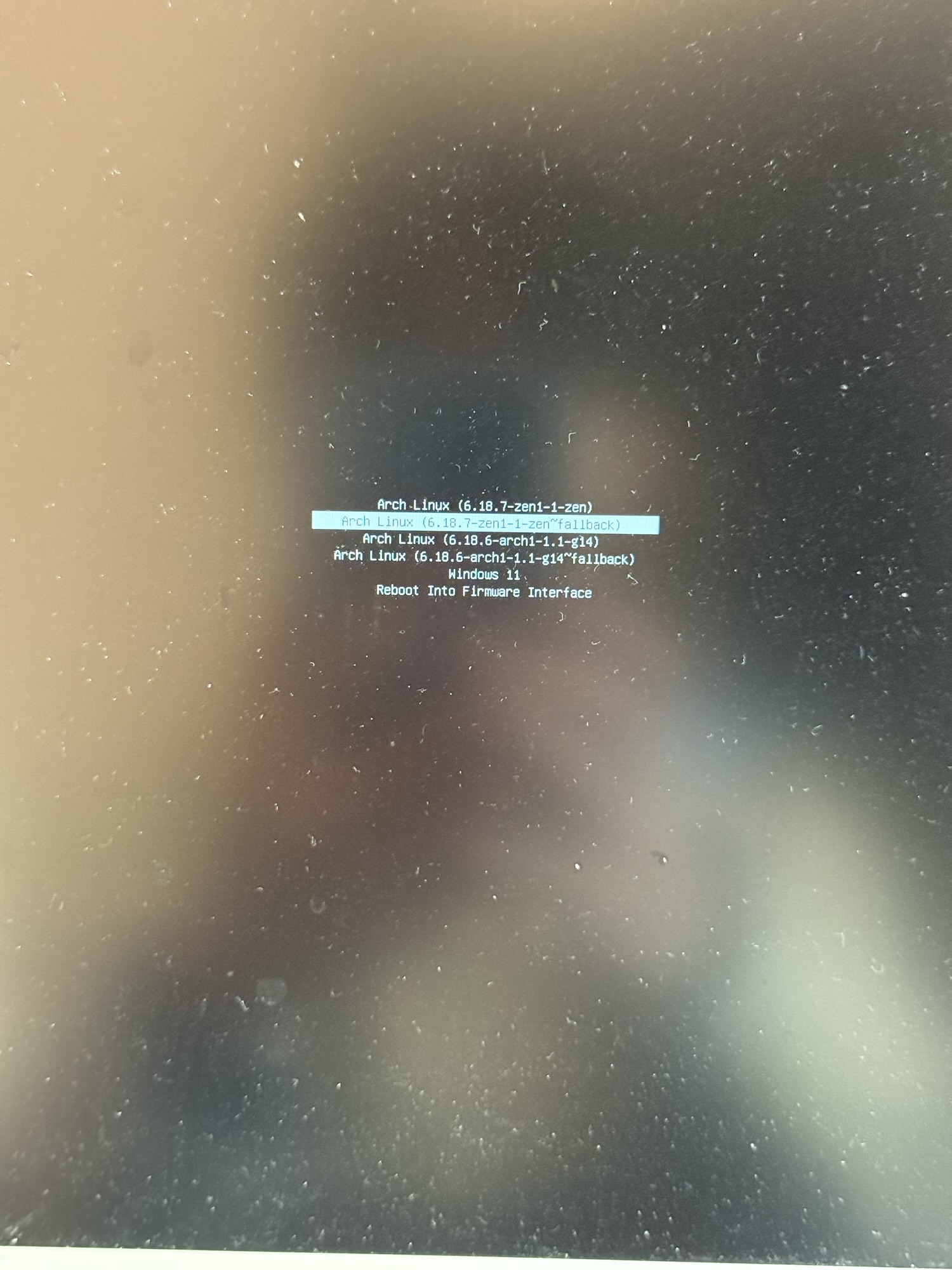
I tried reverting to the Arch Live ISO from 6.17. I booted from the BIOS into the Live environment. Mounting the filesystems went smoothly, including mounting the boot partition to /boot. However, when I ran bootctl install, I got an error stating that I wasn't booted in EFI mode. I then tried to access the system directly, but I'm still encountering the same error as before.
https://www.huize.ac.cn/wp-content/uplo … g_8707.jpg
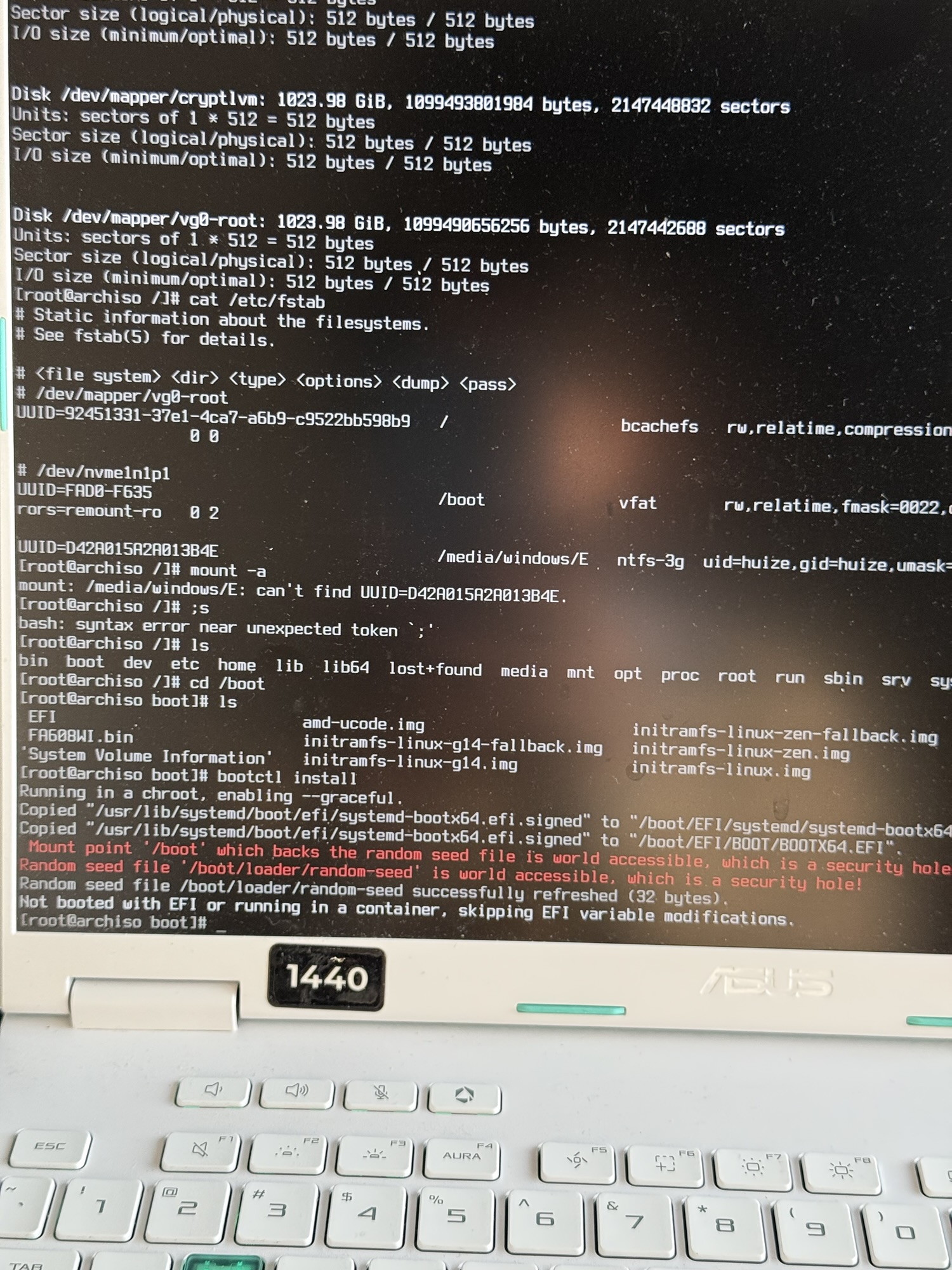
Afterwards, I tried flashing the bootable drive using ISO mode and confirmed in the BIOS that I was booting via EFI. However, when I ran bootctl install again, I encountered the exact same error.
My understanding is that Windows only modified the boot partition on the primary drive, leaving the second drive's EFI partition untouched. Does UEFI booting rely solely on files within the ESP, or is an entry in the BIOS also required? Like wrote some data into BIOS.
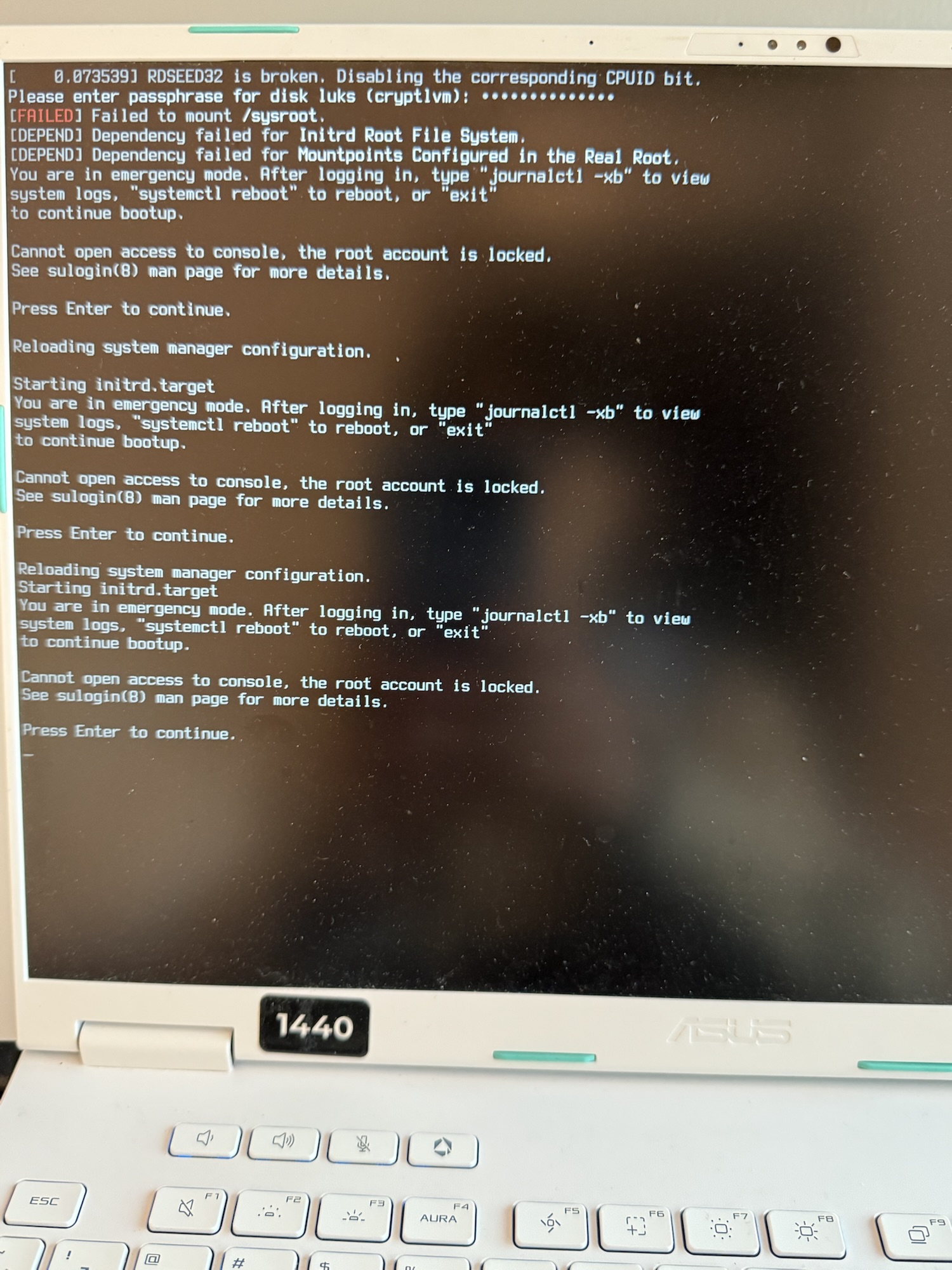
Post-Windows-reinstallation, the EFI partition on my second drive still contains its files. I'm still seeing the original Arch Linux boot loader, which confirms the partition wasn't formatted. However, only Windows boots successfully. Linux hangs immediately after LUKS password entry, eventually leading to the same error I encountered previously.
Offline
#8 2026-01-29 16:10:07
- seth
- Member
- From: Won't reply 2 private help req
- Registered: 2012-09-03
- Posts: 77,527
Re: Unable to mount Bcachefs on Arch Linux after reinstalling Windows
https://wiki.archlinux.org/title/System … ot_manager
Last note in the blue box.
Offline
#9 2026-01-29 18:58:27
- zhihuiyuze
- Member
- Registered: 2022-12-27
- Posts: 52
- Website
Re: Unable to mount Bcachefs on Arch Linux after reinstalling Windows
I used `arch-chroot -S` and it succeeded, but I still can't boot into the system. Theoretically, I have a UKI, so I don't need configuration files under `/boot/loader/entries` (the folder is currently empty).
https://www.huize.ac.cn/wp-content/uploads/2026/01/img_8720.jpg
I can see my different kernels on the boot page, so I don't think it's an EFI issue.
Offline
#10 2026-01-29 19:05:32
- Scimmia
- Fellow
- Registered: 2012-09-01
- Posts: 13,729
Re: Unable to mount Bcachefs on Arch Linux after reinstalling Windows
All of the options shown are 6.18+, did you install the dkms module for bcachefs? Did it actually build?
What are you doing with your links, anyway? So many of them are screwed up.
Offline
#11 2026-01-29 19:10:22
- zhihuiyuze
- Member
- Registered: 2022-12-27
- Posts: 52
- Website
Re: Unable to mount Bcachefs on Arch Linux after reinstalling Windows
All of the options shown are 6.18+, did you install the dkms module for bcachefs? Did it actually build?
What are you doing with your links, anyway? So many of them are screwed up.
I wanted to share the logs but I can’t copy right now, so I uploaded the photos.
Yes I installed it, it was 6.15 I upgraded to 6.18 in arch-chroot, also installed the dkms for bcachefs. This was after the error occurred, back to the time that I haven’t upgraded it, the issue still exists.
Offline
#12 2026-01-29 19:14:25
- Scimmia
- Fellow
- Registered: 2012-09-01
- Posts: 13,729
Re: Unable to mount Bcachefs on Arch Linux after reinstalling Windows
The original issue was that it couldn't mount a Windows partition, now you can't mount your sysroot, totally different issue.
Did you regenerate your UKIs after the module built? What does `dkms status` say while chrooted?
Photos are fine for things like this, but your last link is a link to the URL 'screnshot', obviously not valid, and one of your previous thumbnails links to postimages.org instead of an actual picture.
Last edited by Scimmia (2026-01-29 19:25:52)
Offline
#13 2026-01-29 19:36:51
- seth
- Member
- From: Won't reply 2 private help req
- Registered: 2012-09-03
- Posts: 77,527
Re: Unable to mount Bcachefs on Arch Linux after reinstalling Windows
but I still can't boot into the system
How specifically does it fail?
He's posting stuff like "[ url = label ]link[ / url ]" - probably advised by chatgpt 
Offline
#14 2026-01-29 19:41:09
- zhihuiyuze
- Member
- Registered: 2022-12-27
- Posts: 52
- Website
Re: Unable to mount Bcachefs on Arch Linux after reinstalling Windows
UKI should trigger by mkinitcpio, which I see it was been processed after I upgraded my kernel.
I’d just mkinitcpio, this will be
==> ERROR: '/lib/modules/6.17.9-arch1-1' is not a valid kernel module directoryBut that is not the problem since I use zen and g14 kernel.
Output of mkinitcpio -P linux is here, which is triggered by upgrading kernel every time.
 ==> Building image from preset: /etc/mkinitcpio.d/linux-g14.preset: 'default'
==> Using default configuration file: '/etc/mkinitcpio.conf'
  -> -k /boot/vmlinuz-linux-g14 -U /boot/EFI/Linux/arch-linux-g14.efi linux
==> Starting build: '6.18.6-arch1-1.1-g14'
  -> Running build hook: [base]
  -> Running build hook: [systemd]
  -> Running build hook: [autodetect]
  -> Running build hook: [modconf]
  -> Running build hook: [block]
  -> Running build hook: [sd-encrypt]
  -> Running build hook: [lvm2]
  -> Running build hook: [filesystems]
  -> Running build hook: [keyboard]
  -> Running build hook: [fsck]
  -> Running build hook: [sd-vconsole]
==> Generating module dependencies
==> Creating zstd-compressed initcpio image
  -> Early uncompressed CPIO image generation successful
==> Initcpio image generation successful
==> Creating unified kernel image: '/boot/EFI/Linux/arch-linux-g14.efi'
  -> Using ukify to build UKI
==> Unified kernel image generation successful
==> Running post hooks
  -> Running post hook: [sbctl]
Signing /boot/EFI/Linux/arch-linux-g14.efi
✓ Signed /boot/EFI/Linux/arch-linux-g14.efi
==> Post processing done
==> Building image from preset: /etc/mkinitcpio.d/linux-g14.preset: 'fallback'
==> Using default configuration file: '/etc/mkinitcpio.conf'
  -> -k /boot/vmlinuz-linux-g14 -U /boot/EFI/Linux/arch-linux-g14-fallback.efi -S autodetect linux
==> Starting build: '6.18.6-arch1-1.1-g14'
  -> Running build hook: [base]
  -> Running build hook: [systemd]
  -> Running build hook: [modconf]
  -> Running build hook: [block]
  -> Running build hook: [sd-encrypt]
  -> Running build hook: [lvm2]
  -> Running build hook: [filesystems]
  -> Running build hook: [keyboard]
  -> Running build hook: [fsck]
  -> Running build hook: [sd-vconsole]
==> Generating module dependencies
==> Creating zstd-compressed initcpio image
  -> Early uncompressed CPIO image generation successful
==> Initcpio image generation successful
==> Creating unified kernel image: '/boot/EFI/Linux/arch-linux-g14-fallback.efi'
  -> Using ukify to build UKI
==> Unified kernel image generation successful
==> Running post hooks
  -> Running post hook: [sbctl]
Signing /boot/EFI/Linux/arch-linux-g14-fallback.efi
✓ Signed /boot/EFI/Linux/arch-linux-g14-fallback.efi
==> Post processing done
==> Building image from preset: /etc/mkinitcpio.d/linux-zen.preset: 'default'
==> Using default configuration file: '/etc/mkinitcpio.conf'
  -> -k /boot/vmlinuz-linux-zen -U /boot/EFI/Linux/arch-linux-zen.efi linux
==> Starting build: '6.18.7-zen1-1-zen'
  -> Running build hook: [base]
  -> Running build hook: [systemd]
  -> Running build hook: [autodetect]
  -> Running build hook: [modconf]
  -> Running build hook: [block]
  -> Running build hook: [sd-encrypt]
  -> Running build hook: [lvm2]
  -> Running build hook: [filesystems]
  -> Running build hook: [keyboard]
  -> Running build hook: [fsck]
  -> Running build hook: [sd-vconsole]
==> Generating module dependencies
==> Creating zstd-compressed initcpio image
  -> Early uncompressed CPIO image generation successful
==> Initcpio image generation successful
==> Creating unified kernel image: '/boot/EFI/Linux/arch-linux-zen.efi'
  -> Using ukify to build UKI
==> Unified kernel image generation successful
==> Running post hooks
  -> Running post hook: [sbctl]
Signing /boot/EFI/Linux/arch-linux-zen.efi
✓ Signed /boot/EFI/Linux/arch-linux-zen.efi
==> Post processing done
==> Building image from preset: /etc/mkinitcpio.d/linux-zen.preset: 'fallback'
==> Using default configuration file: '/etc/mkinitcpio.conf'
  -> -k /boot/vmlinuz-linux-zen -U /boot/EFI/Linux/arch-linux-zen-fallback.efi -S autodetect linux
==> Starting build: '6.18.7-zen1-1-zen'
  -> Running build hook: [base]
  -> Running build hook: [systemd]
  -> Running build hook: [modconf]
  -> Running build hook: [block]
  -> Running build hook: [sd-encrypt]
  -> Running build hook: [lvm2]
  -> Running build hook: [filesystems]
  -> Running build hook: [keyboard]
  -> Running build hook: [fsck]
  -> Running build hook: [sd-vconsole]
==> Generating module dependencies
==> Creating zstd-compressed initcpio image
  -> Early uncompressed CPIO image generation successful
==> Initcpio image generation successful
==> Creating unified kernel image: '/boot/EFI/Linux/arch-linux-zen-fallback.efi'
  -> Using ukify to build UKI
==> Unified kernel image generation successful
==> Running post hooks
  -> Running post hook: [sbctl]
Signing /boot/EFI/Linux/arch-linux-zen-fallback.efi
✓ Signed /boot/EFI/Linux/arch-linux-zen-fallback.efi
==> Post processing done
==> Building image from preset: /etc/mkinitcpio.d/linux.preset: 'default'
==> Using default configuration file: '/etc/mkinitcpio.conf'
  -> -k /boot/vmlinuz-linux -g /boot/initramfs-linux.img linux
==> Starting build: '6.18.7-arch1-1'
  -> Running build hook: [base]
  -> Running build hook: [systemd]
  -> Running build hook: [autodetect]
  -> Running build hook: [modconf]
  -> Running build hook: [block]
  -> Running build hook: [sd-encrypt]
  -> Running build hook: [lvm2]
  -> Running build hook: [filesystems]
  -> Running build hook: [keyboard]
  -> Running build hook: [fsck]
  -> Running build hook: [sd-vconsole]
==> Generating module dependencies
==> Creating zstd-compressed initcpio image: '/boot/initramfs-linux.img'
  -> Early uncompressed CPIO image generation successful
==> Initcpio image generation successful
==> Running post hooks
  -> Running post hook: [sbctl]
Signing /boot/vmlinuz-linux
File has already been signed /boot/vmlinuz-linux
==> Post processing done
dkms status >
bcachefs/v1.35.2, 6.18.6-arch1-1.1-g14, x86_64: installed
bcachefs/v1.35.2, 6.18.7-arch1-1, x86_64: installed
bcachefs/v1.35.2, 6.18.7-zen1-1-zen, x86_64: installed
nvidia/590.48.01, 6.18.6-arch1-1.1-g14, x86_64: installed
nvidia/590.48.01, 6.18.7-arch1-1, x86_64: installed
nvidia/590.48.01, 6.18.7-zen1-1-zen, x86_64: installed
Offline
#15 2026-01-29 19:49:52
- zhihuiyuze
- Member
- Registered: 2022-12-27
- Posts: 52
- Website
Re: Unable to mount Bcachefs on Arch Linux after reinstalling Windows
but I still can't boot into the system
How specifically does it fail?
He's posting stuff like "[ url = label ]link[ / url ]" - probably advised by chatgpt
My reply disappeared I don’t know why.
I just noticed that the pictures can’t be clicked but just showing in the post with limited sized.
I use preview to double check to make sure it’s showing on the post
It falls like this > https://www.huize.ac.cn/wp-content/uplo … g_8711.jpg
I think luks is decrypted successfully, but maybe lvm or the file system doesn’t work so I can’t go into the kernel.
Offline
#16 2026-01-29 20:13:02
- seth
- Member
- From: Won't reply 2 private help req
- Registered: 2012-09-03
- Posts: 77,527
Re: Unable to mount Bcachefs on Arch Linux after reinstalling Windows
It would seem that bcachefs didn't make it into the initramfs or UKI - try to explicitly add it to the MODULES array.
Offline
#17 2026-01-29 20:29:30
- zhihuiyuze
- Member
- Registered: 2022-12-27
- Posts: 52
- Website
Re: Unable to mount Bcachefs on Arch Linux after reinstalling Windows
I added MODULES=(bcachefs) to mkinitcpio.conf before there was nothing there, and do mkinitcpio -P. It still falls like this > https://www.huize.ac.cn/wp-content/uplo … g_8723.jpg
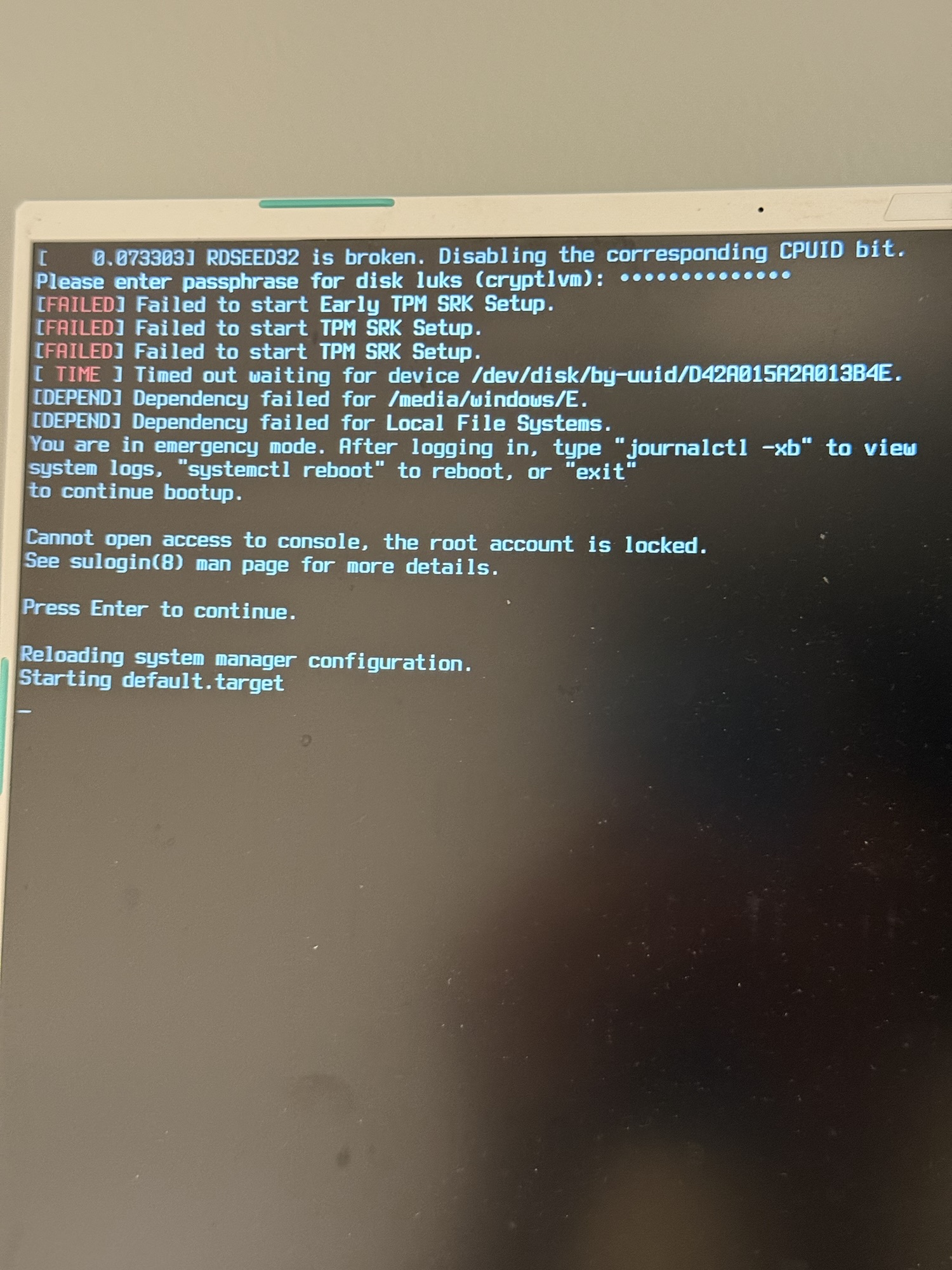
Before I updated the kernel, which is 6.15. I don’t need dkms the error was the same as now. Also I don’t think I need to add lvm to mkinitcpio, so maybe is other issue?
Offline
#18 2026-01-29 20:36:58
- Scimmia
- Fellow
- Registered: 2012-09-01
- Posts: 13,729
Re: Unable to mount Bcachefs on Arch Linux after reinstalling Windows
So back to that, why is it trying to mount a windows partition in the initramfs? Do you have a /etc/fstab.initramfs?
Offline
#19 2026-01-30 10:54:55
- zhihuiyuze
- Member
- Registered: 2022-12-27
- Posts: 52
- Website
Re: Unable to mount Bcachefs on Arch Linux after reinstalling Windows
No, I don't have /etc/fstab.initramfs. I have /etc/fstab, and I use it to do auto-mount :E from Windows. But the UUID of :E was not changed, so it is no longer working. Now I have fixed the UUID for that one, but it seems Windows changed the type to bitlocker(I didn't set up encryption for that). So I # that line.
Offline
#20 2026-01-30 12:26:20
- seth
- Member
- From: Won't reply 2 private help req
- Registered: 2012-09-03
- Posts: 77,527
Re: Unable to mount Bcachefs on Arch Linux after reinstalling Windows
… and what'S the consequence for the booting process/success?
Offline
#21 2026-01-30 12:28:41
- Scimmia
- Fellow
- Registered: 2012-09-01
- Posts: 13,729
Re: Unable to mount Bcachefs on Arch Linux after reinstalling Windows
So is the root account on your actual system locked, and you're running the 'quiet' kernel parameter? I assumed we were still in the initramfs, but those two things together could have the same output.
Is it working now, then?
Offline
#22 2026-01-30 13:38:20
- zhihuiyuze
- Member
- Registered: 2022-12-27
- Posts: 52
- Website
Re: Unable to mount Bcachefs on Arch Linux after reinstalling Windows
I have commented out the Windows partitions in /etc/fstab, and I can now boot into the system normally. However, TPM auto-unlock is still not working. I suspect this is because Windows automatically enables BitLocker and encrypts all NTFS volumes upon activation and upgrade to the Pro version. Since I didn't set a manual password, it is likely just using a Clear Key.
What I don’t understand is why this prevented the kernel from loading. Logically, it should have only caused a failure when attempting to mount the E: drive partition.
Currently, I am trying to fix the TPM auto-unlock and place the BitLocker Recovery Key for the E: drive within my Linux LUKS-encrypted partition to achieve automatic unlocking of the E: drive.
Offline
#23 2026-01-30 13:40:54
- Scimmia
- Fellow
- Registered: 2012-09-01
- Posts: 13,729
Re: Unable to mount Bcachefs on Arch Linux after reinstalling Windows
None of the info you've posted ever had the kernel not loading. The issue in the OP *was* the failure mounting the Windows partition, we just couldn't see it as all we got was a thumbnail with a bad link.
Offline
#24 2026-01-30 13:43:06
- zhihuiyuze
- Member
- Registered: 2022-12-27
- Posts: 52
- Website
Re: Unable to mount Bcachefs on Arch Linux after reinstalling Windows
I added MODULES=(bcachefs) to mkinitcpio.conf before there was nothing there, and do mkinitcpio -P. It still falls like this > https://www.huize.ac.cn/wp-content/uplo … g_8723.jpg
Before I updated the kernel, which is 6.15. I don’t need dkms the error was the same as now. Also I don’t think I need to add lvm to mkinitcpio, so maybe is other issue?
So, based on this image, was my system previously unable to access the kernel? Or was there some other reason?
Offline
#25 2026-01-30 13:51:41
- Scimmia
- Fellow
- Registered: 2012-09-01
- Posts: 13,729
Re: Unable to mount Bcachefs on Arch Linux after reinstalling Windows
No, that image is also failure to mount the Windows partition.
Offline