You are not logged in.
- Topics: Active | Unanswered
Pages: 1
#1 2026-02-05 22:34:36
- system72
- Member

- Registered: 2025-11-22
- Posts: 572
- Website
screw removal
how do you remove a screw out of a laptop that doesnt want to come out? im trying to reconnect the trackpoint ribbon cable, much to my dismay angrily hitting it does not do much wonders
Offline
#2 2026-02-05 23:10:04
- ewaller
- Administrator

- From: Pasadena, CA
- Registered: 2009-07-13
- Posts: 20,715
Re: screw removal
What type of drive does it have?
Is the laptop metal or plastic?
Did the other screws have thread lock compound on them?
Edit:
Have you stripped the head or is it seized?
Last edited by ewaller (2026-02-05 23:13:41)
Nothing is too wonderful to be true, if it be consistent with the laws of nature -- Michael Faraday
The shortest way to ruin a country is to give power to demagogues.— Dionysius of Halicarnassus
---
How to Ask Questions the Smart Way
Offline
#3 2026-02-05 23:32:11
- seth
- Member

- From: Won't reply 2 private help req
- Registered: 2012-09-03
- Posts: 78,513
Re: screw removal
angrily hitting it does not do much wonders
Is the screw loose and spinning freely but not driving out?
1. Turn the device on its head and carefully rotate the screw w/o pushing it in
2. Magnetize the screwdriver (sticking a magnet to the metal part will do) so you can slightly pull the screw while rotating it
3. Drop of superglue
(all same principle idea, different adhesion - gravity, magnet, glue)
Have you opened the device before?
There're screws that can be loosened or fastened, but not extracted (this is mostly for field systems to prevent you from losing the screw and would still detach the connection, but could in theory be abused to seal a device)
https://en.wikipedia.org/wiki/Captive_fastener
Offline
#4 2026-02-05 23:46:00
- system72
- Member
- Registered: 2025-11-22
- Posts: 572
- Website
Re: screw removal
What type of drive does it have?
nvme ssd
is the laptop metal or plastic?
plastic
Did the other screws have thread lock compound on them?
probably
Have you stripped the head or is it seized?
its kind of stripped, stripped to the point my screw driver doesnt work
Is the screw loose and spinning freely but not driving out?
its tight
1. Turn the device on its head and carefully rotate the screw w/o pushing it in
2. Magnetize the screwdriver (sticking a magnet to the metal part will do) so you can slightly pull the screw while rotating it
3. Drop of superglue
its already slightly magnetized but the screw is already tight in there so it wouldnt do anything
Have you opened the device before?
2 months ago
There're screws that can be loosened or fastened, but not extracted (this is mostly for field systems to prevent you from losing the screw and would still detach the connection, but could in theory be abused to seal a device)
yes but the plan is not to remove the screw but loosen it to take the back plastic cover off which i am unable to do
Offline
#5 2026-02-06 01:30:28
- ewaller
- Administrator
- From: Pasadena, CA
- Registered: 2009-07-13
- Posts: 20,715
Re: screw removal
ewaller wrote:What type of drive does it have?
nvme ssd
LoL. I meant which type of drive screw itself has. Common, Phillips, Hex, Torex.
As it sounds sligtly stripped, I'm going to assume Phillips, and the screw type is flat head.
As to my other questions. If the other screws had thread lock compound, then this one proably does as well. A little heat applied with a hot air gun or a hair dryer can soften thread lock compound. Too much heat can compromise your plastic case -- that is why I asked if it was plastic or metal.
If there is no thread lock compound (but you think there was) and the threads are siezed, you might try a dab of pentrating lubricant. It won't penetrate if there is thread lock compound. Also, just a little, don't risk contaminating your electronics.
Before you try penetrating lubricant, you might try a couple tricks to get a better grip on the screw head.
First, try a new driver that is not worn.
Second, try finding a thick rubber band and place the edge of the band over the screw and engage the drive with your driver through the rubber. This sometimes increases the bite just enough to not spin out.
Third, take your driver and adhere it to the screw with a drop of cyanoacrylate glue (super glue). Don't let it get anywhere except the head. Wait until it is fully cured and the driver and screw are one. Then you might be able to back the screw and driver out. A drop of two part epoxy can also work, but again, FULLY cured.
If none of these work, things go ugly. At this point, I usually drill the head out. This is easy if you have a drill press. It's a bit more sketch using a hand drill, but it can be done. Just enough to decapitate the screw, then you can disassemble the unit and using locking plyers take the remaining stud out.
I confess, I have world class technicians at work. For everything after heating the screw to soften the locking compund and/or the rubber band, I usually take my problem to these pros and ask them to clean up my mess.
Last edited by ewaller (2026-02-06 01:44:02)
Nothing is too wonderful to be true, if it be consistent with the laws of nature -- Michael Faraday
The shortest way to ruin a country is to give power to demagogues.— Dionysius of Halicarnassus
---
How to Ask Questions the Smart Way
Offline
#6 2026-02-06 02:12:01
- system72
- Member
- Registered: 2025-11-22
- Posts: 572
- Website
Re: screw removal
i didnt understand any of that, can you dumb it down for me
Offline
#7 2026-02-06 02:22:53
- 5hridhyan
- Member

- Registered: 2025-12-25
- Posts: 1,113
Re: screw removal
i didnt understand any of that
-The "Drive" Confusion, *the shape of the screw head (like Phillips +, Flathead −, Hex hexagon shape, or Torx insert star symbol)
-most laptop screws have a dry *glue on them (thread-locker), using a hair dryer to warm up the screw, and this melts the *glue so it turns easier.
-put a rubber band over the screw, then push your screwdriver into it. The rubber fills the stripped holes and gives you grip
-(super glue)glue the screwdriver tip directly to the screw. Let it dry completely, then turn
-The "Ugly" Option: If all else fails, you have to use a drill to literally destroy the head of the screw so it can come off
edit:
@ewaller's warnings apply!!
Last edited by 5hridhyan (2026-02-06 03:32:44)
Offline
#8 2026-02-06 03:43:26
- ewaller
- Administrator
- From: Pasadena, CA
- Registered: 2009-07-13
- Posts: 20,715
Re: screw removal
5hridhyan did a pretty good summary. Thanks 5hridhyan.
My summary.
You need to make the screw easier to turn.
You need to improve the coupling of your driver to the screw.
You need to not damage things trying to do those last two things.
You can make it easier to turn by softeneing the thread lock compound with heat.
You can get a better grip on the screw with a new screw driver, by using a little bit of rubber to increase the bite, or you can glue the screwdriver to the screw.
Using heat is one way to make things easier to turn. Using penetrating lubricant is another. Lubricant might make the screwdriver slip more easily. Lubricant might make it impossible to glue the screwdriver to the screw.
If none of the above work, you may need to destroy the screw by removing the head and then removing the remaining part.
Nothing is too wonderful to be true, if it be consistent with the laws of nature -- Michael Faraday
The shortest way to ruin a country is to give power to demagogues.— Dionysius of Halicarnassus
---
How to Ask Questions the Smart Way
Offline
#9 2026-02-06 04:21:18
- system72
- Member
- Registered: 2025-11-22
- Posts: 572
- Website
Re: screw removal
i meant the head of the screw driver can fit inside of the screw but when i turn it the screw doesnt turn but the screw driver turns, its like an -O- <----- the screw head
Offline
#10 2026-02-06 04:28:41
- 5hridhyan
- Member
- Registered: 2025-12-25
- Posts: 1,113
Re: screw removal
it's like an -O- <----- the screw head
that means the screw is fully "stripped." since it's a smooth circle, so the super glue method is your best bet to get a *perfect grip.
If that doesn't work, you'll have to drill and destroy the head so the plate can come off.
edit:
Warning: If you drill, go slow and only use a bit slightly larger than the screw's shaft. You just want the "top" to pop off; don't drill too deep......
Last edited by 5hridhyan (2026-02-06 04:33:00)
Offline
#11 2026-02-06 04:38:02
- system72
- Member
- Registered: 2025-11-22
- Posts: 572
- Website
Re: screw removal
is there anything else i can do?
https://system72.dev/store/gxUnQCue.jpg
https://system72.dev/store/p12xwFxE.jpg
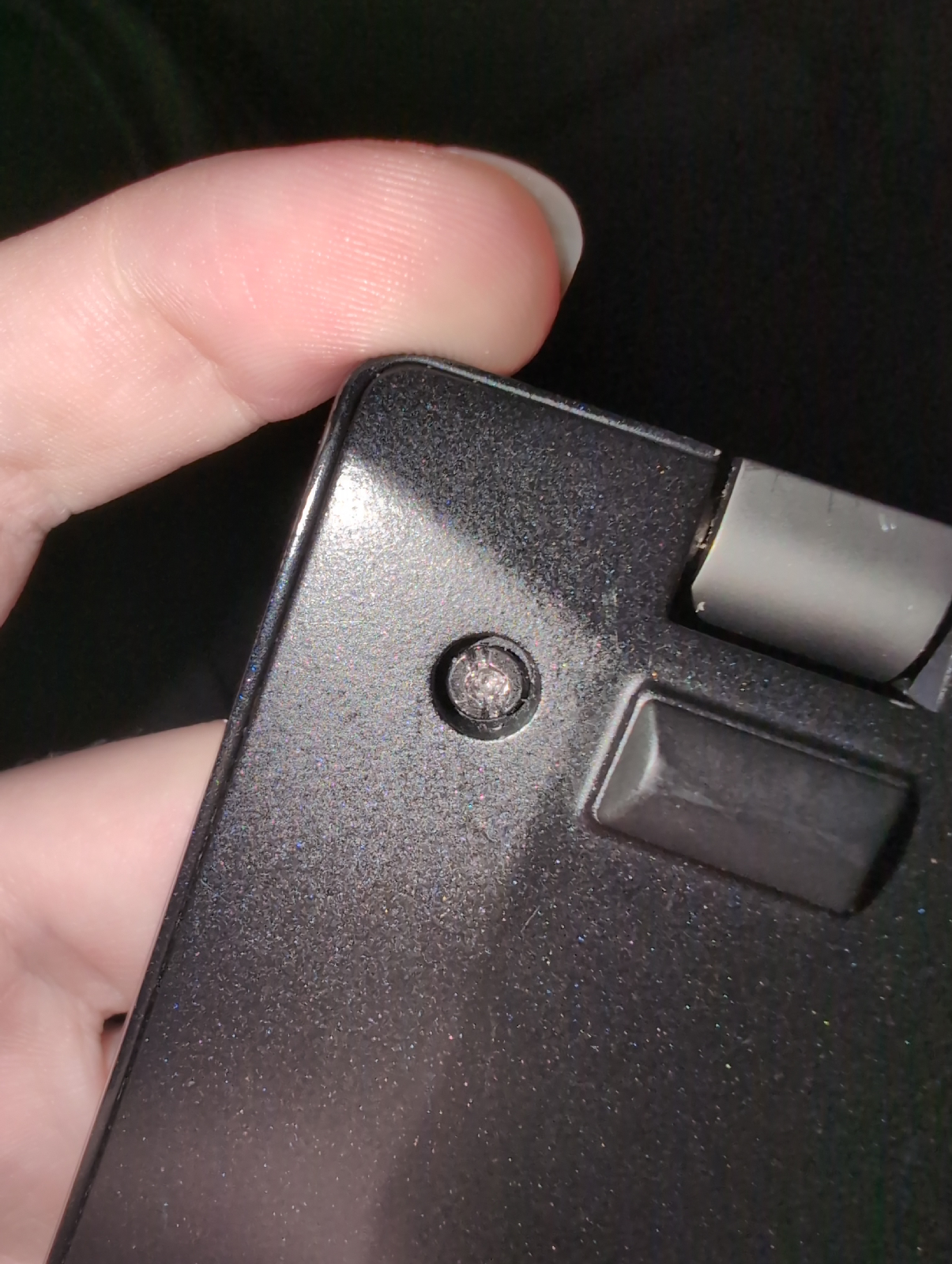
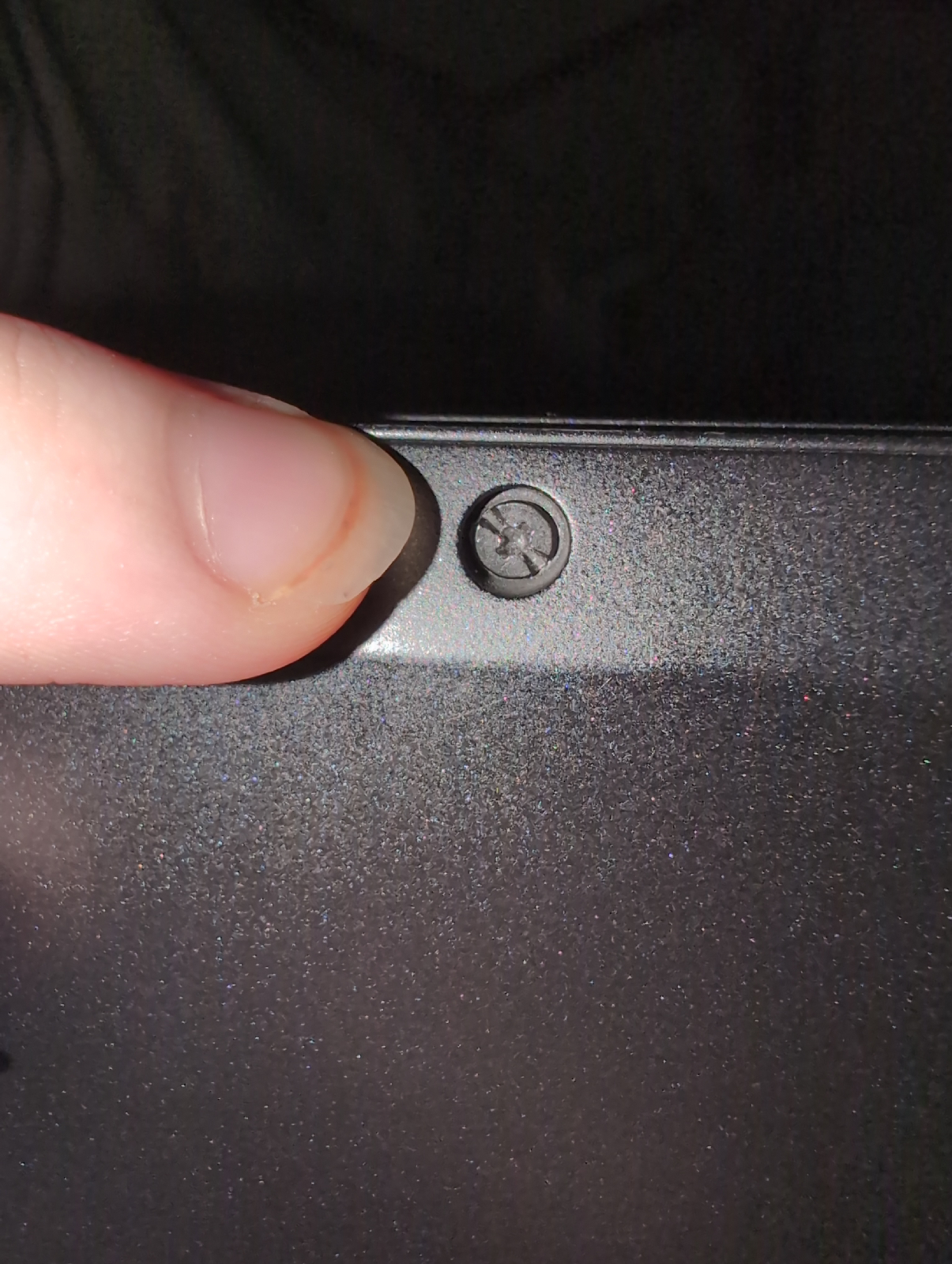
what type of screw head would i need for the - - besides the O
Last edited by system72 (2026-02-06 04:38:43)
Offline
#12 2026-02-06 07:11:00
- 5hridhyan
- Member
- Registered: 2025-12-25
- Posts: 1,113
Re: screw removal
what type of screw head would i need
1st Image: No hopes, it’s cooked! super glue is your best bet to get a grip, or cut a slot if you have metal file otherwise it’s time to drill the head off.
and when re-assembling you'll need a replacement screw as well
2nd Image: This one is still salvageable. It’s a standard phillips (cross), usually, laptop bottom covers use a PH0 or PH00 bit. make sure you use the exact size and press down hard so you don't turn this one into an "O" as well.
edit:
https://bbs.archlinux.org/viewtopic.php … 1#p2276231
If that's the T14s, remember those bottom screws are captive --they aren't supposed to fall out of the plate! and seeing the screw in 1st Image; you'll definitely need the drill or the super glue to get the plate off now.
Last edited by 5hridhyan (2026-02-06 07:26:07)
Offline
#13 2026-02-06 07:30:22
- system72
- Member
- Registered: 2025-11-22
- Posts: 572
- Website
Re: screw removal
no, which type of screw driver head will i need to unscrew the - -
Offline
#14 2026-02-06 07:32:39
- 5hridhyan
- Member
- Registered: 2025-12-25
- Posts: 1,113
Re: screw removal
no, which type of screw driver head will i need to unscrew the - -
That is called a Flathead (or Slotted) screwdriver.
But fair warning: since that screw wasn't originally a Flathead, a standard one might not grip perfectly. you'll need a precision flathead (usually 2.0mm or 2.5mm).
If you can't get the Flathead to "bite" into that line, you are back to the super glue or Drill methods we mentioned. Don't force it with the wrong size flathead or you'll snap the plastic around it!
Edit :
but seeing the 1st image I don't think any standard screw drivers can remove it.
2nd image philips PH0 or PH00 bits
Last edited by 5hridhyan (2026-02-06 09:33:25)
Offline
#15 2026-02-06 08:49:47
- dimich
- Member

- From: Kharkiv, Ukraine
- Registered: 2009-11-03
- Posts: 827
Re: screw removal
Take a wire cutter with thin sharp tips, like this: .
.
Open it a little and put tips to screw head groove near edges. Then turn the cutter like a screw driver.
If this doesn't help, drill the screw out with thin drill.
Offline
#16 2026-02-06 09:22:23
- SimonJ
- Member
- Registered: 2021-05-11
- Posts: 390
- Website
Re: screw removal
You can also get reverse thread screw removers. I have had much success with these. You will still need to drill a bit, but it is safer than trying to remove the head completely and then get the shaft out IMHO
Link: https://www.amazon.es/-/en/dp/B0D57RJK2 … 8028&psc=1
Offline
Pages: 1