You are not logged in.
- Topics: Active | Unanswered
#1 2026-04-27 15:23:22
- Berny23
- Member

- From: Einsamkeit, Himmelsrand
- Registered: 2024-10-16
- Posts: 4
- Website
Virtual Surround Manager: 7.1 sound for your headphones with one click
Hey guys, wanted to share this app I built over the whole last week. I've seen countless requests for such a program on forums, reaching back lots of years.
TL;DR: It's like HeSuVi on Windows, but for Linux. Also, uncluttered, without PipeWire configs and intentionally very simple to use.

How it works normally (without this app):
1. Write filter chain config file, including path to your wav HRIR profile
2. Restart PipeWire
3a. Set the virtual 7.1 sink as system default and choose your real device in EasyEffects settings
3b. Or: Write 3 new config files (some clients use different PipeWire compatibility configs) that route all audio to the virtual sink and then your real device, making switching between headphones and speakers a chore
4. If you use EasyEffects: Exclude the apps that should use 7.1 audio
3. Restart PipeWire every time you change any config, causing disrupted audio and crashes for some tools like EasyEffects
How it works with this app:
1. Select your headphones as system default.
2. Open Virtual Surround Manager, select your favorite HRIR preset and click the switch
3. If you use EasyEffects: Exclude the apps that should use 7.1 audio
Features
- Enable or disable virtual surround sound seemlessly, without changing your default device
- Drop in your own HRIR WAV files as virtualization presets, same as HeSuVi on Windows
- Profile selection is automatically saved
- Compatible with EasyEffects (and probably similar apps)
- Written entirely using the PipeWire C API, no config files are required or used
- Modern user interface, built with KDE's Kirigami 6 framework
- Available languages: English, German
- Project is not just AI-generated, everything is written by hand or autocomplete 
GitHub: https://github.com/Berny23/virtual-surround-manager
AUR: yay -S virtual-surround-manager
Flatpak support is planned, but currently not working correctly. IF YOU ARE A DEVELOPER, PLEASE HELP ME WITH THE FLATPAK. THANKS! (see folder dist/flatpak)
Last edited by Berny23 (2026-04-27 19:07:19)
☛ Arch Linux + KDE Plasma + Kröhnkite (auto-tiling)
☛ RTX 4090 + Ryzen 7 9800X3D
☛ Game & Movie Screenshots: berny23.de
Offline
#2 2026-08-15 19:11:53
- Snqk3
- Member
- Registered: 2026-08-15
- Posts: 3
Re: Virtual Surround Manager: 7.1 sound for your headphones with one click
Hello,
Thanks for the job, great work, but I have a problem with it, I can't make the icon in the system state bar at startup working, I don't know why. All is correctly checked :
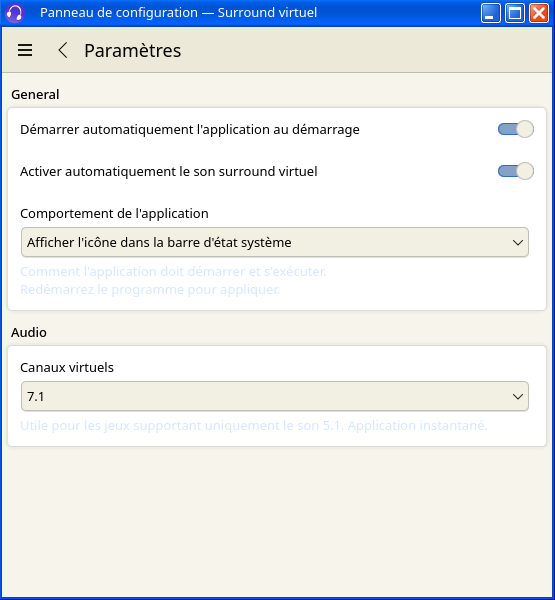
Last edited by Snqk3 (2026-08-15 19:30:56)
Offline
#3 2026-08-15 19:39:12
- Snqk3
- Member
- Registered: 2026-08-15
- Posts: 3
Re: Virtual Surround Manager: 7.1 sound for your headphones with one click
I managed to make it works correctly by using the flatpak version, I had the problem with the one installed by the paru command (I'm on CachyOS)...
EDIT : It seems that with the version downloaded by paru, nothing launches at startup (icon in taskbar but program itself too) whereas all options are checked... So I stay on flatpak version.
Last edited by Snqk3 (2026-08-15 21:10:30)
Offline
#4 2026-08-15 20:56:59
- topcat01
- Member

- Registered: 2019-09-17
- Posts: 333
Re: Virtual Surround Manager: 7.1 sound for your headphones with one click
Very interesting app! Thanks for sharing. I will try it out with a movie file with 5.1 audio.
Offline
#5 2026-08-16 03:08:15
- Berny23
- Member
- From: Einsamkeit, Himmelsrand
- Registered: 2024-10-16
- Posts: 4
- Website
Re: Virtual Surround Manager: 7.1 sound for your headphones with one click
Thanks for using my app, guys!
@Snqk3 Maybe you are missing some runtime requirement for this.
☛ Arch Linux + KDE Plasma + Kröhnkite (auto-tiling)
☛ RTX 4090 + Ryzen 7 9800X3D
☛ Game & Movie Screenshots: berny23.de
Offline
#6 2026-08-16 19:13:55
- Snqk3
- Member
- Registered: 2026-08-15
- Posts: 3
Re: Virtual Surround Manager: 7.1 sound for your headphones with one click
Hello abd thank you,
What could be required for the program please ?
Thanks again 
Thanks for using my app, guys!
@Snqk3 Maybe you are missing some runtime requirement for this.
Offline
#7 2026-09-02 04:06:49
- pgreenlight
- Member
- Registered: 2026-09-02
- Posts: 2
Re: Virtual Surround Manager: 7.1 sound for your headphones with one click
Hey I tried You’re App
it's a cool idea that u built it
i have issue with it might be just the down point of it, or it might be an actual problem I installed it from aur(yay helper)
and i choose one of the default profiles "Atmos" the sound quality decreased for a noticeable amount, so my question is it's just a down point or it's a config issue ?
Offline
#8 2026-09-02 14:29:49
- Berny23
- Member
- From: Einsamkeit, Himmelsrand
- Registered: 2024-10-16
- Posts: 4
- Website
Re: Virtual Surround Manager: 7.1 sound for your headphones with one click
Quality should not decrease. Make sure the audio source (game, movie) has real 7.1 or 5.1 output.
If the audio source is only stereo, my app cannot virtualize anything and it will sound worse. Only enable virtual surround sound for movies/games that support real surround sound.
☛ Arch Linux + KDE Plasma + Kröhnkite (auto-tiling)
☛ RTX 4090 + Ryzen 7 9800X3D
☛ Game & Movie Screenshots: berny23.de
Offline