You are not logged in.
- Topics: Active | Unanswered


#2 2025-05-15 06:40:34
- jl2
- Member

- From: 47° 18' N 8° 34' E
- Registered: 2022-06-01
- Posts: 1,410
Re: Share your tiling window manager desktop!
this thread already exists ... (and apparently, I never posted there  )
)
edit: nvm not tiling specific
But anyway, here are mine: https://gitlab.com/jlo62/dotties
It's a little dated, and I'm currently (very slowly) working on getting the CSS for the apps centralized (for easy editing  ) and then make them light colored (better for the eyes IMO and energy-saving on my non-OLED devices)
nice rice!
I ought to check waybar once again ... eww is a little broken at times but I don't think it could make graphs.
and I see, you like cava 
Last edited by jl2 (2025-05-15 07:28:27)
Why I run Arch? To "BTW I run Arch" the guy one grade younger.
And to let my siblings and cousins laugh at Arsch Linux...
Offline
#3 2025-05-15 07:59:01
- seth
- Member

- From: Won't reply 2 private help req
- Registered: 2012-09-03
- Posts: 78,207
Re: Share your tiling window manager desktop!
Your cyan (175) and blue (204) are too close to the (highly saturated) background color (192).
Make sure to keep all staurated (s*v) hue deltas > 25° or < 5°, otherwise the colors will start to "bite".
green and yellow are on the edge, but there's also a 120°/255v in-your-face-green?
Offline
#4 2025-11-14 21:53:55
- MonolithImmortal
- Member
- From: Atlanta, GA
- Registered: 2011-01-29
- Posts: 12
Re: Share your tiling window manager desktop!

Wait wait, we were sharing our arch tiling window manger desktops haha. I just am super pleased with my Power Toys Fancy Zones tiling set up on my work PC. Had to use a lot of black out edits to make sure I didn't violate hipaa here.
Dental CAD designer, bodybuilder, arch linux enthusiast.
Offline
#5 2025-11-23 20:53:34
- system72
- Member

- Registered: 2025-11-22
- Posts: 572
- Website
Re: Share your tiling window manager desktop!
my setup

Last edited by system72 (2025-12-04 06:07:41)
Offline
#6 2025-12-18 18:33:06
- system72
- Member
- Registered: 2025-11-22
- Posts: 572
- Website
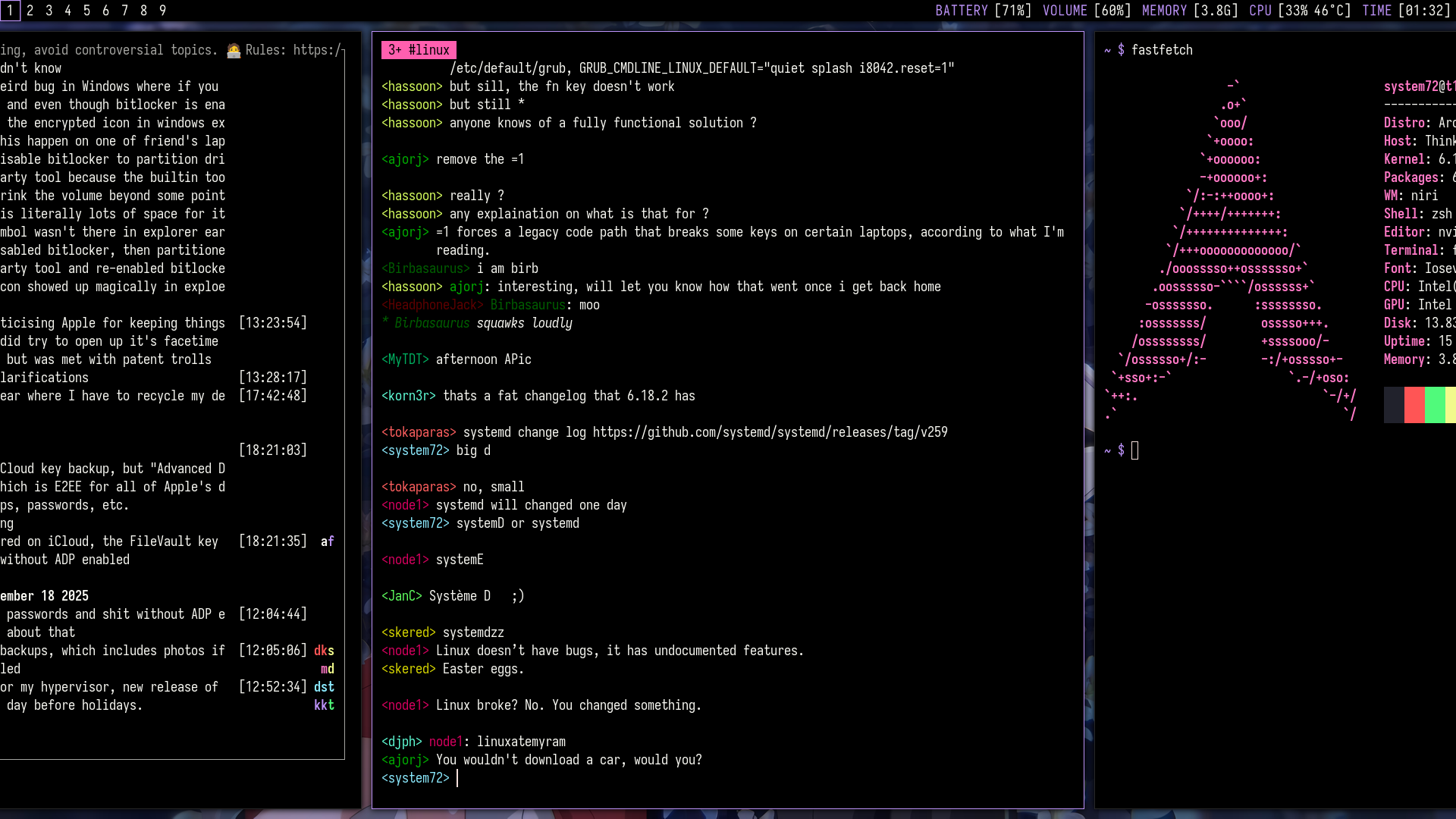
Re: Share your tiling window manager desktop!
i decided to change some things up
Offline
#7 2025-12-21 08:13:09
- ReDress
- Banned

- From: Nairobi
- Registered: 2024-11-30
- Posts: 467
- Website
Re: Share your tiling window manager desktop!
Your cyan (175) and blue (204) are too close to the (highly saturated) background color (192).
Make sure to keep all staurated (s*v) hue deltas > 25° or < 5°, otherwise the colors will start to "bite".
green and yellow are on the edge, but there's also a 120°/255v in-your-face-green?
Here I thought tiling could never get technical enough but supposedly it could?!?!
Offline
#8 2025-12-21 08:30:51
- seth
- Member
- From: Won't reply 2 private help req
- Registered: 2012-09-03
- Posts: 78,207
Re: Share your tiling window manager desktop!
That's color theory, not tiling 
Offline
#9 2025-12-21 11:50:09
- ReDress
- Banned
- From: Nairobi
- Registered: 2024-11-30
- Posts: 467
- Website
Re: Share your tiling window manager desktop!
Had to use a lot of black out edits to make sure I didn't violate hipaa here.
Pleasantly surprised by the amount of effort that might have taken :-)
Offline
#10 2026-05-03 12:07:00
- Whoracle
- Member
- Registered: 2010-11-02
- Posts: 242
Re: Share your tiling window manager desktop!
After ~7 years of daily use, I finally cleaned up my AwesomeWM config and made it public.
I’ve been running roughly the same AwesomeWM config for about 7 years now. It started as the usual personal rc.lua pile based on a modified version of an Awesome Copycats theme - either steamburn or blackburn if I remember correctly - then slowly grew more opinionated, and recently I finally took the time to clean it up properly, split it into modules, document it, and make it somewhat usable outside my own machine.
Repo: https://github.com/whoracle/awesome-lynxburn
It is still very much a personal config, not a polished desktop environment or framework, but if anyone wants to steal ideas, use pieces of it, or run it as-is: feel free and have fun.
Since my lua kind of sucks, I also made some use of AI when refactoring this. Docs are 99% AI. If you don't like 'em clankers, leave this be. If you are OK with this, still vet at the very least the
lxsecrets module before using - I can tell you as much as I want that this is safe, but I'm just a voice on the internet, and you should NOT trut me with your secrets. In doubt delete the whole module from the tree if you (rightfully) don't trust me
But really you should vet the whole setup before using it.
Some highlights:
A compact top bar with small lx* modules for media, notifications, network, Bluetooth, power profiles, display handling, secrets/token health, and launching apps.
Shared popup behavior across modules: keyboard navigation, popup cycling, consistent mouse actions, and one common visual style.
lxmedia: PipeWire/PulseAudio widget with volume, mic activity, stream routing, device switching, and MPRIS controls.
lxnotify: retained notification inbox with grouping, dismiss/actions, and pause controls.
lxrunner: small Awesome-native launcher with PATH commands, desktop entries, aliases, and launch history.
lxsecrets: token/secret health checks for GitLab/Vault, including refresh/login flows and VPN-gated checks.
lxdisplay: brightness, display profiles, and redshift-style temperature scheduling.
A bundled theme with several color schemes: lynxburn, zenburn, nord, catppuccin, solarized, and kanagawa variants.
One additional tiling layout lifted from lcpz/lain: centerwork
Quake-Style terminal also lifted from lcpz/lain
I intentianlly restricted the available tiling layouts to the subset I actually use daily:
centerwork on my main ultrawide
centerwork.horizontal on my portrait chat-and-docs monitor
vertical on 2 monitors
horizontal on the Docs monitor
floating on all 3, just in case I ever need it
Additional layouts can be easily added back, and third-party layouts can still be registered if you want them.
I also stumbled across SomeWM recently, which is a Wayland compositor with AwesomeWM Lua compatibility. That sent me down a Wayland side quest, so the config now has experimental SomeWM support too. X11/AwesomeWM is still the daily-driver environment, but the repo has platform detection, split defaults, and Wayland-ish command backends where it made sense.
Caveat: this is my real config. It works for me, it is documented, and I’ve tried to make the boundaries sane, but it is not a distro package with support promises. Expect to read the docs and adjust config.lua.
If you’re into Awesome configs (and thus keyboard-heavy workflows), or just want to borrow some module ideas, have a look.
I don't daily this in SomeWM because for me on my setup, the overall experience is sluggish - might be my config, might be an issue with wlroots-vis-a-vis NVIDIA, I don't know. Feedback and bug reports are welcome, especially if you try it on a setup that is not mine, like SomeWM/Wayland.
Development happens on my private gitlab instance - GitHub is only for issue tracking and releases.
Screenshots:
Links to two more:
https://img.lynxcore.org/lxmedia.jpg
https://img.lynxcore.org/lxdisplay.jpg


Offline