You are not logged in.
- Topics: Active | Unanswered
#51 2026-06-25 06:13:38
- Enrico1989
- Member
- Registered: 2018-07-05
- Posts: 422
Re: [SOLVED] Audio breaks after every suspend/change of VT
I referred to https://pipewire.pages.freedesktop.org/ … -migration and eventually came up with this
monitor.alsa.rules = [
  {
    matches = [
      {
        # Matches all sources
        node.name = "~alsa_input.*"
      },
      {
        # Matches all sinks
        node.name = "~alsa_output.*"
      }
    ],
    actions = {
      update-props = {
        device.profile-set = "analog-only.conf"
      }
    }
  }
]
and then run
$ # as non-root
$ systemctl --user restart pipewire.service
$ systemctl --user restart wireplumber.service
and then moved to other VT and back, and the audio is gone, as "usual". (Much easy to recover after some earlier cleanup steps + using wiremix.)
I should probably try with `profile` instead of `profile-set`. I kept `profile-set` because the migration guide I linked turns
["device.profile"] = "pro-audio",into
device.profile = "pro-audio"and since the first link has
["device.profile-set"] = "analog-only.conf",I kept the `-set`.
Offline
#52 2026-06-29 11:13:01
- Enrico1989
- Member
- Registered: 2018-07-05
- Posts: 422
Re: [SOLVED] Audio breaks after every suspend/change of VT
I should probably try with `profile` instead of `profile-set`
Tried, and it doesn't seem to fix the issue.
Offline
#53 2026-07-29 07:34:30
- Enrico1989
- Member
- Registered: 2018-07-05
- Posts: 422
Re: [SOLVED] Audio breaks after every suspend/change of VT
I'm also adding some more info that is very unaccessible behind my desk:
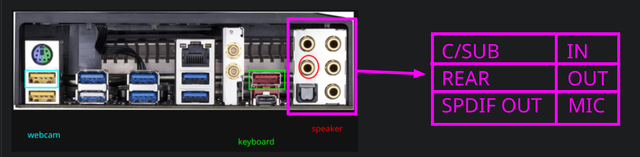
For unrelated reasons I recently unplugged everything, physically unmounted and mounted back the video card and the CMOS battery, and reset the BIOS.
I don't think that had any effect.
But after reading the user's manual of the mobo, when I plugged all the peripherals back in, I plugged the jack of the audio not where it was (in the circle in the image above), but in the "OUT".
This seems to have fixed all the issues.
Last edited by Enrico1989 (2026-07-29 07:34:47)
Offline
#54 2026-07-29 13:57:10
- seth
- Member

- From: Won't reply 2 private help req
- Registered: 2012-09-03
- Posts: 77,789
Re: [SOLVED] Audio breaks after every suspend/change of VT
\o/
"rear" would be for surround sound?
Still counts as a cable issue 
Please always remember to mark resolved threads by editing your initial posts subject - so others will know that there's no task left, but maybe a solution to find.
Thanks.
Offline
#55 2026-07-30 19:09:38
- Enrico1989
- Member
- Registered: 2018-07-05
- Posts: 422
Re: [SOLVED] Audio breaks after every suspend/change of VT
Still counts as a cable issue
Definitely. But at this point I don't care much. I've never been into sophisticated audio.
Offline