You are not logged in.
- Topics: Active | Unanswered
Pages: 1
#1 2026-08-14 08:09:44
- Rolfi
- Member
- Registered: 2026-08-14
- Posts: 3
erratic Synaptics touchpad / clickpad
Hello,
I'm taking a shot at digging up this post from over 10 years ago. Maybe I'll be lucky enough to find you still logged in.
I have the same problem you described with a Synaptic touchpad on an old Clevo W310Cz. It seems to me that this idea really makes sense, especially after trying multiple software solutions without success.
Unfortunately, I’m not an electronics or computer whiz, even though I can use a soldering iron.
You’ll probably be able to help me if you read my reply.
I’m not sure which components to solder on the touchpad.
Did you solder each small pad around the edge of the PCB to one of the ground pads on the chassis (as shown in the photo)?
I really hope I can use this computer “normally” again.
Thanks in advance
Offline
#2 2026-08-14 12:22:44
- Lone_Wolf
- Administrator

- From: Netherlands, Europe
- Registered: 2005-10-04
- Posts: 15,477
Re: erratic Synaptics touchpad / clickpad
Moderator Note
Split off from Found hardware solution for erratic Synaptics touchpad / clickpad and moved to kernel and hardware board.
Disliking systemd intensely, but not satisfied with alternatives so focusing on taming systemd.
clean chroot building not flexible enough ?
Try clean chroot manager by graysky
Offline
#3 2026-08-14 13:11:39
- dimich
- Member

- From: Kharkiv, Ukraine
- Registered: 2009-11-03
- Posts: 817
Re: erratic Synaptics touchpad / clickpad
I’m not sure which components to solder on the touchpad.
The original post talks about joining grounds on motherboard and touchpad board. I.e. single wire, one end to motherboard's ground, other end to touchpad board's ground. You can find ground pad on touchpad board by tracking corrsponding wire in flexible flat cable, and solder additional wire in parallel.
Offline
#4 2026-08-14 18:59:59
- Rolfi
- Member
- Registered: 2026-08-14
- Posts: 3
Re: erratic Synaptics touchpad / clickpad
Sorry for digging an old post. I would like to ping @rallyemax this way.
Offline
#5 2026-08-14 19:01:17
- Rolfi
- Member
- Registered: 2026-08-14
- Posts: 3
Re: erratic Synaptics touchpad / clickpad
Rolfi wrote:I’m not sure which components to solder on the touchpad.
The original post talks about joining grounds on motherboard and touchpad board. I.e. single wire, one end to motherboard's ground, other end to touchpad board's ground. You can find ground pad on touchpad board by tracking corrsponding wire in flexible flat cable, and solder additional wire in parallel.
Thanks a lot for this precision. I will check that ASAP.
Offline
#6 2026-08-21 14:51:44
- Thor-x86
- Member

- From: Java Island, Indonesia
- Registered: 2021-10-15
- Posts: 27
- Website
Re: erratic Synaptics touchpad / clickpad
Embedded system engineer here. You supposed to not add extra ground wire except if the ground wire in the ribbon cable got damaged. Typically, there are two reasons:
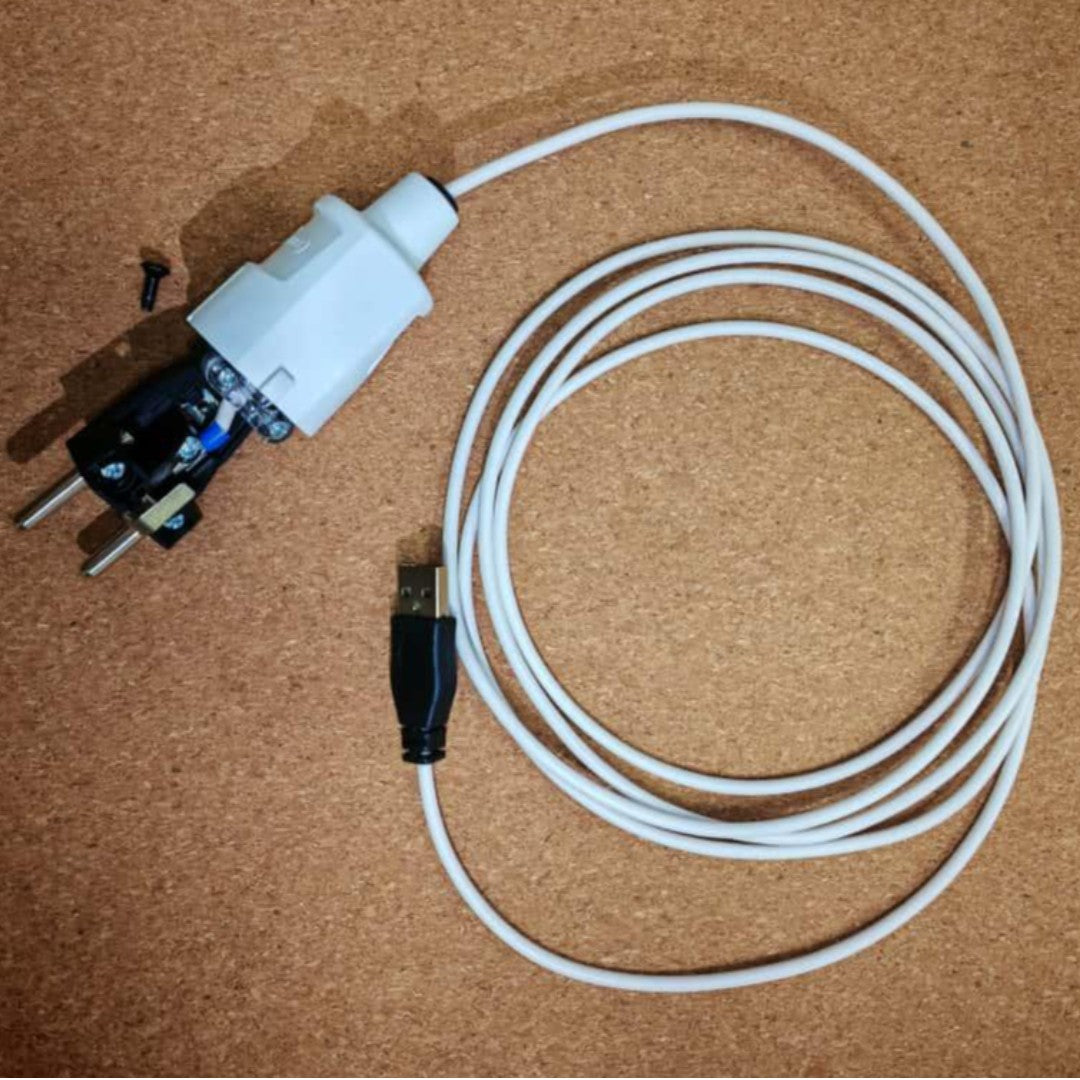
If it's only happening while charging, that means your laptop charger has earthing issue. Since you already have soldering skill, I suggest you to craft your own USB grounding cable.
or, if it always happen, that means your touchpad is either poorly designed or about to break. The only solution is by software: https://askubuntu.com/a/456333/1109616. Drawback? Your touchpad will feel heavier than it used to be.
Offline
Pages: 1