You are not logged in.
- Topics: Active | Unanswered
#1 2026-10-17 09:22:01
- FernandoBasso
- Member

- From: Brazil
- Registered: 2010-10-27
- Posts: 113
- Website
[SOLVED] Wrong Obsidian icon in Xfce taskbar
Found this recent, previous thread, but didn't work for me: https://bbs.archlinux.org/viewtopic.php?pid=2309382
I have a fully up to date Arch install, and installed Obsidian through pacman.
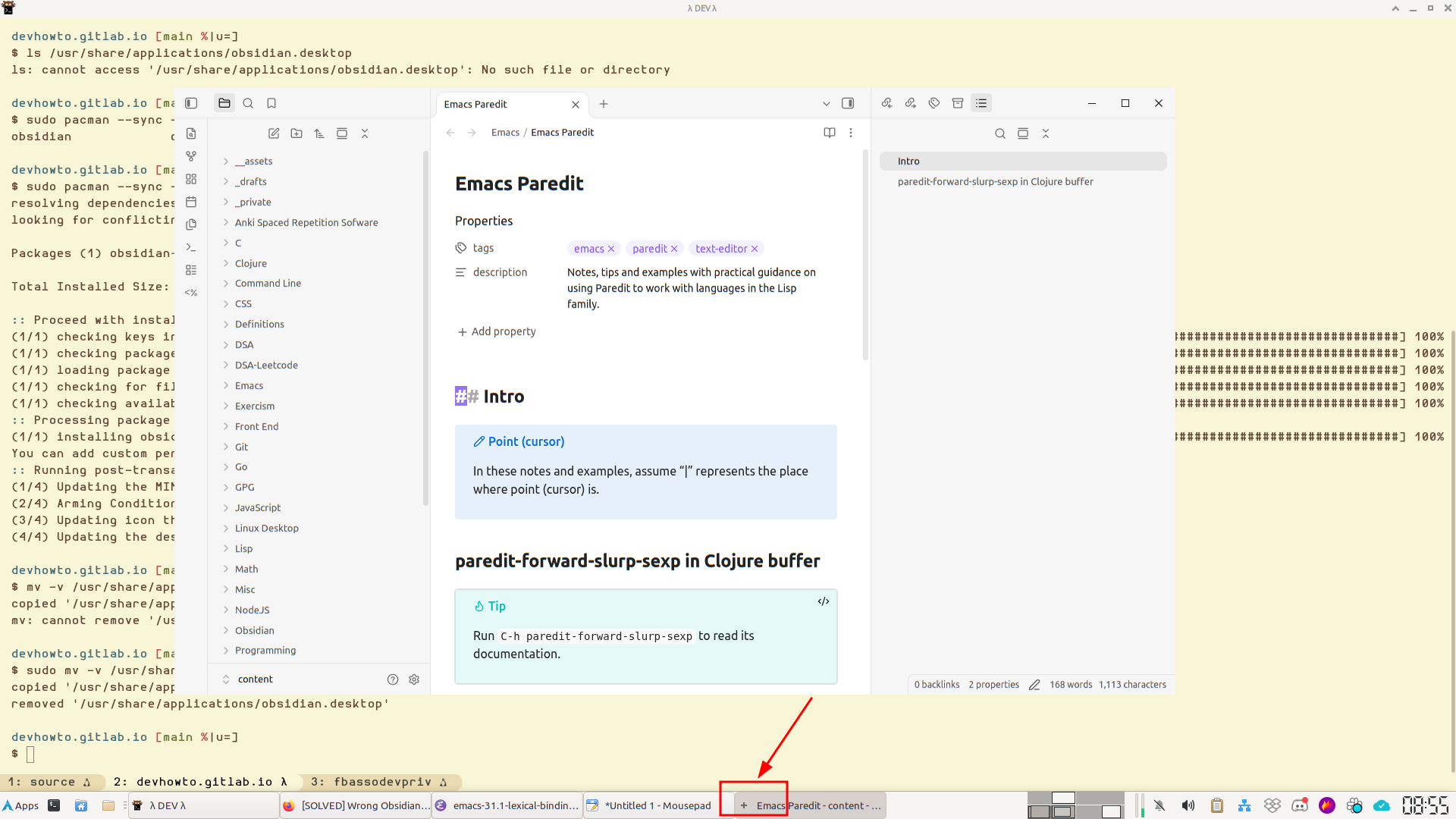
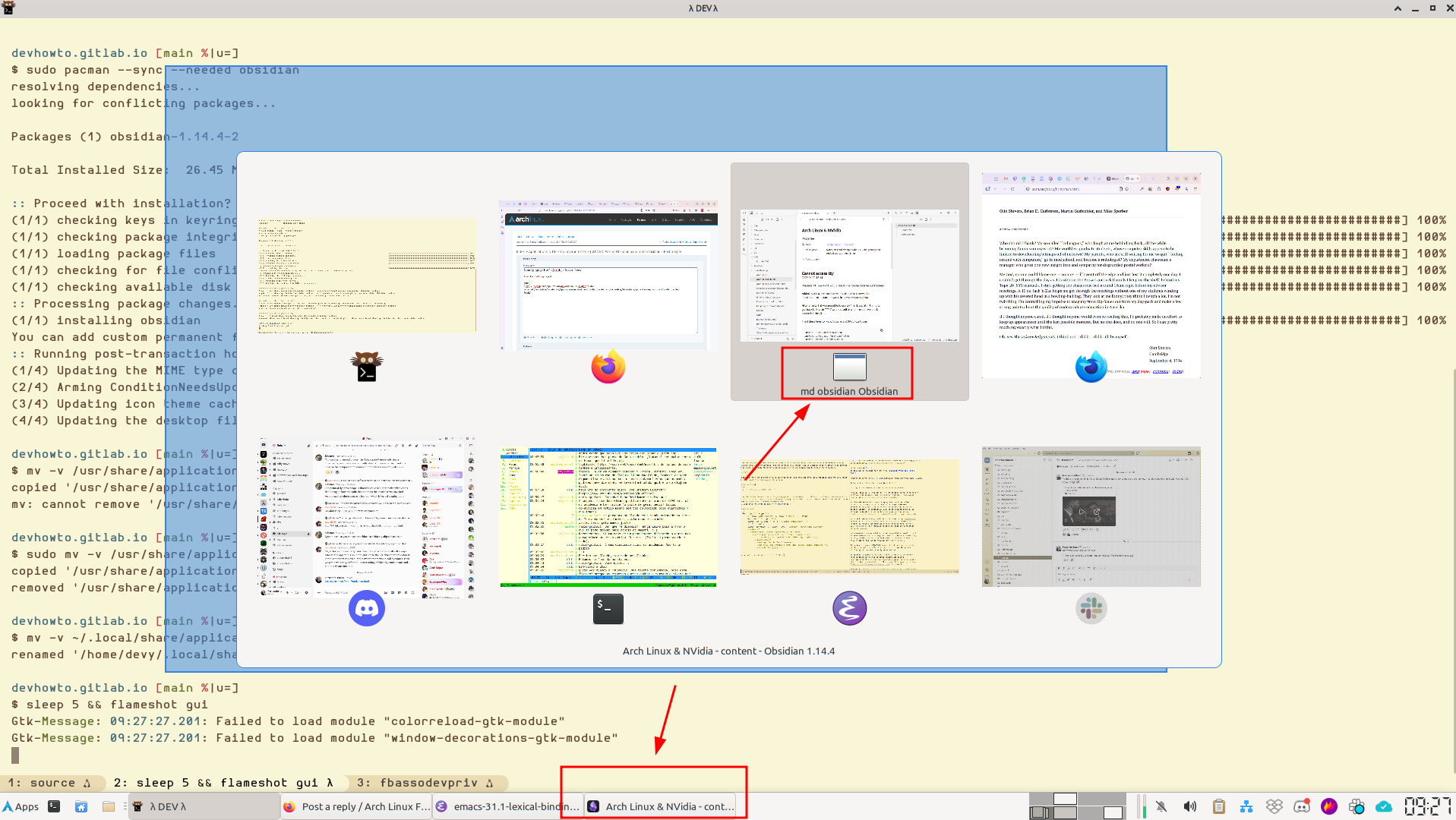
The correct Obsidian icon shows up on Xfce's application finder and on the application menu, but it shows like a gray + (plus) icon on the taskbar, and as an empty square resembling an application window on the task switcher (Alt+Tab).
Here's the output of xprop:
$ xprop
_NET_WM_ICON_GEOMETRY(CARDINAL) = 2689, 1044, 200, 36
_NET_FRAME_EXTENTS(CARDINAL) = 0, 0, 0, 0
_NET_WM_ALLOWED_ACTIONS(ATOM) = _NET_WM_ACTION_CLOSE, _NET_WM_ACTION_ABOVE, _NET_WM_ACTION_BELOW, _NET_WM_ACTION_FULLSCREEN, _NET_WM_ACTION_MOVE, _NET_WM_ACTION_RESIZE, _NET_WM_ACTION_MAXIMIZE_HORZ, _NET_WM_ACTION_MAXIMIZE_VERT, _NET_WM_ACTION_MINIMIZE, _NET_WM_ACTION_CHANGE_DESKTOP, _NET_WM_ACTION_STICK
WM_STATE(WM_STATE):
		window state: Normal
		icon window: 0x0
_NET_WM_DESKTOP(CARDINAL) = 2
_NET_WM_STATE(ATOM) = _NET_WM_STATE_FOCUSED
_NET_WM_USER_TIME(CARDINAL) = 212523968
WM_NORMAL_HINTS(WM_SIZE_HINTS):
		program specified location: 2150, 116
		program specified minimum size: 200 by 150
		window gravity: Static
_NET_WM_OPAQUE_REGION(CARDINAL) = 0, 0, 1320, 800
_MOTIF_WM_HINTS(_MOTIF_WM_HINTS) = 0x2, 0x0, 0x0, 0x0, 0x0
XdndAware(ATOM) = BITMAP
_NET_WM_BYPASS_COMPOSITOR(CARDINAL) = 2
_NET_WM_SYNC_REQUEST_COUNTER(CARDINAL) = 81788933
_GTK_HIDE_TITLEBAR_WHEN_MAXIMIZED(CARDINAL) = 1
WM_NAME(UTF8_STRING) = "AsciiDoc & Asciidoctor - content - Obsidian 1.14.4"
_NET_WM_NAME(UTF8_STRING) = "AsciiDoc & Asciidoctor - content - Obsidian 1.14.4"
WM_WINDOW_ROLE(STRING) = "browser-window"
WM_CLASS(STRING) = "md.obsidian.obsidian", "md.obsidian.Obsidian"
_NET_WM_WINDOW_TYPE(ATOM) = _NET_WM_WINDOW_TYPE_NORMAL
_NET_WM_PID(CARDINAL) = 1635493
WM_CLIENT_MACHINE(STRING) = "theforce"
WM_PROTOCOLS(ATOM): protocols  WM_DELETE_WINDOW, _NET_WM_PING, _NET_WM_SYNC_REQUEST
And the contents of /usr/share/applications/obsidian.desktop:
[Desktop Entry]
Name=Obsidian
Exec=/usr/bin/obsidian %U
Terminal=false
Type=Application
Icon=obsidian
#Icon=/home/devy/Pictures/obsidian.png
StartupWMClass=md.obsidian.Obsidian
#StartupWMClass=obsidian
Comment=Obsidian
MimeType=application/pdf;text/markdown;application/x-obsidian-canvas;application/x-obsidian-base;x-scheme-handler/obsidian;
Categories=Office;
Note the two commented lines. I did try those as well, restarted Obsidian, and even restarted the whole system. Nothing worked. Any ideas?
Last edited by FernandoBasso (2026-10-20 15:49:41)
There is a difference between knowing the path and walking the path.
Offline
#2 2026-10-17 14:49:28
- seth
- Member

- From: Won't reply 2 private help req
- Registered: 2012-09-03
- Posts: 78,469
Re: [SOLVED] Wrong Obsidian icon in Xfce taskbar
https://bbs.archlinux.org/viewtopic.php … 2#p2309382
Do you possibly also have a local shadow of the file?
xfce might also be using a cache of the desktop entries and incorrectly not updating that - does it work w/ a fresh user?
The client doesn't put an icon onto the window properties, so if taskbar and WM (switcher) only look there instead of first/last that's gonna come back empty and you'd get a default/generic icon (what I assume is you're describing)
The other thread says
When I open Obsidian (installed from extra repo) it shows the default wayland icon on the bar.
so that's probably not been xfce.
https://aur.archlinux.org/packages/xseticon can set the _NET_WM_ICON property
Though https://forum.xfce.org/viewtopic.php?id=18796 suggests the .desktop service is used
Another possible pitfall might be the case:
StartupWMClass=md.obsidian.obsidian(ie. idk whether it cares about classname or classclass and they're different)
Offline
#3 2026-10-20 10:06:54
- FernandoBasso
- Member
- From: Brazil
- Registered: 2010-10-27
- Posts: 113
- Website
Re: [SOLVED] Wrong Obsidian icon in Xfce taskbar
If by “local shadow of the file” you mean ~/.local/share/applications/obsidian.desktop, yes, I do.
desktop-file-validate suggests no problems with it.
And the problem persists with a fresh user.
As for the StartupWMClass, I tried the values “obsidian”, “md.obsidian.obsidian”, and “md.obsidian.Obsidian”. Nothing worked.
Had a lengthy conversation on Xfce Matrix room where we checked other things as well, and in the end, this workaround worked for me:
There is a difference between knowing the path and walking the path.
Offline
#4 2026-10-20 14:26:21
- seth
- Member
- From: Won't reply 2 private help req
- Registered: 2012-09-03
- Posts: 78,469
Re: [SOLVED] Wrong Obsidian icon in Xfce taskbar
Ftr, https://forums.linuxmint.com/viewtopic.php?t=444222 is
https://aur.archlinux.org/packages/xseticon can set the _NET_WM_ICON property
So seems those clients don't use the desktop service file but fwiw
If by “local shadow of the file” you mean ~/.local/share/applications/obsidian.desktop, yes, I do.
means that
the contents of /usr/share/applications/obsidian.desktop:
are completely meaningless - the you'd have to edit ~/.local/share/applications/obsidian.desktop
Please always remember to mark resolved threads by editing your initial posts subject - so others will know that there's no task left, but maybe a solution to find.
Thanks.
Offline
#5 2026-10-20 15:49:12
- FernandoBasso
- Member
- From: Brazil
- Registered: 2010-10-27
- Posts: 113
- Website
Re: [SOLVED] Wrong Obsidian icon in Xfce taskbar
Oh yes. I was not clear enough. I mentioned /usr/share/applications/obsidian.desktop as the example of the contents of the file, and I did edit ~/.local/share/applications/obsidian.desktop with all possible combinations of settings, but to no avail. Since the workaround mentioned earlier works, I'm satisfied with that for now.
Thanks for your help.
There is a difference between knowing the path and walking the path.
Offline
#6 Yesterday 18:33:25
- lambdarch
- Member

- From: France
- Registered: 2021-01-10
- Posts: 110
- Website
Re: [SOLVED] Wrong Obsidian icon in Xfce taskbar
Unfortunately, g_desktop_app_info_search(), which libxfce4windowing uses as a last resort to find a .desktop file containing a valid icon name, does a pretty poor job (it doesn't build a database from the StartupWMClass fields, in particular; otherwise, the correct file would have been found). What works in this type of situation is to rename or copy the original .desktop file to match the value in the StartupWMClass field (provided that it matches what the app window advertises, which is the starting point for libxfce4windowing…). So in this case, md.obsidian.Obsidian.desktop.
This is also why apps are encouraged to name their .desktop files based on the "id" they advertise, especially on Wayland, where no other information is available.
Last edited by lambdarch (Yesterday 18:37:40)
Xfce dev: https://gravatar.com/gaelbonithon
Offline
#7 Today 10:59:07
- FernandoBasso
- Member
- From: Brazil
- Registered: 2010-10-27
- Posts: 113
- Website
Re: [SOLVED] Wrong Obsidian icon in Xfce taskbar
Unfortunately, g_desktop_app_info_search(), which libxfce4windowing uses as a last resort to find a .desktop file containing a valid icon name, does a pretty poor job (it doesn't build a database from the StartupWMClass fields, in particular; otherwise, the correct file would have been found). What works in this type of situation is to rename or copy the original .desktop file to match the value in the StartupWMClass field (provided that it matches what the app window advertises, which is the starting point for libxfce4windowing…). So in this case, md.obsidian.Obsidian.desktop.
This is also why apps are encouraged to name their .desktop files based on the "id" they advertise, especially on Wayland, where no other information is available.
I tried this on ~/.local/share/applications/md.obsidian.Obsidian.desktop:
[Desktop Entry]
Name=Obsidian
Exec=/usr/bin/obsidian
Terminal=false
Type=Application
Icon=obsidian
StartupWMClass=md.obsidian.Obsidian
Comment=Obsidian Note Taking
MimeType=application/pdf;text/markdown;application/x-obsidian-canvas;application/x-obsidian-base;x-scheme-handler/obsidian;
Categories=Office;
Removed the normal obsidian.desktop from both ~/{.local,usr}/share/applications/ and still get the same problem with the icon.
There is a difference between knowing the path and walking the path.
Offline
#8 Today 11:23:23
- lambdarch
- Member
- From: France
- Registered: 2021-01-10
- Posts: 110
- Website
Re: [SOLVED] Wrong Obsidian icon in Xfce taskbar
Strange. A simple
pacman -S obsidian
mv /usr/share/applications/obsidian.desktop /usr/share/applications/md.obsidian.Obsidian.desktop
works for me. (It also works when copying/moving the file to ~/.local/share/applications/md.obsidian.Obsidian.desktop)
Xfce dev: https://gravatar.com/gaelbonithon
Offline
#9 Today 12:02:37
- FernandoBasso
- Member
- From: Brazil
- Registered: 2010-10-27
- Posts: 113
- Website
Re: [SOLVED] Wrong Obsidian icon in Xfce taskbar
$ mv -v \
    ~/.local/share/applications/*obsidian* \
    ~/pCloud//Backups/dot-desktop-files/

$ sudo pacman -R obsidian

$ ls /usr/share/applications/obsidian.desktop
ls: cannot access '/usr/share/applications/obsidian.desktop': No such file or directory

$ sudo pacman --sync obsidian

$ sudo mv -v \
    /usr/share/applications/obsidian.desktop \
    ~/.local/share/applications/md.obsidian.Obisidian.desktop
copied '/usr/share/applications/obsidian.desktop' -> '/home/devy/.local/share/applications/md.obsidian.Obisidian.desktop'
removed '/usr/share/applications/obsidian.desktop'
And still the same result. Maybe I have something else going on.
Last edited by FernandoBasso (Today 12:07:52)
There is a difference between knowing the path and walking the path.
Offline
#10 Today 12:17:17
- lambdarch
- Member
- From: France
- Registered: 2021-01-10
- Posts: 110
- Website
Re: [SOLVED] Wrong Obsidian icon in Xfce taskbar
Typo ^^: Obisidian ≠ Obsidian
Xfce dev: https://gravatar.com/gaelbonithon
Offline
#11 Today 12:30:07
- FernandoBasso
- Member
- From: Brazil
- Registered: 2010-10-27
- Posts: 113
- Website
Re: [SOLVED] Wrong Obsidian icon in Xfce taskbar
Typo ^^: Obisidian ≠ Obsidian
Gosh. Dammit! Eagle eyes!
$ mv -v ~/.local/share/applications/md.obsidian.Ob{i,}sidian.desktop
renamed '/home/devy/.local/share/applications/md.obsidian.Obisidian.desktop' -> '/home/devy/.local/share/applications/md.obsidian.Obsidian.desktop'
It works for the taskbar icon, but not with the application switcher (Alt+Tab), but it is already good enough for me.
There is a difference between knowing the path and walking the path.
Offline
#12 Today 13:24:08
- seth
- Member
- From: Won't reply 2 private help req
- Registered: 2012-09-03
- Posts: 78,469
Re: [SOLVED] Wrong Obsidian icon in Xfce taskbar
Have you tried to restart the WM (in case the icon is cached there)?
Offline
#13 Today 13:35:24
- FernandoBasso
- Member
- From: Brazil
- Registered: 2010-10-27
- Posts: 113
- Website
Re: [SOLVED] Wrong Obsidian icon in Xfce taskbar
Have you tried to restart the WM (in case the icon is cached there)?
Just logged out and in. The taskbar icon is correct, the application switcher icon the “default/wrong” one.
There is a difference between knowing the path and walking the path.
Offline
#14 Today 13:37:08
- lambdarch
- Member
- From: France
- Registered: 2021-01-10
- Posts: 110
- Website
Re: [SOLVED] Wrong Obsidian icon in Xfce taskbar
xfwm4 doesn't use libxfce4windowing, it only uses libwnck, as it's X11-only. And libwnck doesn't look at .desktop files at all (if I'm not mistaken, but I don't think so). So I'd say "it's normal".
Xfce dev: https://gravatar.com/gaelbonithon
Offline