You are not logged in.
- Topics: Active | Unanswered
#1 2008-12-02 07:38:54
- colnago
- Member
- From: Victoria, BC
- Registered: 2004-03-25
- Posts: 438
Removable media no longer automatically mounting
A recent update (perhaps policykit 0.9.7? ) has stopped my removable media from mounting in KDE 4 (arch_64). It complains about "...hal.storage.mount-removable...".
Anyway, this is easily fixed by changing your /etc/PolicyKit/PolicyKit.conf
<!DOCTYPE pkconfig PUBLIC "-//freedesktop//DTD PolicyKit Configuration 1.0//EN"
"http://hal.freedesktop.org/releases/PolicyKit/1.0/config.dtd">

<!-- See the manual page PolicyKit.conf(5) for file format -->

<config version="0.1">
<match action="org.freedesktop.hal.storage.mount-removable">
<return result="yes" />
</match>
</config>
Log back in and it is working again.
[Edit: I am behind the times, this is already reported as a bug: http://bugs.archlinux.org/task/12221 ]
Last edited by colnago (2008-12-02 07:45:45)
Offline
#2 2008-12-03 16:01:20
- jamtat
- Member

- Registered: 2008-03-13
- Posts: 229
Re: Removable media no longer automatically mounting
This solution does not work for me. I'm using gnome, btw. I looked at the bug report for which you provide a link and tried some of the resolutions being discussed there, including installing, and logging in to gnome, through gdm. It still fails with the following error messages: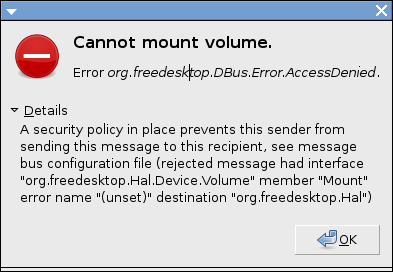
and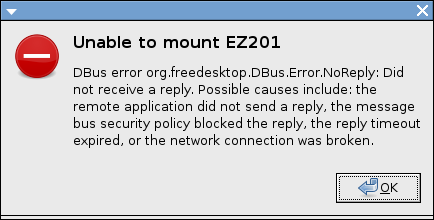
Further pointers on how to resolve this issue will be appreciated.
James
Offline
#3 2008-12-04 07:12:33
- kishd
- Member
- Registered: 2006-06-14
- Posts: 401
Re: Removable media no longer automatically mounting
Try changing
<match action="org.freedesktop.hal.storage.mount-removable">
to
<match action="org.freedesktop.hal.storage.*">
---for there is nothing either good or bad, but only thinking makes it so....
Hamlet, W Shakespeare
Offline
#4 2008-12-05 05:03:27
- jamtat
- Member
- Registered: 2008-03-13
- Posts: 229
Re: Removable media no longer automatically mounting
Making that change to the PolicyKit.conf file did not resolve the issue. I get the same error when I plug in removable media or pop in a CD/DVD.
James
Offline
#5 2008-12-05 08:36:40
- kishd
- Member
- Registered: 2006-06-14
- Posts: 401
Re: Removable media no longer automatically mounting
I added my username to the PolicyKit.conf. It seems that this solved the problem for me. Note the additional <match> </match> pair.
<config version="0.1">
<match user="kishd">
<match action="org.freedesktop.hal.storage.*">
<return result="yes"/>
</match>
</match>
</config>
---for there is nothing either good or bad, but only thinking makes it so....
Hamlet, W Shakespeare
Offline
#6 2008-12-05 19:27:13
- jamtat
- Member
- Registered: 2008-03-13
- Posts: 229
Re: Removable media no longer automatically mounting
Still getting the same error messages (having made the further changes you suggested above) with failure to mount the inserted medium. I can issue pmount to mount it just fine--desktop icon appearing and all. But auto-mounting is still broken on this system. Think I'll trying another -Syu in case some fixes have come out in the last couple days.
James
Last edited by jamtat (2008-12-09 22:21:54)
Offline
#7 2008-12-09 21:07:15
- jamtat
- Member
- Registered: 2008-03-13
- Posts: 229
Re: Removable media no longer automatically mounting
This is getting to be a real pain. I've done system upgrades a few times since the problem cropped up after a pacman -Syu recently (hadn't done an -Syu for some time previous to that) and the system still will not auto mount inserted media (USB flash drives, CD's/DVD's). I can manually mount them using pmount. But if I simply insert the medium no drives are mounted and the messages I posted above appear. Can anyone offer help on diagnosing and resolving this problem? Point me to any further information about its nature?
Thanks,
James
PS Oddly I noticed yesterday that an external DVD burner I have, which is powered off most of the time, somehow escapes this problem--at least in part. When I insert a blank DVD into that drive, the system opens my CD/DVD burning application and asks that sort of disk I want to burn. But if it's a data DVD, the above-posted errors appear.
Offline
#8 2008-12-10 06:09:42
- SyXbiT
- Member

- From: Seattle, WA
- Registered: 2008-06-28
- Posts: 179
- Website
Re: Removable media no longer automatically mounting
I have exactly the same problem. Have to mount manually with pmount, which is a huge pain.
Let me know if you solve this (I've tried everything on every wiki and forum)
Offline
#9 2008-12-10 16:52:34
- jamtat
- Member
- Registered: 2008-03-13
- Posts: 229
Re: Removable media no longer automatically mounting
Yeah, I'll definitely post here if I find a solution. I have to guess this is not a widespread problem or a whole lot of other people would be posting about it. I have found some posts about the problem, including this one, but not as many as there should be if just doing a system update caused it. It's possible there's something peculiar about our systems that is causing the problem. I'm just not sure what that is.
For one thing, this problem does not owe to the newer hal on my system--as it has on the systems of some who have encountered the problem. The problematic newer version of hal I've read about identifies version 0.5.11-7 as the culprit, while the older version--0.5.11-4--is supposed to be ok. I have version 0.5.11-4 on this system.
I am using gnome as my WM/DE. I initially had the system set up without a login manager. I recall having some problems with auto-mounting of removable media when I first set up this system. I made some changes relating to hal to get auto-mounting to work, but I don't recall exactly what they were. I think the main thing was putting hal in the daemons section of rc.conf. I'll have to ruminate more about that to try and recall if I did anything else.
Anyway, one of the postings I read about this problem at the bug report forum linked to from this thread it was suggested that adding a login manager would resolve the problem. Thus, I added gdm and now login using it. But that had no effect on the auto-mounting problem. I also added an .xinitrc to my user's home directory whereas originally I simply relied on the system-wide xinitrc. I made some changes there to the way gnome is started (appended ck-launch-session between exec and /usr/bin/gnome-session) as suggested in that same forum but with no positive effect. I should mention that I've been rebooting or logging out/in after making such changes.
Maybe if we post here what things might be unique about our systems we will be able to puzzle out the source of this problem? Like I said it doesn't seem to be widespread but rather looks to be peculiar to certain systems.
Thanks,
James
Offline
#10 2008-12-12 23:16:30
- jamtat
- Member
- Registered: 2008-03-13
- Posts: 229
Re: Removable media no longer automatically mounting
Don't know if this is related but in any case it doesn't seem right at all: I note that when I run htop that there are about 50 instances of /usr/bin/console-kit-daemon running. As stated above, I added ck-launch-session to .xinitrc on the advice of a post at one of the sites where they were discussing the auto-mounting problem. ck stands for console-kit, so far as I understand. So this case of way too many console-kit-daemons running may have some bearing on the auto-mount problem on this particular system. Further input will be appreciated.
James
Offline
#11 2008-12-13 03:52:33
- kishd
- Member
- Registered: 2006-06-14
- Posts: 401
Re: Removable media no longer automatically mounting
It is in fact one ck process running with many threads.
---for there is nothing either good or bad, but only thinking makes it so....
Hamlet, W Shakespeare
Offline
#12 2008-12-13 07:58:55
- SyXbiT
- Member
- From: Seattle, WA
- Registered: 2008-06-28
- Posts: 179
- Website
Re: Removable media no longer automatically mounting
i have my desktop running perfectly. then, i needed to wipe it and reinstall.
since then, usb mounting hasn't worked. I've spent countless hours debugging and trying things. The best help I got was to install a cvs hal. haven't done that yet. been busy with school and work.
i'm just using pmount right now
Offline
#13 2008-12-17 11:09:58
- MindTooth
- Member

- From: Norway
- Registered: 2008-11-11
- Posts: 331
Re: Removable media no longer automatically mounting
I have exactly the same problem. Have to mount manually with pmount, which is a huge pain.
Let me know if you solve this (I've tried everything on every wiki and forum)
The pmount option worked perfectly. Still about old, but working.
Birger 
Offline
#14 2008-12-23 03:56:33
- jamtat
- Member
- Registered: 2008-03-13
- Posts: 229
Re: Removable media no longer automatically mounting
Where do I enter such codes to resolve the problem at hand? I am not a hardcore user of any Linux production, so honestly, I have no idea how to go about maintaining certain problems.
Codes for pmount? If that's what you're talking about, you first confirm whether the pmount utility is installed on your system (e.g., enter the letters "pm" in a terminal and keep hitting the tab key to see if bash auto-completion gives pmount as one of the possible ways the command can be completed). If it's not installed, install it. Then you have to figure out the device node of your removable medium. If you don't know how to find that out, insert the medium, then take a look at the last few lines of dmesg output. That should tell you the device node. Then, you just enter
pmount /dev/sdX#into the terminal (where X is a letter you found by looking at dmesg output and # is the number of a partition: further clue - most removable media have only 1 partion, so the number will likely be the number 1). Once you do that your removable medium should mount and your Desktop environment should put an icon representing the medium on you're desktop (assuming you're using a more full-fledged desktop like Gnome or KDE). This is an ugly solution for the auto-mounting problem discussed in this thread, but at least it works--ugly because you end up doing manually what the machine is supposed to be doing for you auto-magically (mounting and unmounting inserted media).
James
PS Don't forget to issue
pumount /dev/sdX#before you remove your medium from the machine or you may be in for some trouble.
Last edited by jamtat (2008-12-23 04:02:35)
Offline