You are not logged in.
- Topics: Active | Unanswered
#26 2009-12-03 21:34:42
- miau
- Member
- Registered: 2009-05-06
- Posts: 202
Re: AD1981B problem with sound
What is the name of the second Master Option? Have you tried unmuting AUX? Is Line Line In or Line Out? Could you also post a screenshot with all mixer settings not only the playback ones?
Last edited by miau (2009-12-03 21:35:46)
Offline
#27 2009-12-03 21:41:23
- ni3pas
- Member
- Registered: 2009-12-02
- Posts: 17
Re: AD1981B problem with sound
If this is helping you, I got this message:
The audio playback device Intel 82801DB-ICH4 with AD1981B (Intel 82801DB-ICH4) does not work. Falling back to .
Offline
#28 2009-12-03 21:54:43
- miau
- Member
- Registered: 2009-05-06
- Posts: 202
Re: AD1981B problem with sound
Mhh, is this the first time this message appears?
What is the output of
amixer?
Offline
#29 2009-12-03 22:32:10
- ni3pas
- Member
- Registered: 2009-12-02
- Posts: 17
Re: AD1981B problem with sound
No the message is the same as at the start
The output of amixer is :
Simple mixer control 'Master',0
Capabilities: pvolume pswitch
Playback channels: Front Left - Front Right
Limits: Playback 0 - 31
Mono:
Front Left: Playback 23 [74%] [-12.00dB] [on]
Front Right: Playback 23 [74%] [-12.00dB] [on]
Simple mixer control 'Master Mono',0
Capabilities: pvolume pvolume-joined pswitch pswitch-joined
Playback channels: Mono
Limits: Playback 0 - 31
Mono: Playback 23 [74%] [-12.00dB] [on]
Simple mixer control 'Headphone',0
Capabilities: pvolume pswitch
Playback channels: Front Left - Front Right
Limits: Playback 0 - 31
Mono:
Front Left: Playback 23 [74%] [-12.00dB] [on]
Front Right: Playback 23 [74%] [-12.00dB] [on]
Simple mixer control 'PCM',0
Capabilities: pvolume pswitch
Playback channels: Front Left - Front Right
Limits: Playback 0 - 31
Mono:
Front Left: Playback 23 [74%] [0.00dB] [on]
Front Right: Playback 23 [74%] [0.00dB] [on]
Simple mixer control 'Line',0
Capabilities: pvolume pswitch cswitch cswitch-exclusive
Capture exclusive group: 0
Playback channels: Front Left - Front Right
Capture channels: Front Left - Front Right
Limits: Playback 0 - 31
Front Left: Playback 0 [0%] [-34.50dB] [off] Capture [off]
Front Right: Playback 0 [0%] [-34.50dB] [off] Capture [off]
Simple mixer control 'CD',0
Capabilities: pvolume pswitch cswitch cswitch-exclusive
Capture exclusive group: 0
Playback channels: Front Left - Front Right
Capture channels: Front Left - Front Right
Limits: Playback 0 - 31
Front Left: Playback 25 [81%] [3.00dB] [on] Capture [off]
Front Right: Playback 25 [81%] [3.00dB] [on] Capture [off]
Simple mixer control 'Mic',0
Capabilities: pvolume pvolume-joined pswitch pswitch-joined cswitch cswitch-exclusive
Capture exclusive group: 0
Playback channels: Mono
Capture channels: Front Left - Front Right
Limits: Playback 0 - 31
Mono: Playback 22 [71%] [-1.50dB] [off]
Front Left: Capture [on]
Front Right: Capture [on]
Simple mixer control 'Mic Boost (+20dB)',0
Capabilities: pswitch pswitch-joined
Playback channels: Mono
Mono: Playback [off]
Simple mixer control 'Mic Select',0
Capabilities: enum
Items: 'Mic1' 'Mic2'
Item0: 'Mic1'
Simple mixer control 'Video',0
Capabilities: cswitch cswitch-exclusive
Capture exclusive group: 0
Capture channels: Front Left - Front Right
Front Left: Capture [off]
Front Right: Capture [off]
Simple mixer control 'Phone',0
Capabilities: pvolume pvolume-joined pswitch pswitch-joined cswitch cswitch-exclusive
Capture exclusive group: 0
Playback channels: Mono
Capture channels: Front Left - Front Right
Limits: Playback 0 - 31
Mono: Playback 0 [0%] [-34.50dB] [off]
Front Left: Capture [off]
Front Right: Capture [off]
Simple mixer control 'Aux',0
Capabilities: pvolume pswitch cswitch cswitch-exclusive
Capture exclusive group: 0
Playback channels: Front Left - Front Right
Capture channels: Front Left - Front Right
Limits: Playback 0 - 31
Front Left: Playback 20 [65%] [-4.50dB] [on] Capture [off]
Front Right: Playback 20 [65%] [-4.50dB] [on] Capture [off]
Simple mixer control 'Mono Output Select',0
Capabilities: enum
Items: 'Mix' 'Mic'
Item0: 'Mix'
Simple mixer control 'Capture',0
Capabilities: cvolume cswitch
Capture channels: Front Left - Front Right
Limits: Capture 0 - 15
Front Left: Capture 8 [53%] [12.00dB] [on]
Front Right: Capture 8 [53%] [12.00dB] [on]
Simple mixer control 'Mix',0
Capabilities: cswitch cswitch-exclusive
Capture exclusive group: 0
Capture channels: Front Left - Front Right
Front Left: Capture [off]
Front Right: Capture [off]
Simple mixer control 'Mix Mono',0
Capabilities: cswitch cswitch-exclusive
Capture exclusive group: 0
Capture channels: Front Left - Front Right
Front Left: Capture [off]
Front Right: Capture [off]
Simple mixer control 'External Amplifier',0
Capabilities: pswitch pswitch-joined
Playback channels: Mono
Mono: Playback [off]
Simple mixer control 'Stereo Mic',0
Capabilities: pswitch pswitch-joined
Playback channels: Mono
Mono: Playback [off]
Offline
#30 2009-12-03 22:36:31
- miau
- Member
- Registered: 2009-05-06
- Posts: 202
Re: AD1981B problem with sound
Have you tried turning on the aux channel?
You could also try to rmmod either intel-snd-8x0 or snd-intel8x0m so that you only use one of the two modules.
Offline
#31 2009-12-04 17:24:40
- ni3pas
- Member
- Registered: 2009-12-02
- Posts: 17
Re: AD1981B problem with sound
OK I solved the problem but not permenately. In every reboot I have to do 2 things:
#rmmod snd-intel8x0
#modprobe snd-intel8x0
After that, my sound is OK!!!
I took 2 printscreens to give you some info to help me solve it:
Before the 2 commands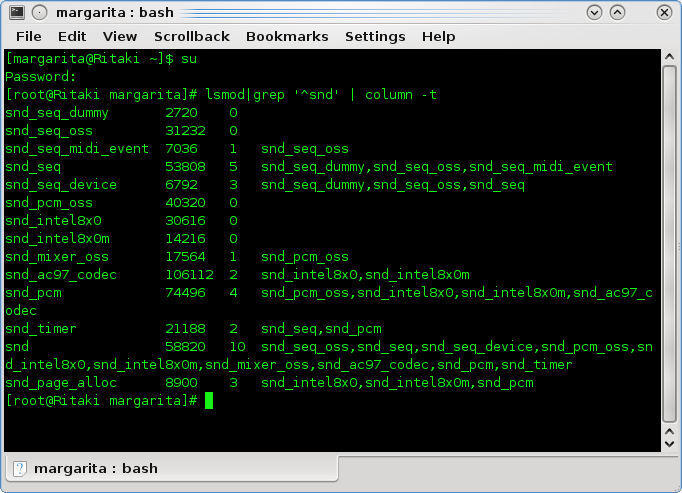
After the 2 commands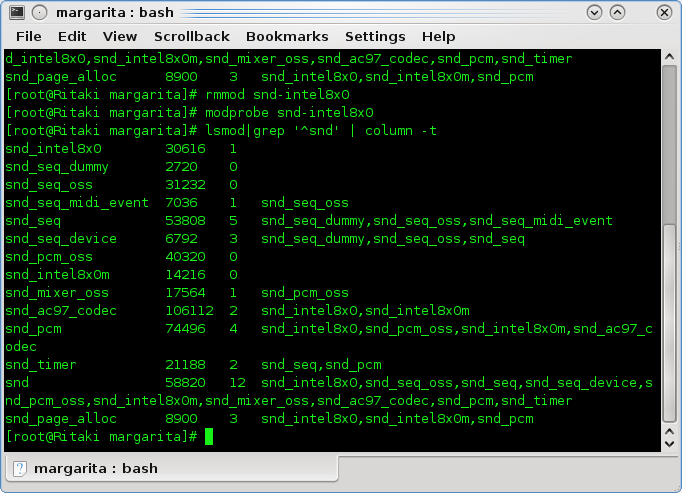
Any ideas?
Offline
#32 2009-12-04 18:20:13
- miau
- Member
- Registered: 2009-05-06
- Posts: 202
Re: AD1981B problem with sound
Yes i see the difference, but i don't know a solution. You could try to add the rmmod snd_intel8x0 and modprobe snd_intel8x0 to ypur rc.local. So you don't have to type it every startup on your own.
Offline
#33 2009-12-04 18:35:52
- ni3pas
- Member
- Registered: 2009-12-02
- Posts: 17
Re: AD1981B problem with sound
Yeah I'm aware of that solution! Thanks anyway man! I really appreciate it!
Offline
#34 2009-12-18 00:58:08
- mawch
- Member
- Registered: 2005-11-21
- Posts: 13
Re: AD1981B problem with sound
very good,thanks a lot ,you guys.I solved sound problem that bother me 2 weeks.I just do this once .
#rmmod snd-hda-intel
#modprobe snd-hda-intel
Offline