You are not logged in.
- Topics: Active | Unanswered
#1 2011-08-09 19:56:23
- jwhendy
- Member
- Registered: 2010-04-01
- Posts: 621
Conky cut off at bottom
My conky is getting cut off. I've viewed some similar topics, but the suggestion solutions are not working for me:
- [SOLVED] conky getting cut off: resolved by increasing text_buffer_size and then maximum_width
- conky window cut off: increased minimum_size
Here is my current config:
# placement
alignment top_left
gap_x 5
gap_y 20
#minimum_size 1600 900

# appearance/function
draw_borders no # conky window border
draw_graph_borders yes # graph outline border
draw_shades no # drop shadows -- ick
draw_outline no # outlines around letters --ick
own_window yes
own_window_hints undecorated,below,sticky,skip_taskbar,skip_pager
own_window_class Conky
own_window_transparent yes
own_window_type desktop

# font/colors
use_xft yes
xftfont Droid Sans Mono Slashed:size=9.5
default_color white
default_outline_color white
default_shade_color white
text_buffer_size 8192
#minimum_size 800 800
#text_height 800

# misc
out_to_console no
out_to_stderr no
use_spacer none
double_buffer yes

# measuring
no_buffers yes
net_avg_samples 2
cpu_avg_samples 2
update_interval 2.0


TEXT
${execi 300 cat ~/org/aux/agenda-export.txt}
All this does is put up my Org-mode agenda up on my background. An example agenda looks like THIS. I have a cron job exporting my agenda to a text file called agenda-export.txt and conky puts it up on my background. Compare the output of cat and the conky background, though:
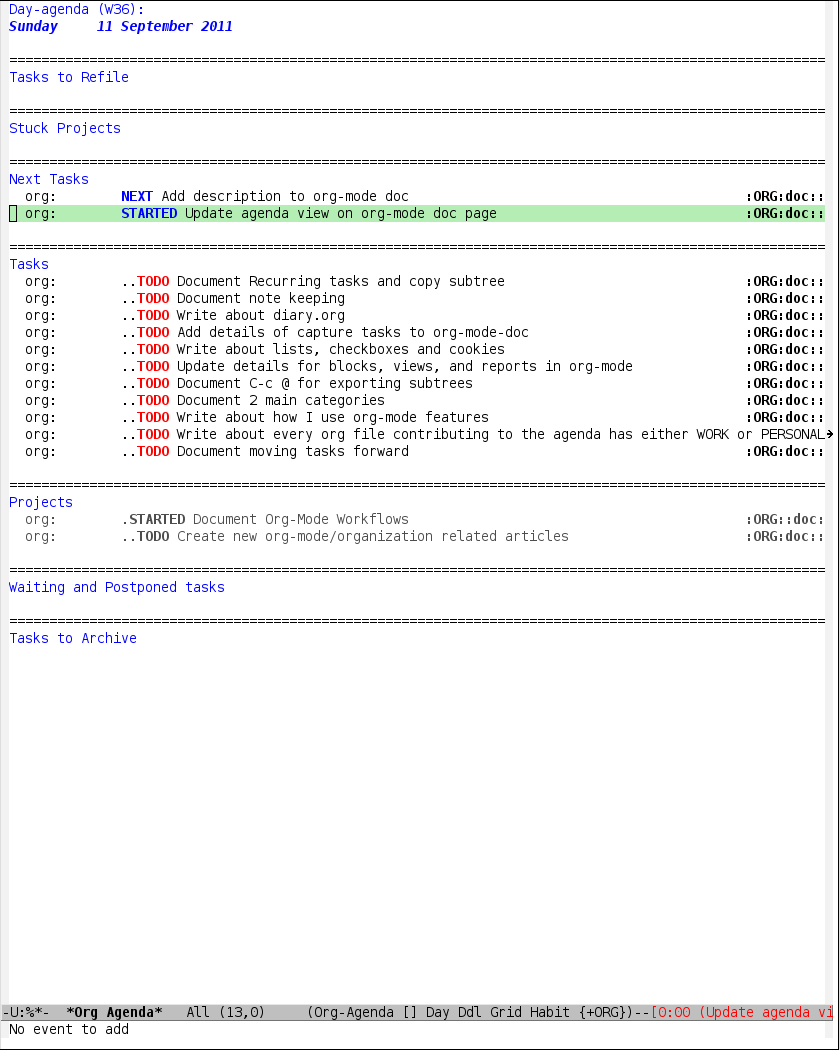
---( cat )---
---( conky output )---
So I'm losing quite a bit of text in the conky output. I've looked into, from what I can find, are the pertinent variables and have tried the following:
- text_buffer_size: anywhere from 4096 to 20000
- minimum_size: from 800 800 to 1600 900 (my full screen width/height), and setting this either at the top or after the text_buffer_size.
- text_height: 800
When conky refreshes, I can see the footprint the screen is going to take up before it lays out the text and it's staying at the same size. None of the options above seem to make it increase.
Any suggestions?
Offline
#2 2011-08-12 16:34:54
- dcj123
- Member

- Registered: 2009-12-27
- Posts: 58
Re: Conky cut off at bottom
I have a similar problem with a similar number of solutions although mine is getting cut off horizontally.
https://bbs.archlinux.org/viewtopic.php?id=123948
Last edited by dcj123 (2011-08-12 16:35:09)
Offline
#3 2011-08-12 21:50:42
- Sector11
- Banned
- Registered: 2010-02-25
- Posts: 10
Re: Conky cut off at bottom
When conky refreshes, I can see the footprint the screen is going to take up before it lays out the text and it's staying at the same size. None of the options above seem to make it increase.
Any suggestions?
maybe try:
max_specials 1024Could supply a "sample" agenda-export.txt for me to try here?
Just change: names, places etc that are sensitive to protect the guilty so to speak 
Last edited by Sector11 (2011-08-12 22:00:01)
Offline
#4 2011-08-13 22:03:17
- GSF1200S
- Member

- Registered: 2008-12-24
- Posts: 474
Re: Conky cut off at bottom
Im having this problem too, and im not even using that many "specials." I have a complicated conky running on the right side of my screen, and then a conky on the left which simply cat's /var/log/messages.log, /var/log/pacman.log, and some pytyle shortcuts im aiming to know in and out. As a temporary workaround, im literally having to run a total of 4 conkys in order to get some simple log monitoring on the desktop.
Offline
#5 2011-08-13 22:33:38
- Sector11
- Banned
- Registered: 2010-02-25
- Posts: 10
Re: Conky cut off at bottom
@ GSF1200S
Offline
#6 2011-08-13 23:12:59
- jwhendy
- Member
- Registered: 2010-04-01
- Posts: 621
Re: Conky cut off at bottom
@Sector11: I'm assuming you meant "Scrotwm by chance"?
I'm using Openbox. I can't tell what the resolution was in the linked threat -- using .xinitrc? I start conky via ~/.config/openboxautostart.sh.
Offline
#7 2011-08-14 01:16:49
- GSF1200S
- Member
- Registered: 2008-12-24
- Posts: 474
Re: Conky cut off at bottom
I dont see how the window manager would make a difference since conky is merely drawing to the root desktop. Im running Openbox as well- ill try later installing fluxbox and a few others and see if the problem goes away, but something tells me that has little to do with it. Ill check that thread when im back from dinner- thanks for the link..
Offline
#8 2011-08-14 14:48:26
- jwhendy
- Member
- Registered: 2010-04-01
- Posts: 621
Re: Conky cut off at bottom
I have had some minor success adding a `sleep 2s &&` prefix to my autostart.sh. I have three conkys, which you can see my my screenshot above. The bottom right and top one-liner work fine with no delay in openbox. I found that adding a delay has been helping me. Though... my conky also cats out a text file and now I've found it cutting off on the sides (horizontally) sometimes. Oddly, re-editing/saving the conky config in nano forces conky to refresh and it fixes the problem. I don't know why it wouldn't display correctly on it's own if it would when I force it to redraw itself...
Offline