You are not logged in.
EDITED FROM LAST NIGHT: I tried to make my question clearer.
I messed up my iptables and now I have these 2 parts in my iptables that I didn't have before and don't know how to remove...
so could somebody please tell me what command to use to completely remove the *nat and *mangle parts below?
Does this even matter or do anything? I'm still very much a noob and just slightly figured out the way iptables works, but I don't know if those two "*nat" and "*mangle" sections need to be there if I don't have any rules for nat tables or mangle tables.
(these parts):
*mangle
:PREROUTING ACCEPT [15:913]
:INPUT ACCEPT [15:913]
:FORWARD ACCEPT [0:0]
:OUTPUT ACCEPT [24:1088]
:POSTROUTING ACCEPT [24:1088]
COMMIT
and
*nat
:PREROUTING ACCEPT [2:327]
:INPUT ACCEPT [0:0]
:OUTPUT ACCEPT [0:0]
:POSTROUTING ACCEPT [0:0]
COMMIT
I have tried "iptables-restore < /etc/iptables/empty.rules" and it does not change/remove the *nat or *mangle parts that I want gone.
any help would be appreciated. thank you.
this is what my iptables.rules looks like:
# Generated by iptables-save v1.4.18 on Tue Mar 26 01:16:34 2013
*mangle
:PREROUTING ACCEPT [15:913]
:INPUT ACCEPT [15:913]
:FORWARD ACCEPT [0:0]
:OUTPUT ACCEPT [24:1088]
:POSTROUTING ACCEPT [24:1088]
COMMIT
# Completed on Tue Mar 26 01:16:34 2013
# Generated by iptables-save v1.4.18 on Tue Mar 26 01:16:34 2013
*filter
:INPUT DROP [0:0]
:FORWARD DROP [0:0]
:OUTPUT ACCEPT [0:0]
:TCP - [0:0]
:UDP - [0:0]
-A INPUT -p icmp -m icmp --icmp-type 8 -m recent --set --name ping_limiter --mask 255.255.255.255 --rsource
-A INPUT -p icmp -m icmp --icmp-type 8 -m recent --update --seconds 4 --hitcount 6 --name ping_limiter --mask 255.255.255.255 --rsource -j DROP
-A INPUT -p icmp -m icmp --icmp-type 8 -j ACCEPT
-A INPUT -m conntrack --ctstate RELATED,ESTABLISHED -j ACCEPT
-A INPUT -i lo -j ACCEPT
-A INPUT -m conntrack --ctstate INVALID -j DROP
-A INPUT -p udp -m conntrack --ctstate NEW -j UDP
-A INPUT -p tcp -m tcp --tcp-flags FIN,SYN,RST,ACK SYN -m conntrack --ctstate NEW -j TCP
-A INPUT -p udp -j REJECT --reject-with icmp-port-unreachable
-A INPUT -p tcp -j REJECT --reject-with tcp-reset
-A INPUT -j REJECT --reject-with icmp-proto-unreachable
COMMIT
# Completed on Tue Mar 26 01:16:34 2013
# Generated by iptables-save v1.4.18 on Tue Mar 26 01:16:34 2013
*nat
:PREROUTING ACCEPT [2:327]
:INPUT ACCEPT [0:0]
:OUTPUT ACCEPT [0:0]
:POSTROUTING ACCEPT [0:0]
COMMIT
# Completed on Tue Mar 26 01:16:34 2013
Last edited by Cygnet_Committee (2013-03-26 18:02:40)
Offline
EDITED: after reading this 2nd post, I think I do sound a bit impatient... so all I really want is to add more info to hopefully solve this and learn from it.
I don't want to sound impatient or disrespectful, I can't find any answers on google to what I'm so confused about. I've also used the search feature of this forum and other iptables forums and the man pages.
(There is the possibility that my question is totally stupid... but even if it is it would be nice to get a reply saying that and explaining why it is a stupid question.)
So I ask again, will someone please help me with this? I had a Stateful Firewall working perfectly from the wiki before I started experimenting with OpenVPN.
this is how I ruined my iptables.rules:
1st) I tried to add OpenVPN and a NAT table configuration for it from the Stateful Firewall Wiki and OpenVPN HOWTO page.
2nd) So after adding a NAT chain I had a new "*nat section" in my iptables.rules for OpenVPN
3rd) Then I decided I didn't want to spend money on a VPN and had no other reason for it since I only have one computer and one connection.
4th) So I tried to flush/delete my rules with "-F" and "-X" and realized that my iptables.rules still had the OpenVPN "*nat section" part in my iptables.rules with the same OpenVPN settings. I then tried "iptables-restore < /etc/iptables/empty.rules" and all I did was flush and replace my "*filter section".
5th) Then I found a page on google that explained how to flush/delete the NAT table with the rules with "-t nat F" and "-t nat X". On that page it also said to use the commands "-t mangle -F" and "-t mangle -X" and I used it without thinking that I had never even made a chain/rule/policy about mangle.
6th) Now, the code did flush and delete the NAT table part for OpenVPN... but it left the "*nat section" and added a new "*mangle section" to my iptables.rules (which never had either section on there before this... it only had a "*filter section" in my iptables.rules)
7th) So now I have these 2 sections in my iptables for "*nat" and "*mangle", and I don't know if this affects my Stateful Firewall rules... I am behind a LAN router using a private address 192.168.1.0/24.
I don't know if I should have these PREROUTING or POSTROUTING chains below when using the commands "iptables -t nat -L -v" and "iptables -t mangle -L -v"... and if I don't need this for a Stateful Firewall then how do I go about reseting the iptables.rules back to normal (without *nat and *mangle with PREROUTING or POSTROUTING)
This is my output of:
iptables -t nat -L -v
[ROOT@me] /home/name ^_^ $ iptables -t nat -L -v
Chain PREROUTING (policy ACCEPT 2 packets, 72 bytes)
 pkts bytes target     prot opt in     out     source               destination

Chain INPUT (policy ACCEPT 0 packets, 0 bytes)
 pkts bytes target     prot opt in     out     source               destination

Chain OUTPUT (policy ACCEPT 213 packets, 11348 bytes)
 pkts bytes target     prot opt in     out     source               destination

Chain POSTROUTING (policy ACCEPT 213 packets, 11348 bytes)
 pkts bytes target     prot opt in     out     source               destination
iptables -t mangle -L -v
[ROOT@me] /home/name ^_^ $ iptables -t mangle -L -v
Chain PREROUTING (policy ACCEPT 1972 packets, 1807K bytes)
 pkts bytes target     prot opt in     out     source               destination

Chain INPUT (policy ACCEPT 1972 packets, 1807K bytes)
 pkts bytes target     prot opt in     out     source               destination

Chain FORWARD (policy ACCEPT 0 packets, 0 bytes)
 pkts bytes target     prot opt in     out     source               destination

Chain OUTPUT (policy ACCEPT 16879 packets, 1079K bytes)
 pkts bytes target     prot opt in     out     source               destination

Chain POSTROUTING (policy ACCEPT 16879 packets, 1079K bytes)
 pkts bytes target     prot opt in     out     source               destination
iptables -nvL
[ROOT@me] /home/name $ iptables -nvL
Chain INPUT (policy DROP 0 packets, 0 bytes)
 pkts bytes target     prot opt in     out     source               destination
    1    56            icmp --  *      *       0.0.0.0/0            0.0.0.0/0            icmptype 8 recent: SET name: ping_limiter side: source mask: 255.255.255.255
    0     0 DROP       icmp --  *      *       0.0.0.0/0            0.0.0.0/0            icmptype 8 recent: UPDATE seconds: 4 hit_count: 6 name: ping_limiter side: source mask: 255.255.255.255
    1    56 ACCEPT     icmp --  *      *       0.0.0.0/0            0.0.0.0/0            icmptype 8
 6909 8261K ACCEPT     all  --  *      *       0.0.0.0/0            0.0.0.0/0            ctstate RELATED,ESTABLISHED
    2   104 ACCEPT     all  --  lo     *       0.0.0.0/0            0.0.0.0/0
   19   760 DROP       all  --  *      *       0.0.0.0/0            0.0.0.0/0            ctstate INVALID
    4   657 UDP        udp  --  *      *       0.0.0.0/0            0.0.0.0/0            ctstate NEW
    0     0 TCP        tcp  --  *      *       0.0.0.0/0            0.0.0.0/0            tcp flags:0x17/0x02 ctstate NEW
    4   657 REJECT     udp  --  *      *       0.0.0.0/0            0.0.0.0/0            reject-with icmp-port-unreachable
    1    40 REJECT     tcp  --  *      *       0.0.0.0/0            0.0.0.0/0            reject-with tcp-reset
   38  1368 REJECT     all  --  *      *       0.0.0.0/0            0.0.0.0/0            reject-with icmp-proto-unreachable

Chain FORWARD (policy DROP 0 packets, 0 bytes)
 pkts bytes target     prot opt in     out     source               destination

Chain OUTPUT (policy ACCEPT 12170 packets, 1269K bytes)
 pkts bytes target     prot opt in     out     source               destination

Chain TCP (1 references)
 pkts bytes target     prot opt in     out     source               destination

Chain UDP (1 references)
 pkts bytes target     prot opt in     out     source               destination
... I apologize again for my questions and if they sound impatient or rude or anything.
Last edited by Cygnet_Committee (2013-03-26 18:22:39)
Offline
Don't worry.
I don't want to be rude, but: Have you tried to turn it off and on again?
Iptables rules are volatile unless you save them and set your system to "iptables-restore" at boot.
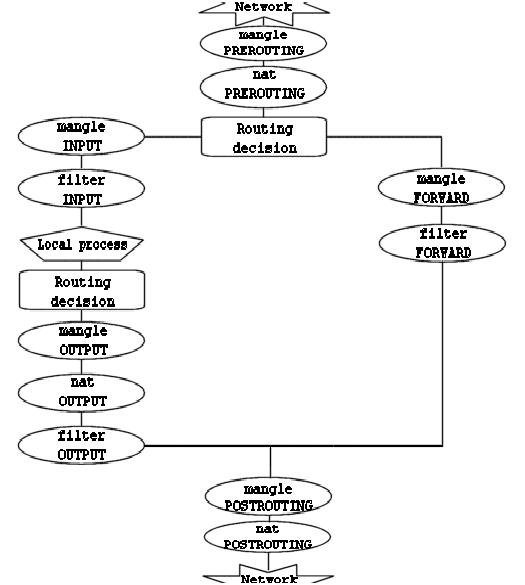
BTW your *nat and *filter tables are empty and set to ACCEPT: they aren't doing a thing.
Here is a picture that will help you understand the order in which they are traversed
http://www.faqs.org/docs/iptables/image … averse.jpg
Offline
Don't worry.
I don't want to be rude, but: Have you tried to turn it off and on again?
Iptables rules are volatile unless you save them and set your system to "iptables-restore" at boot.
You're not being rude, sometimes the simplest answer has been over looked and needs a straight forward answer. I appreciate any info that helps me learn more about linux. My rules had been saved and enabled by systemctl enable:
iptables-save > /etc/iptables/iptables.rules
systemctl enable iptables.service
systemctl start iptables.service && systemctl status iptables.service
The rules I had done about the NAT table and VPN I had added and saved to my iptables.rules about a week ago.
I had added them to the default Stateful Firewall rules that I have used for a long time from this wiki: https://wiki.archlinux.org/index.php/Si … le_machine
I then noodled around with the OpenVPN firewall settings, client/server scripts, and this link for about a week before realizing I hadn't even done any of the VPN/NAT gateway rules correctly: https://wiki.archlinux.org/index.php/Si … AT_gateway
That is when I decided to scrap the project and start over or find a new way to achieve the privacy that I want.
So that is when I started trying to flush all the rules and reset it back to a blank iptables "empty.rules" like I wrote about in the above posts.
BTW your *nat and *filter tables are empty and set to ACCEPT: they aren't doing a thing.
Thank you. I was not sure if this was correct since my INPUT chain's filter policy and FORWARD chain's filter policy were to DROP. (as well as sysctl.conf set to net.ipv4.ip_forward = 0)
I realized that the empty-mangle.rules and empty-nat.rules are what I have now... but what was weirding me out was that they had never been written on my iptables.rules before. It had only showed the *filter rules like this:
# Generated by iptables-save v1.4.18 on Tue Mar 26 01:16:34 2013
*filter
:INPUT DROP [0:0]
:FORWARD DROP [0:0]
:OUTPUT ACCEPT [0:0]
:TCP - [0:0]
:UDP - [0:0]
-A INPUT -p icmp -m icmp --icmp-type 8 -m recent --set --name ping_limiter --mask 255.255.255.255 --rsource
-A INPUT -p icmp -m icmp --icmp-type 8 -m recent --update --seconds 4 --hitcount 6 --name ping_limiter --mask 255.255.255.255 --rsource -j DROP
-A INPUT -p icmp -m icmp --icmp-type 8 -j ACCEPT
-A INPUT -m conntrack --ctstate RELATED,ESTABLISHED -j ACCEPT
-A INPUT -i lo -j ACCEPT
-A INPUT -m conntrack --ctstate INVALID -j DROP
-A INPUT -p udp -m conntrack --ctstate NEW -j UDP
-A INPUT -p tcp -m tcp --tcp-flags FIN,SYN,RST,ACK SYN -m conntrack --ctstate NEW -j TCP
-A INPUT -p udp -j REJECT --reject-with icmp-port-unreachable
-A INPUT -p tcp -j REJECT --reject-with tcp-reset
-A INPUT -j REJECT --reject-with icmp-proto-unreachable
COMMIT
# Completed on Tue Mar 26 01:16:34 2013
... so I was just wondering if I could get my iptables.rules back to the way it had been before the *nat and *mangle sections got added in (even if they are "empty and set to ACCEPT:" and not doing a thing.
Thanks for the reply. Sorry about any confusion.
Last edited by Cygnet_Committee (2013-03-26 22:04:45)
Offline
If /etc/iptables/iptables.rules does not contain any reference to *nat or *mangle, they should not appear in the output of iptables-save.
Note that if you run "iptables -t mangle -L" or something along the lines, the relevant kernel module (iptable_mangle) is loaded and *mangle will appear in the future output of iptables-save.
Maybe it will be clearer if I show the terminal output on my system (lines starting with "-root- # " are the command prompts)
-root- # iptables-save
# Generated by iptables-save v1.4.18 on Wed Mar 27 00:07:59 2013
*filter
:INPUT ACCEPT [126193:103747565]
:FORWARD DROP [0:0]
:OUTPUT ACCEPT [78341:6361048]
COMMIT
# Completed on Wed Mar 27 00:07:59 2013
# Generated by iptables-save v1.4.18 on Wed Mar 27 00:07:59 2013
*nat
:PREROUTING ACCEPT [2:656]
:INPUT ACCEPT [0:0]
:OUTPUT ACCEPT [2861:183117]
:POSTROUTING ACCEPT [2861:183117]
COMMIT
# Completed on Wed Mar 27 00:07:59 2013
-root- # iptables -t mangle -L
Chain PREROUTING (policy ACCEPT)
target     prot opt source               destination

Chain INPUT (policy ACCEPT)
target     prot opt source               destination

Chain FORWARD (policy ACCEPT)
target     prot opt source               destination

Chain OUTPUT (policy ACCEPT)
target     prot opt source               destination

Chain POSTROUTING (policy ACCEPT)
target     prot opt source               destination
-root- # iptables-save
# Generated by iptables-save v1.4.18 on Wed Mar 27 00:08:26 2013
*mangle
:PREROUTING ACCEPT [0:0]
:INPUT ACCEPT [0:0]
:FORWARD ACCEPT [0:0]
:OUTPUT ACCEPT [0:0]
:POSTROUTING ACCEPT [0:0]
COMMIT
# Completed on Wed Mar 27 00:08:26 2013
# Generated by iptables-save v1.4.18 on Wed Mar 27 00:08:26 2013
*filter
:INPUT ACCEPT [126194:103747617]
:FORWARD DROP [0:0]
:OUTPUT ACCEPT [78342:6361137]
COMMIT
# Completed on Wed Mar 27 00:08:26 2013
# Generated by iptables-save v1.4.18 on Wed Mar 27 00:08:26 2013
*nat
:PREROUTING ACCEPT [2:656]
:INPUT ACCEPT [0:0]
:OUTPUT ACCEPT [2861:183117]
:POSTROUTING ACCEPT [2861:183117]
COMMIT
# Completed on Wed Mar 27 00:08:26 2013
-root- # rmmod iptable_mangle
-root- # iptables-save
# Generated by iptables-save v1.4.18 on Wed Mar 27 00:08:33 2013
*filter
:INPUT ACCEPT [126199:103747817]
:FORWARD DROP [0:0]
:OUTPUT ACCEPT [78352:6361922]
COMMIT
# Completed on Wed Mar 27 00:08:33 2013
# Generated by iptables-save v1.4.18 on Wed Mar 27 00:08:33 2013
*nat
:PREROUTING ACCEPT [2:656]
:INPUT ACCEPT [0:0]
:OUTPUT ACCEPT [2861:183117]
:POSTROUTING ACCEPT [2861:183117]
COMMIT
# Completed on Wed Mar 27 00:08:33 2013
----
EDIT:
FYI, I don't know if rmmod-ing the module will have just cosmetic effects or on the contrary destroy everything
Last edited by aesiris (2013-03-26 23:26:04)
Offline
this is my iptables.rules:
# Generated by iptables-save v1.4.18 on Tue Mar 26 01:16:34 2013
*mangle
:PREROUTING ACCEPT [15:913]
:INPUT ACCEPT [15:913]
:FORWARD ACCEPT [0:0]
:OUTPUT ACCEPT [24:1088]
:POSTROUTING ACCEPT [24:1088]
COMMIT
# Completed on Tue Mar 26 01:16:34 2013
# Generated by iptables-save v1.4.18 on Tue Mar 26 01:16:34 2013
*filter
:INPUT DROP [0:0]
:FORWARD DROP [0:0]
:OUTPUT ACCEPT [0:0]
:TCP - [0:0]
:UDP - [0:0]
-A INPUT -p icmp -m icmp --icmp-type 8 -m recent --set --name ping_limiter --mask 255.255.255.255 --rsource
-A INPUT -p icmp -m icmp --icmp-type 8 -m recent --update --seconds 4 --hitcount 6 --name ping_limiter --mask 255.255.255.255 --rsource -j DROP
-A INPUT -p icmp -m icmp --icmp-type 8 -j ACCEPT
-A INPUT -m conntrack --ctstate RELATED,ESTABLISHED -j ACCEPT
-A INPUT -i lo -j ACCEPT
-A INPUT -m conntrack --ctstate INVALID -j DROP
-A INPUT -p udp -m conntrack --ctstate NEW -j UDP
-A INPUT -p tcp -m tcp --tcp-flags FIN,SYN,RST,ACK SYN -m conntrack --ctstate NEW -j TCP
-A INPUT -p udp -j REJECT --reject-with icmp-port-unreachable
-A INPUT -p tcp -j REJECT --reject-with tcp-reset
-A INPUT -j REJECT --reject-with icmp-proto-unreachable
COMMIT
# Completed on Tue Mar 26 01:16:34 2013
# Generated by iptables-save v1.4.18 on Tue Mar 26 01:16:34 2013
*nat
:PREROUTING ACCEPT [2:327]
:INPUT ACCEPT [0:0]
:OUTPUT ACCEPT [0:0]
:POSTROUTING ACCEPT [0:0]
COMMIT
# Completed on Tue Mar 26 01:16:34 2013
I'll google around about rmmod-ing the relevant kernel modules and maybe flush and replace my rules again and restore the empty-rules to start over from scratch (should only take a minute to copy paste)... just to see if it works and cleans up my iptables.rules with only the *filter part like it used to be.
Thanks for the reply. I'm not gonna mark this solved just in case someone else has more info on this. Thanks again for the help.
Offline