You are not logged in.
- Topics: Active | Unanswered
#1 2022-03-12 07:02:18
- tesla135
- Member
- Registered: 2013-06-27
- Posts: 76
Large window on some applications
HI, I'm using mate as my desktop environment and I have problem when I try to create a new virtual machine in virtualbox. The window it's too large.
https://i.postimg.cc/j5YP2Mbd/Screensho … -48-15.png
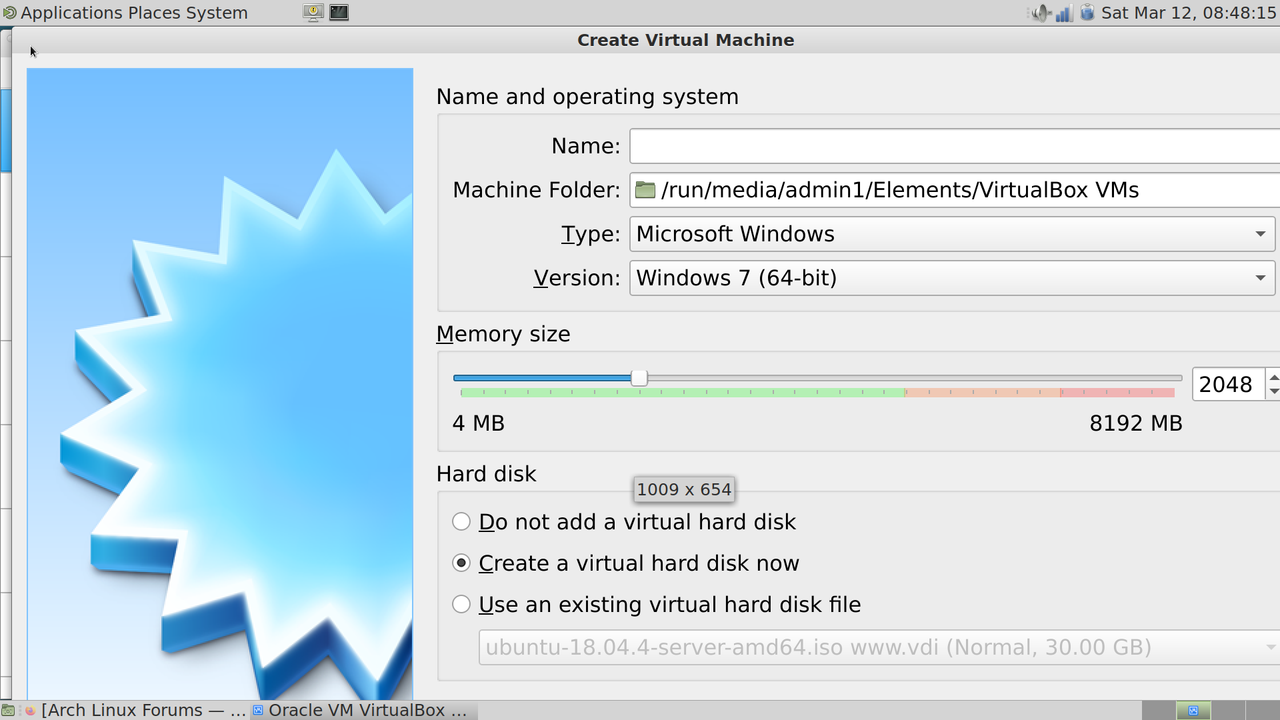
And something similar happens on avidemux(but not all my applications), but right on the main app with no other secondary window opened.
Things like changing resolution, dpi or hold alt + drag did not worked.
Offline
#2 2022-03-12 07:41:55
- seth
- Member

- From: Won't reply 2 private help req
- Registered: 2012-09-03
- Posts: 77,262
Re: Large window on some applications
xrandr -q
xdpyinfo | grep resolution
did not worked.
https://bbs.archlinux.org/viewtopic.php?id=57855
The font looks too big, but 720p is fairly small and the client might just assume XGA or above.
Offline
#3 2022-03-12 07:58:30
- tesla135
- Member
- Registered: 2013-06-27
- Posts: 76
Re: Large window on some applications
xrandr -q
Screen 0: minimum 320 x 200, current 1920 x 1080, maximum 16384 x 16384
eDP-1 connected primary 1920x1080+0+0 (normal left inverted right x axis y axis) 344mm x 193mm
   1920x1080     60.01*+  60.01    59.97    59.96    59.93
   1680x1050     59.95    59.88
   1400x1050     59.98
   1600x900      59.99    59.94    59.95    59.82
   1280x1024     60.02
   1400x900      59.96    59.88
   1280x960      60.00
   1440x810      60.00    59.97
   1368x768      59.88    59.85
   1280x800      59.99    59.97    59.81    59.91
   1280x720      60.00    59.99    59.86    59.74
   1024x768      60.04    60.00
   960x720       60.00
   928x696       60.05
   896x672       60.01
   1024x576      59.95    59.96    59.90    59.82
   960x600       59.93    60.00
   960x540       59.96    59.99    59.63    59.82
   800x600       60.00    60.32    56.25
   840x525       60.01    59.88
   864x486       59.92    59.57
   700x525       59.98
   800x450       59.95    59.82
   640x512       60.02
   700x450       59.96    59.88
   640x480       60.00    59.94
   720x405       59.51    58.99
   684x384       59.88    59.85
   640x400       59.88    59.98
   640x360       59.86    59.83    59.84    59.32
   512x384       60.00
   512x288       60.00    59.92
   480x270       59.63    59.82
   400x300       60.32    56.34
   432x243       59.92    59.57
   320x240       60.05
   360x202       59.51    59.13
   320x180       59.84    59.32
HDMI-1 disconnected (normal left inverted right x axis y axis)
DP-1 disconnected (normal left inverted right x axis y axis)
HDMI-2 disconnected (normal left inverted right x axis y axis)
xdpyinfo | grep resolution
resolution: 96x96 dots per inchOffline
#4 2022-03-12 08:02:10
- seth
- Member
- From: Won't reply 2 private help req
- Registered: 2012-09-03
- Posts: 77,262
Re: Large window on some applications
Since the active resolution is 1920x1080, why is the posted screenshot 1280x720?
Offline
#5 2022-03-12 08:32:28
- tesla135
- Member
- Registered: 2013-06-27
- Posts: 76
Re: Large window on some applications
Since the active resolution is 1920x1080, why is the posted screenshot 1280x720?
Well, it's weird, in the screenshot properties is 1920X1080 and the virtualbox window is 1009 x 654.
Offline
#6 2022-03-12 08:41:54
- seth
- Member
- From: Won't reply 2 private help req
- Registered: 2012-09-03
- Posts: 77,262
Re: Large window on some applications
Is this a nested VM?
What's the $QT_SCALE_FACTOR, https://wiki.archlinux.org/title/HiDPI#VirtualBox ?
Offline
#7 2022-03-12 09:26:52
- tesla135
- Member
- Registered: 2013-06-27
- Posts: 76
Re: Large window on some applications
Is this a nested VM?
What's the $QT_SCALE_FACTOR, https://wiki.archlinux.org/title/HiDPI#VirtualBox ?
It's not a nested VM
printenv | grep QT_SCALE_FACTOR
QT_SCALE_FACTOR=1With this active command
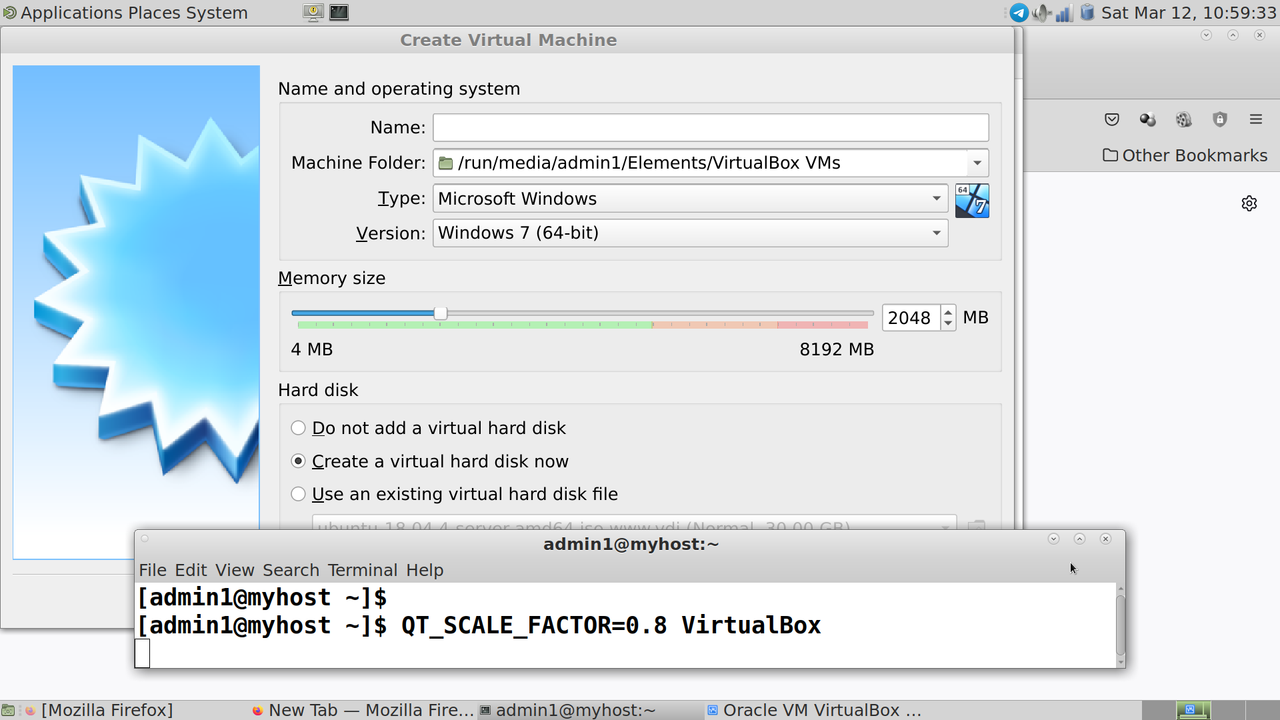
QT_SCALE_FACTOR=0.8 VirtualBox
opens a new virtualbox with screensize smaller
https://i.postimg.cc/Gh0vJZcQ/Screensho … -59-34.png
I'm tring to set globaly QT_SCALE_FACTOR=0.8 by adding to the end of /etc/profile
export QT_SCALE_FACTOR=0.8But it's somehow is overwritten back to 1
Offline
#8 2022-03-13 15:39:45
- seth
- Member
- From: Won't reply 2 private help req
- Registered: 2012-09-03
- Posts: 77,262
Re: Large window on some applications
https://github.com/mate-desktop/mate-se … -392228442
That doesn't explain why the entire scaling is off to begin with and you're getting a 1280x720 screenshot on a 1920x1080 screen (which is a factor of 2/3)
Edit: you've a physical resolution of 141.77 DPI, mate is running at 96 - there's the 2/3 factor. But idk. how and why Mate is messing arund w/ the HiDPI situation.
Did you undergo any efforts in that direction yourself?
Last edited by seth (2022-03-13 15:44:09)
Offline