You are not logged in.
- Topics: Active | Unanswered
Pages: 1
#1 2021-01-08 07:28:12
- callmer
- Member
- Registered: 2021-01-07
- Posts: 80
problems with network in vm arch
Hi guys. I am new at arch. I just installed it in vm and I am not able to share with you files because network doesn't work here, ping google.com gives: name or service not known [after I added dns addresses in /etc/resolve.conf before it it was: temporary failure in name resolution ], curl google.com gives: couldn't resolve host. Then I switched to NAT in vm network setting, also useless. Have any Ideas? Thanks in advance.
Offline
#2 2021-01-08 08:49:13
- seth
- Member

- From: Won't reply 2 private help req
- Registered: 2012-09-03
- Posts: 77,660
Re: problems with network in vm arch
Start w/ some basic information.
1. How do you configure the network devices/connections?
find /etc/systemd -type l -exec test -f {} \; -print | awk -F'/' '{ printf ("%-40s | %s\n", $(NF-0), $(NF-1)) }' | sort -f2. Output of "ip a; ip r"?
3. Output of "lspci; lsusb"?
Online
#3 2021-01-08 09:22:18
- callmer
- Member
- Registered: 2021-01-07
- Posts: 80
Re: problems with network in vm arch
Start w/ some basic information.
1. How do you configure the network devices/connections?
find /etc/systemd -type l -exec test -f {} \; -print | awk -F'/' '{ printf ("%-40s | %s\n", $(NF-0), $(NF-1)) }' | sort -f2. Output of "ip a; ip r"?
3. Output of "lspci; lsusb"?
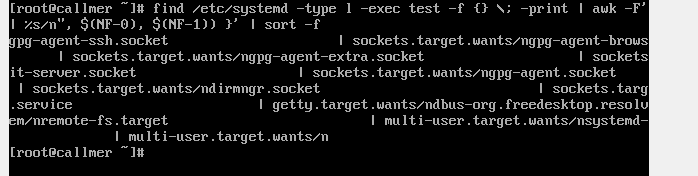
1.
2.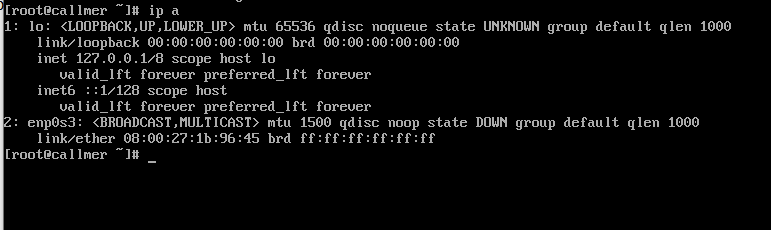 ip r: empty
3.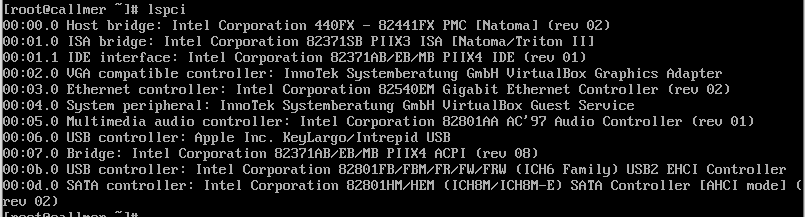 lsusb: command not found
Sorry I can't nor copy-paste the result neither use pastebin service
Last edited by callmer (2021-01-08 09:23:41)
Offline
#4 2021-01-08 09:28:21
- seth
- Member
- From: Won't reply 2 private help req
- Registered: 2012-09-03
- Posts: 77,660
Re: problems with network in vm arch
Please replace the embedded images w/links.
You botched the "find" command, try
find /etc/systemd -type l -exec test -f {} \; -print(the rest is mostly to fancy the output)
The NIC is there and up and you've a carrier but no lease, suggesting the answer to " How do you configure the network devices/connections?" is "not".
https://wiki.archlinux.org/index.php/Ne … management
You probably want to use dhcp.
Edit: stutter ;-)
Last edited by seth (2021-01-08 09:28:38)
Online
#5 2021-01-08 09:40:17
- callmer
- Member
- Registered: 2021-01-07
- Posts: 80
Re: problems with network in vm arch
Please replace the embedded images w/links.
You botched the "find" command, try
find /etc/systemd -type l -exec test -f {} \; -print(the rest is mostly to fancy the output)
The NIC is there and up and you've a carrier but no lease, suggesting the answer to " How do you configure the network devices/connections?" is "not".
https://wiki.archlinux.org/index.php/Ne … management
You probably want to use dhcp.Edit: stutter ;-)
here is the link of image of find comman's result https://hkar.ru/13HxJ
Maybe, is it something that I should change in vm or in arch? I mean if I'll install arch on my real machine is it necessary to do likely network configurations? I'll let you know after reading article you sent.
edit: You are right I don't have DHCP, and one more thing I don't have tools from articles you sent(ifconfig for example)
Last edited by callmer (2021-01-08 09:48:27)
Offline
#6 2021-01-09 05:14:18
- PPK
- Member
- From: Myanmar, Pyay, Aung San 5th
- Registered: 2021-01-06
- Posts: 4
Re: problems with network in vm arch
Arch doesn't include tool for connecting to network after installation. Boot into usb or whatever medium you are using again and install dhcpcd. Type "systemctl enable dhcpcd" afterward.
Offline
#7 2021-01-09 05:16:48
- PPK
- Member
- From: Myanmar, Pyay, Aung San 5th
- Registered: 2021-01-06
- Posts: 4
Re: problems with network in vm arch
[double post]
Last edited by PPK (2021-01-10 08:27:59)
Offline
#8 2021-01-09 08:03:19
- seth
- Member
- From: Won't reply 2 private help req
- Registered: 2012-09-03
- Posts: 77,660
Re: problems with network in vm arch
When you install arch on your "real machine", ensure to follow the installation guide.
https://wiki.archlinux.org/index.php/In … l_packages
@PPK, you can't. You can report it and a mod can, but typically you'd just replace it w/ sth. like "[double post]" or so.
Online
#9 2021-01-09 15:26:20
- callmer
- Member
- Registered: 2021-01-07
- Posts: 80
Re: problems with network in vm arch
When you install arch on your "real machine", ensure to follow the installation guide.
https://wiki.archlinux.org/index.php/In … l_packages@PPK, you can't. You can report it and a mod can, but typically you'd just replace it w/ sth. like "[double post]" or so.
pacstrap: command not found
Offline
#10 2021-01-09 15:30:44
- V1del
- Forum Moderator

- Registered: 2012-10-16
- Posts: 25,354
Re: problems with network in vm arch
you need to do that from the iso. Mount your root partition somewhere and pacstrap the missing packages.
or as you do have systemd: https://wiki.archlinux.org/index.php/Systemd-networkd
Last edited by V1del (2021-01-09 15:32:14)
Offline
#11 2021-01-09 15:30:47
- seth
- Member
- From: Won't reply 2 private help req
- Registered: 2012-09-03
- Posts: 77,660
Re: problems with network in vm arch
pacstrap is available on the installation iso, not your installed system.
You need to read and follow the *entire* guide, I just linked the section you apparently missed.
Edit: ninja'd by seconds. Revenge of the V1del…
Last edited by seth (2021-01-09 15:31:23)
Online
#12 2021-01-09 20:04:38
- callmer
- Member
- Registered: 2021-01-07
- Posts: 80
Re: problems with network in vm arch
I am not sure, but it seems like the problem is that I deleted ISO before installing NetworkManager, so it hadn't configured internet. Am I right? Now it all works.
Last edited by callmer (2021-01-09 20:05:06)
Offline
Pages: 1