You are not logged in.
- Topics: Active | Unanswered
Pages: 1
#1 Yesterday 20:00:03
- defnot_dames
- Member
- Registered: Yesterday
- Posts: 8
Problems after crash
had a game completely lock up on me. absolutely no shortcuts or keyboard commands would do anything, i was forced to do a manual restart of the device. and now i've had several problems after the restart.
afterwards, my external drive wouldn't mount. had this problem when i first got the machine, installed NTFS-3G and solved the problem then. assumed maybe it needed an update/reinstall after some quick searching about the problem.
pacman was running somewhere and wouldn't let me run any commands or do anthing. did research and attempted to kill the process (after ensuring that it wasn't actively doing any updating or anything, as I read that could brick the install or arch), but got errors that there were no processes with that system id. the id of pacman was constantly changing, and i could not find any solutions on how to deal with it.
restarted the machine once more, figured it couldn't make anything worse.
external drive still won't mount. attempted to mount it through the Konsole recieved the following
sudo mount /dev/sda1 /mnt
[sudo] password for deck:
mount: /var/mnt: wrong fs type, bad option, bad superblock on /dev/sda1, missing codepage or helper program, or other error.
dmesg(1) may have more information after failed mount system call.
~)$ dmesg
dmesg: read kernel buffer failed: Operation not permitted
i've been attempting to solve this using pieced together solutions from variations of others having the same problems. its been 3 hours and i am at the end of my rope.
i simply want to access my external drive.
Offline
#2 Yesterday 20:56:44
- seth
- Member

- From: Won't reply 2 private help req
- Registered: 2012-09-03
- Posts: 78,799
Re: Problems after crash
i simply want to access my external drive.
installed NTFS-3G and solved the problem then
ntfs-3g is more lenient towards dirty/opened filesystems but you'll have to chkdsk it (on windows) to clear stale nodes and in case this is a dual boot system see the 3rd link below. Mandatory.
Disable it (it's NOT the BIOS setting!) and reboot windows and linux twice for voodo reasons.
pacman was running somewhere and wouldn't let me run any commands or do anthing
You mean there's a stale lock?
https://wiki.archlinux.org/title/Pacman … )%22_error
You'll likely also have to run fsck and
sudo LC_ALL=C pacman -Qkk | grep -v ', 0 altered files' | grep -v backupto see whether there's any package corruption since you apparently rebooted while pacman was running.
Online
#3 Yesterday 20:59:21
- ewaller
- Administrator

- From: Pasadena, CA
- Registered: 2009-07-13
- Posts: 20,719
Re: Problems after crash
Is that drive actually an NTFS drive? If it were not, I would suggest you run fsck against it. That won't work for NTFS. You may need to check the disk under Windows if it is NTFS.
Nothing is too wonderful to be true, if it be consistent with the laws of nature -- Michael Faraday
The shortest way to ruin a country is to give power to demagogues.— Dionysius of Halicarnassus
---
How to Ask Questions the Smart Way
Offline
#4 Yesterday 21:00:57
- seth
- Member
- From: Won't reply 2 private help req
- Registered: 2012-09-03
- Posts: 78,799
Re: Problems after crash
Good question…
lsblk -f
sudo file -s /dev/sda1Online
#5 Yesterday 21:54:00
- defnot_dames
- Member
- Registered: Yesterday
- Posts: 8
Re: Problems after crash
ntfs-3g is more lenient towards dirty/opened filesystems but you'll have to chkdsk it (on windows) to clear stale nodes and in case this is a dual boot system see the 3rd link below. Mandatory.
Disable it (it's NOT the BIOS setting!) and reboot windows and linux twice for voodo reasons.
its not a dual boot system, there is only a linux distro on the machine, unless you're talking about removing it from one machine and running chdksk on a windows machine?
pacman was running somewhere and wouldn't let me run any commands or do anthing
You mean there's a stale lock?
https://wiki.archlinux.org/title/Pacman … )%22_error
You'll likely also have to run fsck andsudo LC_ALL=C pacman -Qkk | grep -v ', 0 altered files' | grep -v backupto see whether there's any package corruption since you apparently rebooted while pacman was running.
attempting to run fsck gives me a pretty unsettling message, which i did not continue:
WARNING!!! The filesystem is mounted. If you continue you ***WILL***
cause ***SEVERE*** filesystem damage.
Do you really want to continue<n>? no
check aborted.
Offline
#6 Yesterday 22:00:04
- seth
- Member
- From: Won't reply 2 private help req
- Registered: 2012-09-03
- Posts: 78,799
Re: Problems after crash
Why is there an ntfs disk if you don't use windows in this context (and it's also not an external drive) or was the ntfs-3g story unrelated to the current system?
So… the partition is mounted?
lsblk -f
sudo file -s /dev/sda1
sudo LC_ALL=C pacman -Qkk | grep -v ', 0 altered files' | grep -v bac
Online
#7 Yesterday 22:05:21
- defnot_dames
- Member
- Registered: Yesterday
- Posts: 8
Re: Problems after crash
Why is there an ntfs disk if you don't use windows in this context (and it's also not an external drive) or was the ntfs-3g story unrelated to the current system?
So… the partition is mounted?
the drive was originally used on a windows machine, and i switched to a linux machine in august. it is an external drive, which is why ntfs-3g was needed after it had been on a windows machine. since the original time, i have not had any issues with it mounting on startup. the ntfs-3g story was just additional info about the drive in case that would be relevant to getting it to re-mount. i am new to linux, and want to give as much context as possible, as i don't know what info is needed to help find a fix
Offline
#8 Yesterday 22:13:11
- defnot_dames
- Member
- Registered: Yesterday
- Posts: 8
Re: Problems after crash
Is that drive actually an NTFS drive? If it were not, I would suggest you run fsck against it. That won't work for NTFS. You may need to check the disk under Windows if it is NTFS.
it was originally used on a windows machine and moved to a linux only system. to originally acces the drive, ntfs-3g was required and worked to mount the drive, so i'm assuming that means it is an ntfs drive. unless ntfs-3g reformats it entirely when it mounts the drive.
edit: using lsblk -f does confirm it to be a ntfs drive
Last edited by defnot_dames (Yesterday 22:14:28)
Offline
#9 Yesterday 22:19:02
- seth
- Member
- From: Won't reply 2 private help req
- Registered: 2012-09-03
- Posts: 78,799
Re: Problems after crash
edit: using lsblk -f does confirm it to be a ntfs drive
Please don't paraphrase, https://bbs.archlinux.org/viewtopic.php?id=57855
Post the output of all three commands - we don't know what problems you're even facing, let alone what setup we're dealing with.
What I can tell you is that fsck will not work w/ an ntfs partition, the suggested approach is to use chkdsk on windows.
Also whatever partition you tried to fsck apparently was mounted at the time, so … the wrong one?
Online
#10 Yesterday 22:35:09
- defnot_dames
- Member
- Registered: Yesterday
- Posts: 8
Re: Problems after crash
Post the output of all three commands - we don't know what problems you're even facing, let alone what setup we're dealing with.
What I can tell you is that fsck will not work w/ an ntfs partition, the suggested approach is to use chkdsk on windows.
Also whatever partition you tried to fsck apparently was mounted at the time, so … the wrong one?
it was for the wrong one, my bad. makes sense now knowing fsck won't work for an ntfs drive. trying to wrap my head around the syntax and such has been difficult, apologies
here is the output
(deck@the-grandbaby ~)$ lsblk -f
NAME        FSTYPE FSVER LABEL       UUID                                 FSAVAIL FSUSE% MOUNTPOINTS
sda
└─sda1      ntfs         TOSHIBA EXT 90A47C27A47C1248
zram0       swap   1     zram0       c3f4534d-d65b-48f8-8a12-ec636665b365                [SWAP]
nvme0n1
├─nvme0n1p1 vfat   FAT16 esp         5D1D-1BD5                             252.9M     1% /esp
├─nvme0n1p2 vfat   FAT16 efi-A       5D1D-612D
├─nvme0n1p3 vfat   FAT16 efi-B       5D1D-9AAA                                63M     1% /efi
├─nvme0n1p4 btrfs        rootfs      7c1d2c2b-46d3-41e7-b7ad-e58ecc100598
├─nvme0n1p5 btrfs        rootfs      59e52dc5-2947-408c-b57b-1428a5f4b2e6  836.5M    70% /
├─nvme0n1p6 ext4   1.0   var-A       1d5cb1a3-8738-4633-9ae6-a8156b021b8e
├─nvme0n1p7 ext4   1.0   var-B       51692b3c-195d-4be6-bba0-a06a112e1912  173.4M    17% /var
└─nvme0n1p8 ext4   1.0   home        2017a5a3-c84c-48de-811d-cb1e7c5a32e1  308.6G    31% /var/log
                                                                                         /var/lib/systemd/coredump
                                                                                         /var/tmp
                                                                                         /var/lib/steamos-log-submitter
                                                                                         /var/lib/flatpak
                                                                                         /var/cache/pacman
                                                                                         /var/lib/docker
                                                                                         /nix
                                                                                         /opt
                                                                                         /srv
                                                                                         /root
                                                                                         /home
(deck@the-grandbaby ~)$ sudo file -s /dev/sda1
/dev/sda1: DOS/MBR boot sector, code offset 0x52+2, OEM-ID "NTFS    ", sectors/cluster 8, Media descriptor 0xf8, sectors/track 63, heads 255, hidden sectors 2048, dos < 4.0 BootSector (0x80), FAT (1Y bit by descriptor); NTFS, sectors/track 63, sectors 3907024895, $MFT start cluster 786432, $MFTMirror start cluster 2, bytes/RecordSegment 2^(-1*246), clusters/index block 1, serial number 090a47c27a47c1248; contains bootstrap BOOTMGR
there is the output of those commands
Last edited by defnot_dames (Yesterday 22:52:48)
Offline
#11 Yesterday 22:45:09
- seth
- Member
- From: Won't reply 2 private help req
- Registered: 2012-09-03
- Posts: 78,799
Re: Problems after crash
What's the output/result of
mkdir /tmp/sda1
sudo mount /dev/sda1 /tmp/sda1
sudo ntfs-3g /dev/sda1 /tmp/sda1
Please use [code][/code] tags, not "quote" tags. Also edit your post in this regard.
the suggested approach is to use chkdsk on windows.
https://wiki.archlinux.org/title/NTFS-3 … ilesystems can "fix" *some* (minor) problems, if there're actual data inconsistencies you *want* to fix them using chkdsk
Online
#12 Yesterday 22:58:21
- defnot_dames
- Member
- Registered: Yesterday
- Posts: 8
Re: Problems after crash
What's the output/result of
mkdir /tmp/sda1
sudo mount /dev/sda1 /tmp/sda1
sudo ntfs-3g /dev/sda1 /tmp/sda1
Please use [code][/code] tags, not "quote" tags. Also edit your post in this regard.
seth wrote:the suggested approach is to use chkdsk on windows.
https://wiki.archlinux.org/title/NTFS-3 … ilesystems can "fix" *some* (minor) problems, if there're actual data inconsistencies you *want* to fix them using chkdsk
output
(130)(deck@the-grandbaby ~)$ mkdir /tmp/sda1
(deck@the-grandbaby ~)$ sudo mount /dev/sda1 /tmp/sda1
[sudo] password for deck:
mount: /tmp/sda1: wrong fs type, bad option, bad superblock on /dev/sda1, missing codepage or helper program, or other error.
       dmesg(1) may have more information after failed mount system call.
(32)(deck@the-grandbaby ~)$ dmesg
dmesg: read kernel buffer failed: Operation not permitted
(1)(deck@the-grandbaby ~)$ sudo ntfs-3g /dev/sda1 /tmp/sda1
$MFTMirr does not match $MFT (record 3).
Failed to mount '/dev/sda1': Input/output error
NTFS is either inconsistent, or there is a hardware fault, or it's a
SoftRAID/FakeRAID hardware. In the first case run chkdsk /f on Windows
then reboot into Windows twice. The usage of the /f parameter is very
important! If the device is a SoftRAID/FakeRAID then first activate
it and mount a different device under the /dev/mapper/ directory, (e.g.
/dev/mapper/nvidia_eahaabcc1). Please see the 'dmraid' documentation
for more details.
i'm assuming the next step from here will be removing the drive from the linux machine, booting up my windows machine and running ckdsk /f on that machine. correct?
(fixed the quote tags to code tags)
Offline
#13 Yesterday 23:02:18
- seth
- Member
- From: Won't reply 2 private help req
- Registered: 2012-09-03
- Posts: 78,799
Re: Problems after crash
First check "smartctl -a /dev/sda", https://wiki.archlinux.org/title/SMART
Also consider backing up the data and switching the drive to a different FS (ext4) if you don't intend to connect it to a windows system - NTFS has only downsides on linux (not a proper POSIX system and no usable maintainance tools)
Online
#14 Yesterday 23:15:39
- defnot_dames
- Member
- Registered: Yesterday
- Posts: 8
Re: Problems after crash
First check "smartctl -a /dev/sda", https://wiki.archlinux.org/title/SMART
Also consider backing up the data and switching the drive to a different FS (ext4) if you don't intend to connect it to a windows system - NTFS has only downsides on linux (not a proper POSIX system and no usable maintainance tools)
1)(deck@the-grandbaby ~)$ smartctl -a /dev/sda
smartctl 7.5 2025-04-30 r5714 [x86_64-linux-7.2.7-valve2-2-neptune-72-g31504582a073] (local build)
Copyright (C) 2002-25, Bruce Allen, Christian Franke, www.smartmontools.org

Read Device Identity failed: Operation not permitted

If this is a USB connected device, look at the various --device=TYPE variants
A mandatory SMART command failed: exiting. To continue, add one or more '-T permissive' options.
Offline
#15 Today 08:32:17
- seth
- Member
- From: Won't reply 2 private help req
- Registered: 2012-09-03
- Posts: 78,799
Re: Problems after crash
Online
#16 Today 15:20:49
- defnot_dames
- Member
- Registered: Yesterday
- Posts: 8
Re: Problems after crash
the device is not supported. i won't bother pasting in the results. i'll take it to a windows machine and run chkdsk.
it is not difficult to be polite and straightforward to someone asking on the NEWbie Corner, who is clearly new to all this and struggling to decipher everything an error message says. we all start somewhere and this is a place to look for help, not ridicule.
if chkdsk works and the drive mounts on the linux machine, i will update the thread and mark it as resolved. i'm not responding further on this thread otherwise.
Offline
#17 Today 15:44:09
- seth
- Member
- From: Won't reply 2 private help req
- Registered: 2012-09-03
- Posts: 78,799
Re: Problems after crash
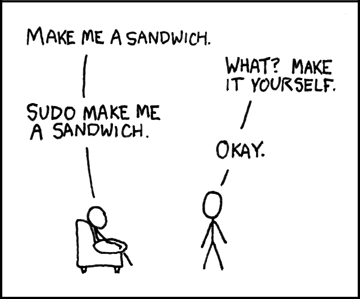
Nobody's ridiculing anyone - the smartctl call failed for a lack of root permissions, since you didn't pick up on that I explained the situation using a famous meme (implying a solution to that)
Online
Pages: 1