You are not logged in.
- Topics: Active | Unanswered
Pages: 1
#1 Yesterday 15:12:41
- rasat
- Forum Fellow

- From: Finland
- Registered: 2002-12-27
- Posts: 2,313
- Website
FvwmIconMan multiple managers
Many know the default RightPanel of FVWM, a taskbar-like dock configured along the right edge of the screen. It includes FvwmIconMan, which provides a customizable, scriptable way to display, manage, and toggle active windows. That's the usual information, including for me.
What is the most effective purpose of using FvwmIconMan?
"FvwmIconMan is one of the most powerful built-in modules in FVWM, serving primarily as a highly customizable task manager that manages your open windows using complex rules. Using multiple FvwmIconMan managers to group applications into assigned windows is a powerful advanced window management. In addition, FvwmIconMan lets you do more than click an icon to focus a window. You can bind custom FVWM actions to different mouse clicks or key combinations (Left Click, Middle Click, Right Click, Wheel Scroll) inside the manager."
It offers configuration possibilities for things we may not even realize we can do. This topic explores these FvwmIconMan configurations.
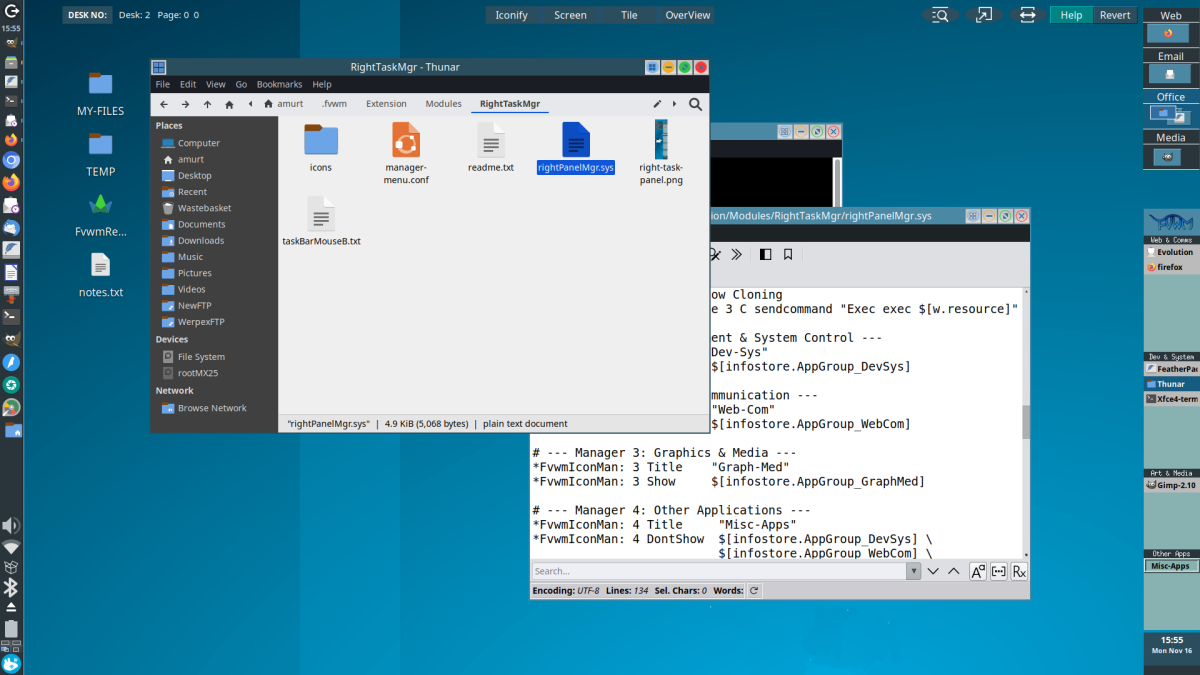
This is the experiment I am working on: creating a task panel with multiple window app groups and mouse actions. It is designed for the Xfce-Fvwm project.
https://bbs.archlinux.org/viewtopic.php … 8#p2309968
Click to view screenshot:
Last edited by rasat (Yesterday 15:20:24)
Markku
Offline
#2 Yesterday 16:49:22
- Mjaakko
- Member
- Registered: 2023-06-19
- Posts: 18
Re: FvwmIconMan multiple managers
That's interesting. I am using the Xfce Fvwm extensions, didn't see this task panel. The horizontal Fluxbox-style round-ended panel has many mouse click configs. Where are the manager configs?
Last edited by Mjaakko (Yesterday 16:50:05)
Offline
#3 Today 13:22:53
- rasat
- Forum Fellow
- From: Finland
- Registered: 2002-12-27
- Posts: 2,313
- Website
Re: FvwmIconMan multiple managers
Where are the manager configs?
I don't know much information on any forums. AI is a great tool for specific configs. The RightTask Panel I am working on was started by collaborating with AI. Took some time for AI to get it right. Now it does well. For this topic, to start with a simple config, I asked AI: "Fvwm3. Horizontal FvwmPanel with two rows of FvwmIconMan Manager. Create a sample."
Sample Configuration:
# ----------------------------------------------------
# 1. Configuration for Dual-Row FvwmIconMan (Horizontal)
# ----------------------------------------------------
DestroyModuleConfig MyDualIconMan:*
*MyDualIconMan: NumManagers 2
*MyDualIconMan: Resolution global
*MyDualIconMan: Font "xft:Sans:size=10"
*MyDualIconMan: DrawIcons false
*MyDualIconMan: FormatString "%t"

# --- Row 1 Specific Settings ---
*MyDualIconMan1: Background #555555
*MyDualIconMan1: Foreground #ffffff
*MyDualIconMan1: ButtonGeometry 120x24
*MyDualIconMan1: ManagerGeometry 0x1   # 0x1 forces buttons to align horizontally

# --- Row 2 Specific Settings ---
*MyDualIconMan2: Background #222222
*MyDualIconMan2: Foreground #ffffff
*MyDualIconMan2: ButtonGeometry 120x24
*MyDualIconMan2: ManagerGeometry 0x1   # 0x1 forces buttons to align horizontally

# ----------------------------------------------------
# 2. Main Horizontal Panel Configuration (2 Rows)
# ----------------------------------------------------
DestroyModuleConfig FvwmPanel:*
*FvwmPanel: Geometry 800x52+0-0
*FvwmPanel: Rows 2
*FvwmPanel: Columns 1
*FvwmPanel: Frame 1

# Using the correct 'Swallow' syntax
*FvwmPanel: (1x1, Swallow "MyDualIconMan1" `Module FvwmIconMan MyDualIconMan1`)
*FvwmPanel: (1x1, Swallow "MyDualIconMan2" `Module FvwmIconMan MyDualIconMan2`)

# ----------------------------------------------------
# 3. Startup
# ----------------------------------------------------

Module FvwmButtons FvwmPanel

Style FvwmPanel !Borders, !Title, WindowListSkip, StaysOnTop, Sticky, CirculateSkip, NeverFocus, WindowListSkip
How It Works:
Unique Aliases: Using MyDualIconMan1 and MyDualIconMan2 creates distinct window names so FvwmButtons can identify and Swallow them without errors.
ManagerGeometry 0x1: Forces taskbar buttons to expand horizontally across a single row instead of stacking vertically.
Rows 2 Container: Tells FvwmButtons to split its canvas into two stacked rows, placing the two horizontal taskbars right on top of each other.
Panel Styling: The Style rule hides window decorations, keeps the dock on top, sticks it to all workspaces, and isolates it from keyboard focus loops.
Screenshot:
Last edited by rasat (Today 13:38:35)
Markku
Offline
Pages: 1